Hello! Welcome to the first lesson in our new module, Managing Your Binance Portfolio.
In the last lesson, we concluded our module on risk management by discussing the theory of portfolio diversification. You learned why it's wise not to put all your eggs in one basket and how to think about allocating your capital across different types of cryptocurrencies.
Today, we're taking that theory and applying it directly to the Binance platform. The goal of this lesson is to learn how to check your total portfolio balance and individual asset allocation. This is a fundamental skill for managing your investments, tracking your performance, and making informed decisions. By the end of this lesson, you'll know exactly where to look in your Binance account to get a clear picture of your holdings.
Understanding Your Binance Wallets
A common point of confusion for beginners is that a Binance account isn't just one single wallet. It's actually a collection of several specialized wallets used for different activities. The funds you use for trading are separate from the funds you might be earning interest on, for example.
The main wallets you'll interact with initially are:
- Spot Wallet: This is your primary wallet for buying, selling, and holding cryptocurrencies. When you perform a trade on the spot market, the funds come from and go into this wallet.
- Funding Wallet: This wallet is primarily used for depositing and withdrawing fiat currency (like USD or EUR) and for peer-to-peer (P2P) trading. When you first deposit money, it often lands here.
- Earn Wallet: This holds the crypto you've subscribed to Binance Earn products to generate passive income (a topic we'll cover in detail later).
- Futures & Margin Wallets: These are for more advanced trading with leverage, which we will also discuss in a future module.
To help you visualize how these wallets work together, please watch the following video.
Binance Wallet Overview Explained - 2023
The video 'Binance Wallet Overview Explained' does a great job of clarifying this structure. The presenter explains that Binance has multiple distinct wallets and that the 'Overview' screen provides a summary of all of them.
Watch from the beginning until 01:26, and then from 02:28 to 04:09. Focus on understanding the purpose of each main wallet type (Spot, Funding, Earn, Futures) and how the 'Overview' provides a total sum.
Checking Your Total Portfolio Balance: The "Overview"
As the video explained, Binance provides a "Unified Asset Overview" to make things simple. This screen consolidates the value of all your assets across all your different wallets (Spot, Earn, etc.) into a single total balance. This is your go-to place for a quick snapshot of your entire portfolio's value.
You can find this by navigating to the Wallet section and selecting the Overview tab.
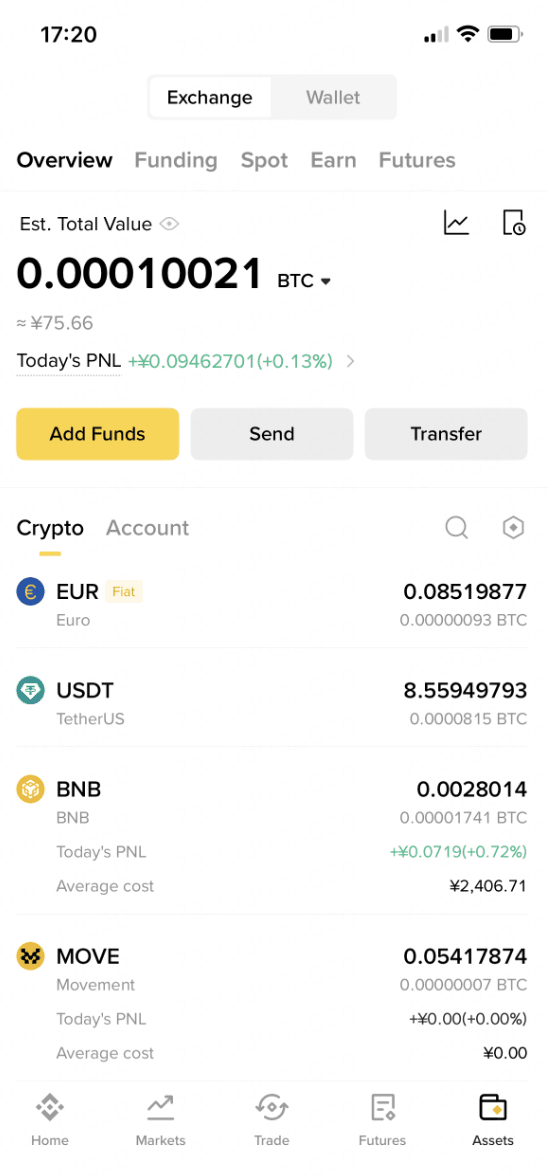
This overview screen gives you the 30,000-foot view of your investments. To get more specific, you need to look at the individual wallets.
Checking Individual Asset Allocation in Your Spot Wallet
While the overview is great for seeing your total worth, you'll spend more time in your Spot Wallet. This is where you can see a detailed breakdown of every individual cryptocurrency you own, how much you have of each, and its current estimated value. This is how you check your asset allocation—the practical result of the diversification strategy we discussed in the last lesson.
The official Binance support center has a clear, step-by-step guide on how to do this.
How to View My Binance Spot Account Activity?
This guide from Binance, 'How to View My Binance Spot Account Activity?', will walk you through the exact steps to find your Spot Wallet on both the website and the mobile app.
Read the sections 'How to view my Spot Account activities from the Binance website?' and 'How to view my Spot Account activities from the Binance App?'. You don't need an account with funds to follow along; focus on understanding the navigation steps shown in the screenshots.
As you can see from the guide, the Spot Wallet provides a list of your assets, typically sorted by the total value of your holdings.
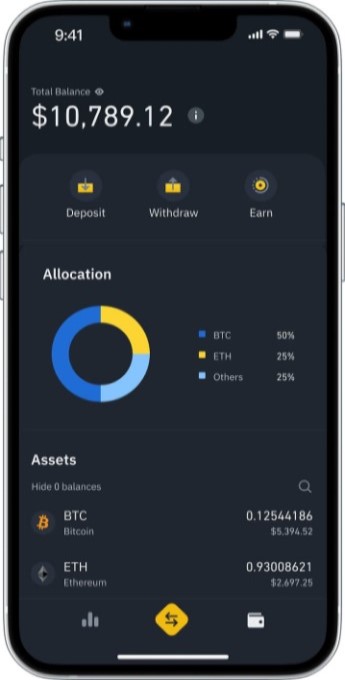
This screen is where you can verify your diversification. For example, if your strategy was to have 50% BTC, 30% ETH, and 20% in other altcoins, this is where you would check if your current holdings reflect that allocation.
An Important Note on Value Estimation
When you look at your portfolio, you'll see the value expressed in a fiat currency (e.g., $10,789.12) and also in Bitcoin (BTC). It's crucial to understand that the fiat value is an estimate that changes every second with the market price.
Newcomers often get fixated on this dollar value, but professional traders focus more on the quantity of the asset they hold. For example, owning 0.5 BTC is a fixed fact. The dollar value of that 0.5 BTC will fluctuate, but the amount you own does not.
How to View My Binance Spot Account Activity?
The Binance support article you just read has a helpful FAQ section that explains this concept well.
Read question #1 in the 'Frequently Asked Questions' section, titled 'Why doesn’t the Spot Account value estimation match the market price?'. This will clarify why you should focus on the amount of crypto you own rather than its constantly changing fiat valuation.
Conclusion
In this lesson, you've bridged the gap between the theory of portfolio management and the practical reality of the Binance platform.
Key Takeaways:
- Your Binance account consists of multiple wallets (Spot, Funding, Earn, etc.) for different purposes.
- The Wallet Overview screen provides a consolidated total balance of all your assets across all wallets.
- The Spot Wallet is where you view your individual asset allocation, seeing exactly how much of each cryptocurrency you hold.
- The fiat currency value (e.g., USD) of your portfolio is a constantly changing estimate. The most important metric to track is the quantity of each asset you own.
What's Next?
Now that you know how to view and analyze your holdings, the next logical step is to learn how to make changes to your allocation. In our next lesson, we'll cover the simplest way to do this on Binance: "Use the 'Convert' function for small, simple trades." This tool is perfect for beginners to easily swap one cryptocurrency for another without navigating the complex trading screen.