Hello! Welcome back to our introduction to Binance Futures.
In our last few lessons, we've focused on the critical theory behind futures trading: understanding leverage, its power to amplify gains and losses, and the ultimate risk of liquidation. These concepts are the "rules of the road" for trading safely.
Today, we shift from theory to practice. Before you can place a trade, you need a place to do it and the funds to get started. This lesson covers the final setup steps. Our learning outcome is to open and transfer funds to a Binance Futures account. By the end of this lesson, you will have a funded Futures account, ready for the next step of planning your first practice trade.
1. Activating Your Binance Futures Account
Your main Binance account, where you hold assets for spot trading or savings, is called the Spot Wallet. The Binance Futures platform operates using a separate wallet. Your first step is to "open" or activate this Futures account.
Binance requires this extra step to ensure you are aware of the risks involved. As part of the process, you'll need to acknowledge a service agreement and complete a short quiz. Don't worry—the quiz covers the exact concepts we've been discussing, like leverage and liquidation, to confirm you understand the basics.
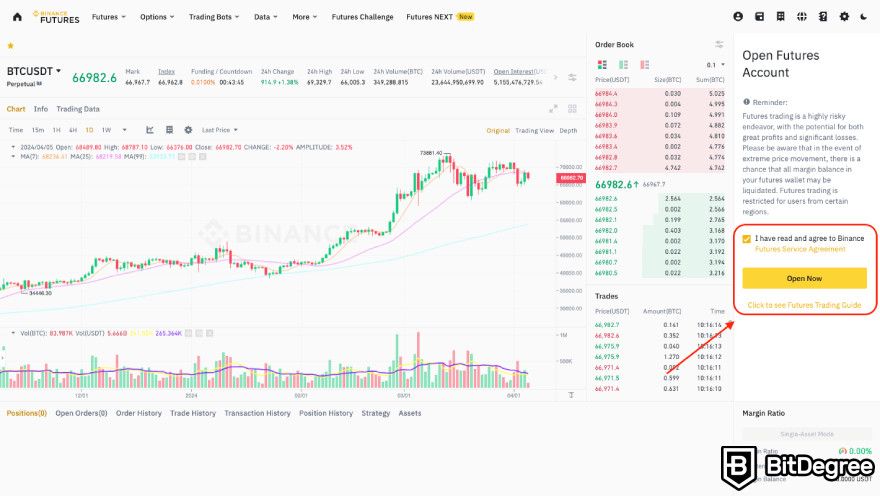
Let's walk through the steps to get your account opened.
A Thorough Guide to Binance Futures Trading for Beginners
The article 'A Thorough Guide to Binance Futures Trading for Beginners' provides a clear, step-by-step walkthrough for opening your Futures account.
Read the section 'How to Open a Binance Futures Account?'. Follow the four steps provided, from clicking on 'Futures' to taking the quiz. Since you already have a verified Binance account, you can focus on Steps 2 through 4.
Once you've completed the quiz and opened the account, you have an active but empty Futures wallet. The next step is to fund it.
2. Understanding USDⓈ-M vs. COIN-M Futures
Before you transfer funds, you need to know where you're sending them. Binance offers two main types of futures contracts, and they each have their own wallet:
- USDⓈ-M Futures (USD Stablecoin-Margined): These contracts are quoted and settled in a stablecoin, primarily USDT or BUSD. This is the most popular and straightforward option for beginners. If you trade BTC/USDT, your profit or loss is calculated and paid in USDT.
- COIN-M Futures (Coin-Margined): These contracts are quoted and settled in the underlying cryptocurrency. For example, if you trade a BTC contract, your margin, profit, and loss are all in BTC. This is more complex and generally suited for advanced traders or miners.
For this course, we will focus exclusively on USDⓈ-M Futures. This means we will be transferring a stablecoin (USDT) to our Futures wallet to use as collateral.
The following video provides a quick overview of these two types.
Binance Futures Trading for Beginners 2026 - FULL GUIDE
The video 'Binance Futures Trading for Beginners' clearly introduces the two main types of futures contracts available on Binance.
Watch from 00:38 to 01:33. The creator explains the difference between USDⓈ-M and COIN-M futures. This will clarify why we are about to transfer USDT to our futures wallet.
3. Transferring Funds to Your Futures Wallet
Now for the main practical step. Transferring funds between your own Binance wallets (e.g., from Spot to Futures) is an internal process. It's instant and, most importantly, free.
Your goal is to move a small amount of USDT from your Fiat and Spot wallet to your USDⓈ-M Futures wallet. Since this is for learning, I recommend transferring a small amount you are comfortable using for practice, such as $20 to $50.
The process is slightly different depending on whether you use the Binance website or the mobile app. We'll cover both.
Transferring on the Binance Website
The process involves navigating to your wallet, selecting "Transfer," and specifying the details: from Spot to USDⓈ-M Futures, the coin (USDT), and the amount.
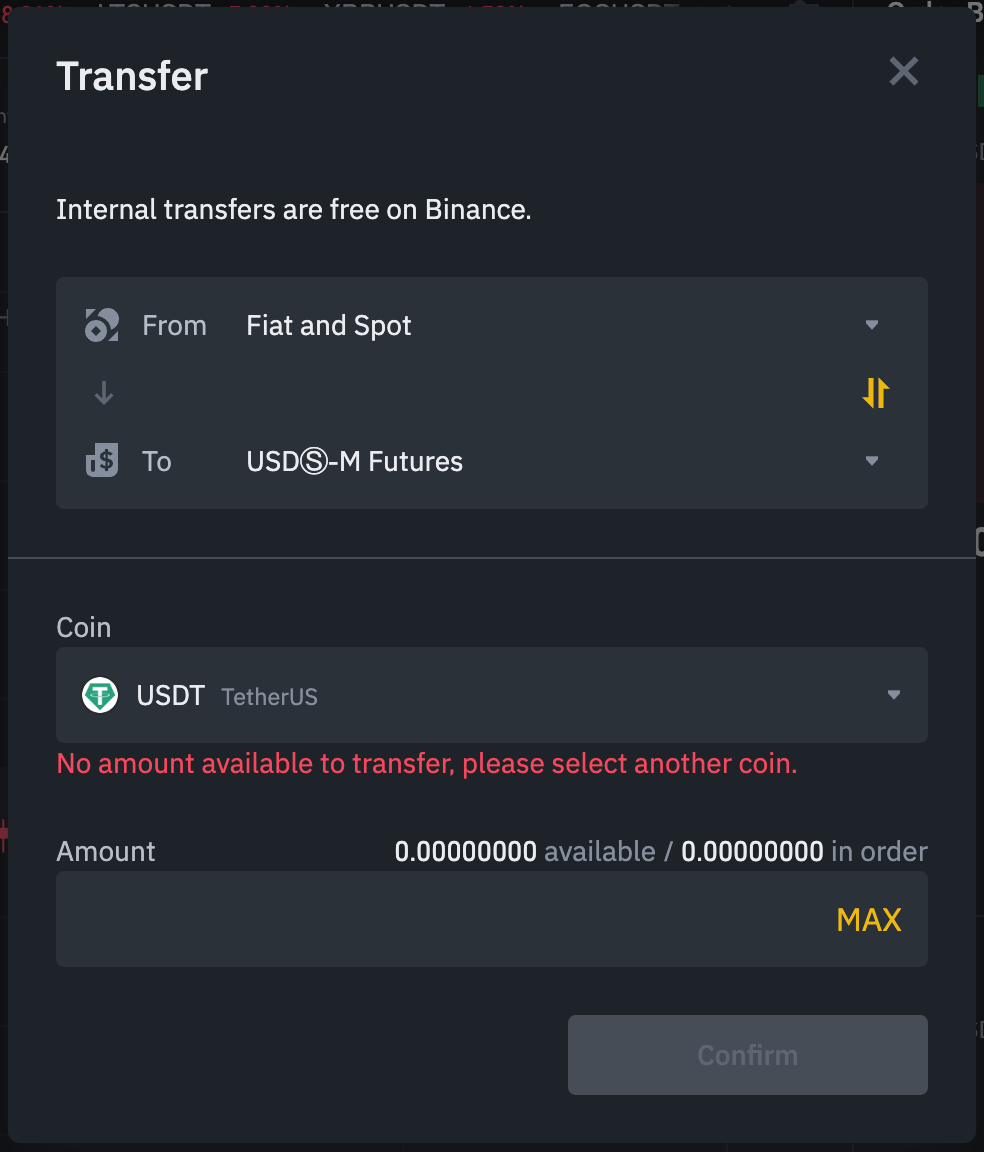
This video demonstrates the process visually.
Binance Futures Trading for Beginners 2026 - FULL GUIDE
Let's return to the 'Binance Futures Trading for Beginners' video for a clear demonstration on the web interface.
Watch from 02:15 to 03:21. Follow along as the creator transfers USDT from the 'Fiat and Spot' wallet to the 'USDⓈ-M Futures' wallet.
Transferring on the Binance Mobile App
The principle on the mobile app is identical. You'll find the "Futures" section in the bottom menu and then look for the "Transfer" option to move funds from your Spot wallet.
How To Do Futures Trading On Binance App (The Complete Guide For Beginners)
For those who prefer using the mobile app, this video provides a direct, step-by-step guide.
Watch from 02:12 to 03:13. The video shows exactly how to initiate a transfer from your Spot wallet to your Futures wallet on the Binance app.
After completing the transfer, you should now see your chosen balance reflected in your USDⓈ-M Futures wallet when you are on the Futures trading screen.
Conclusion
Congratulations! You have now completed the essential setup for trading on Binance Futures. This is a crucial milestone that moves you from being an observer to an active participant.
Key Takeaways:
- The Binance Futures account is separate from your Spot account and must be activated by completing a risk-awareness quiz.
- We will be using USDⓈ-M Futures, which are settled in stablecoins like USDT.
- To trade, you must transfer funds from your Fiat and Spot wallet to your USDⓈ-M Futures wallet. This internal transfer is instant and free.
- It is wise to start by transferring only a small amount of capital that you will use for your initial practice trades.
What's Next?
In our previous lesson, we learned about the Binance Futures calculator. In the next lesson, we will put it to practical use. Now that you have a funded account, you can use the calculator to model potential trades with a real balance. The next learning outcome is to use the Binance Futures calculator to assess potential P&L and liquidation price. This will be our final planning step before placing our very first practice trade.