Hello! Welcome to the next lesson in our journey to becoming a job-ready data engineer.
In our previous lesson, we focused on handling the complexities of dates and times, ensuring our data is standardized and unambiguous—a critical step in data cleaning. We learned how to use Python's datetime module and Pandas to convert all timestamps to the UTC standard.
But what happens when our data pipeline encounters an unexpected issue? A network connection might drop while fetching data from an API, a file might be temporarily locked, or a database might be momentarily unavailable. A naive script would simply crash, requiring manual intervention. This is where today's lesson comes in. We will address the learning outcome: Implement robust error handling, exception management, and retry logic in data pipelines.
We'll start with Python's fundamental error handling mechanism, the try...except block. Then, we'll dive into a crucial design pattern for data engineering: the retry pattern with exponential backoff. By the end, you'll be able to write resilient code that can automatically recover from the temporary glitches that are common in distributed systems.
1. The Foundation: Handling Errors with try and except
Before we can build complex retry logic, we need to master the basic tool for managing errors in Python: the try...except block. This structure allows you to "try" a piece of code that might fail and "except" (or catch) any errors that occur, preventing your program from crashing and allowing you to handle the problem gracefully.
This video from Corey Schafer provides a clear and thorough explanation of all the components of Python's exception handling syntax.
Python Tutorial: Using Try/Except Blocks for Error Handling
The video 'Python Tutorial: Using Try/Except Blocks for Error Handling' will walk you through the syntax and rationale for handling exceptions.
Please watch the following segments to get a full picture: Basic try...except (00:00:00 - 02:18): Understand the fundamental concept of wrapping potentially problematic code in a try block. Catching Specific Exceptions (02:18 - 04:05): This is a critical point. Pay attention to why it's better to catch specific errors (like FileNotFoundError) instead of a generic Exception. Handling Multiple Exceptions (04:05 - 05:39): Learn how to stack except blocks to handle different error types differently. The else Clause (05:39 - 07:18): Understand when and why to use the else block, which runs only if no exception was raised in the try block. The finally Clause (07:18 - 08:43): See how the finally block is used for cleanup actions (like closing a file or database connection) that must run regardless of whether an error occurred. Raising Exceptions (08:35 - 10:14): Learn how to manually trigger an exception using the raise keyword.
The Structure of Exception Handling
To summarize the video's key points:
try: You place the code that might raise an exception here.except ExceptionType as e: If an exception ofExceptionTypeoccurs in thetryblock, the code in this block is executed. It's best practice to be specific (e.g.,except ValueError:rather thanexcept Exception:). Theas epart is optional but allows you to inspect the exception object (e.g., to log the error message).else: This optional block runs only if thetryblock completes successfully (i.e., no exceptions were raised). It's useful for code that should only run if the initial part succeeded.finally: This optional block runs no matter what—whether an exception occurred or not. It's essential for resource cleanup.raise: This keyword lets you create and throw your own exceptions, which is useful for enforcing rules in your code.
When an exception is raised inside a function, Python looks for a matching except block within that function. If it doesn't find one, it "propagates" the exception up the call stack to the function that called it, and so on, until a handler is found or the program terminates.
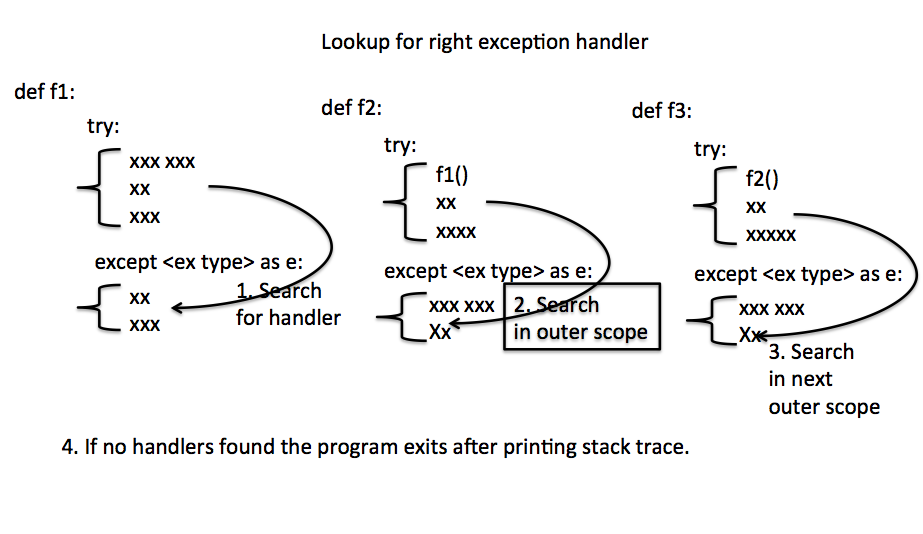
Test your understanding!
Imagine a function process_data(file_path) that reads a JSON file using Pandas, performs a calculation that might fail (e.g., division by zero), and then must print a "Processing complete" message.
How would you structure this function using try...except...else...finally to handle a FileNotFoundError, a ZeroDivisionError, and ensure the completion message is always printed?
Show answer
A robust implementation would separate the error handling and use all clauses appropriately.
import pandas as pd

def process_data(file_path):
    try:
        print(f"Attempting to read {file_path}...")
        df = pd.read_json(file_path)
        # Simulate a calculation that might fail
        result = 100 / len(df) # This could cause a ZeroDivisionError if the file is empty
        print("Initial data processing successful.")

    except FileNotFoundError as e:
        print(f"Error: The file was not found. Details: {e}")
    except ZeroDivisionError as e:
        print(f"Error: Calculation failed, likely due to empty data. Details: {e}")
    except Exception as e:
        # A general catch-all for any other unexpected errors
        print(f"An unexpected error occurred: {e}")

    else:
        # This runs only if the try block was successful
        print(f"Successfully calculated result: {result}")
        print("Continuing with further processing...")

    finally:
        # This always runs
        print("Processing complete.")

# Example usage:
# process_data("my_data.json")      # Assuming this file exists and is not empty
# process_data("non_existent.json") # This will trigger FileNotFoundError
# process_data("empty.json")        # Assuming this file exists but is empty
2. Handling Transient Failures: The Retry Pattern
In data engineering, many errors are transient. These are temporary issues, like a brief network outage or a service hitting a rate limit. Simply crashing is not a good solution, as the operation would likely succeed if you just waited a moment and tried again. This is where the Retry Pattern becomes essential.
The naive approach is to retry immediately in a loop, but this can make things worse by overwhelming the service you're trying to contact (a "thundering herd" problem). A much better approach is exponential backoff, where you increase the delay between each successive retry.
The following video from ArjanCodes provides an excellent walkthrough of building a retry mechanism from first principles. This will give you a deep understanding of how it works.
Retry Pattern: The Secret to Resilient Python Code
In 'Retry Pattern: The Secret to Resilient Python Code', you'll learn how to build a robust retry mechanism from scratch, including exponential backoff and decorators.
This video builds the concept layer by layer. Please watch the following parts in order: The Problem of Transient Failures (00:00:00 - 01:38): Understand the core problem the retry pattern solves. Building a Simple Retry Function (01:38 - 05:18): See how a basic retry loop works. Adding Exponential Backoff (07:13 - 09:27): This is the key improvement. Focus on why increasing the delay exponentially is better than a fixed delay. Refactoring to a Decorator (09:27 - 14:50): Learn how to wrap this logic into a clean, reusable decorator. This is a very common and elegant pattern in Python. When to Use a Library (21:04 - 21:52): The video concludes by recommending a production-ready library, which we'll discuss next.
3. Production-Ready Retries with tenacity
While building a retry decorator from scratch is a fantastic learning exercise, for production code you should use a well-tested, feature-rich library. As mentioned in the video, tenacity is the de facto standard for this in Python. It handles all the complexities of exponential backoff, adding random "jitter" (to prevent synchronized retries from multiple clients), and allows for complex conditions.
Let's look at a practical, real-world example of using tenacity in a data pipeline.
Stop Optimizing the Wrong Things: A Data Pipeline ...
The article 'Stop Optimizing the Wrong Things' from the Dagster blog highlights how proper retry logic is a form of performance optimization for reliability. We will look at their specific code example for tenacity.
Please read the section titled 'Step 5: Handle Transient Failures with Exponential Backoff'. Focus on the code block that uses the @retry decorator from the tenacity library. Notice how configurable it is.
Here is the example from the article, which is a great template for your own projects:
from tenacity import retry, stop_after_attempt, wait_exponential, retry_if_exception_type
from requests.exceptions import ConnectionError, Timeout

# You must install tenacity first: pip install tenacity

@retry(
    stop=stop_after_attempt(5),  # Stop after 5 attempts
    wait=wait_exponential(multiplier=1, min=1, max=60), # Wait 1s, then 2s, 4s, ... up to 60s
    retry=retry_if_exception_type((ConnectionError, Timeout)), # Only retry on these specific network errors
    reraise=True # If it fails after all retries, re-raise the last exception
)
def fetch_from_api(url):
    """Fetch data from an API with automatic exponential backoff."""
    print("Attempting to fetch data...")
    response = requests.get(url, timeout=10)
    response.raise_for_status() # Raise an HTTPError for bad responses (4xx or 5xx)
    return response.json()

try:
    data = fetch_from_api("http://httpstat.us/503") # 503 Service Unavailable is a classic transient error
except Exception as e:
    print(f"Pipeline failed after multiple retries: {e}")
This decorator-based approach is powerful because it cleanly separates the business logic (fetch_from_api) from the resilience logic (@retry).
4. Important Design Considerations
Implementing retries isn't a silver bullet. You must use it thoughtfully.
Retry Pattern: Handling Transient Failures in Distributed ...
The article 'Retry Pattern: Handling Transient Failures' provides a great summary of the key design considerations you must account for.
Please read the short section titled 'Design Considerations'.
The most important consideration for data engineers is idempotency.
An operation is idempotent if running it multiple times has the same effect as running it once.
- Idempotent example: An
UPDATESQL statement that sets a column to a specific value (UPDATE users SET status = 'processed' WHERE id = 123). Running this 10 times is the same as running it once. - Non-idempotent example: An
INSERTstatement that adds a new row. If this is retried, you will create duplicate rows. Another example is appending a line to a file.
Rule: Only apply retry logic to operations that are idempotent or have been designed to handle retries safely.
Finally, remember the difference between transient and permanent failures:
- Retry these (transient):
ConnectionError,Timeout, HTTP 503 Service Unavailable, HTTP 429 Too Many Requests. - Do NOT retry these (permanent):
FileNotFoundError,ValueError(bad data),AuthenticationError(bad credentials), HTTP 404 Not Found. Retrying will not fix the underlying problem.
Conclusion
You have now learned how to make your data pipelines significantly more robust and resilient. Instead of building fragile scripts that break at the first sign of trouble, you can now write professional-grade code that anticipates and recovers from common failures.
Key Takeaways:
- Use the
try...except...else...finallyblock to handle expected errors gracefully and ensure resource cleanup. - Catch specific exceptions to avoid masking bugs in your code.
- For interactions with external systems (APIs, databases), implement a retry pattern to handle transient failures.
- Always use exponential backoff with jitter to avoid overwhelming services.
- In production, use a library like
tenacityinstead of writing your own retry logic. - Ensure that any operation you retry is idempotent to prevent unintended side effects like data duplication.
Preview of the Next Lesson:
We've just seen how powerful Python decorators are for implementing retry logic. In our next lesson, we will explore decorators further. We will learn how to use decorators for logging and performance monitoring, and apply profiling tools to identify bottlenecks. This will give us the visibility we need to understand how our pipelines are performing and where we can optimize them.