Hello! Welcome back to our course.
In our last lesson, we focused on getting data into our programs by reading and writing various file formats like CSV, JSON, and the highly efficient Parquet. You learned how Pandas and PyArrow work together to handle these I/O operations, a foundational skill for any data engineer.
Now that we have the data loaded into a DataFrame, our next job is to clean and transform it. One of the most common and error-prone areas in data preparation involves timestamps. This lesson is dedicated to mastering this challenge, addressing the learning outcome: Handle date and time complexities, including timezones, in data processing.
We will cover Python's standard datetime library, untangle the complexities of timezones by understanding "naive" vs. "aware" datetimes, and finally, apply these concepts at scale within Pandas DataFrames. For a data engineer, correctly handling timestamps is non-negotiable—it ensures data integrity, enables accurate time-series analysis, and prevents subtle bugs that can corrupt entire datasets.
1. The Building Blocks: Python's datetime Module
Before we can handle dates and times in a large dataset, we first need to understand the fundamental objects Python provides for this purpose. The built-in datetime module is the starting point.
To get a comprehensive overview of the datetime module, we'll watch a detailed tutorial from Corey Schafer. It covers creating date and time objects, performing calculations, and converting them to and from strings.
Python Tutorial: Datetime Module - How to work with Dates, Times, Timedeltas, and Timezones
This video, 'Python Tutorial: Datetime Module', provides an excellent, step-by-step introduction to Python's core functionalities for handling dates and times.
Please watch the following segments carefully: Working with date and timedelta (01:09 - 07:31): Focus on how to create date objects and how timedelta is used to represent a duration and perform arithmetic (e.g., finding the date a week from now). Working with datetime objects (07:31 - 11:30): This part introduces the datetime object, which combines both date and time information. Observe how it gives you access to all components, from year down to microsecond. Formatting and Parsing (23:10 - 26:49): Pay close attention to the two key methods: strftime() for converting a datetime object into a formatted string, and strptime() for parsing a string into a datetime object. This is a very common task in data cleaning.
Key Operations with datetime
As you saw, the datetime module provides several key classes and methods:
datetime.date(year, month, day): Represents a date.datetime.time(hour, minute, second): Represents a time of day.datetime.datetime(...): Represents a specific point in time, combining date and time.datetime.timedelta(...): Represents a duration or difference between two datetimes. You can perform arithmetic withtimedeltaobjects (e.g.,my_datetime + timedelta(days=5)).strftime(format): String Format Time. Converts adatetimeobject to a string according to a specified format code.strptime(string, format): String Parse Time. Converts a string into adatetimeobject based on a matching format code.
Correctly parsing strings into datetime objects is a critical first step in cleaning messy data.
Test your understanding!
You have a log file with timestamps formatted as Day-Month-Year Hour:Minute:Second, for example: 28-Oct-2023 15:45:10.
Write the Python code using datetime.strptime() to convert this string into a datetime object. What format_string would you use? You can find the format codes in the Python documentation or by recalling them from the video.
Show answer
You would use the format code "%d-%b-%Y %H:%M:%S".
%d: Day of the month as a zero-padded decimal number.%b: Month as locale’s abbreviated name (e.g., Oct).%Y: Year with century as a decimal number.%H: Hour (24-hour clock) as a zero-padded decimal number.%M: Minute as a zero-padded decimal number.%S: Second as a zero-padded decimal number.
The Python code would be:
from datetime import datetime

date_string = "28-Oct-2023 15:45:10"
format_string = "%d-%b-%Y %H:%M:%S"
datetime_object = datetime.strptime(date_string, format_string)

print(datetime_object)
# Output: 2023-10-28 15:45:10
2. The Core Challenge: Timezones
Handling dates and times would be simple if everyone used the same clock. But timezones, and especially daylight saving time (DST), introduce significant complexity. In your physics studies, you know that a measurement is meaningless without a frame of reference. Similarly, a timestamp is ambiguous without a timezone.
This brings us to the most important concept in this lesson: naive vs. aware datetime objects.
Using Python datetime to Work With Dates and Times
The article 'Using Python datetime to Work With Dates and Times' from Real Python provides a formal definition and excellent explanation of this distinction.
Please read the section titled 'Comparing Naive and Aware Python datetime Instances'. Focus on understanding why a naive object is ambiguous and an aware object is not. The explanation of daylight saving time is particularly insightful.
- A naive
datetimeobject has no timezone information. It represents a time, like "9:00 AM", but we don't know where it's 9:00 AM. - An aware
datetimeobject includes timezone information, representing a specific, unambiguous moment in time, like "9:00 AM in London".
As a data engineer, you will often receive data from sources around the world. If you treat all timestamps as naive, you will inevitably make incorrect calculations when trying to order events or calculate durations.
The Golden Rule of Timezones
To manage this complexity, data engineers follow a simple but powerful rule:
Convert all timestamps to a single, standard timezone as early as possible in your data pipeline. That standard is Coordinated Universal Time (UTC). Perform all calculations and storage in UTC. Only convert to a local timezone for final display to users if necessary.
UTC is the global standard because it has no daylight saving time shifts, making it a stable and unambiguous reference.
Making Datetimes "Aware"
Python's built-in datetime module doesn't provide a direct way to handle the IANA timezone database (the standard source for timezone information). We need a third-party library. The most common are:
pytz: The long-standing, widely used library.dateutil: Another powerful and popular library.zoneinfo: Included in Python's standard library since version 3.9. While this is the future,pytzanddateutilare still prevalent in many existing systems and libraries, including older versions of Pandas.
Let's see how to use pytz to work with timezones.
Python Tutorial: Datetime Module - How to work with Dates, Times, Timedeltas, and Timezones
We'll return to Corey Schafer's video, which demonstrates how to use pytz to create and manipulate timezone-aware datetimes.
Please watch these segments: Naive vs. Aware Datetimes (00:00:00 - 00:01:09): A quick refresher on the core concepts. Introduction to pytz (00:13:18 - 00:15:59): See how to create a timezone-aware datetime in UTC. This is the first step of our 'Golden Rule'. Converting Between Timezones (00:15:59 - 00:20:05): Focus on the .astimezone() method, which correctly converts an aware datetime from one timezone to another. Localizing a Naive Datetime (00:20:05 - 00:23:10): This is a critical step. If you have a naive datetime that you know represents a time in a specific timezone (e.g., 'US/Mountain'), you must use the .localize() method to make it aware before you can convert it to UTC or any other timezone.
The key functions to remember are:
pytz.timezone('Zone/Name'): Creates a timezone object.tz_object.localize(naive_datetime): Makes a naive datetime object aware by assigning it a timezone.aware_datetime.astimezone(new_tz_object): Converts an already aware datetime object to a new timezone.
3. Handling Timezones in Pandas
Now, let's apply these concepts in a real-world data engineering context: manipulating a column of timestamps in a Pandas DataFrame. Pandas provides a powerful set of tools through the .dt accessor that makes these operations vectorized and efficient.
pd.to_datetime() is your primary tool for parsing columns. It's incredibly versatile and can often infer the format automatically. For timezone handling, you can use .dt.tz_localize() and .dt.tz_convert().
Pandas Time Series Analysis 6: Timezone Handling
The video 'Pandas Time Series Analysis 6: Timezone Handling' from the codebasics channel provides a concise and practical guide to managing timezones directly within Pandas.
Please watch these two key segments: Localizing a Naive Index (00:01:48 - 00:03:44): See how to use df.index.tz_localize() to convert a naive datetime index into a timezone-aware one. The same principle applies to a data column using df['col'].dt.tz_localize(). Converting to a New Timezone (00:03:44 - 00:06:50): This part shows df.index.tz_convert(), which is used to convert an already-aware index to another timezone (e.g., from US/Eastern to Europe/Berlin). Again, this works on columns with .dt.tz_convert().
The process in Pandas mirrors the one with single datetime objects:
- Parse: Convert your string column to datetime objects, preferably naive to start.
df['ts'] = pd.to_datetime(df['ts_string']). - Localize: If you know the original timezone, make the column aware.
df['ts'] = df['ts'].dt.tz_localize('America/New_York'). - Convert: Convert to your standard, UTC.
df['ts_utc'] = df['ts'].dt.tz_convert('UTC').
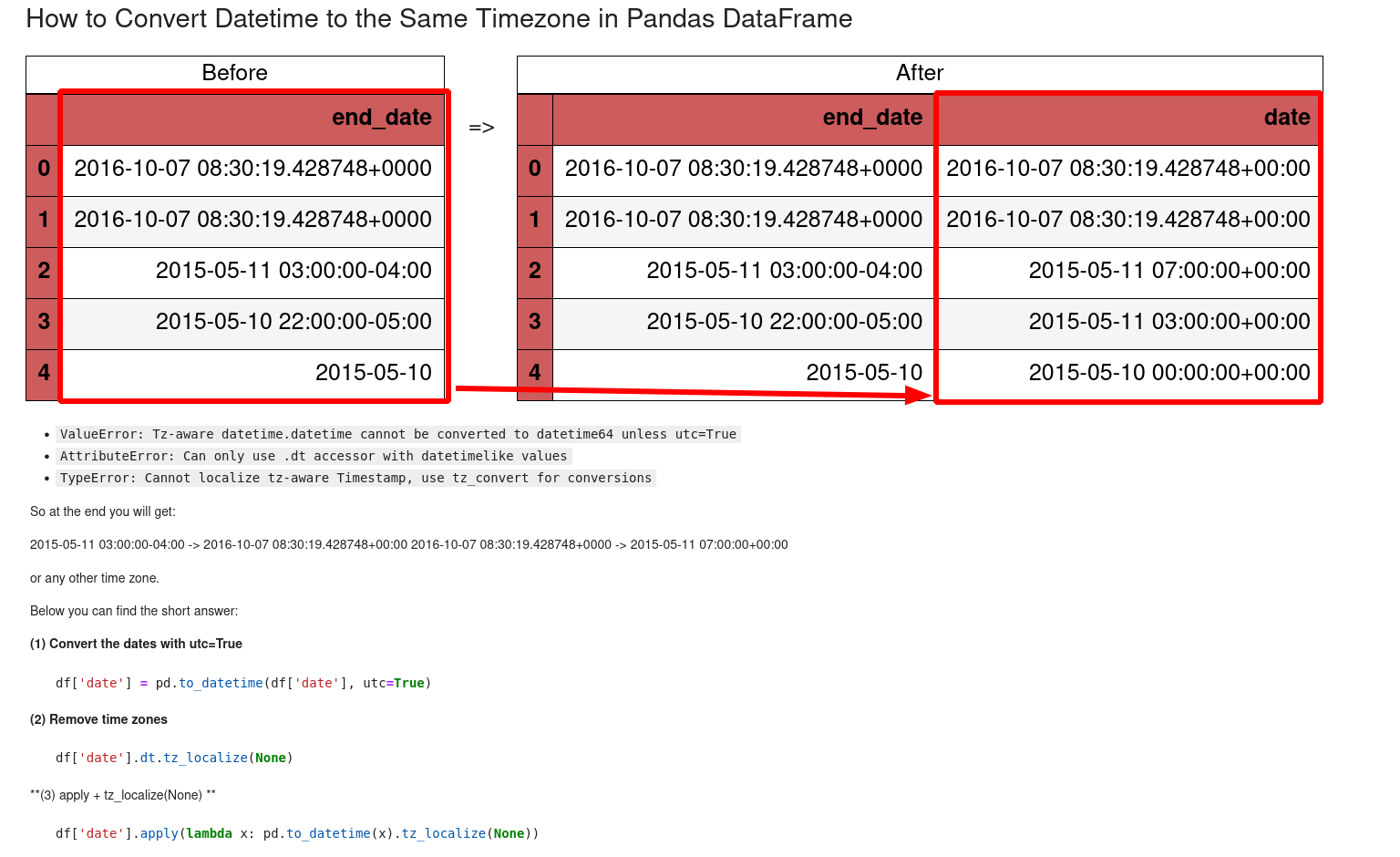
Often, you can do this in one go with pd.to_datetime: if your strings have timezone offsets in them (e.g., "2023-10-28 10:00:00-04:00"), pd.to_datetime will create an aware series directly. Then you can just convert to UTC.
The following image perfectly summarizes the goal of this process in a data pipeline.
Test your understanding!
You have a Pandas DataFrame df with a column named event_time. The data is a series of naive datetime objects, but you know from the data source that all times were recorded in Chicago ('America/Chicago').
What is the correct sequence of Pandas commands to create a new column event_time_utc that contains these timestamps converted to UTC?
Show answer
The correct sequence is to first localize to the original timezone, then convert to UTC.
import pandas as pd

# Assume df['event_time'] is a column of naive datetime objects
# Example:
# 0   2023-03-12 01:30:00  (Before DST spring forward)
# 1   2023-11-05 01:30:00  (During DST fall back)

# 1. Localize the naive timestamps to the Chicago timezone
df['event_time_aware'] = df['event_time'].dt.tz_localize('America/Chicago', ambiguous='infer')

# 2. Convert the aware timestamps to UTC
df['event_time_utc'] = df['event_time_aware'].dt.tz_convert('UTC')

print(df[['event_time_aware', 'event_time_utc']])
Notice the ambiguous='infer' argument. This is important for handling times that occur twice during DST fall-back. Pandas needs to know how to interpret them.
Conclusion
In this lesson, we tackled the complex but essential topic of handling dates and times. You've learned that what seems simple on the surface is filled with potential pitfalls, but armed with the right concepts and tools, you can manage them robustly.
Key Takeaways:
- Python's
datetimemodule provides the fundamental objects (datetime,date,time,timedelta) for working with time. - The distinction between naive (no timezone) and aware (with timezone) objects is critical for correctness.
- The data engineering "Golden Rule" is to convert all timestamps to UTC as soon as possible, perform all processing in UTC, and only convert to local time for display.
- Libraries like
pytzanddateutilare used to handle timezone information. - In Pandas, you use
pd.to_datetime()for parsing,.dt.tz_localize()to make naive datetimes aware, and.dt.tz_convert()to change between timezones.
Preview of the Next Lesson:
With data loaded and timestamps cleaned, our pipeline is starting to take shape. But what happens when things go wrong? A source file might be missing, a data format might be incorrect, or a network connection might fail. In our next lesson, we will implement robust error handling, exception management, and retry logic in data pipelines, ensuring our code is resilient and reliable.