Hello! Welcome to the third lesson in our "Professional Python for Data Engineering" module.
In our last session, we discussed how to organize code into modular and reusable functions and classes. We established that functions are great for stateless actions (like transformations), while classes excel at managing stateful components (like database connections).
Today, we'll put those concepts into a practical context. This lesson addresses the learning outcome: Read and write complex data formats like CSV, JSON, and Parquet using libraries like Pandas and PyArrow. As a data engineer, your primary job is to move and transform data, which almost always begins with reading it from a source file and ends with writing it to a destination. Mastering these I/O (Input/Output) operations is a fundamental skill. We'll start with the most common formats and the most user-friendly library, then move to the high-performance tools used in modern data stacks.
1. The Data Engineer's Toolkit: Pandas for I/O
For many day-to-day data manipulation tasks, the Pandas library is the go-to tool. It provides a powerful DataFrame object and a set of intuitive functions for reading and writing various data formats. The naming convention is simple and consistent: pd.read_<format>() to read data into a DataFrame, and df.to_<format>() to write a DataFrame to a file.
Let's explore how to handle the most common file formats: CSV and JSON.
Python Pandas Tutorial (Part 11): Reading/Writing Data to Different Sources - Excel, JSON, SQL, Etc
The video 'Python Pandas Tutorial (Part 11)' by Corey Schafer provides a clear, hands-on demonstration of reading and writing different file formats with Pandas. It's an excellent practical starting point.
Please watch the following segments: CSV and TSV (00:51 - 06:19): This covers read_csv and to_csv. Pay attention to the sep argument for handling different delimiters, like tabs in a TSV file. Excel (06:19 - 12:18): While we focus on other formats, it's useful to see how easily Pandas handles Excel files, which are common in business settings. Note the need to install extra packages (openpyxl, xlrd). JSON (12:18 - 16:53): This is a critical section. Focus on the orient argument. The way your JSON is structured (e.g., a list of records vs. a dictionary of columns) determines how you read and write it.
Handling CSV and JSON with Pandas
As you saw in the video, Pandas makes I/O straightforward.
- For CSV,
pd.read_csv()is the primary function. You'll frequently use arguments likesep(to specify the delimiter, e.g.,,or\t),header(to indicate which row contains column names), andindex_col(to set a specific column as the DataFrame index). - For JSON,
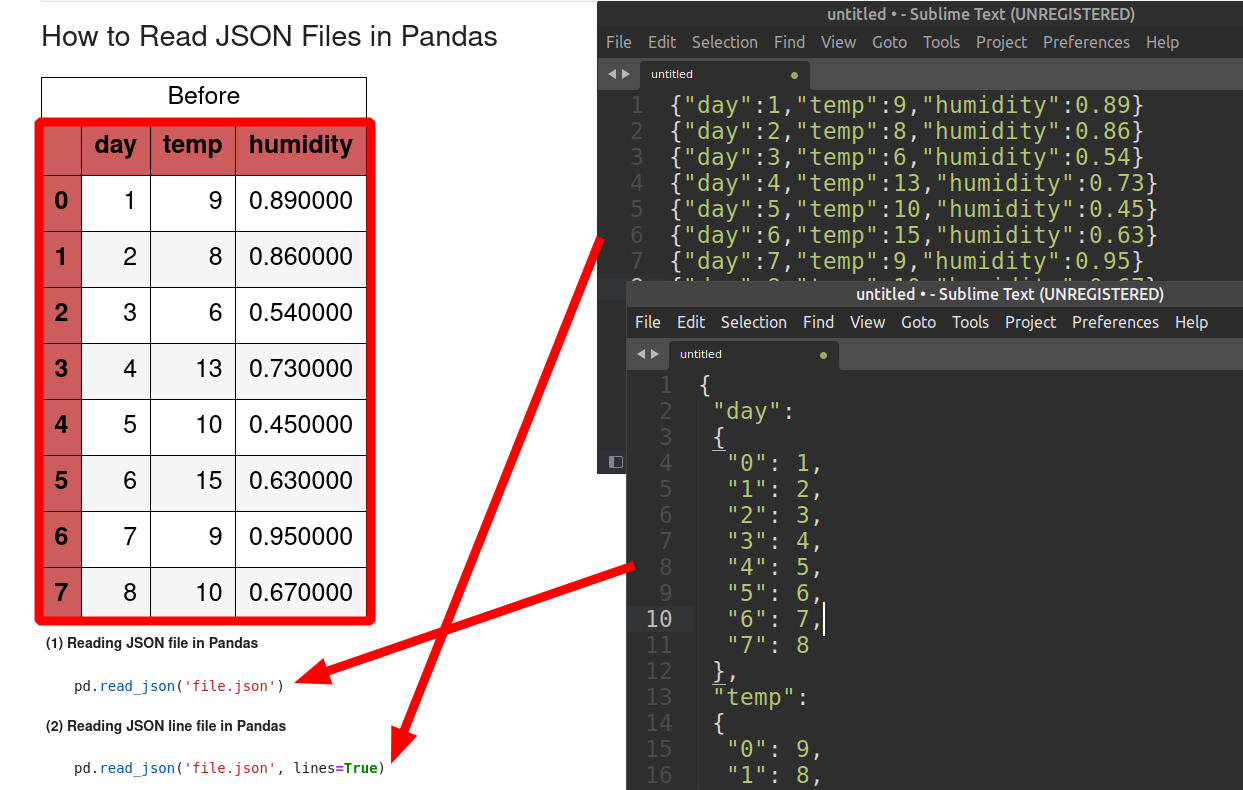
pd.read_json()is used. Theorientparameter is key here. Common orientations include:'records': A list of JSON objects, where each object is a row. This is very common for APIs.'columns': A dictionary where keys are column names and values are lists of column data.'split': A dictionary with keysindex,columns, anddata.
This image illustrates two common JSON structures and the Pandas commands to read them.
Test your understanding!
You receive a JSON file from an API with the following structure:
{
  "columns": ["timestamp", "sensor_id", "temperature"],
  "index": [0, 1],
  "data": [
    ["2023-10-27T10:00:00Z", "A-01", 22.5],
    ["2023-10-27T10:00:00Z", "B-02", 23.1]
  ]
}
Which orient parameter would you use in pd.read_json() to correctly load this data into a DataFrame?
Show answer
You would use orient='split'. This orientation corresponds to a dictionary containing the keys columns, index, and data.
2. The Modern Standard: Columnar Storage with Parquet
While CSV and JSON are human-readable and universal, they are not efficient for large-scale analytics. Modern data engineering heavily relies on columnar storage formats, with Apache Parquet being the industry standard.
The key difference lies in how data is stored on disk.
- Row-oriented formats (e.g., CSV): Data is stored row by row. To read the values for a single column, you must read the entire file and pick out the values you need from each row.
- Column-oriented formats (e.g., Parquet): Data for each column is stored together. To read a single column, you only need to access that specific block of data, skipping all other columns.

This architectural difference has profound implications for performance, especially in analytical workloads where you often only need a subset of columns from a very "wide" table (a table with many columns). From your physics background, you can think of this as choosing a more efficient coordinate system for a specific problem. Columnar storage is optimized for column-based operations.
Parquet also offers:
- Efficient Compression: It applies the best compression algorithm for the data type of each column, significantly reducing storage size.
- Schema Evolution: It stores the schema within the file, which helps prevent data corruption if the structure of your data changes over time.
To work with Parquet in Python, we need the PyArrow library. Pandas uses PyArrow as its engine for reading and writing Parquet files.
Speed Up Data Processing with Apache Parquet in Python
The video 'Speed Up Data Processing with Apache Parquet in Python' by NeuralNine gives a powerful demonstration of why Parquet is superior to CSV for analytical tasks.
Watch from the beginning to 09:12. The video will walk you through: What Parquet is (column-oriented). Installing the necessary libraries (pandas, pyarrow). Reading a Parquet file and converting it to CSV for comparison (pd.read_parquet, df.to_csv). Comparing the file loading time and in-memory size of the same data in Parquet vs. CSV format. Demonstrating the massive speedup when reading only a subset of columns from a Parquet file.
The key takeaway is that for analytical workloads, Parquet is almost always the better choice over CSV due to its superior read performance and smaller storage footprint.
3. Under the Hood: Using PyArrow Directly
Pandas provides a convenient high-level interface, but it's built on top of lower-level libraries. For Parquet and other formats, PyArrow is the powerful engine doing the heavy lifting. Understanding PyArrow directly is valuable because it's a core technology in the big data ecosystem (used by Spark, Dask, and others) and provides a universal in-memory format for zero-copy data sharing between systems.
The article below introduces the basics of PyArrow and shows how to use it for I/O operations directly.
Getting Started with Data Analytics Using PyArrow in Python
The article 'Getting Started with Data Analytics Using PyArrow in Python' offers a clear introduction to PyArrow's main concepts and its I/O capabilities.
Please read the following sections: 'Section 1: Understanding Key PyArrow Objects': Briefly skim this to familiarize yourself with terms like Table, Schema, and Array. This helps build your theoretical understanding. 'Section 2: Reading and Writing Parquet Files with PyArrow': See how to use pyarrow.parquet.read_table() and write_table(). Notice the ability to select specific columns, which is a key feature. 'Section 4: Working with JSON, CSV, and Feather Files': Observe that PyArrow isn't just for Parquet; it can efficiently handle CSV and JSON as well.
While you will often use PyArrow through Pandas, knowing that these pyarrow.csv and pyarrow.json modules exist is useful for performance-critical situations where you might want to bypass the Pandas DataFrame overhead entirely.
4. The Best of Both Worlds: Pandas with a PyArrow Backend
Now, let's connect everything. Modern Pandas allows you to explicitly use PyArrow as a "backend" not just for I/O, but for the in-memory data representation itself. This combines the user-friendly API of Pandas with the performance and type-fidelity of Arrow.
You can enable this in two main ways:
- For I/O: Specify
engine='pyarrow'in read functions likepd.read_csv(). This uses PyArrow's fast parser instead of the default Python one. - For Data Representation: Specify
dtype_backend='pyarrow'. This tells Pandas to create a DataFrame where the columns are backed by PyArrow arrays instead of NumPy arrays. This provides better handling of missing values and supports a wider range of data types.
The official Pandas documentation explains this integration clearly.
PyArrow Functionality — pandas 3.0.0 documentation
This page from the Pandas documentation is the authoritative source on how Pandas and PyArrow work together. It's a bit dense, but the key concepts are very important for professional use.
Please focus on the section titled 'I/O Reading'. It shows concrete examples of using engine='pyarrow' and dtype_backend='pyarrow' with pd.read_csv(). Understanding these two arguments will allow you to write more efficient and robust data loading code.
As a rule of thumb for modern data engineering:
- Always prefer Parquet for intermediate or final data storage in analytical pipelines.
- When reading large CSVs, use
pd.read_csv(..., engine='pyarrow')for a significant speed boost. - Consider using
dtype_backend='pyarrow'when you need robust handling of data types and missing values, or when you plan to pass data to other Arrow-native tools.
Conclusion
In this lesson, we explored the essential task of reading and writing data in formats crucial to data engineering. You learned not just how to perform these operations, but why you would choose one format or tool over another.
Key Takeaways:
- Pandas provides a high-level, user-friendly API (
read_*,to_*) for handling common formats like CSV, JSON, and Excel. - CSV and JSON are text-based and universal but inefficient for large-scale analytics.
- Parquet is a columnar, binary format that offers superior compression and read performance, making it the industry standard for analytical data storage.
- PyArrow is the high-performance engine that powers Parquet operations in Python and serves as a bridge between different data processing systems.
- You can unlock significant performance gains in Pandas by leveraging PyArrow through the
engineanddtype_backendarguments.
Preview of the Next Lesson:
Now that you can read raw data into memory, the next step is cleaning and preparing it. In our upcoming lesson, we will tackle one of the most common and tricky aspects of data preparation: "Handle date and time complexities, including timezones, in data processing." You'll learn how to parse various date formats, perform time-based calculations, and correctly manage timezones to ensure your data is accurate and consistent.