Introduction
Hello! In our last lesson, you built a cleanup.sh script using for and while loops to automate archiving files. You saw how loops allow you to perform actions on multiple items, which is a big step in automation.
As your scripts grow, you'll notice that you might have distinct blocks of logic—one part to set up directories, another to archive logs, and another to archive temp files. If you need to perform the same setup or archiving task in multiple scripts, you'd have to copy and paste that code. This is where functions come in.
In this lesson, you will learn to define and call functions within a Bash script. This skill is fundamental to writing clean, reusable, and maintainable code, a principle that applies whether you're writing a system administration script in Bash or a web application in Python. By organizing your script's logic into functions, you make it more modular and easier to understand, just like organizing Python code into functions and classes.
1. Why Use Functions? The "Don't Repeat Yourself" Principle
In programming, a core principle is "Don't Repeat Yourself" (DRY). Functions are the primary tool for achieving this. Instead of writing the same sequence of commands multiple times, you can package them into a function and simply call it by name whenever you need it.
This not only saves typing but also makes your scripts much easier to maintain. If you need to change the logic, you only have to update it in one place—the function definition—rather than finding every place you copied the code.
Let's watch a video that demonstrates this concept by refactoring a script that has repetitive code.
How To Write Bash Scripts In Linux - Complete Guide (Part 12 - Functions)
This video from Learn Linux TV shows a practical example of a script with several identical if statements. The presenter then introduces a function to consolidate this repeated logic, making the script shorter and cleaner.
Watch from the beginning (00:06) to 07:28. Pay attention to how a repetitive block of code is identified and then moved into a function named check_exit_status. Notice how calling the function is much cleaner than rewriting the if statement multiple times.
As you saw, using a function resulted in:
- Readability: The main part of the script now clearly shows its intent: run a command, then check the status.
- Maintainability: To change how the exit status is checked, you only need to edit the function in one place.
- Reusability: You can now use the
check_exit_statusfunction after any command in your script.
2. Defining and Calling Functions
There are two common ways to define a function in Bash. We'll focus on the most widely used and portable syntax.
The article 'Bash Functions' from Linuxize provides a clear, concise overview of the syntax for defining functions. It's a great reference to have.
Read the sections 'Defining Bash Functions' and 'Example: Hello World Function'. Focus on the first syntax style: function_name () { ... }. Note the important rule that a function must be defined before it is called.
The basic syntax is:
function_name () {


    # A block of commands
    echo "This is inside the function."
    ls -l
}
To execute the commands inside the function, you simply "call" it by writing its name:
# This will execute the echo and ls commands defined in the function
function_name
3. Passing Arguments and Variable Scope
Functions become much more powerful when you can pass information to them. In Bash, functions receive arguments in the same way a script does: as positional parameters ($1, $2, $3, etc.).
This allows you to create flexible functions that behave differently based on the input you provide. For example, a function could take a filename as an argument and perform an action on that specific file.
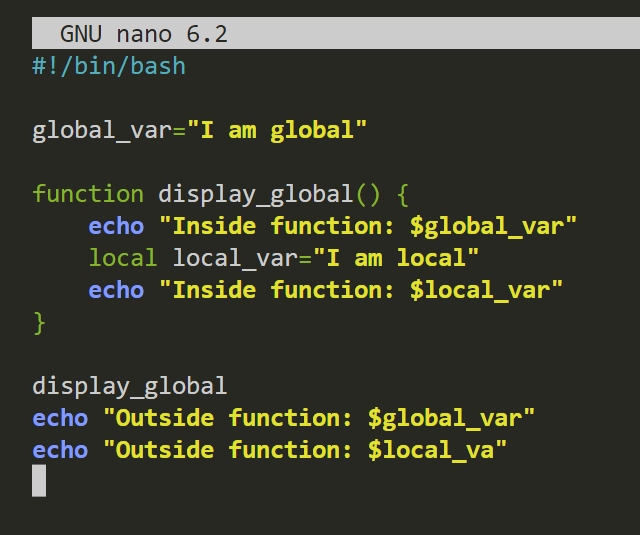
Local vs. Global Variables
When working with variables and functions, it's crucial to understand variable scope.
- Global variables are visible throughout the entire script, both inside and outside functions.
- Local variables, declared with the
localkeyword, are visible only inside the function where they are created.
Using local is a best practice because it prevents a function from accidentally changing a variable used in another part of your script, which can lead to very confusing bugs.
4. "Returning" Values from a Function
If you're used to Python or Java, you might expect a function to return data. Bash functions work a bit differently and can be thought of as "mini-programs." They have two main ways of sending information back to the caller:
-
Exit Status: Functions can return a numeric exit code (an integer between 0 and 255) using the
returncommand. By convention,0means success and any non-zero value indicates an error. The main script can then check this value using the special variable$?. This is useful for signaling whether the function succeeded or failed. -
Standard Output: To "return" text or data, the function simply prints it to standard output using
echo. The calling part of the script can then capture this output into a variable using command substitution$(...).
This next video does an excellent job of explaining these two concepts: passing arguments and the two methods of returning values.
Crash-Course! Functions in Bash quickly explained and demystified!
This crash course from the 'You Suck at Programming' channel provides a fantastic, quick explanation of how arguments and return values work in Bash functions. It clearly explains the 'mini-program' mental model.
Watch from 00:46 to 05:12. Focus on these key points: How arguments are passed to the greet function and accessed inside it using $1 and $2. How the function uses return 5 to set an exit code, which is then checked with $?. How the function's echo output is captured into a variable using s=$(...).
Do-It-Yourself: Refactor Your cleanup.sh Script
It's time to put these concepts into practice. You're going to take the cleanup.sh script you wrote in the previous lesson and refactor it to use functions. This will make it more modular and readable.
Your Current Script (or similar):
#!/usr/bin/env bash

shopt -s nullglob

TARGET_DIR="."
ARCHIVE_DIR="archive"

if [[ ! -d "$TARGET_DIR/$ARCHIVE_DIR" ]]; then
    echo "Creating archive directory..."
    mkdir "$TARGET_DIR/$ARCHIVE_DIR"
fi

echo "Searching for .log and .tmp files to archive..."

for file in "$TARGET_DIR"/*.log "$TARGET_DIR"/*.tmp; do
    echo "Archiving $file..."
    mv "$file" "$TARGET_DIR/$ARCHIVE_DIR/"
done

echo "Cleanup complete."
Your Task:
Create a new script named cleanup_functional.sh and modify it to use functions.
-
Create a
setup_archive_dirfunction:- This function should contain the logic for checking if the archive directory exists and creating it if it doesn't.
- It should accept one argument: the path to the archive directory.
- Inside the function, use a
localvariable for the directory path argument. - The
ifstatement andmkdircommand from your old script should go inside this function.
-
Create an
archive_filesfunction:- This function should contain the
forloop that archives files. - It should accept two arguments: the file pattern to search for (e.g.,
*.log) and the destination archive directory. - Use
localvariables for these arguments. - The
forloop from your old script should go inside this function, but it should be modified to use the arguments you pass to it.
- This function should contain the
-
Update the main script body:
- The main part of your script (after the function definitions) should now be very simple.
- It should first call
setup_archive_dirwith the name of your archive folder. - Then, it should call
archive_filestwice: once for.logfiles and once for.tmpfiles.
How to Test Your Script:
First, recreate your test environment if needed:
# remove the old practice directory if it exists
rm -rf ~/automation_practice


# Create a fresh directory to work in
mkdir ~/automation_practice
cd ~/automation_practice


# Create some files
touch app-2024-01.log
touch app-2024-02.log
touch tempfile_123.tmp
touch data.csv
Now, run your new cleanup_functional.sh script. The output and result should be exactly the same as before, but your code will be much better organized.
Click here for a hint on the new script's structure.
#!/usr/bin/env bash

shopt -s nullglob


# --- Function Definitions ---


# Creates the archive directory if it doesn't exist.
# Usage: setup_archive_dir <directory_path>
setup_archive_dir () {
    local archive_path="$1" # Use a local variable for the argument
    if [[ ! -d "$archive_path" ]]; then
        echo "Creating archive directory: $archive_path"
        mkdir -p "$archive_path"
    fi
}


# Archives files matching a pattern.
# Usage: archive_files <file_pattern> <destination_dir>
archive_files () {
    local pattern="$1"
    local dest_dir="$2"

    echo "Archiving files matching '$pattern'..."
    for file in $pattern; do
        echo "  -> Moving $file"
        mv "$file" "$dest_dir/"
    done
}


# --- Main Script Logic ---

TARGET_DIR="."
ARCHIVE_DIR="archive"
FULL_ARCHIVE_PATH="$TARGET_DIR/$ARCHIVE_DIR"


# Call the functions to do the work
setup_archive_dir "$FULL_ARCHIVE_PATH"
archive_files "$TARGET_DIR/*.log" "$FULL_ARCHIVE_PATH"
archive_files "$TARGET_DIR/*.tmp" "$FULL_ARCHIVE_PATH"

echo "Cleanup complete."
For more practice, you can explore the exercises on `w3resource`. The sections on "Creating and calling functions" and "Passing arguments to functions" are directly relevant.
Bash Scripting Exercises, Solutions, Practice
This page lists several exercises to help you solidify your understanding of Bash functions. No need to do them now, but it's a good resource to bookmark for further practice.
Navigate to the 'Functions and Modularization' section on the page. You will find links to exercises that cover what we've learned today.
Conclusion
Congratulations! You've taken a significant step forward in writing professional-quality shell scripts. By learning to define and call functions, you can now create code that is modular, reusable, and much easier to read and maintain.
Key Takeaways:
- Functions group blocks of code under a name, promoting reusability and adhering to the DRY principle.
- Functions are defined with the
function_name () { ... }syntax and must be defined before they are called. - Arguments are passed as positional parameters (
$1,$2, etc.). - Always use the
localkeyword for variables inside your functions to control their scope and prevent bugs. - Functions "return" information via two channels: a numeric exit status (
returnand$?) for success/failure, and standard output (echoand$(...)) for data.
In our next lesson, we will build on this by learning how to accept and parse command-line arguments in a script. This will allow you to make your scripts even more flexible, enabling you to run them like ./cleanup_functional.sh --target /var/log instead of having to edit variables inside the script itself.