Introduction
Hello! In our last few lessons, we've focused on managing permissions and ownership for files and directories that already exist. You learned to use chmod to control what actions are allowed and chown/chgrp to control who has ownership.
Today, we'll shift our focus to setting permissions at the moment of creation. Have you ever wondered why a new file you create with touch gets rw-r--r-- permissions and a new directory from mkdir gets rwxr-xr-x? This isn't random; it's controlled by a system setting called the umask.
Your goal for this lesson is to learn how to:
- Set default permissions for newly created files using
umask.
Understanding umask is crucial for a developer and system administrator. It ensures that any new files for your web project, scripts, or logs are created with a secure and predictable set of permissions from the very beginning, saving you from having to manually adjust them later.
What is umask?
The umask (user mask) is a four-digit octal number that your shell uses to determine the default permissions for new files and directories. It works by "masking" or removing permissions from a base value.
The system starts with two default base permissions:
- For files:
666(rw-rw-rw-). Files are not given execute permissions by default as a security precaution. - For directories:
777(rwxrwxrwx). Directories need the execute bit to be accessible.
The umask value is then subtracted from these base permissions to get the final permissions. For example, a common umask is 0022.
- New file:
666 - 022 = 644(rw-r--r--) - New directory:
777 - 022 = 755(rwxr-xr-x)
Let's watch a short video that introduces this concept.
what is umask? (intermediate) anthony explains #346
This video from the channel anthonywritescode provides a quick and clear explanation of what umask is and how it affects newly created files and directories.
Watch from the beginning to 02:06. Pay attention to how the speaker defines umask as a bitmask that removes permissions from the default.
Checking and Interpreting Your umask
You can easily check the current umask for your shell session. Open your terminal and run:
umask
This command will print the umask value in its octal form (e.g., 0022).
You can also view it in a more human-readable, symbolic format using the -S flag:
umask -S
This will show you the permissions that will be granted to new files, like u=rwx,g=rx,o=rx.

Do It Yourself: Verify Your Default Permissions
Let's confirm this logic with a hands-on exercise.
-
Check your umask:
umaskTake note of the value. On a standard Fedora system, it's likely
0002for regular users if you're in a private group, or0022if not. -
Create a test file and directory:
touch umask_test_file.txt mkdir umask_test_dir -
Check their permissions:
ls -l umask_test_file.txt
ls -ld umask_test_dir
(Remember to use
ls -ldfor a directory to see its own permissions, not its contents). -
Do the math: Take the base permissions (
666for the file,777for the directory) and subtract yourumaskvalue. Does the result match the permissions you see in thels -loutput? For example, if yourumaskis0022, you should see644(rw-r--r--) for the file and755(rwxr-xr-x) for the directory.
If you'd like a more detailed written explanation of this calculation, the umask section of the freeCodeCamp article we used in the last lesson is an excellent resource.
How File Ownership and Permissions Work in RHEL
This article provides a very clear, step-by-step breakdown of how to calculate final permissions using the umask value.
Review the section titled 'The umask Command' and focus on the 'Example of calculating umask' part. This reinforces what we've just discussed.
Changing the umask
You can change the umask for your current terminal session. This is useful when you need to create a set of files with different default permissions than usual.
For example:
umask 0077: A very restrictive setting. This removes all permissions for the group and others (666 - 077 = 600). New files will only be accessible by you.umask 0002: A collaborative setting. This removes only the write permission for others, allowing your group members to write to files you create (666 - 002 = 664).
The following video clip demonstrates how to change the umask and discusses the security implications of different values.
what is umask? (intermediate) anthony explains #346
Continuing with the 'anthonywritescode' video, this part shows you how to change the umask and what happens when you use very permissive or restrictive values.
Watch from 02:06 to 05:12. Observe the direct effect that changing the umask has on the permissions of newly created files and directories.
This table is a great reference for how common umask values affect permissions.
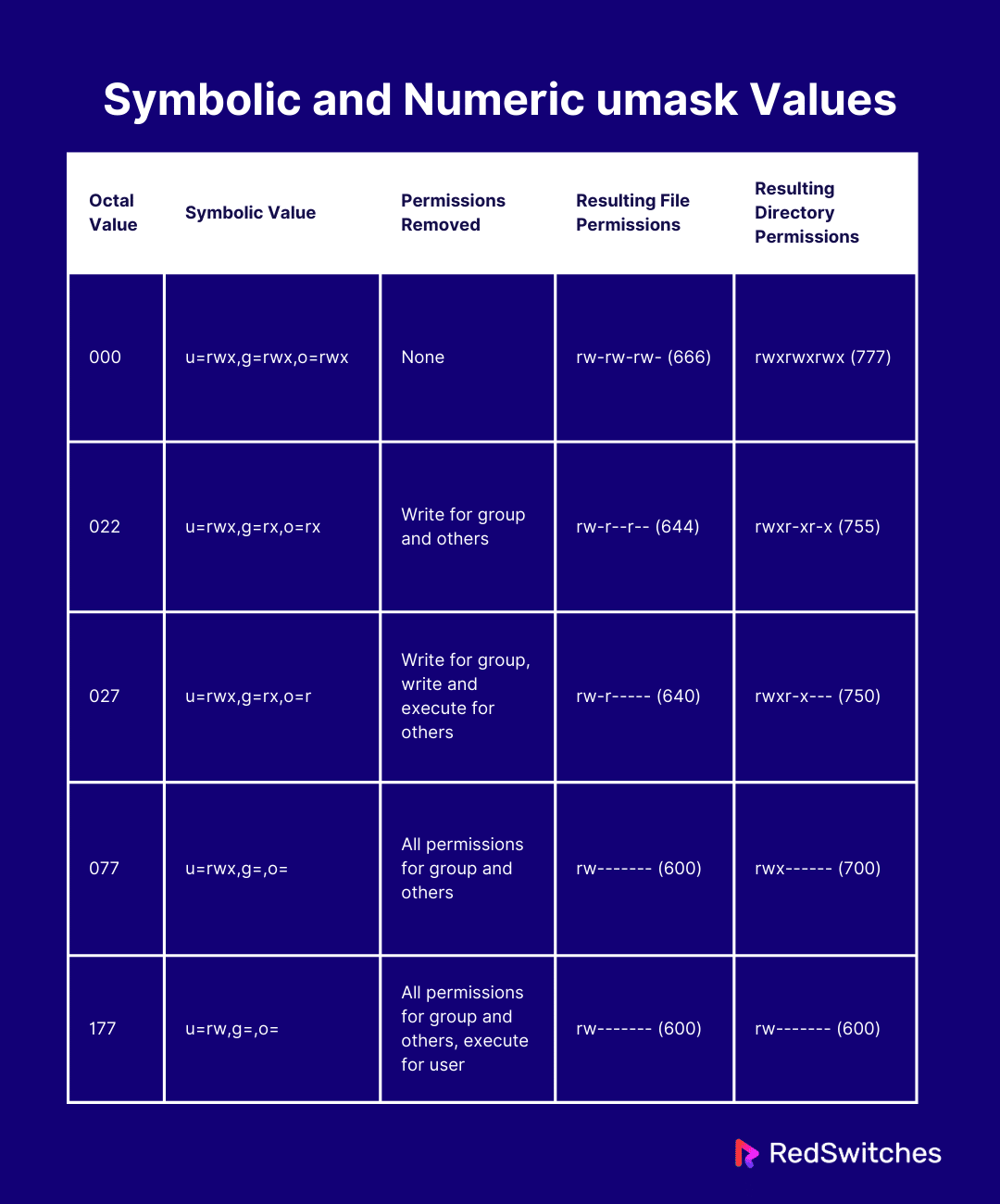
Do It Yourself: Experiment with umask
-
Set a restrictive umask:
umask 0077
umask # Confirm it's set
touch private_file.txt
ls -l private_file.txt
You should see the permissions are
-rw-------(600). No one but you can read or write to it. -
Set a collaborative umask:
umask 0002
umask # Confirm it's set
touch group_file.txt
ls -l group_file.txt
You should see the permissions are
-rw-rw-r--(664). Your group members can now write to this file. -
Clean up:
rm umask_test_file.txt private_file.txt group_file.txt
rmdir umask_test_dir
Important: When you close your terminal, the
umaskwill revert to the default.
Making umask Changes Permanent
To change your default umask permanently for your user account, you need to add the umask command to your shell's startup file. For the Bash shell on Fedora, this is typically ~/.bashrc.
The following article explains how to do this.
What Is umask in Linux, and How Do You Use It?
This How-To Geek article walks through changing the umask value permanently. It's a good practical guide.
Read the section 'Changing the Default umask Value'. Focus on the part that describes adding the umask command to your .bashrc file. There is no need to try this right now, but it's important to know how it's done.
Conclusion
You've now mastered the final piece of the standard Linux permissions puzzle! You can not only modify permissions after the fact but also control them right at the moment of creation. This proactive approach is fundamental to good system administration and security.
Key Takeaways:
umasksets the default permissions for new files and directories.- It works as a mask, removing permissions from the base values of
666(files) and777(directories). - You can check your current mask with
umask(octal) orumask -S(symbolic). - A common secure default is
0022, resulting in644files and755directories. - A collaborative
umasklike0002allows group members to write to new files. - You can change the
umasktemporarily for your session or permanently by editing your~/.bashrcfile.
In our next lesson, we'll move beyond the traditional permission model. As you requested, we'll begin our exploration of SELinux (Security-Enhanced Linux), a powerful security layer built into Fedora. We will start by learning what SELinux is, how to check its status, and understanding its different operational modes.