Introduction
Welcome back! In our previous lesson, you learned how to check the status of SELinux and switch between its enforcing, permissive, and disabled modes. You now understand that SELinux acts as a security guard for your system, and you know how to tell that guard to be on-duty, to just watch and report, or to go off-duty.
This lesson addresses the next logical question: how does SELinux decide what to allow or block? The answer lies in security contexts. This concept is the heart of SELinux and is what separates it from the standard file permissions you've already learned.
Your goal is to deploy Django applications, and a common stumbling block for developers is having their web server blocked by SELinux for seemingly no reason. By the end of this lesson, you will understand why this happens. You will be able to explain the purpose of SELinux security contexts and, crucially, how they fundamentally differ from standard Unix file permissions.
The Limits of Standard Permissions: Discretionary Access Control (DAC)
Before we can appreciate what SELinux does, we must first understand the limitations of the standard Linux permission model you're familiar with (rwx for user, group, and other). This model is called Discretionary Access Control (DAC). The key word is "discretionary": the owner of a file has the discretion to change its permissions and grant access to others.
While this is flexible, it has a significant security weakness. Watch the first part of the following video, which explains this problem clearly.
The video 'SELinux Part1' from the uadmin channel provides an excellent recap of traditional Linux security and highlights its main vulnerability, which sets the stage for why SELinux is needed.
Watch from the beginning until timestamp 02:08. Focus on the example of a compromised web server and what an attacker could potentially access.
As the video explains, under DAC, a process inherits the permissions of the user that runs it. If your web server process is compromised, the attacker gains access to everything the web server's user account can access. This might include sensitive configuration files or other data that the web server itself doesn't strictly need to function, creating a large security risk.
The SELinux Solution: Mandatory Access Control (MAC)
SELinux addresses the weakness of DAC by adding a second, more rigid layer of security called Mandatory Access Control (MAC). With MAC, access is not determined by user discretion. Instead, the operating system kernel enforces a system-wide security policy written by the administrator.

Here's the crucial sequence of events for any action (like a process opening a file):
- DAC Check: The kernel first checks the standard Unix permissions. If the user doesn't have
rwxaccess, the action is denied immediately. SELinux is not even consulted. - MAC Check: If the DAC check passes, the kernel then asks SELinux, "Does the security policy allow this action?" SELinux then makes its decision.
This means SELinux doesn't replace standard permissions; it enhances them. An action must be permitted by both DAC and MAC to succeed.
Under this model, the policy is mandatory. Not even the root user can bypass it. This principle of least privilege ensures that a process, like your web server, can only access the exact files and resources it needs to do its job, and nothing more, regardless of which user account it's running under.
The "What": SELinux Security Contexts
So how does SELinux implement this policy? It does so through security contexts (also called labels). Every single process and every single file/directory on your system has a security context attached to it.
A security context is like a detailed ID badge. The SELinux policy consists of rules that state which badges are allowed to interact with other badges. For example, a rule might say: "Processes with a httpd_t badge are allowed to read files with a httpd_sys_content_t badge."
To understand this better, let's explore the components of a security context.
What Is SELinux? | Baeldung on Linux
The article 'What Is SELinux?' from Baeldung on Linux clearly explains the structure of a security context. Reading this will help you decipher the labels you'll soon see on your own system.
Read the section '3.1. Security Context (Label)'. Pay close attention to the four parts of a context: user, role, type, and level.
As the article describes, a context has four parts, formatted as user:role:type:level.
- User: An SELinux user identity (e.g.,
unconfined_u). This is not the same as your Linux username. - Role: The role defines a set of allowable types (e.g.,
object_rfor files,system_rfor system processes). - Type: This is the most important part for system administration. The type for a process is called its domain, and the type for a file is just its type. The SELinux policy is primarily based on rules governing how domains can interact with types.
- Level: Used for an advanced security model called Multi-Level Security (MLS). You can safely ignore this for now.
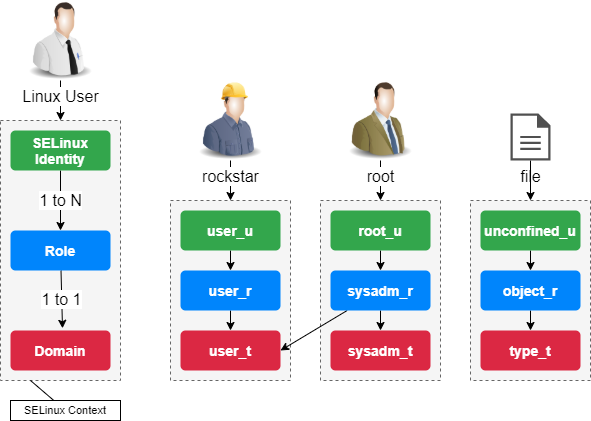
Seeing Contexts in Action
Let's make this concrete. You can view these security contexts using the same commands you already know, but with an added -Z flag.
Understanding and Configuring SELinux (Security Enhanced Linux)
Now, let's watch a practical demonstration. This video from Juriy Bura shows how to use ls -Z and ps -Z to see the real contexts on a live system.
Watch from timestamp 02:38 to 06:19. Notice how the output of ls -Z includes the user:role:type:level information. The video also shows how different files (e.g., in a user's home directory vs. a web server directory) have different context types.
Do It Yourself: Exploring Contexts
Time to explore this on your own Fedora system. Open your terminal and follow along.
-
First, view the context of your home directory. The
-doption tolsshows information about the directory itself, not its contents.ls -dZ ~You will see an output like
unconfined_u:object_r:user_home_dir_t:s0. The important part is the type:user_home_dir_t. -
Now, look at the context of the
/etcdirectory, which holds system configuration files.ls -dZ /etcThe output should be something like
system_u:object_r:etc_t:s0. Notice the different type:etc_t. -
Finally, let's look at a process. The
id -Zcommand will show you the security context of your current shell session.id -ZYou will likely see
unconfined_u:unconfined_r:unconfined_t:s0-s0:c0.c1023. Theunconfined_tdomain means that, by default, SELinux doesn't place many restrictions on processes run by a logged-in user. This is a deliberate choice in Fedora's "targeted" policy to make user-facing desktops easier to manage while still strictly confining system services like web servers.
This simple exploration demonstrates the core idea: different things on the system have different context types. SELinux uses these types to enforce the security policy.
The Decisive Difference: A Practical Example
Let's put it all together with an example that proves SELinux can block an action even when standard permissions (DAC) would allow it, and even when it's performed by the root user.
We will simulate a web server process (httpd_t domain) trying to read a temporary file.
Do It Yourself: SELinux in Action
-
Become root. This makes the next steps easier and emphasizes that even
rootis subject to SELinux.sudo su - -
Confirm SELinux is enforcing.
getenforceIf it's not
Enforcing, set it now:setenforce 1. -
Install the web server package. We need this package to have access to the
httpd_tdomain for our test. We won't be starting the server.dnf install -y httpd -
Create a test file in the
/tmpdirectory.echo "secret web content" > /tmp/my_secret.html -
Check its permissions and context.
ls -lZ /tmp/my_secret.htmlNotice two things in the output:
- The permissions (e.g.,
-rw-r--r--) make the file world-readable. DAC will allow anyone to read it. - The context type will be something like
user_tmp_t. This is the default type for files created in/tmpby a user process.
- The permissions (e.g.,
-
Simulate the web server reading the file. We'll use the
runconcommand to run thecatcommand within the web server's security context (httpd_t).runcon -t httpd_t -- cat /tmp/my_secret.htmlThe command will fail with
cat: /tmp/my_secret.html: Permission denied.
This is the "aha!" moment. You are root. The file is world-readable. Yet, the action was blocked. This is because the SELinux policy does not have a rule allowing the httpd_t domain to read files with the user_tmp_t type. DAC said "yes", but MAC said "no".
- Exit the root shell.
exit
This simple exercise perfectly illustrates the fundamental difference between the two security models.
Conclusion
Congratulations! You've just grasped the most critical concept in SELinux. Understanding the "why" and "what" of security contexts elevates your skills beyond just running commands and allows you to diagnose and solve complex permission issues—a vital skill for deploying your web applications securely on Fedora.
Key Takeaways:
- Discretionary Access Control (DAC): The standard
rwxpermission model. It's "discretionary" because the owner decides who gets access. Its main weakness is that a compromised process gets all the rights of its user. - Mandatory Access Control (MAC): SELinux's model. Access is dictated by a mandatory, system-wide policy that even
rootcannot bypass. - Security Contexts: SELinux implements MAC using labels (
user:role:type:level) on every process and file. An action is only allowed if a policy rule exists for the specific context types involved. - The Decisive Difference: DAC checks happen first, then MAC. An action must pass both checks. SELinux can deny actions that standard permissions would allow.
In our next module, we'll switch gears to another essential system administration skill: processing text. We'll start by learning the basics of vim, a powerful and ubiquitous terminal-based text editor. Mastering it will be invaluable when you need to edit configuration files, such as those for Nginx, PostgreSQL, or even custom SELinux policies later in your journey.