Hello! Welcome back.
In our last lesson, we built a basic, secure firewall from scratch using iptables. You learned how to set a "default deny" policy and then methodically open ports for the services you need. That's a crucial skill for deploying a new server.
Today, we're going to tackle the inevitable next step: troubleshooting a firewall that isn't working as expected. This is where a junior sysadmin proves their worth—not just by building things, but by being able to diagnose and fix them under pressure. This lesson is designed to give you a systematic approach to do just that.
This directly addresses your goal of being able to diagnose and troubleshoot operating systems, specifically focusing on this lesson's outcome: Diagnose and resolve firewall-related connectivity issues by inspecting iptables rules on a Linux server.
1. Why Firewalls "Break"
Firewall issues rarely stem from the software itself failing. Almost always, it's a human error in the rule configuration. A single misplaced or poorly written rule can block legitimate traffic, or worse, allow malicious traffic.
To understand the common pitfalls, let's start with a short reading that outlines the types of problems that misconfigured rules can cause.
How to Debug IPTables Rules in Linux
This article from VPS.us, 'How to Debug IPTables Rules in Linux', provides a concise overview of the most common issues you'll encounter. Understanding these categories will help you quickly classify a problem.
Read the section titled 'Common IPTables Rule Problems'. Focus on the three main categories of issues: Blocked Legitimate Traffic, Unwanted Traffic Allowed, and Connectivity and Performance Problems.
As you can see, problems usually boil down to rules being too restrictive, too permissive, or ordered incorrectly. Now, let's build our toolkit to find these problematic rules.
2. The Firewall Troubleshooting Toolkit
Effective troubleshooting requires the right tools. Your primary tools for iptables are built into the command itself and your Linux system.
How to Debug IPTables Rules in Linux
Let's review the essential commands for inspecting a firewall. The same article provides a great summary.
Read the sections 'Listing and Viewing Rules', 'Checking IPTables Service Status', and the beginning of 'Logging and Monitoring Traffic' (up to the discussion on rate limiting).
Let's distill the most critical points from that reading into your core workflow.
Key Inspection Command
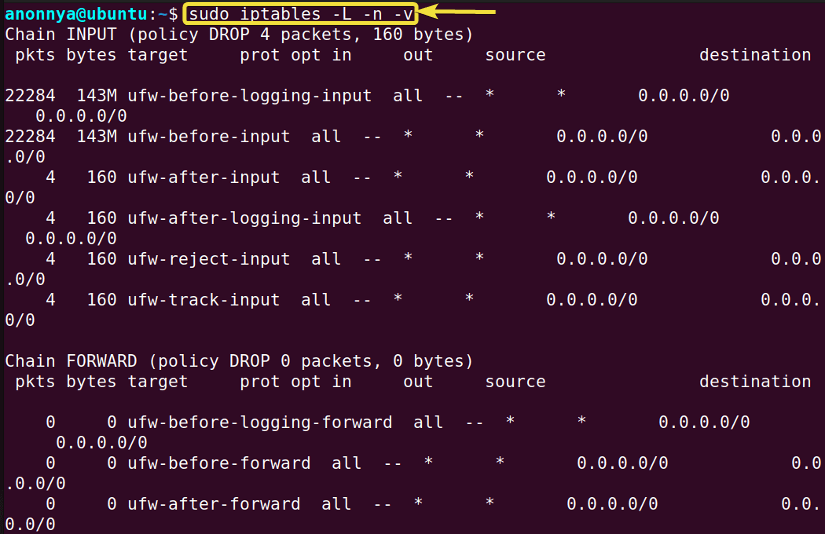
Your single most powerful command is the one you already know, but now we'll use it with a detective's eye:
sudo iptables -L -v -n --line-numbers
When you run this to diagnose a problem, you are looking for specific clues:
pktsandbytescounters: These are your best friends. If a rule has0packets, it has never been matched. If your service isn't working and theACCEPTrule for it has0packets, the traffic isn't reaching that rule. Look for a rule above it with a non-zero packet count that might be dropping the traffic first.- Chain
policy: Is the default policyACCEPTorDROP? This fundamentally changes how you read the ruleset. ADROPpolicy means you're looking for a missingACCEPTrule. AnACCEPTpolicy means you're looking for an incorrectDROPorREJECTrule. - Rule Order (
--line-numbers): Sinceiptablesstops at the first match, seeing the line numbers is critical to understanding the flow. A generalDROPrule at line 2 will preempt a specificACCEPTrule at line 5.
Using the LOG Target
Sometimes you need to see if a packet is even reaching a certain point. The LOG target is perfect for this. It acts like a print statement for your firewall. You can insert a LOG rule to see if traffic is being processed just before it gets dropped.
For example, if you suspect HTTP traffic is being dropped, you could insert this rule at the top of your INPUT chain:
# Insert a logging rule at the top of the INPUT chain for traffic to port 80
sudo iptables -I INPUT 1 -p tcp --dport 80 -j LOG --log-prefix "HTTP_TRAFFIC_DEBUG: "
Then, you can watch the kernel logs in real-time as you try to connect:
tail -f /var/log/syslog


# Or on some systems: tail -f /var/log/messages
If you see your log message, you know the packet is entering the firewall. If you don't, the problem is likely upstream (e.g., a network issue, or the traffic is blocked on the OUTPUT chain of the source).
3. Practical Scenarios: Find the Fault
Let's put the toolkit to use. Here are a few common scenarios. For each one, examine the rules and try to diagnose the problem before reading the solution.
Scenario 1: The New Web Server is Unreachable
- Symptom: You've just deployed a web server, but all connections to ports 80 and 443 are timing out. You've confirmed the web server process (e.g., Nginx) is running. You can still SSH into the server.
- Ruleset:
$ sudo iptables -L INPUT -v -n --line-numbers
Chain INPUT (policy ACCEPT)
num   pkts bytes target     prot opt in     out     source               destination
1      500  250K DROP       all  --  *      *       1.2.3.4              0.0.0.0/0
2     120K   85M ACCEPT     all  --  lo     *       0.0.0.0/0            0.0.0.0/0
3     340K  290M ACCEPT     all  --  *      *       0.0.0.0/0            0.0.0.0/0            ctstate RELATED,ESTABLISHED
4       85  5100 ACCEPT     tcp  --  *      *       0.0.0.0/0            0.0.0.0/0            tcp dpt:22
5        0     0 ACCEPT     tcp  --  *      *       0.0.0.0/0            0.0.0.0/0            tcp dpt:80
6        0     0 ACCEPT     tcp  --  *      *       0.0.0.0/0            0.0.0.0/0            tcp dpt:443
7      950 57000 REJECT     all  --  *      *       0.0.0.0/0            0.0.0.0/0            reject-with icmp-host-prohibited
Diagnosis and Solution
-
Diagnosis:
- The policy is
ACCEPT, so we're looking for aDROPorREJECTrule that's firing incorrectly. - Look at the packet counters. Rules 5 and 6 (for ports 80 and 443) have
0 pkts. This means traffic is not reaching them. - Look at the rules above them. Rule #1 is a
DROPrule for a specific IP, but rule #7 is a generalREJECTrule that comes after our web server rules. This shouldn't be the issue. - The issue is subtle and common with copy-pasting rules. Look again at rule #7. It's a "catch-all"
REJECTrule. But wait, why would this affect our web traffic if theACCEPTrules are before it? Let's re-read the ruleset... Ah, there is no generalDROPorREJECTbefore our web rules. What else could it be? Let's reconsider rule #1. It's aDROPrule for a single IP. Is our web traffic coming from1.2.3.4? Maybe. - Let's look at the problem from the perspective of rule order. The classic mistake is putting a general
DROP/REJECTbefore a specificACCEPT. Rule #7 is at the end, which is correct. Rule #1 is at the top. This is the most likely culprit if our traffic source matches. But what if we made a mistake when writing the rule for our web server? Let's say we mistyped the port. The rules look correct though. - Let's re-examine this. The most common error is a general block rule appearing before a specific allow rule. Here, we don't have a general block rule at the top. The issue must be something else. What if the policy was
DROPinstead? If the policy wasDROP, and rules 5 and 6 had 0 packets, it would mean the traffic isn't matching. - Let's pivot. What if the problem is simpler? In the previous lesson, you saw a video where a rule was added that blocked all traffic. Could rule #7 be the problem? If the policy is
ACCEPT, why is there a finalREJECTrule? This is redundant and confusing. A better practice is to have aDROPpolicy and onlyACCEPTrules. - Okay, let's reset and think methodically.
pingworks (ICMP), SSH works (TCP 22). HTTP/S does not (TCP 80/443). TheACCEPTrules for 80/443 have 0 packets. This is the main clue. Something is stopping the packets before they can be accepted by rules 5 and 6. There is no rule before them that should match general web traffic. This is a classic symptom of a default policy misconfiguration. If the chain's default policy wasDROP, and we forgot to add the web server rules, this would happen. But the policy here saysACCEPT. This ruleset is contradictory and poorly designed. The most likely error is that the finalREJECTrule (rule #7) is somehow interfering or, more likely, a rule was added and then removed incorrectly, or there's a misunderstanding.
Let's re-frame the scenario with a clearer, more common error.
New Scenario 1 (Corrected): The Overeager
DROPRule - The policy is
-
Symptom: Same as before.
-
Ruleset:
$ sudo iptables -L INPUT -v -n --line-numbers Chain INPUT (policy ACCEPT) num pkts bytes target prot opt in out source destination 1 950 57000 DROP all -- * * 0.0.0.0/0 0.0.0.0/0 2 120K 85M ACCEPT all -- lo * 0.0.0.0/0 0.0.0.0/0 3 340K 290M ACCEPT all -- * * 0.0.0.0/0 0.0.0.0/0 ctstate RELATED,ESTABLISHED 4 85 5100 ACCEPT tcp -- * * 0.0.0.0/0 0.0.0.0/0 tcp dpt:22 5 0 0 ACCEPT tcp -- * * 0.0.0.0/0 0.0.0.0/0 tcp dpt:80 6 0 0 ACCEPT tcp -- * * 0.0.0.0/0 0.0.0.0/0 tcp dpt:443 -
Diagnosis:
- The
ACCEPTrules for the web server (5 and 6) have0 pkts. - There is a
DROP allrule at position #1 with a high packet count. iptablesprocesses rules top-to-bottom and stops at the first match. All incoming web traffic is matching rule #1 and being dropped before the firewall ever gets a chance to evaluate rules 5 and 6. SSH still works because your established connection is being handled by rule #3, which comes after theDROPbut is matched first for return packets. A new SSH connection would likely fail.
- The
-
Solution: The
DROP allrule is in the wrong place. The best practice is not to have such a rule at all, but instead to set the chain's policy toDROP. If you must have this rule, it needs to be the very last one in the chain. The immediate fix is to delete it.sudo iptables -D INPUT 1A better long-term fix is to adopt a default-drop policy:
# Flush rules to start clean
sudo iptables -F INPUT


# Set the policy
sudo iptables -P INPUT DROP


# Re-add your ACCEPT rules in the correct order (lo, established, ssh, web, etc.)
sudo iptables -A INPUT -i lo -j ACCEPT
sudo iptables -A INPUT -m conntrack --ctstate RELATED,ESTABLISHED -j ACCEPT
sudo iptables -A INPUT -p tcp --dport 22 -j ACCEPT
sudo iptables -A INPUT -p tcp --dport 80 -j ACCEPT
sudo iptables -A INPUT -p tcp --dport 443 -j ACCEPT
Scenario 2: The Silent Application
- Symptom: A monitoring script on your server is supposed to send alerts to an external API via HTTPS (port 443). The script is failing with connection timeouts. You've confirmed the script works from your own laptop.
- Ruleset:
$ sudo iptables -L OUTPUT -v -n --line-numbers
Chain OUTPUT (policy DROP)
num   pkts bytes target     prot opt in     out     source               destination
1      45K   31M ACCEPT     all  --  *      lo      0.0.0.0/0            0.0.0.0/0
2     190K  210M ACCEPT     all  --  *      *       0.0.0.0/0            0.0.0.0/0            ctstate RELATED,ESTABLISHED
3      200 16800 ACCEPT     udp  --  *      *       0.0.0.0/0            0.0.0.0/0            udp dpt:53
4        5   420 ACCEPT     icmp --  *      *       0.0.0.0/0            0.0.0.0/0
Diagnosis and Solution
- Diagnosis:
- The problem is with an outgoing connection, so we correctly inspect the
OUTPUTchain. - The
policyisDROP. This is a highly secure but strict configuration. It means no outgoing connections are allowed unless explicitly permitted. - We look at the existing
ACCEPTrules. We see rules for loopback (lo), return traffic (RELATED,ESTABLISHED), DNS (udp dpt:53), andping(icmp). - There is no rule that allows the server to initiate a new outgoing
TCPconnection to destination port443. TheRELATED,ESTABLISHEDrule only allows replies to incoming connections, not for the server to start a new one.
- The problem is with an outgoing connection, so we correctly inspect the
- Solution: We need to add a rule to the
OUTPUTchain to allow new HTTPS connections.sudo iptables -A OUTPUT -p tcp --dport 443 -j ACCEPT
4. A Systematic Methodology for Troubleshooting
Randomly trying things is slow and dangerous. A structured approach will solve problems faster and more safely. This is what employers look for.
- Isolate and Verify: Confirm the exact problem. What is the source IP? Destination IP? Destination port? What works (
ping)? What doesn't (curl)? - Inspect the Correct Chain: Is it an incoming connection (
INPUT), outgoing (OUTPUT), or routed (FORWARD)? - Read the Rules Top-to-Bottom: Check the chain's
policy. Look at the packet counters. Form a hypothesis based on a rule that is either missing or in the wrong order. - Test Your Hypothesis: Insert a temporary
LOGrule to confirm traffic flow, or a temporaryACCEPTrule at the top (-I INPUT 1 ...) to bypass the ruleset and prove the firewall is the problem. - Apply the Fix: Delete (
-D), replace (-R), or insert (-I) the correct rule. - Verify the Fix: Rerun the test from step 1.
- Persist Your Changes: Don't forget to save your working rules!
sudo netfilter-persistent save
This article provides a good walkthrough of this kind of thinking.
FULL GUIDE: Linux Firewall Mastery: From Basics to Advanced
This guide from Medium covers several troubleshooting scenarios with solutions. It reinforces the systematic approach we've just discussed.
Read 'PART 13 — TROUBLESHOOTING & DIAGNOSTICS'. Pay attention to the three common problems presented and the commands used to check them. This mirrors the methodology we are learning.
Conclusion
Today you've moved from being a firewall builder to a firewall detective. You learned that troubleshooting isn't magic; it's a methodical process of observation and deduction. By using the tools at your disposal, you can systematically diagnose and resolve connectivity issues caused by firewall misconfigurations.
Key Takeaways:
- Packet counters are your primary clue: They tell you which rules are being hit and which are not.
- Rule order is everything: A general
DROPrule can nullify all the specificACCEPTrules that follow it. - Know your chains: Is the problem with traffic coming
IN, goingOUT, or passingTHROUGH? This determines where you look. - Use a systematic approach: Isolate, Inspect, Hypothesize, Test, Fix, Verify, and Persist.
- Default
DROPpolicies are secure but strict: ForINPUT, this is best practice. ForOUTPUT, it's more secure but requires you to explicitly allow every type of outgoing connection your server needs to make.
In our next lesson, we will move our troubleshooting focus from the host itself out to the network. We will learn to diagnose and resolve common Layer 2/3 issues, including IP address conflicts and VLAN misconfigurations, expanding your diagnostic skills beyond a single server.