Hello! Welcome to your next lesson in the Data Center Operations and Deployment module.
In our last lesson, we took a virtual tour of a data center's physical infrastructure, focusing on the critical roles of power, cooling, and structured cabling. You learned why these systems are engineered with such precision and redundancy. Now that you understand the environment, we'll address a crucial question: how do you safely make changes within it? Racking a new server isn't as simple as just finding an empty slot and plugging it in. In a live data center, every change must be carefully planned and controlled to prevent outages.
This lesson is dedicated to that control process. Our learning outcome is to follow a change management procedure to plan and document a server deployment. We'll explore the formal process used in professional IT environments, known as change management, and see how it applies directly to the task of bringing a new server online. This is a core skill that separates a professional from a hobbyist and is something every hiring manager for a data center role will expect you to understand.
Why Do We Need a Formal Process? The "Why" of Change Management
A data center is a complex and fragile ecosystem. A single incorrect patch cable or an unexpected power draw can trigger a cascade of failures, potentially taking critical services offline and costing a company millions. Change Management is a structured process designed to minimize this risk. Its primary goal is to ensure that all changes to the IT environment are authorized, planned, tested, documented, and implemented in a way that minimizes disruption to services.
To get a solid grasp of the core concepts, let's watch a video that breaks down the fundamentals.
Change Management: Made it easy .
The video 'Change Management: Made it easy.' by Get into IT with Syed Ahmed provides a clear overview based on the ITIL (Information Technology Infrastructure Library) framework, which is the most widely adopted standard for IT service management.
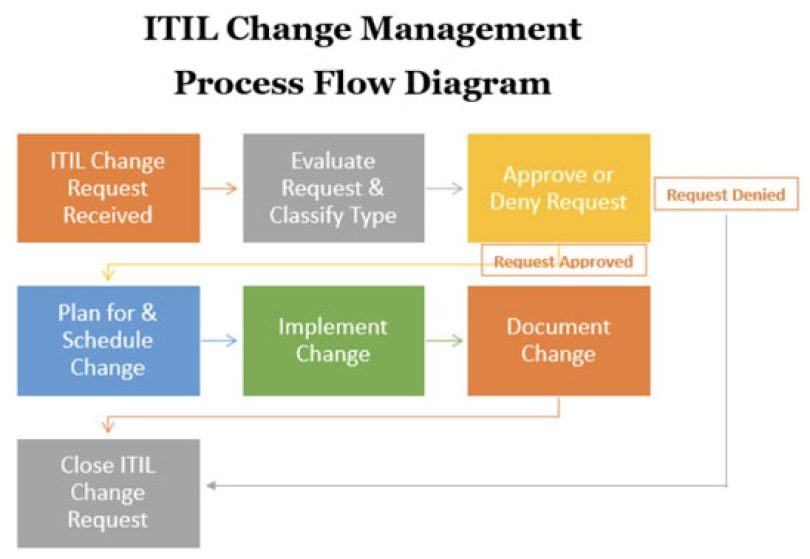
Please watch the following segments: What is Change Management? (00:29 - 03:43): Focus on the definition of a change and the primary purpose of the change management process: to control the lifecycle of all changes and minimize business impact. Types of Changes (04:14 - 10:59): Pay close attention to the distinction between Standard, Normal, and Emergency changes. A new server deployment is a classic example of a Normal Change—a well-planned activity. The Five Core Steps (12:42 - 16:48): Understand the high-level process flow: Request -> Approval -> Implementation -> Validation -> Closure. This is the basic lifecycle of any change.
The key takeaway is that a "Normal Change" like deploying a server isn't an impromptu task. It follows a structured, auditable path from request to completion.
The Heart of the Process: The Request for Change (RFC)
The central artifact in the change management process is the Request for Change (RFC). This is the formal document where you propose a change, justify it, outline the plan, assess the risk, and seek approval. It's the blueprint for the entire operation.
An RFC isn't just paperwork; it forces you to think through every aspect of the change before you touch any equipment. Let's look at the typical information required in an RFC.
The exact format of an RFC varies between companies, but they all capture the same essential information.
This document, 'How to enter an RFC', provides a fantastic, field-by-field breakdown of a typical RFC form. It serves as a great checklist for the information you need to gather.
Read through the list of fields from the start of the document down to field #17, 'Back-out Plan'. You don't need to memorize them, but get a feel for the level of detail required. Pay special attention to: Reason for the Change: The business justification. Risk of Failure: Your assessment of what could go wrong. Change Details: The step-by-step implementation plan. Back-out Plan: The crucial plan for how to undo the change if something goes wrong.
Seeing it in Action: Creating an RFC in ServiceNow
To make this more concrete, let's see how you would create an RFC in ServiceNow, one of the most common IT Service Management (ITSM) tools used in the industry. This directly aligns with your preference for a "practice-first" approach.
HOW TO CREATE A CHANGE REQUEST USING 2022 VERSION OF SERVICENOW
The video 'HOW TO CREATE A CHANGE REQUEST USING 2022 VERSION OF SERVICENOW' walks through the practical steps of filling out an RFC. This demonstrates how the fields from the previous reading are used in a real tool.
Watch the following segments, noting how the presenter populates the form for a 'Normal' change: Change Stages (01:39 - 05:05): Observe the different stages the RFC moves through, from 'New' to 'Authorize' to 'Schedule'. Populating Basic Fields (06:01 - 10:13): See how fields like Category, Priority, Justification, and Short Description are filled out. The Core Plans (10:56 - 14:17): This is the most important part. Watch how the Implementation Plan, Risk/Impact Analysis, and Back-out Plan (Rollback Scripts) are documented. Notice the emphasis on attaching supporting documents like test plans. Scheduling and Assignment (14:31 - 17:50): Finally, see how the change is assigned to a specific team and scheduled for a specific maintenance window.
After watching, you should have a clear picture of how an RFC serves as the single source of truth for a planned change, containing everything from the justification to the detailed execution steps.
From RFC to Deployment: The Detailed Planning Documents
An RFC often summarizes the plan, but it relies on much more detailed supporting documents. For a server deployment, you can't just write "Install server" in the implementation plan. You need a comprehensive plan that covers logistics, physical placement, and configuration.
This is where documents like a Work Plan or Onboarding Guide come in. These are the detailed, step-by-step instructions that a technician will follow on the day of the deployment.

Real-world organizations have extremely thorough procedures for this. Let's look at an official guide from a state technology agency.
Data Center Onboarding Guide | WaTech
The 'Data Center Onboarding Guide' from WaTech is a real-world example of the level of planning required to deploy equipment in a government data center. It's very detailed, so we will focus on the key planning phases.
Skim through the following sections to understand the scope of the planning process. Focus on the titles and the general purpose of each step. '60-120 DAYS BEFORE ONBOARDING' (starts on page 6): Look at the tasks here, such as 'Inventory Equipment', 'Develop a DRAFT High Level Design', 'Begin Elevation Planning', and 'Create the Bill Of Materials'. This is the deep planning phase. '30-60 DAYS BEFORE ONBOARDING' (starts on page 15): Notice the key deliverables here: 'Complete the Data Center Facilities Work Plan', 'Create Back-out Plan', and 'Create Test Plan'. These are the exact documents that would be attached to the RFC we just learned about.
The WaTech guide illustrates a crucial point: the RFC is often one of the last steps in the planning process. You must have your detailed work plan, back-out plan, and test plan ready before you can submit the change for approval.
The final step in the approval process is review by the Change Advisory Board (CAB). This is a committee of stakeholders (e.g., managers, senior engineers from different teams) who review all Normal Changes to assess their risk and potential impact on the entire organization before giving the final go-ahead.
Conclusion
Today, we've dissected the formal procedure for planning and documenting a server deployment. You've learned that in a professional data center environment, changes are not made casually. They are managed through a rigorous process designed to protect the stability and availability of services.
Key Takeaways:
- Change Management is a risk-reduction framework. Its purpose is to ensure changes are implemented safely and successfully.
- A new server deployment is a Normal Change that requires formal planning, documentation, and approval.
- The Request for Change (RFC) is the central document that outlines the what, why, when, how, and risk of a change.
- An RFC must be supported by detailed planning documents, including a step-by-step work plan, a test plan to validate success, and a back-out plan in case of failure.
- The Change Advisory Board (CAB) provides the final approval for Normal Changes, ensuring cross-functional visibility and risk assessment.
You now understand the "paperwork" and planning that precedes any physical work. This knowledge is fundamental for a data center role and a key point to emphasize in an interview, as it shows you understand the importance of process and safety in a critical environment.
In our next lesson, we'll move to the exciting part. With our change planned and approved, we'll learn how to execute a server deployment: rack the server, connect power and network, configure its management interface, and install the OS.