Hello! Welcome to the first lesson in our new module, Data Center Operations and Deployment.
In our previous module, we focused on network devices, culminating in a lesson on how to use SNMP to monitor their health and performance remotely. We learned how to track utilization and interpret error counters to spot problems. Now, we're going to zoom out and look at the massive physical environment where all this equipment lives. What does it take to keep thousands of servers and network devices running 24/7?
This lesson addresses the foundational knowledge for any data center role. Your goal is to be able to diagnose and maintain hardware in a data center, and that starts with understanding the environment itself. Our learning outcome is to identify the roles of power, cooling, and structured cabling in a data center environment. We will explore the "why" behind each of these critical pillars, using virtual tours and practical examples, so you can confidently discuss these topics in a job interview.
Let's begin by looking at a high-level overview of a data center's physical layout.

As you can see, a data center is far more than just a room full of computers. It's a complex, industrial-scale facility engineered for maximum uptime. We'll now break down the three most critical components of this physical infrastructure.
1. The Unseen Foundation: Power
The most fundamental requirement for any data center is a continuous, clean, and reliable source of power. A power outage, even for a fraction of a second, can bring down services for millions of users. Therefore, data centers are built with multiple layers of redundancy.
Your background in ECE gives you a head start in understanding electrical systems. The key principle here is the power chain, which ensures that servers never lose power, even if the main electrical grid fails.
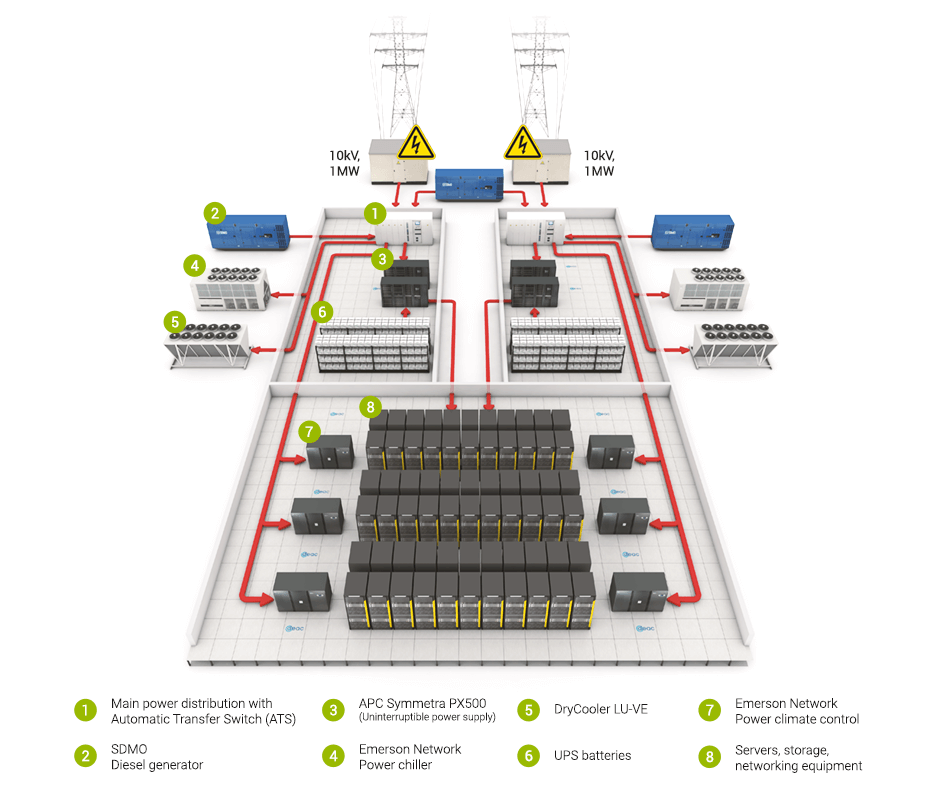
The typical power chain follows this path:
- Utility Power: The main electrical grid, which is the primary but least reliable source.
- Generators: Massive diesel generators that can power the entire data center for days. They take a few seconds to start up.
- Automatic Transfer Switch (ATS): A switch that detects a loss of utility power and automatically signals the generators to start and then transfers the data center's load to them.
- Uninterruptible Power Supply (UPS): A system of batteries (or sometimes kinetic-energy-based flywheels) that provides instantaneous power the moment the utility fails. It keeps everything running during the 10-20 seconds it takes for the generators to start and stabilize.
- Power Distribution Units (PDUs): These are like industrial-grade power strips that take the high-capacity power from the UPS and distribute it to the individual server racks.
To see these components in a real-world facility, let's take a virtual tour.
Data Center Tour & Technical Deep Dive into the Power, Data and Cooling Infrastructure!
The video 'Data Center Tour & Technical Deep Dive' by Lawrence Systems provides an excellent, in-depth look at a live data center's infrastructure. We will watch several segments to see the power chain in action.
Please watch the following segments, focusing on the role each component plays in ensuring uptime: Centrifugal UPS (01:01 - 02:50): See how a kinetic flywheel UPS works to provide immediate power. Diesel Generators (02:50 - 08:14): Understand the scale and redundancy of the backup power source. Static Transfer Switches (STS) (18:50 - 20:57): Learn how these solid-state switches provide seamless switching between power sources faster than a server can notice. Power Distribution Units (PDUs) (25:06 - 29:09): Explore the different types of PDUs used in racks and an innovative universal solution.
Interview Prep: Explaining Power Systems
In an interview, you might be asked to explain these concepts. Based on what you've seen, you could be asked: "Can you explain the purpose of a UPS and an ATS in a data center?"
Data Center Technician Interview Questions and Answers
The resource 'Data Center Technician Interview Questions and Answers' provides concise, effective answers to common questions. Let's review the one about UPS and ATS.
Read question #7, 'Can you explain the purpose of a UPS and an ATS in a data center?'. Notice how the answer clearly and separately defines the role of each component: the UPS for immediate, short-term power, and the ATS for switching to the long-term backup source.
2. Keeping It Cool: Thermal Management
IT equipment converts nearly 100% of the electricity it consumes into heat. A single server rack can generate as much heat as a kitchen oven. Without a robust cooling system, the entire data center would overheat and fail in minutes.
The core principle of data center cooling is managing airflow. You don't just blast cold air into a room; you separate the cold air intake of the servers from their hot air exhaust. This is known as Hot Aisle/Cold Aisle containment.
- Cold Aisle: The front of the racks, where servers draw in cool air.
- Hot Aisle: The back of the racks, where servers expel hot air.
This prevents hot exhaust air from being re-ingested by the servers, dramatically improving cooling efficiency.
The cooling is provided by a system that includes:
- Computer Room Air Handler (CRAH) / Air Conditioner (CRAC): Large units that take in hot air from the hot aisles and return cold air, usually into a raised floor plenum that distributes it to the cold aisles.
- Chillers: For larger data centers, a chilled water loop is often used. Chillers cool water, which is then pumped to the CRAH units to absorb heat from the air.
Let's return to our data center tour to see this in practice.
Data Center Tour & Technical Deep Dive into the Power, Data and Cooling Infrastructure!
We'll now look at the cooling infrastructure in the same data center.
Watch the following segments: The Cooling Plant (08:14 - 10:59): This shows the massive centrifugal chillers and million-gallon thermal storage tanks that form the heart of the cooling system. Raised Floor and Airflow (16:31 - 18:50): This segment is crucial. It shows the 42-inch raised floor used as a cold air plenum and an interactive floor tile that demonstrates the static pressure pushing cold air up. It also explains the term 'ton of cooling'.
Interview Prep: Explaining Airflow
A very common interview question is, "What is a cold aisle and hot aisle?"
Data Center Technician Interview Questions and Answers
Let's consult our interview guide again for a sharp definition.
Read question #6. The answer is simple but effective: it defines both aisles and clearly states their purpose—efficient airflow and preventing overheating.
As a technician, a significant part of your daily routine involves walking the data center floor to monitor the environment. This includes checking for temperature anomalies, listening for unusual fan noises, and ensuring cooling units are operating correctly, as highlighted in the article "The Truth About Data Center Technician Daily Work."
3. Connecting It All: Structured Cabling
With thousands of servers, switches, and storage devices, the cabling that connects them can quickly become a tangled mess—often called "spaghetti." This makes troubleshooting nearly impossible, blocks airflow, and creates a safety hazard.
Structured cabling is the discipline of designing and installing a cabling system in an organized, standardized way. Key principles include:
- Physical Separation: Running power and data cables in separate pathways to prevent electromagnetic interference (EMI).
- Cable Management: Using overhead cable trays, conduits, and in-rack organizers to route cables neatly.
- Labeling: Clearly labeling both ends of every cable so you know what it is and where it goes.
- Standards: Following industry standards for cable types (e.g., Cat6a copper, single-mode/multi-mode fiber), lengths, and termination.
Let's see what this looks like at both a macro and micro scale.
Data Center Tour & Technical Deep Dive into the Power, Data and Cooling Infrastructure!
First, let's see the large-scale network distribution in our data center tour.
Watch the segment on Fiber and Copper Distribution (10:59 - 16:31). Pay attention to the high-density fiber panels, the color-coding system, and the discussion of how the infrastructure has evolved from copper to fiber over time.
Now, let's zoom into a single rack and see the meticulous work involved in cabling new servers. This is a core "rack and stack" task for a data center technician.
A DAY in the LIFE of the DATA CENTRE | FULL CUSTOMER "RACK & STACK" with ASH & JAMES!
The video 'A DAY in the LIFE of the DATA CENTRE' shows the hands-on process of cabling servers in a rack. This is a perfect example of the practice-first approach you prefer.
Watch the Cabling segment from 05:58 to 11:58. Focus on the process: cutting cables to the correct length, labeling both ends, using a 'cable comb' to create a neat loom, and securing the bundles with velcro. This is what separates professional work from an amateur mess.
Interview Prep: Explaining Cabling Best Practices
Questions about cabling are designed to test your attention to detail and commitment to quality work.
Data Center Technician Interview Questions and Answers
Our interview guide covers several key cabling concepts.
Review the following questions to solidify your understanding: Question #3: Precautions for fiber optic cables (mentions bend radius). Question #28: How to ensure proper cable dressing (mentions velcro and cable management). Question #32: Difference between Shielded (STP) and Unshielded (UTP) cables. These demonstrate an understanding of the practical, hands-on work required in the role.
Conclusion
Today, we've explored the three pillars that make a modern data center possible. You've seen that it's an industrial-scale machine where power, cooling, and data connectivity are engineered with multiple layers of redundancy and a meticulous attention to detail.
Key Takeaways:
- Reliable Power: The power chain ensures continuous operation through a sequence of Utility -> ATS -> Generators -> UPS -> PDUs. Redundancy is built in at every step.
- Efficient Cooling: Thermal management is not just about making things cold; it's about intelligently managing airflow using a hot aisle/cold aisle design to remove heat efficiently.
- Organized Cabling: Structured cabling is a critical discipline that ensures a data center is manageable, scalable, and reliable. It involves standardization, neatness, and clear labeling.
These three systems are deeply interconnected. Poor cabling can block airflow, causing cooling issues. A cooling failure can cause servers to overheat and shut down. And a power failure will bring everything to a halt. As a data center technician, your job is to be the guardian of this entire physical ecosystem.
In our next lesson, we will build directly on this foundation. Now that you understand the physical layout, we'll learn how to follow a change management procedure to plan and document a server deployment—a core process for safely making changes in this critical environment.