Hello! Welcome to the final module of our course, focusing on Data Governance with Unity Catalog.
In our last lesson, we saw how to implement row and column-level security using dynamic views, primarily relying on the is_account_group_member() function to check a user's group. This is a powerful, scalable approach.
Today, we will add two more essential functions to our security toolkit: current_user() and is_member(). This will allow us to build even more granular and user-specific access rules. Our learning outcome is to use dynamic views with current_user() and is_member() for fine-grained access control. We will explore how to create rules based on an individual user's identity and clarify the important distinction between different types of group membership functions.
1. User-Specific Permissions with current_user()
While group-based permissions are efficient, some security rules need to be specific to the individual user. For example, a rule might state, "Sales reps can only see the customer accounts they personally manage."
This is where the current_user() function comes in. It's a simple yet powerful function that returns the email address of the user executing the query.

A common and robust pattern is to use current_user() to look up a user's permissions in a separate metadata table. This decouples your security logic from your views, making it easier to manage permissions by simply updating the metadata table.
Let's watch a detailed walkthrough of this pattern.
36 Row Level Filters in UC | Filter Sensitive Data in Unity Catalog table using Row Level Security
The video '36 Row Level Filters in UC' by Ease With Data provides an excellent, step-by-step demonstration of building a dynamic, user-based security model from scratch.
Please watch the following segments: Creating the Mapping Table (05:38 - 07:36): Observe how a separate table, allowed_market_segment, is created to map user emails to the data they are allowed to see. Building the Logic (07:36 - 12:56): Pay close attention to how current_user() is used with an EXISTS clause to check if the user running the query has access to a specific market segment based on the mapping table. This logic is then encapsulated in a reusable SQL function that returns TRUE or FALSE. Creating a Dynamic View (12:56 - 16:00): Watch how the SQL function is used in the WHERE clause of a CREATE VIEW statement to create a dynamic view. This directly filters the data based on the user's permissions defined in the mapping table.
This approach of using a mapping table is highly flexible. When a user's access rights change, you only need to INSERT, UPDATE, or DELETE a row in your permissions table, and all the views that use the logic will reflect the change immediately without needing to be redefined.
2. Understanding is_member() vs. is_account_group_member()
In the previous lesson, we used is_account_group_member(). You may also encounter is_member(). It's crucial to understand the difference.
is_account_group_member('group_name'): Checks if the user is in an account-level group. These groups are defined in the account console and can span multiple workspaces. This is the recommended function for Unity Catalog, as UC is an account-level service.is_member('group_name'): Checks if the user is in a workspace-level group (sometimes called a "local" group). This function is provided for compatibility with older Databricks environments that used the Hive Metastore.
You should always prefer is_account_group_member() for new security policies in Unity Catalog to ensure your governance model is consistent and portable across your entire Databricks account.
The official Databricks documentation clearly explains the role of these functions and the recommendation. Please read this short introduction.
Read the introductory section, stopping at 'Before you begin'. Focus on the descriptions of current_user(), is_account_group_member(), and is_member(), and note the explicit recommendation to avoid using is_member() with Unity Catalog data.
Although is_account_group_member() is preferred, the mechanics of using is_member() in a query are identical. The following example demonstrates a common pattern where the group name itself is stored as a column in the data.
Databricks row and column level security
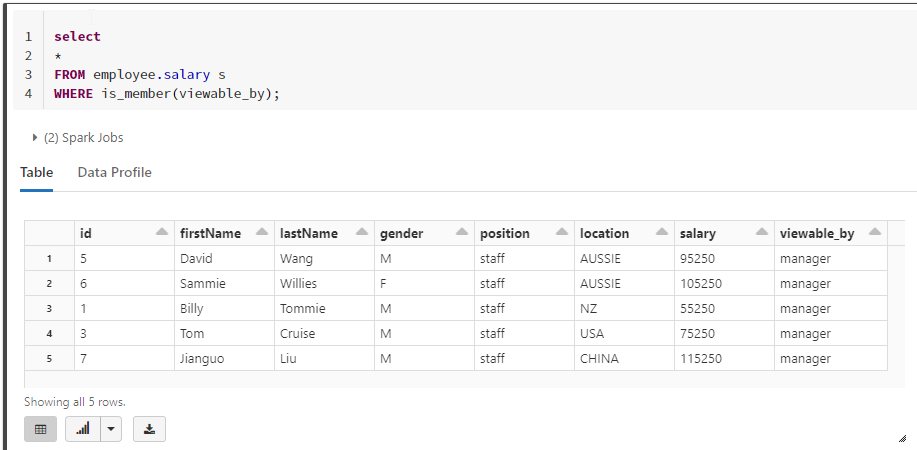
This blog post from 'blacklabnz' shows a concise, practical example of using is_member() to implement row-level security. This helps visualize the pattern, which works identically for is_account_group_member().
Read the sections 'Update the query with is_member() function' and 'Visualize in PowerBI'. Notice the elegant query SELECT * FROM employee.salary s WHERE is_member(viewable_by). Here, the is_member function dynamically checks if the user belongs to the group named in the viewable_by column for each row.
3. Hands-On Practice: Combining Logic
Now, let's combine these concepts to build a view with a more complex security policy. In this exercise, you will create a view for a tasks table with the following rules:
- All users can see tasks that are assigned directly to them.
- Members of the
project_managersgroup can see all tasks for all projects.
Instructions:
-
In a new SQL notebook, ensure you are using a catalog and schema where you have permission to create objects.
-
Setup: Run the following SQL to create a sample table and an account-level group.
-- Create a sample tasks table
CREATE OR REPLACE TABLE tasks (
  task_id INT,
  project_name STRING,
  task_description STRING,
  assigned_to STRING -- User email
);

-- Insert sample data. Replace 'your.email@example.com' with your actual Databricks user email.
INSERT INTO tasks VALUES
  (101, 'Project Alpha', 'Design database schema', 'data.arch@example.com'),
  (102, 'Project Alpha', 'Develop ETL pipeline', 'your.email@example.com'),
  (103, 'Project Beta', 'Create dashboard mockups', 'ui.ux@example.com'),
  (104, 'Project Alpha', 'Deploy to production', 'devops@example.com'),
  (105, 'Project Beta', 'User acceptance testing', 'your.email@example.com');

-- Create the group in your account console if you are an admin.
-- If you are not an admin, you can simulate this by asking an admin to create the group
-- and add you to it.
-- In the Account Console > User management > Groups, create a group named 'project_managers'.
-- Add your user to this group.
Note: If you don't have permissions to create account-level groups, you can still write the query. For testing, you can temporarily remove the
is_account_group_membercondition to verify that thecurrent_user()logic works. -
Task: Create the Dynamic View
Create a view namedproject_tasks_securethat implements the two security rules described above. Use anORcondition in yourWHEREclause.Click here for the solution
CREATE OR REPLACE VIEW project_tasks_secure AS SELECT * FROM tasks WHERE -- Rule 1: Users can see tasks assigned to them assigned_to = current_user() OR -- Rule 2: Project managers can see all tasks is_account_group_member('project_managers'); -
Verification:
Query your new view:SELECT * FROM project_tasks_secure;- Since you are a member of the
project_managersgroup, you should see all 5 tasks. - If you were to be removed from the
project_managersgroup (you can ask an admin to do this for testing), and then re-ran the query, you would only see the two tasks assigned to your email address (task_ids 102 and 105).
- Since you are a member of the
Conclusion
In this lesson, you've mastered the use of current_user() and is_member() to implement sophisticated, fine-grained access control with dynamic views. This level of control is essential for building a secure and compliant data lakehouse.
Key Takeaways
- The
current_user()function is your tool for implementing security rules based on an individual's identity, which is perfect for "user-can-see-their-own-data" scenarios. - Using
current_user()with a separate mapping table creates a flexible and easily manageable security system. is_account_group_member()checks against account-level groups and is the recommended function for Unity Catalog.is_member()checks against workspace-local groups and is mainly for backward compatibility.- You can combine these functions using logical operators (
AND,OR) in aWHEREclause to enforce complex business rules.
Next Steps
Now that we know how to grant permissions and define fine-grained access policies on our data, the next logical question is: "How did this data get here, and what has happened to it?" The next lesson, Trace data lineage for tables and columns using the Unity Catalog UI, will answer exactly that. We'll explore how Unity Catalog automatically captures and visualizes the lineage of your data assets.