Hello! Welcome back to our module on Data Governance with Unity Catalog.
In the last lesson, we learned how to manage access to entire data objects using GRANT and REVOKE on catalogs, schemas, and tables. This is great for broad access control, but often we need more precision. What if a user should only see certain rows (like sales data for their region) or have sensitive columns hidden (like salaries or email addresses)?
This lesson will teach you how to implement that fine-grained control. Our learning outcome is to create views to implement column-level and row-level security. We'll build on our knowledge of SQL and the Unity Catalog permission model to create "dynamic views" that intelligently filter or mask data based on who is querying them.
1. Dynamic Views: The Engine of Granular Security
The primary mechanism for implementing row and column-level security in Unity Catalog is the dynamic view. A dynamic view is a standard SQL view that includes functions to customize the data it returns based on the identity of the user running the query.
The two key functions that make this possible are:
is_account_group_member('group_name'): This function returnsTRUEif the current user is a member of the specified account-level group. This is the recommended function for implementing security policies in Unity Catalog.current_user(): This function returns the email address of the current user. We will explore this function in more detail in the next lesson.
By embedding these functions within a view's definition, we can create powerful and flexible security rules.
Create a dynamic view - Azure Databricks
The official Microsoft Learn documentation provides a concise overview of dynamic views and the functions that power them. Please read the following sections to get familiar with the core concepts and syntax.
Read the introduction and the sections titled 'Column-level permissions', 'Row-level permissions', and 'Data masking'. Focus on understanding the basic SQL patterns used for each type of security.
2. Column-Level Security: Hiding Sensitive Columns
Column-level security is used to restrict access to specific columns containing sensitive information, such as Personally Identifiable Information (PII). The standard pattern is to use a CASE statement within the SELECT clause of your view.
The logic is simple:
CASE WHEN is_account_group_member('privileged_group') THEN sensitive_columnELSE 'REDACTED'END AS sensitive_column
This logic checks if the user belongs to a group with permission to see the data. If they do, the view returns the actual column value. If not, it returns a placeholder like 'REDACTED', NULL, or a masked version of the data.
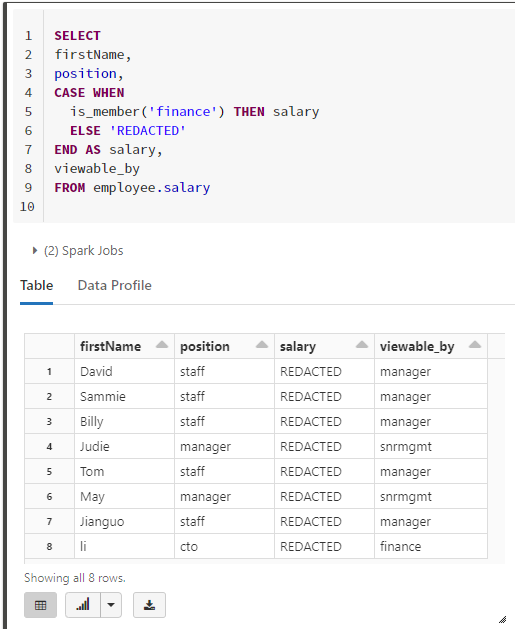
Let's watch a short video that demonstrates how to implement this in a Databricks notebook.
Unlocking the Secrets of Data Access Control with Databricks
The video 'Unlocking the Secrets of Data Access Control with Databricks' by The Data Master provides a clear, hands-on demonstration of creating a view for column-level security.
Watch the segment from 05:56 to 13:13. The presenter creates a table with PII and then builds a view that redacts the 'email' and 'phone_number' columns for users who are members of the 'account_users' group. Notice the use of CREATE OR REPLACE VIEW and the CASE statement structure.
3. Row-Level Security: Filtering Rows by User
Row-level security ensures that users can only see the rows of data that are relevant to them. For example, a sales manager for the US should only see sales records from the US.
The pattern here involves using the is_account_group_member() function within the WHERE clause of the view definition.
For instance, to filter a sales table by region, the WHERE clause might look like this:WHERE is_account_group_member(sales_region)
This dynamically filters the table so that a user who is a member of the USA group will only see rows where the sales_region column is 'USA'.
Advancing Spark - Implementing Row Level Security in Databricks
The 'Advancing Spark' channel provides an excellent walkthrough of implementing row-level security, including a valuable discussion on its performance implications.
Watch the segments from 03:02 to 08:19 and 14:47 to 17:05. Pay attention to how the presenter: Creates groups corresponding to data values (countries). Creates a view with a WHERE clause that uses is_member() to dynamically filter rows based on the user's group membership. (Note: The video uses is_member(), but is_account_group_member() is preferred for Unity Catalog). Discusses how this dynamic filtering still leverages performance optimizations like partition elimination, which is a key concept for data engineers.
4. Data Masking: A More Advanced Form of Column-Level Security
Sometimes, you don't want to hide a column entirely but rather obscure parts of it. This is called data masking. A common example is masking an email address to show only the domain (e.g., jane.doe@example.com becomes example.com).
This is achieved using the same CASE statement pattern as column-level security, but instead of returning a static 'REDACTED' string, you use SQL functions like regexp_extract to transform the data.

The video from The Data Master also covers this technique.
Unlocking the Secrets of Data Access Control with Databricks
Let's return to the 'Unlocking the Secrets...' video to see a practical demonstration of data masking.
Watch the segment from 18:17 to 20:32. The presenter builds a view that uses the regexp_extract function to mask email addresses, showing only the domain name to unauthorized users.
5. Hands-On Practice
Now it's time to apply these concepts. The best way to learn is by doing. In this exercise, you will create a sample table and then build two separate views to enforce column-level and row-level security.
Instructions:
-
Open a new SQL notebook in your Databricks workspace. Make sure it's attached to a running SQL warehouse or a cluster in standard access mode.
-
Setup: Run the following SQL to create a sample table with employee data.
-- Ensure we are using a catalog where we have creation rights, like the main catalog USE CATALOG main; CREATE SCHEMA IF NOT EXISTS governance_tutorial; USE SCHEMA governance_tutorial; -- Create the employee table CREATE OR REPLACE TABLE employees ( employee_id INT, name STRING, department STRING, country STRING, salary DECIMAL(10, 2) ); -- Insert sample data INSERT INTO employees VALUES (1, 'Alice', 'Engineering', 'USA', 120000.00), (2, 'Bob', 'HR', 'USA', 95000.00), (3, 'Charlie', 'Engineering', 'UK', 110000.00), (4, 'Diana', 'Sales', 'UK', 85000.00), (5, 'Eve', 'HR', 'USA', 105000.00); -
Create Groups: Go to the Admin Console in your workspace and create two groups:
hr_teamanduk_managers. Add your own user account as a member of both groups. -
Task 1: Implement Column-Level Security
Create a view namedemployees_redacted_salarythat shows thesalarycolumn only to members of thehr_teamgroup. Other users should see a salary of0.00.-- Paste and run this code CREATE OR REPLACE VIEW employees_redacted_salary AS SELECT employee_id, name, department, country, CASE WHEN is_account_group_member('hr_team') THEN salary ELSE 0.00 END AS salary FROM employees;Now, query your new view:
SELECT * FROM employees_redacted_salary;. Since you are in thehr_teamgroup, you should see all the real salaries. If you were to remove yourself from the group and re-run the query, you would see0.00for all salaries. -
Task 2: Implement Row-Level Security
Create a view namedemployees_uk_onlythat shows employee records only for the 'UK'. This access should be restricted to members of theuk_managersgroup. All other users should see no rows.-- Paste and run this code CREATE OR REPLACE VIEW employees_uk_only AS SELECT * FROM employees WHERE is_account_group_member('uk_managers') AND country = 'UK';Now, query this view:
SELECT * FROM employees_uk_only;. Because you are a member ofuk_managers, you should see the two records for employees in the 'UK'.
Conclusion
In this lesson, you have learned how to enforce granular data security policies in Databricks using dynamic views. This is a crucial skill for protecting sensitive data and ensuring compliance.
Key Takeaways
- Dynamic views are the primary tool for implementing column-level and row-level security in Unity Catalog.
- Column-level security is achieved using a
CASEstatement in theSELECTclause, often combined withis_account_group_member()to show or redact column values. - Row-level security is implemented by adding a
WHEREclause to the view that filters rows based on the user's identity or group membership. - Data masking is an advanced form of column-level security that partially obscures data rather than completely hiding it, using functions like
regexp_extract.
Next Steps
We've focused on using group membership (is_account_group_member) to drive our security rules, which is the most common and scalable approach. In the next lesson, we will expand on this by exploring how to use the current_user() function to create even more personalized and dynamic access controls.