Hello! Welcome back to our course on Databricks for Data Engineers.
In our last lesson, we focused on summarizing data using aggregate functions like COUNT, SUM, and AVG with the GROUP BY clause. You learned how to transform large datasets into high-level summaries, a core task in data engineering.
Today, we'll build on that by introducing a way to implement conditional logic directly within your SQL queries. Often, data isn't perfectly categorized for your needs. You might need to label rows based on certain rules, perform different calculations for different segments of data, or create new fields on the fly. This is where CASE expressions become indispensable.
This lesson directly addresses the learning outcome: Use CASE expressions to implement conditional logic in queries. We will cover the syntax and then explore two powerful applications: creating custom categories for analysis and performing conditional calculations.
1. Introduction to the CASE Expression
A CASE expression is SQL's way of handling if/then/else logic. It evaluates a list of conditions and returns a corresponding value when the first condition is met. If no conditions are met, it returns the value in the ELSE clause, or NULL if no ELSE is specified.
Let's start with a video that clearly explains the fundamental syntax and shows it in action.
Intermediate SQL Tutorial | Case Statement | Use Cases
This video from Alex The Analyst provides a great introduction to the basic syntax of the CASE statement. It also highlights an important rule about how conditions are evaluated.
Watch from the beginning to 03:13. Focus on: The core keywords: CASE, WHEN, THEN, ELSE, and END. How to add multiple WHEN clauses. The rule that CASE stops and returns a value as soon as the first condition is met, making the order of your WHEN clauses very important.
As the video demonstrates, the most common form of the CASE expression, often called a "searched CASE," looks like this:
CASE
    WHEN condition1 THEN result1
    WHEN condition2 THEN result2
    ...
    ELSE default_result
END
For more detailed syntax and rules, the official Databricks documentation is your best reference.
case expression | Databricks on AWS
The Databricks documentation provides the definitive syntax for CASE expressions. It's a good idea to familiarize yourself with this as a technical reference.
Briefly review this page. Pay attention to the two syntax forms under the 'Syntax' section and the examples at the bottom. This is a great page to bookmark for future reference.
One key technical point from the documentation is that the data type of the final result is determined by the "least common type" of all the possible THEN and ELSE results. For instance, if one THEN clause returns an integer (1) and another returns a decimal (2.0), the entire CASE expression will return a decimal to avoid losing precision.
2. Powerful Use Cases for CASE
Now that you understand the syntax, let's explore how CASE is used in practice.
Use Case 1: Creating Custom Categories for Aggregation
A very common data engineering task is to categorize raw data before summarizing it. For example, you might have a table of transactions with prices, but you want to report on "Low," "Medium," and "High" value transactions. CASE is perfect for this.
This pattern directly combines what you learned in the last lesson (GROUP BY) with what you're learning now:
- Use a
CASEexpression in yourSELECTstatement to create a new column containing your custom categories. - Use the
GROUP BYclause to group your data by this new categorical column. - Apply aggregate functions (
COUNT,SUM, etc.) to each group.
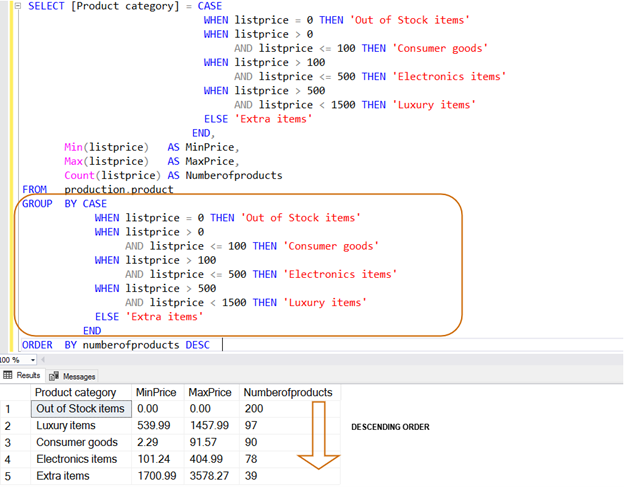
Let's look at another practical example.
How to use Spark SQL: A hands-on tutorial
This article from opensource.com shows a realistic use case: categorizing network connections as 'attack' or 'no attack' and then counting the frequency of each.
Read the section under the heading 'Connections based on protocols and attacks'. Notice how the CASE statement creates the 'state' column, and then GROUP BY uses that same 'state' column to aggregate the data.
Use Case 2: Performing Conditional Calculations
The THEN clause doesn't have to return a static value like a string. It can also return the result of a calculation, allowing you to apply different business logic to different subsets of your data. For example, you could calculate sales tax differently based on a state column or apply different discount formulas based on a customer's status.
The next video segment demonstrates this by calculating different salary raises based on an employee's job title.
Intermediate SQL Tutorial | Case Statement | Use Cases
This final video segment from Alex The Analyst demonstrates how to perform calculations within a CASE expression. This is a powerful technique for data transformation.
Watch from 03:13 to 06:59. Focus on how the THEN clause contains a mathematical formula (salary + salary * 0.10) to calculate the new salary. This shows that CASE can be used for dynamic data transformation, not just labeling.
3. Hands-On Practice in Databricks
It's time to apply these concepts. The following exercises will help you practice both categorization and conditional calculation.
Instructions:
- Navigate to the SQL Editor in your Databricks workspace.
- Make sure a SQL Warehouse is running and selected.
- Copy and paste the following code into the editor and run it. This creates a temporary view named
dealer_salesfor you to query.
CREATE OR REPLACE TEMP VIEW dealer_sales(id, city, car_model, quantity, price_per_car) AS
VALUES
  (100, 'Fremont', 'Honda Civic', 10, 22000),
  (100, 'Fremont', 'Honda Accord', 15, 26000),
  (200, 'Dublin', 'Honda Civic', 20, 22500),
  (200, 'Dublin', 'Honda CRV', 3, 27000),
  (300, 'San Jose', 'Honda Civic', 5, 23000),
  (300, 'San Jose', 'Honda Accord', 8, 27500);

-- Query the view to see its contents
-- SELECT * FROM dealer_sales;
Now, write a SQL query for each of the following tasks.
Practice Questions:
-
Categorization: Write a query that displays the
car_model,city, andquantity. Add a new column namedstock_levelthat categorizes cars based on theirquantity:- 'High Stock' if
quantity> 15 - 'Medium Stock' if
quantity> 5 - 'Low Stock' for all other cases
- 'High Stock' if
-
Categorization + Aggregation: Building on the previous query, find out how many car models are in each
stock_level. Your result should have two columns:stock_levelandmodel_count. -
Conditional Calculation: The dealerships want to add a "market adjustment" fee. Calculate this fee based on the following rules:
- For cars in 'Fremont', the fee is 5% of the
price_per_car. - For cars in 'Dublin', the fee is 7% of the
price_per_car. - For all other cities, the fee is 3% of the
price_per_car.
Write a query that returns the
car_model,city,price_per_car, and the calculatedadjustment_fee. - For cars in 'Fremont', the fee is 5% of the
Conclusion
Great job! You have now learned how to use CASE expressions to add conditional logic to your SQL queries. This is a fundamental skill that dramatically increases the flexibility and power of your data transformations.
Key Takeaways
- The
CASEexpression (CASE WHEN ... THEN ... ELSE ... END) allows you to implementif/then/elselogic within a query. - The order of
WHENconditions matters, as only the first true condition is executed for a given row. CASEis commonly used to create new categorical columns, which can then be used inGROUP BYclauses for more nuanced aggregation.- The
THENclause can contain calculations, enabling you to apply different business rules to different segments of your data.
Next Steps
In our next lesson, we will dive into subqueries and common table expressions (CTEs). These tools are essential for breaking down complex problems into logical, readable steps. You will see how CASE expressions, JOINs, and aggregations can be neatly organized within CTEs to build sophisticated and maintainable data pipelines.