Hello! Welcome to your next lesson in the "Querying Data with Databricks SQL" module.
In our last session, you mastered the fundamentals of querying a single table using SELECT, FROM, WHERE, and ORDER BY. You learned how to retrieve specific columns, filter for the rows you need, and sort the results. This is a crucial skill, but most real-world datasets aren't stored in a single, massive table. Instead, they are organized into multiple, related tables to ensure data integrity and efficiency—a concept known as normalization.
Today, we will build directly on your previous work to address the learning outcome: Perform INNER, LEFT, RIGHT, and FULL OUTER joins between two or more tables. You will learn how to combine data from different tables, a technique that is at the very heart of relational database querying and essential for your role as a data engineer.
The "Why" and "How" of Joining Tables
Before we write any code, let's establish why we need JOINs. Imagine a music streaming service database. You might have one table for artists, another for albums, and a third for individual tracks.
If you wanted to find the name of the artist who created a specific track, you would need to look up the artist_id in the tracks table and then use that ID to find the artist's name in the artists table. A JOIN automates this process, allowing you to pull the track name and artist name into a single result set.
The connection point between tables is typically a primary key in one table and a foreign key in another.
- A Primary Key (PK) is a column (or set of columns) that uniquely identifies each row in a table. In the ERD above,
artist_idis the primary key of theArtiststable. - A Foreign Key (FK) is a column in one table that refers to the primary key in another table. The
artist_idin theAlbumstable is a foreign key referencing theArtiststable.
Let's watch a video that explains the fundamental concepts and motivations behind using joins.
SQL Joins Basics (Visually Explained) | INNER, LEFT, RIGHT, FULL | #SQL Course 8
This video from Data with Baraa provides an excellent visual introduction to SQL joins. It clarifies why we need them and how they work conceptually by connecting tables using keys.
Watch from the beginning to 08:45. Focus on: The difference between joining columns vs. appending rows. The three main reasons for using joins: recombining data, data enrichment, and checking for data existence. The concept of left vs. right tables and how Venn diagrams are used to visualize the logic of different join types.
As the video explained, we can visualize the different join types using Venn diagrams. This is a powerful mental model to understand what data will be returned.
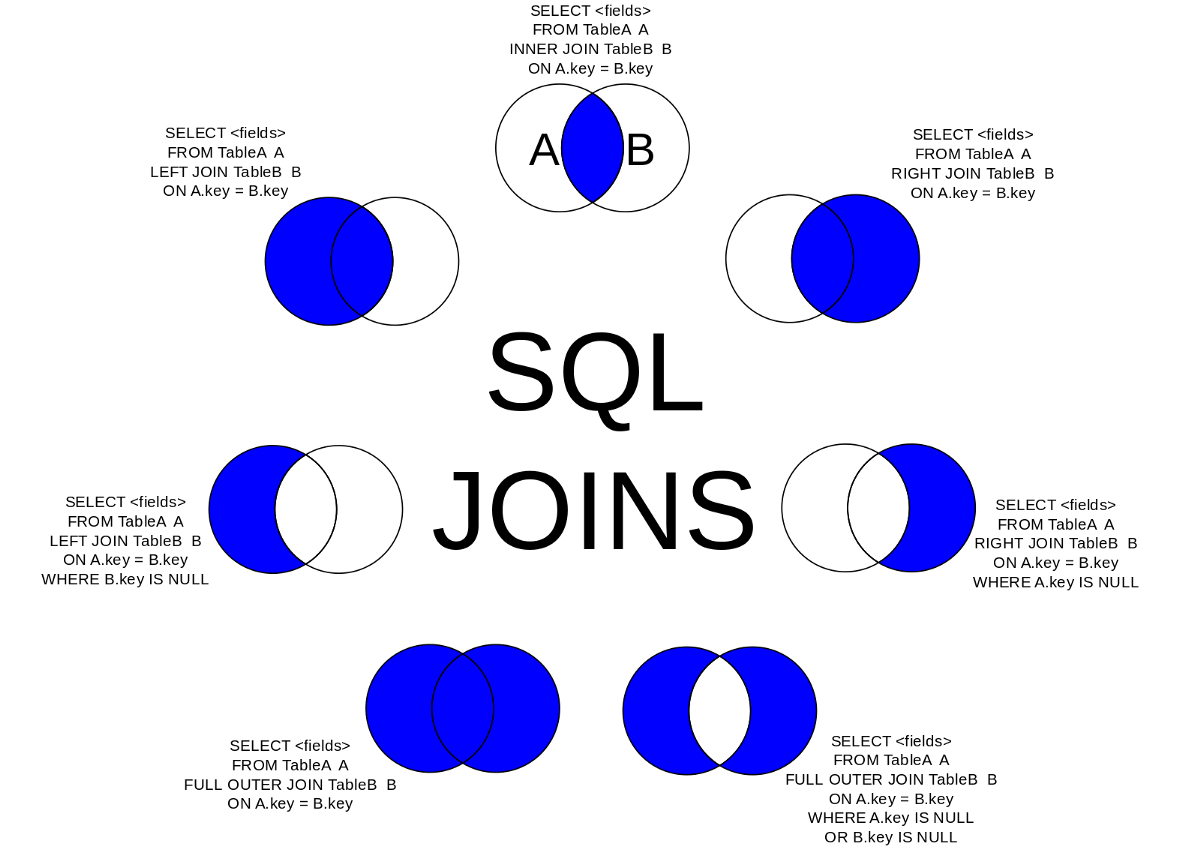
The Four Main Join Types
Now let's dive into the syntax and behavior of the four join types covered in the exam. We'll use one comprehensive video that walks through each type step-by-step.
1. INNER JOIN: The Intersection of Data
An INNER JOIN returns only the rows where the join key exists in both tables. It's the most common type of join.
SQL Joins Basics (Visually Explained) | INNER, LEFT, RIGHT, FULL | #SQL Course 8
Let's continue with the same video to see a detailed breakdown of the INNER JOIN. Pay close attention to the syntax, the use of table aliases (which you learned about in the last lesson), and the step-by-step walkthrough of how the database executes the join.
Watch from 10:19 to 23:01. The key takeaway is that INNER JOIN only returns records that have a match in both the left and right tables.
The basic syntax is:
SELECT
  t1.column1,
  t2.column2
FROM table1 AS t1
INNER JOIN table2 AS t2
  ON t1.common_key = t2.common_key;
For an INNER JOIN, the order of the tables (table1 JOIN table2 vs. table2 JOIN table1) does not change the result.
2. LEFT JOIN: Prioritizing the Left Table
A LEFT JOIN (also called a LEFT OUTER JOIN) returns all rows from the left table and the matched rows from the right table. If there is no match for a row from the left table, the columns from the right table will contain NULL values. With outer joins, the order of the tables is critical.
SQL Joins Basics (Visually Explained) | INNER, LEFT, RIGHT, FULL | #SQL Course 8
Now, let's look at the LEFT JOIN. This is extremely useful when you want to keep all records from a primary table while enriching it with information from a secondary table.
Watch from 23:01 to 29:48. Notice how customers without any orders are still included in the final result, but with NULL values for the order-related columns.
The syntax is nearly identical, you just specify LEFT JOIN:
SELECT
  t1.column1,
  t2.column2
FROM table1 AS t1 -- Left table
LEFT JOIN table2 AS t2 -- Right table
  ON t1.common_key = t2.common_key;
3. RIGHT JOIN: The Mirror Image
A RIGHT JOIN is the exact opposite of a LEFT JOIN. It returns all rows from the right table and the matched rows from the left table. If there's no match, the columns from the left table will be NULL.
SQL Joins Basics (Visually Explained) | INNER, LEFT, RIGHT, FULL | #SQL Course 8
This next segment covers the RIGHT JOIN and offers a valuable piece of real-world advice on how to approach it.
Watch from 29:48 to 35:03. The main point here is that any RIGHT JOIN can be rewritten as a LEFT JOIN by simply swapping the order of the tables. Many developers find LEFT JOIN more intuitive and use it exclusively.
While you should know what a RIGHT JOIN is for the exam, adopting the practice of converting them to LEFT JOINs can make your queries easier to read and maintain.
4. FULL OUTER JOIN: The Complete Picture
A FULL OUTER JOIN combines the logic of both LEFT and RIGHT joins. It returns all rows from both tables. Where there is a match, the rows are combined. Where there is no match from either side, NULL values are used to fill in the gaps.
SQL Joins Basics (Visually Explained) | INNER, LEFT, RIGHT, FULL | #SQL Course 8
Finally, let's look at the FULL OUTER JOIN, which you'll use when you cannot afford to lose information from either table, regardless of whether a match exists.
Watch from 35:03 to 39:33. Observe how the final result contains all customers and all orders, with NULLs appearing on either side where a connection could not be made.
Like an INNER JOIN, the order of tables in a FULL OUTER JOIN does not change the final result.
Hands-On Practice in Databricks
Theory is great, but practice is better. Let's apply these concepts in the Databricks SQL Editor. We'll use the official Databricks documentation examples, which use simple employee and department tables.
Instructions:
- Navigate to the SQL Editor in your Databricks workspace.
- Make sure a SQL Warehouse is running and selected.
- Copy and paste the following code into the editor and run it. This will create two temporary tables (
employeeanddepartment) that exist only for your current session.
CREATE OR REPLACE TEMP VIEW employee(id, name, deptno) AS
VALUES (105, 'Chloe', 5),
       (103, 'Paul' , 3),
       (101, 'John' , 1),
       (102, 'Lisa' , 2),
       (104, 'Evan' , 4),
       (106, 'Amy' , 6);

CREATE OR REPLACE TEMP VIEW department(deptno, deptname) AS
VALUES (3, 'Engineering'),
       (2, 'Sales' ),
       (1, 'Marketing' );

-- You can query them to see the contents
-- SELECT * FROM employee;
-- SELECT * FROM department;
Now, write a query for each of the following tasks. You can check your work by comparing your query's output to the expected results shown in the documentation resource provided below.
This Databricks documentation page provides the exact SQL syntax and expected output for each join type using the tables we just created. Use it to verify your practice queries.
Refer to the 'Examples' section. Find the specific join type you are working on and compare your results to the output shown in the document. Don't just copy the query; write it yourself first!
Practice Questions:
INNER JOIN: Write a query to list only the employees who belong to a department that exists in thedepartmenttable.LEFT JOIN: Write a query to list all employees and their department name. What do you see for employees whosedeptnodoes not exist in thedepartmenttable?RIGHT JOIN: Write a query to list all departments and the employees in them. What happens to departments that have no employees?FULL OUTER JOIN: Write a query that lists all employees and all departments, matching them up where possible.
Conclusion
Fantastic! You have now unlocked one of the most powerful features of SQL. By mastering joins, you can transform collections of separate, normalized tables into rich, insightful datasets.
Key Takeaways
JOINs are used to combine rows from two or more tables based on a related column.INNER JOINreturns only the records that have matching values in both tables.LEFT JOINreturns all records from the left table, and the matched records from the right table.RIGHT JOINreturns all records from the right table, and the matched records from the left table.FULL OUTER JOINreturns all records when there is a match in either the left or right table.- For
LEFTandRIGHTjoins, the order of the tables matters. ForINNERandFULLjoins, it does not.
Next Steps
In the next lesson, we will combine your knowledge of SELECT statements and JOINs with another crucial concept: aggregation. You will learn to use GROUP BY with functions like COUNT(), SUM(), and AVG() to summarize data, for example, to count the number of employees in each department after joining the tables.