Hello! Welcome to the first lesson of Module 2, "Querying Data with Databricks SQL."
In the last module, you learned to navigate the Databricks platform and differentiate between its core compute resources. We concluded that SQL warehouses are the specialized, high-performance engines for running SQL analytics. Today, you'll put that knowledge into practice by using a SQL warehouse to perform the most fundamental task in data engineering and analysis: querying data.
This lesson directly addresses the learning outcome: Write SELECT queries with filtering, sorting, and aliasing in Databricks SQL. Mastering these foundational clauses is the first and most critical step toward proficiency in SQL, forming the backbone of nearly every data task you will perform.
Getting Started: The Anatomy of a SELECT Query
The SELECT statement is how you retrieve data from tables. Its most basic form requires two clauses: SELECT, to specify which columns you want, and FROM, to specify which table to retrieve them from.
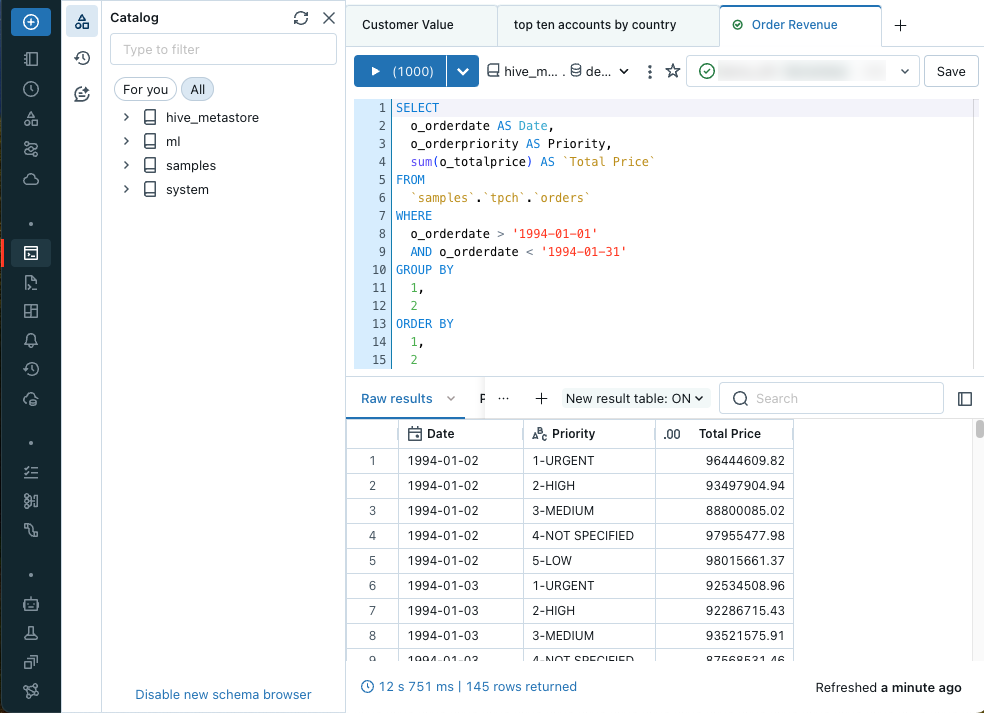
You will write and run these queries in the Databricks SQL Editor. This interface is designed specifically for SQL-based analytics and connects directly to a SQL warehouse.
To begin, let's watch a short video that covers the essentials of selecting and aliasing columns.
Learn Basic SQL in 15 Minutes | Business Intelligence For Beginners | SQL Tutorial For Beginners 1/3
This video by Adam Finer provides a quick and clear introduction to the basic SELECT statement, how to select all or specific columns, and how to rename them using aliases.
Watch the following three clips: Basic SELECT (03:39 - 04:06): Understand SELECT * FROM table_name. Selecting Specific Columns (04:49 - 05:02): See how to list column names to retrieve only the data you need. Aliasing with AS (05:02 - 05:32): Learn how to rename columns in your output for clarity using the AS keyword.
To summarize the key syntax:
- Select all columns:
SELECT * FROM my_table; - Select specific columns:
SELECT column_a, column_b FROM my_table; - Select and rename columns (aliasing):
SELECT column_a AS new_name_a, column_b AS "New Name B" FROM my_table;- Note: If your alias contains spaces or special characters, you must enclose it in double quotes.
Filtering Data with the WHERE Clause
Retrieving an entire table is rarely practical. The WHERE clause allows you to filter rows and retrieve only those that meet specific conditions. This is the primary mechanism for asking targeted questions of your data.
A WHERE clause is composed of one or more conditions that evaluate to true or false for each row. Let's explore the most common operators used to build these conditions.
Learn Basic SQL in 15 Minutes | Business Intelligence For Beginners | SQL Tutorial For Beginners 1/3
Let's return to the same video to see a comprehensive walkthrough of the various filtering operators you can use in a WHERE clause.
Watch from 05:32 to 08:18. Pay attention to how different operators are used to filter numbers, text, and combine conditions: Comparison Operators: _=_, _>_, _>=_ Logical Operators: AND, OR Pattern Matching: LIKE with wildcards _%_ and ___ Other Operators: IN, BETWEEN, IS NULL
Here is a summary table of the filtering operators you just saw:
| Operator | Description | Example |
|---|---|---|
=, !=, >, <, >=, <= |
Standard comparison operators. | WHERE price > 100.0 |
AND, OR, NOT |
Logical operators to combine conditions. | WHERE price > 100 AND category = 'Electronics' |
BETWEEN ... AND ... |
Checks if a value is within a specified range (inclusive). | WHERE order_date BETWEEN '2023-01-01' AND '2023-01-31' |
IN (...) |
Checks if a value matches any value in a list. | WHERE country IN ('USA', 'Canada', 'Mexico') |
LIKE |
Matches a string pattern. % for multiple characters, _ for a single character. |
WHERE product_name LIKE 'Laptop%' |
IS NULL / IS NOT NULL |
Checks if a value is empty (NULL) or not. | WHERE shipping_address IS NULL |
Sorting Results with the ORDER BY Clause
After selecting and filtering your data, you'll often want to present it in a meaningful order. The ORDER BY clause sorts the result set based on one or more columns.
Learn Basic SQL in 15 Minutes | Business Intelligence For Beginners | SQL Tutorial For Beginners 1/3
This final clip from the video demonstrates how to use the ORDER BY clause to sort your query results.
Watch from 09:44 to 10:32 to see how to sort in ascending and descending order.
Key points for sorting:
- Ascending order (default):
ORDER BY column_name ASCor simplyORDER BY column_name. - Descending order:
ORDER BY column_name DESC. - Multi-column sorting: You can sort by multiple columns. The data is sorted by the first column, and then rows with the same value in the first column are sorted by the second column, and so on.
ORDER BY category ASC, price DESC
Understanding the Logical Order of Execution
You've now seen the four main clauses for a basic query: SELECT, FROM, WHERE, and ORDER BY. It's crucial to understand the logical order in which the database processes them, which is different from the order you write them in.
How I Would Learn SQL FAST (if I could start over)
In this short clip, Ansh Lamba explains the SQL order of execution, a concept that is vital for writing correct and complex queries.
Watch from 06:42 to 07:31. The key takeaway is that the database engine first decides which table to get data FROM, then filters rows with WHERE, and only then does it SELECT the final columns.
The logical processing order for the clauses we've learned is:
FROM: Identifies the source table.WHERE: Filters rows based on conditions.SELECT: Chooses the columns to return and computes expressions/aliases.ORDER BY: Sorts the final result set.
Knowing this explains a common beginner mistake: you cannot use a column alias defined in SELECT within the WHERE clause of the same query level. This is because WHERE is processed before SELECT, so the alias doesn't exist yet.
Incorrect:
SELECT
  trip_distance * 1.60934 AS distance_km -- Alias 'distance_km' is created here
FROM samples.nyctaxi.trips
WHERE distance_km > 10; -- ERROR: 'distance_km' is not recognized here
Correct:
SELECT
  trip_distance * 1.60934 AS distance_km
FROM samples.nyctaxi.trips
WHERE trip_distance * 1.60934 > 10; -- Must use the original expression
Hands-On Practice in Databricks
Now it's time to apply what you've learned directly in Databricks. For this exercise, we will use the built-in sample dataset samples.nyctaxi.trips.
Instructions:
- Navigate to your Databricks workspace.
- From the left-hand menu, go to SQL > SQL Editor.
- Ensure a SQL Warehouse is selected in the top-right dropdown.
- In the schema browser on the left, find the
samplescatalog, then thenyctaxischema, and you will see thetripstable. - Write queries in the editor to answer the following questions.
Practice Questions:
- Find all taxi trips that occurred on January 15, 2016. Select the trip distance, fare amount, and total amount. Rename the
fare_amountcolumn tofareandtotal_amounttototal. - Find the top 20 longest trips by duration (
trip_duration_in_seconds). Only include trips where the passenger count was exactly 1. Display the duration, distance, and total amount. The longest trips should appear first. - List all trips that were paid for by 'Cash' and had a fare amount between $50 and $60. Show the fare amount, payment type, and tip amount, sorted by the tip amount from highest to lowest.
- Find all trips that started from a pickup location description ending with 'St' (for Street). Select the pickup and dropoff descriptions, along with the fare amount. Use the
tpep_pickup_datetimecolumn to order the results from newest to oldest, and limit your results to 50 trips.
Feel free to experiment! This hands-on practice is the most effective way to solidify your understanding.
Conclusion
Excellent work! You have successfully written your first queries in Databricks, covering the essential operations of selecting, filtering, and sorting data. These skills form the bedrock of everything else you will do in SQL.
Key Takeaways
- The core of any query is
SELECT ... FROM .... - Aliasing (
AS) is used to rename columns for better readability. - Filtering (
WHERE) is used to select specific rows that meet one or more conditions using operators like=,>,AND,OR,LIKE,IN, andBETWEEN. - Sorting (
ORDER BY) is used to arrange the final output in ascending (ASC) or descending (DESC) order. - SQL has a logical order of execution (
FROM->WHERE->SELECT->ORDER BY) that dictates how queries are processed.
Next Steps
In this lesson, you queried data from a single table. However, real-world data is often spread across multiple tables. In our next lesson, you will learn how to perform INNER, LEFT, RIGHT, and FULL OUTER joins to combine data from two or more tables, unlocking much more powerful analytical capabilities.