Hello! Welcome to your second lesson.
In our first session, we established the "why" behind modern data platforms by contrasting data warehouses, data lakes, and the unified lakehouse paradigm. You learned that the lakehouse aims to provide a single source of truth for both business intelligence (BI) and artificial intelligence (AI) workloads.
Today, we'll build on that foundation to explore the "how." Our learning outcome is to describe the architecture and key components of the Databricks Lakehouse Platform. We will dissect the platform's structure to understand how Databricks brings the lakehouse concept to life. This is a fundamental topic for the Data Engineer Associate exam, as it provides the mental model for where different services run and how they interact.
The Core Architectural Split: Control and Data Planes
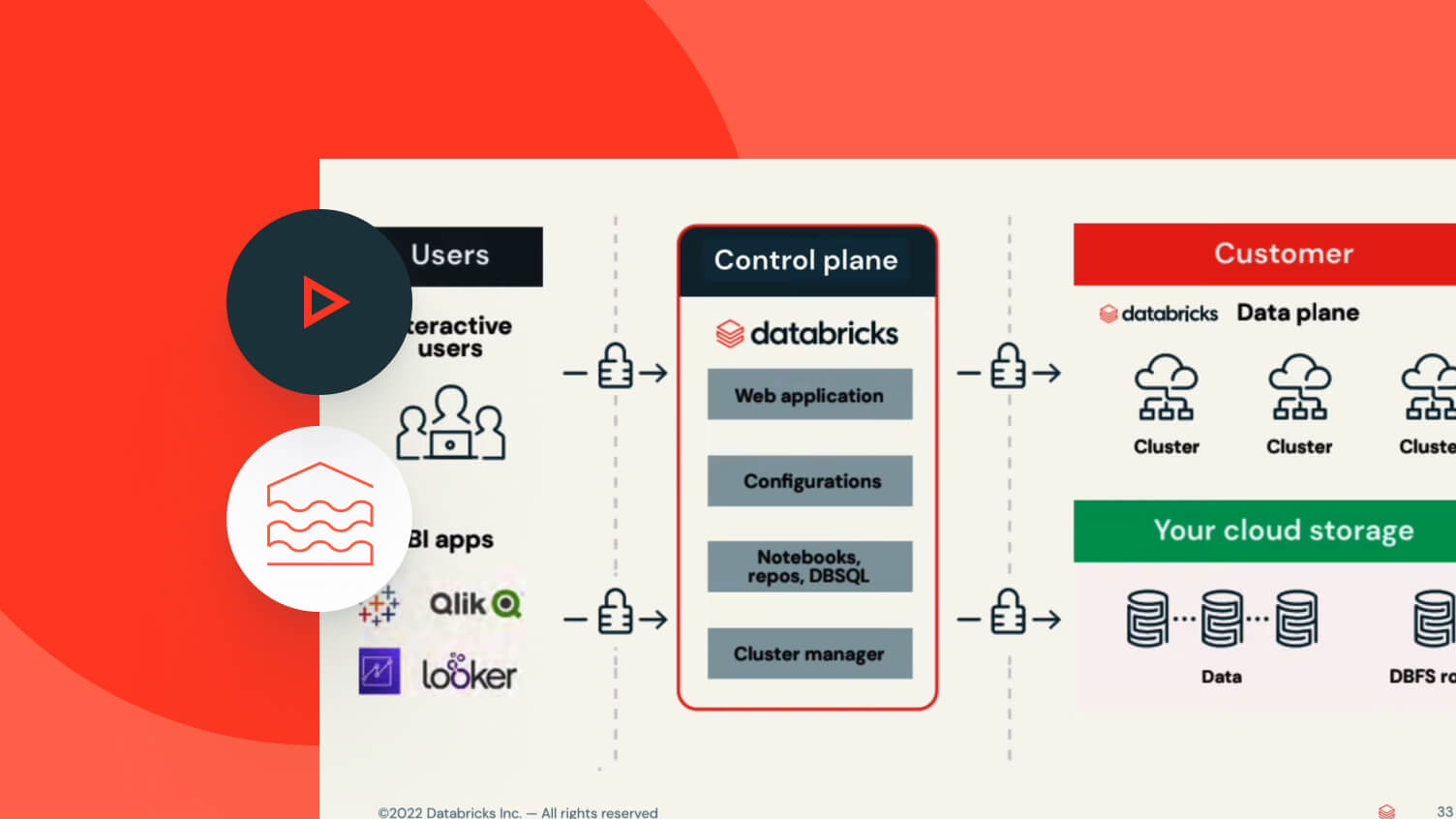
At the highest level, the Databricks Lakehouse Platform has a hybrid architecture, meaning it is split into two primary parts: the Control Plane and the Data Plane. Understanding this separation is crucial because it explains how Databricks provides a managed service while ensuring your data remains secure within your own cloud environment.
- Control Plane: This is hosted and managed entirely by Databricks in its own cloud account. It contains all the "brains" of the platform: the web application you log into, your notebooks, job definitions, cluster configurations, and the central governance layer (Unity Catalog). You interact with the control plane, but your data is not processed or stored here.
- Data Plane: This is where your data lives and is processed. It resides within your cloud account (e.g., your AWS, Azure, or GCP subscription). It consists of your cloud storage (like S3 or ADLS Gen2) and the compute resources (virtual machines) that form Databricks clusters.
This separation ensures that your data never leaves your cloud account, giving you full control and helping you meet security and compliance requirements.
To see how this concept is framed for the certification exam, let's watch a short video that uses exam-style questions to reinforce the distinction.
Databricks Certified Data Engineer Associate | Exam Preparation- Part 1
This clip from 'The Data Master' channel explains the Control and Data Planes and uses practice questions to test your understanding, which is great practice for the exam.
Watch from 04:06 to 06:48. Focus on which components belong to the Control Plane (Databricks account) and which belong to the Data Plane (customer cloud account).
A Three-Layer View: Control, Compute, and Data
For a more precise understanding, we can further divide the Data Plane into two distinct layers: the Compute Plane and the Data Plane.
- Control Plane: As discussed, this is the fully managed orchestration layer.
- Compute Plane: This is where data processing actually happens. It consists of Databricks clusters (powered by Apache Spark) and SQL Warehouses that execute your code and queries. These compute resources are deployed within your cloud account but are managed via the Control Plane.
- Data Plane: This refers purely to the storage layer in your cloud account (e.g., AWS S3, Azure Data Lake Storage) where your data is persisted, typically in the Delta Lake format.
This three-layer model clarifies that while both compute and storage are in your account, they serve different functions.
The following article gives a clear, structured explanation of these three layers.
Databricks Architecture Explained | Key Components & Workflow
This article, 'Databricks Architecture Explained', provides an excellent breakdown of the platform into the Control, Compute, and Data Planes. Reading this will solidify your understanding of this layered model.
Read the sections titled 'Understanding the Databricks Architecture: A Layered View', 'Control Plane: Governance, Orchestration & User Experience', 'Compute Plane: Elastic, Multi-Modal Processing', and 'Data Plane: Storage Integration & Data Operations'.
Key Components of the Databricks Platform
Now that we have the architectural framework, let's zoom in on the specific components you'll be working with. The following video provides a comprehensive tour of the platform's key pieces and how they fit together.
Databricks architecture - how it really works
This video, 'Databricks architecture - how it really works', gives a fantastic walkthrough of the entire platform. We'll watch it in segments to focus on each major component.
We will be watching several parts of this video. I'll guide you through each one.
1. Organizational Structure: Account and Workspaces
Before diving into features, it's important to understand how Databricks organizes environments.
- Account: A company has one Databricks account. This is the highest level, used for centralized user management and billing across the entire organization.
- Workspace: An account can contain multiple workspaces. A workspace is an isolated environment where teams of data engineers, scientists, and analysts collaborate. Each workspace contains assets like notebooks, libraries, and jobs. You might have separate workspaces for development, staging, and production, or for different business units.
Let's watch the section of the video that explains this.
Databricks architecture - how it really works
First, let's understand the difference between a Databricks Account and a Workspace.
Watch from 08:44 to 10:26. Pay attention to the one-to-many relationship between an account and workspaces.
2. Compute Resources (Compute Plane)
All work in Databricks is performed by a compute resource. There are different types, each optimized for specific workloads.
- All-Purpose Compute: Used for interactive development in notebooks. These clusters are created and managed by users for data exploration and analysis.
- Job Compute: Used for running automated, scheduled jobs. These clusters are created just for a specific job run and terminate when the job is complete, making them more cost-effective for production pipelines.
- SQL Warehouses: Specifically optimized for running SQL queries with high performance. They power Databricks SQL and are used to connect with BI tools like Tableau or Power BI.
- Serverless Compute: A model where Databricks manages the compute resources in its own account, abstracting away cluster management entirely. This offers instant start-up times.
Now, let's see how the video explains these different compute types.
Databricks architecture - how it really works
Next, let's explore the four types of compute resources available in Databricks.
Watch from 18:34 to 20:56. Focus on the primary use case for each of the four compute types.
3. Core Services and Tools (Control Plane)
The Control Plane hosts the services you use to develop, govern, and orchestrate your data workloads.
- Unity Catalog (Governance): This is the centralized governance solution for all data and AI assets. It manages metadata, access control, data lineage, and auditing across all workspaces. We'll watch a clip that contrasts it with the older, workspace-level Hive metastore.
- Workflows (Orchestration): The tool for creating, scheduling, and monitoring data processing jobs, which can consist of multiple tasks (e.g., notebooks, SQL queries).
- Databricks Repos (Development): Provides Git integration within the workspace, allowing you to version control your notebooks and other project files by connecting to providers like GitHub, GitLab, or Azure DevOps.
Let's watch the segment on Unity Catalog first.
Databricks architecture - how it really works
Let's learn about Unity Catalog, the cornerstone of data and AI governance in Databricks.
Watch from 13:04 to 15:47. Note how Unity Catalog centralizes governance at the account level, a major advantage over the legacy Hive metastore.
Now, let's focus on Databricks Repos for version control, a critical practice for any serious development.
Databricks Certified Data Engineer Associate | Exam Preparation- Part 1
This clip from 'The Data Master' focuses specifically on Databricks Repos and what operations can be performed within them versus in your Git provider.
Watch from 25:09 to 30:46. Pay attention to the distinction between actions supported directly in Repos (like clone, push, pull) and those that must be done in the Git provider (like merging pull requests).
An Analogy from Physics
To tie these architectural concepts together using your background in physics, you can think of the Databricks platform like a large-scale physics experiment (e.g., at CERN):
- The Control Plane is the control room. This is where physicists and engineers work. It has the user interfaces, the experiment schedule (Workflows), the central catalog of all datasets (Unity Catalog), and the analysis notebooks. The particle collisions don't happen here, but they are designed, controlled, and monitored from here.
- The Compute Plane is the particle accelerator and detector (like the LHC). This is the powerful, expensive machinery that does the actual work—accelerating particles and processing collision events. It runs in its own secure facility (your cloud account).
- The Data Plane is the CERN Data Centre. This is the massive storage infrastructure where petabytes of raw and processed event data are archived. The data is securely stored in your own facility and is accessed by the compute resources when an analysis is run.
Summary: A Functional View
We've looked at the architecture from a deployment perspective (Control/Data Plane) and explored key components. Another way to view it is by function.

The official Databricks documentation provides a comprehensive mapping of all platform features to these functional areas. You don't need to memorize everything now, but it's a valuable reference.
The scope of the lakehouse platform | Databricks on AWS
This official documentation maps the vast array of Databricks features to a modern data platform framework. It's a great reference for understanding the full scope of the platform.
Skim the section 'The scope of the Databricks Platform', particularly the subsections 'Data workloads on Databricks' and 'Outline of Databricks feature areas'. Don't worry about understanding every detail; focus on getting a sense of the breadth of components like Delta Lake, Unity Catalog, Lakeflow Jobs (Workflows), and Databricks SQL.
Key Takeaways
- The Databricks platform is built on a hybrid architecture with a Control Plane (managed by Databricks) and a Data/Compute Plane (hosted in your cloud account).
- This separation provides both a fully managed user experience and robust data security and governance.
- Workspaces are the primary collaboration environments, and an organization can have many of them under a single Account.
- Key components include Compute resources (All-Purpose, Job, SQL Warehouse), the Unity Catalog for governance, Workflows for orchestration, and Repos for version control.
- All these components work together on top of Delta Lake as the storage foundation to create a unified lakehouse platform.
Next Steps
In this lesson, we described the platform's architecture conceptually. In the next lesson, we'll get hands-on. The learning outcome will be to navigate the Databricks workspace to manage notebooks and other assets. You will start interacting with the Web UI and see many of the components we discussed today in action.