In our previous lesson, you successfully created your first MQL5 script file, MyFirstScript.mq5, using the MetaEditor's MQL5 Wizard. You now have a template file waiting for instructions. This lesson brings that file to life.
Today, you will write your very first line of MQL5 code. We will instruct the script to print the classic "Hello World!" message. You will then learn the critical step of compilation—transforming your human-readable code into a program MetaTrader 5 can execute. Finally, you'll run your script and see the result, confirming that your entire development environment is set up and working correctly. This is the moment you transition from setting up tools to creating with them.
Your First Line of MQL5 Code
When the MQL5 Wizard created MyFirstScript.mq5, it generated a basic structure for you. The most important part of this structure for a script is the OnStart() function.
void OnStart()
  {
  //---

  }
Think of OnStart() as the main entry point for a script. When you run the script, MetaTrader looks for this function and executes whatever code is inside its curly braces { ... }. This is a common pattern in C-style languages, and it's where we will place our command.
Our goal is to print a message. To do this, we use MQL5's built-in Print() function.
Let's modify the OnStart() function in your MyFirstScript.mq5 file to look like this:
void OnStart()
  {
  //---
   Print("Hello World!");
  }
This single line of code contains a few crucial syntax elements, especially for someone coming from a Python background:
Print: The name of the function we are calling.("Hello World!"): The argument we are passing to the function. In this case, it's a piece of text, called a string literal, which must be enclosed in double quotes.;: The semicolon at the end is a statement terminator. In MQL5, most individual commands or "statements" must end with a semicolon. This is one of the most significant differences from Python and is a common source of errors for beginners, so it's vital to remember.
Compiling Your Script
You've written the code, but the computer can't understand it directly. We need to convert your .mq5 source file into an executable .ex5 file. This process is called compilation.
The MetaEditor makes this easy. To compile your script, simply click the "Compile" button in the toolbar (it often looks like a stack of papers with a green checkmark) or press the F7 key.
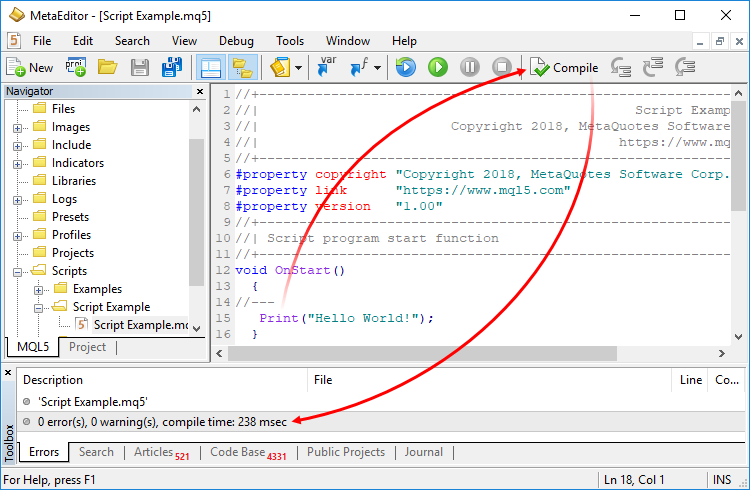
If you typed the code exactly as shown, you should see a message confirming a successful compilation with zero errors. This means MetaEditor has successfully created the MyFirstScript.ex5 file in the MQL5\Scripts folder.
The following reading explains the template code in more detail and walks through the process of adding the Print() statement and compiling.
Master MQL5 from beginner to pro (Part I): Getting started ...
This article from the MQL5 documentation provides a detailed look at the script template and the compilation process. It will solidify your understanding of what you just did.
Start reading from the section titled First script. Focus on understanding the explanations of comments (//), preprocessor directives (#property), and how the Print() function is added within the OnStart block. The images labeled Figure 6 and 7 show exactly the compilation process we've just discussed.
Running Your Script and Seeing the Output
Your script is now compiled and ready to run. To execute it, you need to switch back to the MetaTrader 5 platform (you can use the F4 key as a shortcut to toggle between MT5 and MetaEditor).
The video below demonstrates exactly how to run your script and where to find the output.
Our very first MQL5 Program "Hello World!!!" #coding #programming #helloworld
This video by Sydney Chukwu clearly shows the "Hello World" process from coding to execution. We will focus on the part that uses the Print function.
Watch the segment from writing the code to running it. Pay attention to two key things: How the script is located in the Navigator window in MetaTrader 5. Where the "Hello World" message appears after the script is run (in the Experts tab of the Toolbox).
As you saw in the video, to run your script:
- In MetaTrader 5, find the Navigator panel (usually on the left).
- Expand the Scripts section. You should see
MyFirstScript. - Double-click
MyFirstScriptor drag it onto any open chart.
The script will execute instantly. To see the result, look at the Toolbox window at the bottom of the MT5 platform and click on the "Experts" tab. You should see your "Hello World!" message printed there.

The Importance of Syntax
MQL5 is very strict about its syntax. A single missing character can prevent the program from compiling. Forgetting the semicolon is a classic example.
Let's explore this idea as it's a fundamental part of learning to code.
First program - Introduction to MQL5 and development environment - MQL5 Programming for Traders
This resource dives into the details of MQL5 syntax and demonstrates what happens when you make a mistake.
Read the section that begins with the discussion on commas and continues through the example of a missing semicolon. Notice how the compiler provides error messages that try to help you locate the problem.
As you've just read, the compiler provides feedback in the error log. Being able to read these messages is a critical skill for any developer. We will dedicate our entire next lesson to understanding and fixing these common errors.
Conclusion
Congratulations! You have successfully written, compiled, and executed your first MQL5 program. This is a significant milestone that verifies your entire development workflow is functional.
In this lesson, you learned:
- The
OnStart()function is the entry point for an MQL5 script. - The
Print()function is used to output text to the "Experts" log in MetaTrader 5. - MQL5 statements, like our call to
Print(), must end with a semicolon (;). - The Compile button (or F7) in MetaEditor translates your
.mq5source code into an executable.ex5file. - You can run a script from the Navigator window in MT5, and its
Printoutput appears in the Experts tab.
You've now completed the full "idea-to-output" cycle. In our next lesson, we will explore what happens when this cycle breaks. We will deliberately make mistakes in our code to see how the compiler reports errors, and you will learn how to interpret these messages to debug your programs—an essential skill for building the complex tools you aim to create.