Welcome to the next step in your MQL5 journey. In our last lesson, you successfully wrote, compiled, and executed your first program, making MetaTrader 5 print "Hello World!". This confirmed your setup is working perfectly. Today, we'll explore what happens when things don't work perfectly. Mistakes are an inevitable and essential part of programming, and learning to fix them is what separates a beginner from a proficient developer.
This lesson is dedicated to deciphering the messages the compiler sends you when your code doesn't follow the rules. You will learn to identify and fix basic compilation errors by using the error log in MetaEditor. Think of this as learning to understand the feedback from your most important collaborator: the compiler. Mastering this skill is fundamental to building the complex, custom tools you aim to create.
When Code Breaks: Compilation Errors and Warnings
In the previous lesson, you clicked the "Compile" button (or pressed F7) to translate your human-readable .mq5 source file into an executable .ex5 file. This process only succeeds if your code follows the strict grammatical rules of the MQL5 language, known as its syntax.
When the compiler finds a rule violation, it stops and reports an error. An error is a critical issue that prevents compilation. No .ex5 file is created, and the program cannot be run.
Sometimes, the compiler finds something that isn't technically an error but is suspicious or could lead to unexpected behavior. In this case, it issues a warning. The code will still compile into an .ex5 file, but a warning is a strong hint that you should review your code carefully.
The following reading provides a clear distinction between these two types of feedback from the compiler.
Debugging MQL5 Programs - MQL5 Articles
This article introduces compilation as the first stage of debugging. It explains the two types of issues the compiler reports.
Read the section that distinguishes between the two types of compiler feedback. Start from the description of errors and warnings. Pay close attention to the examples provided for a syntax error (confusing , and ;) and a warning (using = instead of ==).
As you've just read, syntax errors are often simple typos. Forgetting a semicolon is a classic mistake, especially coming from Python where they aren't required. While warnings can be ignored, it's a very bad habit. A good developer aims for code that compiles with zero errors and zero warnings.
Anatomy of an Error Message
When compilation fails, the Toolbox window at the bottom of MetaEditor automatically switches to the Errors tab and presents a report. This report is not a sign of failure; it's a map to the solution.
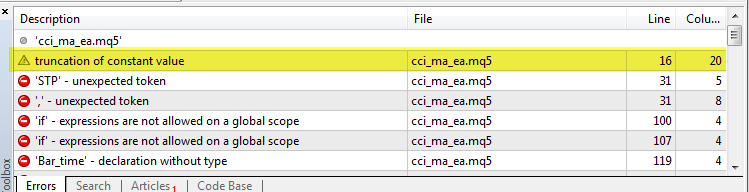
Each error or warning in the log has four key pieces of information, organized into columns. Understanding these is crucial for efficient debugging.
From Novice to Expert: Collaborative Debugging in MQL5 - MQL5 Articles
This article breaks down the components of the error report, explaining what each column means.
Read the introductory section that explains the four columns of a bug report. Start from the table under the heading that introduces the columns: Description, File, Line, and Column.
To summarize:
- Description: A brief explanation of what the compiler thinks is wrong.
- File: The name of the file where the error occurred.
- Line: The exact line number in the file.
- Column: The character position on that line.
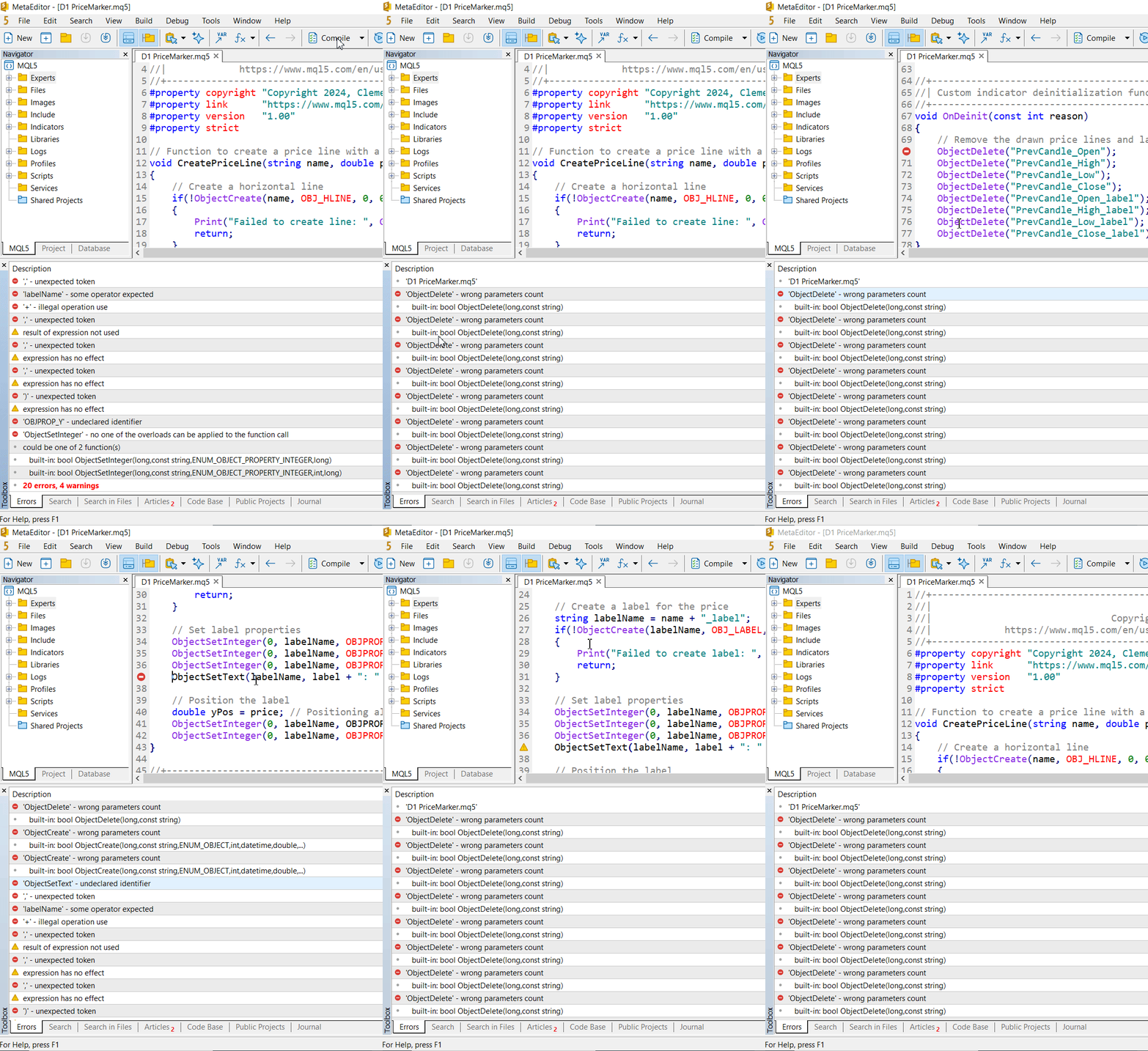
MetaEditor provides a powerful shortcut: if you double-click on any entry in the error log, the cursor will jump directly to the offending line of code.
This short animated image shows this exact workflow: compiling, seeing a list of errors, and double-clicking one to navigate straight to the problem.
Let's Fix Some Bugs
Now, let's get practical. Open your MyFirstScript.mq5 file from the previous lesson. We are going to intentionally break it in a few common ways and learn to interpret the compiler's feedback.
Bug #1: The Missing Semicolon
First, let's commit the most common MQL5 beginner mistake. Remove the semicolon at the end of the Print statement.
Your OnStart function should look like this:
void OnStart()
  {
   Print("Hello World!")
  }
Now, press F7 to compile. The compiler will immediately complain. You should see an error in your log that says something like:';' - unexpected token
The compiler was expecting a semicolon to terminate the statement but instead found the closing curly brace } of the function on the next line. This is its way of telling you, "I thought this command was finished, but something is missing."
To fix it: Simply add the semicolon back and re-compile. The error will vanish.
Bug #2: The Case-Sensitive Typo
MQL5 is a case-sensitive language, meaning Print is different from print. Let's see what happens when we use the wrong case.
Change your code to use a lowercase p:
void OnStart()
  {
   print("Hello World!");
  }
Compile the code by pressing F7. The error log will now show a different message, likely:'print' - undeclared identifier
An "undeclared identifier" means the compiler has encountered a name (print) that it doesn't recognize. It has no built-in function, variable, or keyword with that name. This is a very common error that usually points to a typo or a case-sensitivity mistake.
To fix it: Change print back to Print and re-compile.
Bug #3: Mismatched Parentheses
Let's remove the closing parenthesis of the Print function.
void OnStart()
  {
   Print("Hello World!";
  }
Compile this version. The error messages can sometimes be a bit confusing. You might see something like ')' - unexpected token or '(' - unbalanced parentheses. The compiler sees the semicolon and thinks the statement is over, but it knows that an opening parenthesis ( must eventually be matched by a closing one ). When it can't find the match, it reports an error.
To fix it: Add the closing parenthesis ) back before the semicolon and re-compile.
A Systematic Approach to Debugging
When you have a large file with multiple errors, the log can seem intimidating. The key is to be systematic.
- Always start with the first error in the list. A single mistake, like a missing semicolon, can often confuse the compiler and cause it to report a cascade of subsequent, phantom errors. Fixing the first real error often makes many others disappear.
- Read the description and locate the line. Double-click the error to jump to the location.
- Examine the line. Look for typos, missing characters (
(,},;), or case-sensitivity issues. Sometimes the actual error is on the line before the one reported. - If the error message is unclear, consult the documentation. If the error says a function has the "wrong number of parameters" or is an "undeclared identifier," right-clicking the function name in your code and selecting "Go to definition" or searching for it in the MQL5 Reference is a powerful strategy.
The following reading demonstrates this exact process. The author debugs a script with 20 errors, not by panicking, but by methodically tackling the errors one by one using the documentation.
From Novice to Expert: Collaborative Debugging in MQL5 - MQL5 Articles
This article provides an excellent, practical walkthrough of fixing real-world compilation errors by using the MQL5 documentation.
You don't need to understand what the code does, but focus on the process the author follows. First, read the section about fixing the ObjectDelete error. Notice how the author identifies the error ("wrong number of parameters"), consults the documentation to find the correct usage, applies the fix, and recompiles to see the error count drop. Next, read the section that starts with the next error report. Here, the author encounters an "undeclared identifier" (ObjectSetText). They use the editor's auto-suggest feature and the documentation to discover the correct function name is ObjectSetString, fix it, and clear almost all remaining errors.
This process of Compile -> Read Error -> Locate -> Fix -> Repeat is a fundamental loop in software development. Getting comfortable with it is non-negotiable for becoming a competent programmer.
Conclusion
In this lesson, you took a crucial step towards developer self-sufficiency. You learned that errors are not failures, but guides that provide valuable feedback.
Here are the key takeaways:
- Compilation errors (or syntax errors) are rule violations that prevent your program from being created.
- Warnings indicate potential problems but do not stop compilation. You should always aim to fix them.
- The Error Log in MetaEditor's Toolbox tells you the Description, File, Line, and Column of each issue.
- Double-clicking an error takes you directly to the problematic line of code.
- Common beginner errors include missing semicolons, case-sensitive typos, and mismatched parentheses.
- A systematic approach—fixing the first error and recompiling—is the most effective way to debug.
You are now equipped to handle the most common issues that arise when writing code. In our next lesson, we will move on to the core components of any program: variables and data types. You will learn how to declare variables to store different kinds of information like numbers, text, and dates, which will allow your scripts to perform meaningful calculations and operations.