Hello! Welcome back to our final module on integrating a multi-peripheral system.
In our previous lesson, we made our system much more robust by using mutexes to protect shared resources from race conditions. We now have tasks that can safely share peripherals like a serial port for logging. So far, we've created our motor_control_task and temp_sensor_task with the same priority, meaning the FreeRTOS scheduler treats them as equals.
But are they truly equal in importance? For a responsive machine, reacting to a motor command is often more time-critical than taking a periodic temperature reading. A delay in motor control could lead to physical inaccuracies, while a slight delay in sensor sampling is often acceptable.
This brings us to today's lesson, where we will learn how to apply appropriate task priorities to ensure responsive motor control while reliably sampling the sensor. We'll dive into how the FreeRTOS scheduler works and how we can use task priorities as a powerful tool to fine-tune our system's real-time performance.
1. The Heart of the RTOS: The Preemptive Scheduler
At the core of any Real-Time Operating System (RTOS) like FreeRTOS is the scheduler. The scheduler's job is to decide which task gets to use the CPU at any given moment. FreeRTOS uses a preemptive, priority-based scheduler.
- Priority-Based: You assign a numerical priority to each task. A higher number means a higher priority.
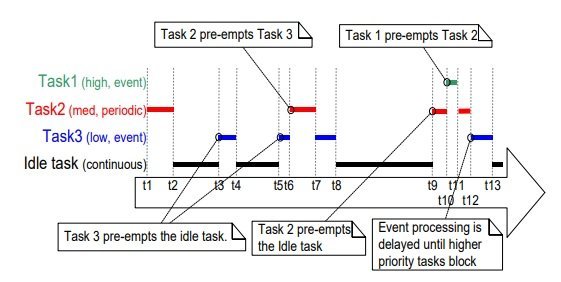
- Preemptive: If a high-priority task becomes ready to run (for example, it receives a message in a queue), it will immediately interrupt, or preempt, any lower-priority task that is currently running.
Think of it like an emergency room triage system. A patient with a critical injury (a high-priority task) will be seen by a doctor immediately, even if the doctor was in the middle of examining a patient with a minor cold (a low-priority task).
To understand this mechanism, it's crucial to know the different states a task can be in.
Introduction to RTOS Part 3 - Task Scheduling | Digi-Key Electronics
The video 'Introduction to RTOS Part 3 - Task Scheduling' from Digi-Key Electronics provides an excellent visual explanation of the scheduler, task preemption, and task states.
Please watch from the beginning to 6:56. The video will cover: How the scheduler uses time slices (or 'ticks') to run tasks (0:40). A clear demonstration of a higher-priority task preempting a lower-priority one (1:42). The four main task states: Ready, Running, Blocked, and Suspended (4:22). Pay close attention to how tasks move between these states.
To solidify these concepts, let's review them with a textual summary.
Getting Started with FreeRTOS on ESP32 with ESP-IDF
The article 'Getting Started with FreeRTOS on ESP32 with ESP-IDF' from Controllerstech offers a great written overview of the scheduler and task priorities.
Please read the sections titled 'Understanding the FreeRTOS Scheduler' and 'Task Priority and Stack Size'. This will reinforce what you just saw in the video, explaining task states, preemptive scheduling, and how priority levels work.
The most important takeaway is this: a lower-priority task will only get CPU time when no higher-priority tasks are in the Ready state. This is why high-priority tasks must be designed to enter the Blocked state (e.g., by calling vTaskDelay() or waiting on a queue) to allow other tasks to run.
2. Choosing the Right Priorities for Our System
Now, let's apply this to our project. We have two main tasks: one for motor control and one for sensor sampling. How should we prioritize them?
motor_control_task: This task needs to be highly responsive. When a command arrives in its queue, we want it to execute almost instantly to ensure precise control. A delay could mean the motor overshoots its target or fails to stop in an emergency. This task is a clear candidate for a higher priority.temp_sensor_task: This task is less time-critical. It performs a periodic action (reading a sensor). If its execution is delayed by a few milliseconds because the motor task needed the CPU, the impact is likely negligible. It just means the sensor reading happens slightly later. This task is a good candidate for a lower priority.
Let's say we assign Priority 2 to the motor_control_task and Priority 1 to the temp_sensor_task. The system will behave as follows:
- The
temp_sensor_taskruns, samples the temperature, and callsvTaskDelay()to wait for its next sampling interval. This moves it to the Blocked state. - While the sensor task is blocked, other lower-priority tasks (or the idle task) might run.
- A command is sent to the motor control queue. This moves the
motor_control_taskfrom Blocked to Ready. - Because the motor task (Priority 2) has a higher priority than the currently running task (e.g., the sensor task at Priority 1 or the idle task at Priority 0), the scheduler immediately preempts the running task and puts the
motor_control_taskinto the Running state. - The motor task executes the command and then blocks, waiting for the next command.
- Now that the highest-priority ready task is gone, the scheduler can resume the lower-priority task that was interrupted.
This ensures snappy motor performance without preventing the sensor from being sampled.
3. A Practical Thought Experiment
To really understand the implications of priority, let's consider a simple example with two tasks: one that blinks an LED and another that reads user input from the serial monitor to change the blink rate.
Introduction to RTOS - Solution to Part 3 (Task Scheduling)
The article 'Introduction to RTOS - Solution to Part 3 (Task Scheduling)' from Digi-Key presents a fantastic thought experiment. The code for the experiment involves one task to toggle an LED and another to read serial input. Focus on the questions asked at the end.
Read the short section at the very end of the article, starting with 'Try playing around with the priorities of the tasks.' You don't need to run the code, but think through the two questions it poses.
Test your understanding!
Let's analyze the scenarios from the article. The toggleLED task blocks using vTaskDelay(), while the readSerial task blocks on Serial.available().
- What happens if you make the
toggleLEDtask Priority 2 andreadSerialPriority 1? - What happens if you make the
readSerialtask Priority 2 andtoggleLEDPriority 1?
Think about which task can preempt the other and when each task enters a blocked state.
Show answer
-
toggleLED(P2),readSerial(P1): Everything works perfectly. ThetoggleLEDtask runs, callsvTaskDelay(), and blocks. While it's blocked, the lower-priorityreadSerialtask gets to run and check for serial input. When the delay for the LED task expires, it becomes ready again and, being higher priority, immediately preempts the serial task to toggle the LED. Responsiveness is maintained for both. -
readSerial(P2),toggleLED(P1): The LED likely stops blinking or blinks erratically. ThereadSerialtask has the higher priority. It loops, checkingif (Serial.available() > 0). This check is very fast and the loop doesn't contain anyvTaskDelay()or other blocking call. The task is constantly in the Ready or Running state, never yielding the CPU. Because it's always ready and has the higher priority, the lower-prioritytoggleLEDtask is starved and rarely (if ever) gets a chance to run. This is a classic mistake: a high-priority task that spins without blocking.
4. Implementing Priorities in Code
Assigning a priority in ESP-IDF is done via the uxPriority parameter of the xTaskCreate() function. Priorities can range from 0 (lowest) up to configMAX_PRIORITIES - 1. For our system, let's use 1 for the sensor and 2 for the motor.
// In our main application setup
#include "freertos/FreeRTOS.h"
#include "freertos/task.h"

// Define task handles
TaskHandle_t motor_task_handle = NULL;
TaskHandle_t sensor_task_handle = NULL;

// ... (Task function definitions for motor_control_task and temp_sensor_task) ...

void app_main() {
    // ... (Initialize peripherals, queues, mutexes, etc.) ...

    // Create the sensor task with a lower priority
    xTaskCreate(
        temp_sensor_task,       // Function to implement the task
        "Sensor Task",          // Name of the task
        4096,                   // Stack size in words
        NULL,                   // Task input parameter
        1,                      // Priority of the task (lower)
        &sensor_task_handle     // Handle to the task
    );

    // Create the motor task with a higher priority
    xTaskCreate(
        motor_control_task,     // Function to implement the task
        "Motor Control Task",   // Name of the task
        4096,                   // Stack size in words
        NULL,                   // Task input parameter
        2,                      // Priority of the task (higher)
        &motor_task_handle      // Handle to the task
    );
}
By making this simple change—adjusting a single number for each task—we have fundamentally improved the real-time behavior of our application, ensuring our motor control is always prioritized.
Conclusion
In this lesson, we explored one of the most powerful features of a Real-Time Operating System: task prioritization. You learned how the preemptive scheduler works and how to leverage it to meet the performance requirements of a real-world embedded system.
Key Takeaways:
- Preemptive, Priority-Based Scheduling: FreeRTOS always runs the highest-priority task that is ready. This task can interrupt (preempt) lower-priority tasks.
- Task States are Key: Tasks must enter a Blocked state (via
vTaskDelay, waiting on queues, etc.) to allow lower-priority tasks to run. - Prioritize for Responsiveness: Assign higher priorities to time-critical tasks like motor control and lower priorities to background or less-critical tasks like periodic sensor sampling.
- Avoid Starvation: Be careful not to create a high-priority task that never blocks, as it will starve all lower-priority tasks of CPU time.
We have now designed a sophisticated multi-tasking application. We have tasks for different peripherals, queues for communication, mutexes for safety, and priorities for performance. But how can we be sure it's all working as intended? How do we debug issues or analyze performance?
In our next lesson, we will learn how to use ESP-IDF tools to analyze task execution, CPU load, and memory usage. This will give us the visibility we need to verify our design and optimize our system's performance.