Welcome to the next lesson in our journey into deep learning engineering. In our previous session, we established the fundamental concepts of managing memory between the CPU (host) and GPU (device). You learned how to allocate device memory with cudaMalloc, transfer data with cudaMemcpy, and release memory with cudaFree, all while implementing robust error handling—a practice that will be indispensable as we move forward.
So far, we've treated the GPU as a passive storage area. Today, we'll activate it. We will explore how to launch computations on the GPU, orchestrating thousands of threads to work in parallel. This lesson is centered on the <<<grid, block>>> syntax, which is the heart of CUDA's execution model. You will learn to organize threads into a hierarchy of grids and blocks, and most importantly, how to use their unique coordinates to assign each thread a specific piece of data to work on. This skill is the absolute foundation for writing any custom kernel, from a simple vector operation to the complex layers of GPT-2 and ResNet-50.
From Serial Function to Parallel Kernel
In standard C++, we write functions. In CUDA, when we write a function that is meant to be executed by many GPU threads in parallel, we call it a kernel. We designate a function as a kernel by using the __global__ specifier.
// A standard C++ function (runs on the CPU)
void cpuFunction() {
    // ... does some work
}

// A CUDA kernel (runs on the GPU)
__global__ void myFirstKernel() {
    // ... does some work, executed by many threads
}
The CPU, or host, is responsible for launching this kernel on the GPU. This is done using a special syntax: the triple angle brackets, <<<...>>>.
// Host code
int main() {
    // Launch one instance of the kernel
    myFirstKernel<<<1, 1>>>();

    // We must wait for the device to finish its work
    cudaDeviceSynchronize();
}
Launching <<<1, 1>>> is the simplest case: it launches a single block containing a single thread. This is functionally equivalent to a serial function call and offers no parallelism. To unlock the GPU's power, we need to launch many threads.
The Thread Hierarchy
CUDA organizes threads into a two-level hierarchy that you, the programmer, define:
- Grid: A grid is the collection of all threads launched for a single kernel call. It's the highest level of organization.
- Block: A grid is composed of one or more thread blocks. All blocks in a grid are of the same size and dimension.
- Thread: Each block is composed of one or more threads.
This hierarchy is not just an abstraction; it has performance implications. Threads within the same block can cooperate using fast on-chip shared memory and synchronization primitives. Threads in different blocks cannot easily communicate with each other.
For convenience when working with multi-dimensional data like images or tensors, grids and blocks can be organized in 1, 2, or 3 dimensions.
Implementing New Algorithm with CUDA Kernels | CUDA C++ Class Part 3
This clip from an NVIDIA Developer class provides a clear visual and conceptual introduction to the thread hierarchy.
Please watch the section explaining the concepts of thread blocks and grids. Pay close attention to how threads are grouped into blocks, and blocks into a grid, and the introduction of the built-in variables that help threads identify themselves.
Decoding <<<grid, block>>> and Identifying Threads
The <<<...>>> syntax, known as the execution configuration, tells the CUDA runtime how to structure the grid and blocks. The first two parameters are the most important:
myKernel<<< Dg, Db >>>(kernel_arguments);
Dg: The dimensions of the grid (how many blocks to launch).Db: The dimensions of each block (how many threads per block).
Dg and Db are typically of type dim3, a simple struct that holds three unsigned integers (x, y, z). For a 1D problem, you can just pass integers.
Inside the kernel, each thread needs to know "who" it is and where it sits in the hierarchy. CUDA provides this information through special, read-only built-in variables:
threadIdx: Auint3variable containing the thread's index within its block.threadIdx.xis the most common for 1D problems.blockIdx: Auint3variable containing the block's index within the grid.blockDim: Adim3variable holding the dimensions of the block. This is the same for all threads.gridDim: Adim3variable holding the dimensions of the grid in blocks. This is also the same for all threads.
Let's see this in action. We'll start by exploring how these variables behave in a simple, step-by-step manner.
CUDA Programming Model - MolSSI Education
This tutorial provides an excellent, gradual introduction to the thread hierarchy and indexing. We'll follow its logic to build up our understanding.
First, read the initial sections. This will walk you through the process of trying to parallelize a simple printing loop. Pay attention to: The result of using only threadIdx.x when launching multiple blocks (gpu_printer_mb_local.cu). You'll see the indices repeat, which highlights the problem we need to solve. The introduction of the global index formula in gpu_printer_mb_global.cu. Then, jump to the section Thread Hierarchy in CUDA. This section formalizes the concepts of grids and blocks and explicitly shows the printThreadID kernel, which is a great way to see the values of the built-in variables directly.
The Global Index: Mapping Threads to Data
As the MolSSI tutorial demonstrated, threadIdx.x alone is not enough. It only gives a thread's local ID within its block. To make each thread operate on a unique element of a large array, we must compute a global index.
For a 1D array, the formula is a simple and powerful combination of the built-in variables:
int global_idx = blockIdx.x * blockDim.x + threadIdx.x;
Let's break this down:
blockIdx.x * blockDim.x: This part calculates the starting index of the current block. If each block has 256 threads (blockDim.x = 256), then block 0 starts at index 0, block 1 starts at index 256, block 2 at 512, and so on.+ threadIdx.x: This part adds the thread's local index within that block to get its unique global position.
This image perfectly illustrates the 1D mapping:
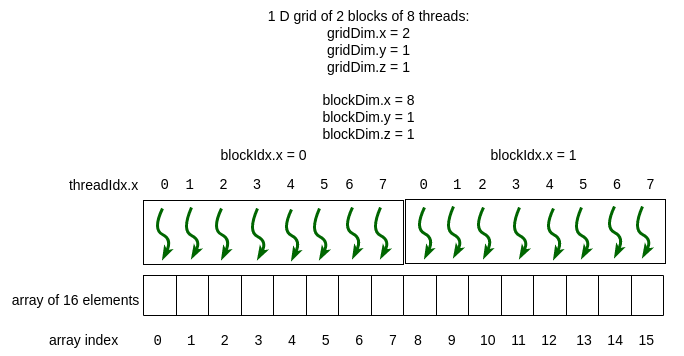
Let's test the formula with the image. Consider the third thread (curly arrow) in the second block:
blockIdx.x = 1threadIdx.x = 2blockDim.x = 8(since there are 8 threads per block)
global_idx = 1 * 8 + 2 = 10.
This matches exactly with the array index 10 shown in the diagram. This single line of code is the engine of data parallelism in CUDA.
Writing a Complete Kernel
Now we can write a full vector addition kernel that correctly uses this indexing scheme.
__global__ void vectorAdd(float *A, float *B, float *C, int N) {
    // Calculate the unique global thread index
    int idx = blockIdx.x * blockDim.x + threadIdx.x;

    // Check array bounds to prevent memory access errors
    if (idx < N) {
        C[idx] = A[idx] + B[idx];
    }
}
The if (idx < N) guard is crucial. Why? Often, the size of your data (N) is not a perfect multiple of your chosen block size. For example, if you have 1000 elements and use blocks of 256 threads, you would launch ceil(1000/256.0) = 4 blocks. This means you are launching 4 * 256 = 1024 threads. The last 24 threads would have indices greater than or equal to 1000. Without the guard, they would attempt to read from and write to memory outside the bounds of your allocated arrays, leading to undefined behavior or crashes.
Choosing Grid and Block Sizes
So, how do we choose the launch parameters on the host?
- Block Size: A good default block size is a multiple of 32 (the number of threads in a warp, a concept we'll cover soon). Common choices are 128, 256, or 512. For now, 256 is an excellent starting point. A block cannot have more than 1024 threads.
- Grid Size: The number of blocks should be calculated to cover all the data. A robust way to do this is with ceiling division.
// Host code to launch the vectorAdd kernel
int N = 1000000; // Total number of elements
int threadsPerBlock = 256;

// Calculate grid size (number of blocks)
int blocksPerGrid = (N + threadsPerBlock - 1) / threadsPerBlock;

// Launch the kernel
vectorAdd<<<blocksPerGrid, threadsPerBlock>>>(d_A, d_B, d_C, N);
The expression (N + threadsPerBlock - 1) / threadsPerBlock is a standard C++ integer arithmetic trick for ceil(N / threadsPerBlock).
Implementing New Algorithm with CUDA Kernels | CUDA C++ Class Part 3
Let's reinforce this with another short clip. This part of the NVIDIA video explains the global index calculation and gives practical advice on choosing block and grid sizes.
Watch the section that details how to combine the built-in variables to calculate a unique global index. Then, watch the section that provides guidance on choosing a block size and calculating the grid size, which introduces the cudaCeilDiv utility (functionally identical to our integer arithmetic trick).
Extending to 2D: A Preview for Images and Matrices
Your work with ResNet and Transformers will involve 2D matrices. CUDA's thread hierarchy makes mapping to 2D data just as elegant. You simply use a 2D grid and 2D blocks.
To get a unique 2D index (row, column), the logic is identical, just applied to both x and y dimensions:
// Calculate unique 2D indices for matrix operations
int row = blockIdx.y * blockDim.y + threadIdx.y;
int col = blockIdx.x * blockDim.x + threadIdx.x;
This pattern is fundamental for implementing operations like matrix multiplication, convolutions, and the attention mechanism, all of which are on our roadmap.
CUDA Crash Course: Matrix Multiplication
This video provides a fantastic visualization of 2D indexing for a matrix multiplication kernel.
Watch the segments that explain 2D thread blocks and grids and then walk through the calculation of the global row and column indices. Don't worry about the matrix multiplication logic itself yet; focus purely on how the 2D grid/block structure maps to the 2D matrix indices.
Conclusion
Today you've learned the most fundamental concept in CUDA programming: how to launch a kernel and give every thread a unique task. This is the mechanism that allows us to express massive parallelism. The leap from a serial for loop to a grid of threads, each calculating its own global_idx, is the conceptual hurdle that unlocks GPU programming. Given your mathematical background, you can think of this as defining a mapping from the discrete coordinate space of the CUDA grid (blockIdx, threadIdx) to the linear address space of your data array.
Key Takeaways:
- Kernels are C++ functions marked with
__global__that run on the GPU. - They are launched from the host using the
<<<grid, block>>>execution configuration. - CUDA uses a two-level thread hierarchy: grids are made of blocks, and blocks are made of threads.
- Inside a kernel, threads use built-in variables (
threadIdx,blockIdx,blockDim,gridDim) to determine their position. - The essential formula
idx = blockIdx.x * blockDim.x + threadIdx.x;maps a thread to a unique element in a 1D array. - Always use a boundary check (
if (idx < N)) to ensure correctness when data sizes are not perfect multiples of the block size.
In our next lesson, we will delve deeper into the nature of kernel execution. We'll explore the difference between synchronous and asynchronous operations and introduce CUDA streams, a powerful tool for orchestrating and overlapping data transfers and computations to hide latency and maximize performance.