Hello! Welcome back to your CCNP ENCOR course.
In our last lesson, we focused on securing the management plane by configuring TACACS+ to control administrative access to our network devices. We established who can log in and what commands they can run.
Today, we shift our focus from protecting the devices themselves to protecting the network itself. We will address the learning outcome: Configure and verify network access control using RADIUS and 802.1X. This is the core technology used in enterprise networks to secure port access, ensuring that only authenticated and authorized users and devices can connect to the LAN.
In this lesson, you will learn to:
- Understand the components and operation of the IEEE 802.1X framework.
- Differentiate the roles of RADIUS and EAP in the authentication process.
- Configure a Cisco IOS XE switch to act as an 802.1X authenticator.
- Implement MAC Authentication Bypass (MAB) as a fallback for non-802.1X capable devices.
- Verify and troubleshoot 802.1X and MAB sessions.
The 802.1X Authentication Framework
While our previous lesson on TACACS+ dealt with device administration, 802.1X and RADIUS deal with network access. It's the difference between securing the door to the security office versus having a security guard at the building's main entrance checking everyone's ID.
The 802.1X standard defines three key roles in this process:
- Supplicant: The end device requesting access (e.g., a user's laptop, an IP phone, a printer). It runs client software that can respond to authentication requests.
- Authenticator: The network device that guards the network edge, typically a switch or a wireless access point. It acts as an intermediary, blocking or allowing traffic based on the authentication result.
- Authentication Server: The centralized server that makes the authentication decision. It holds the database of users, devices, and policies. This is almost always a RADIUS server, like Cisco's Identity Services Engine (ISE).
To kick things off, let's watch a video that introduces these concepts and explains how the Extensible Authentication Protocol (EAP) is used to carry the authentication messages.
The video '802.1X and EAP' provides an excellent overview of what 802.1X is, why it's used, and its relationship with EAP. It clearly explains how authentication happens at a low level before an IP address is even assigned.
Please watch from the beginning to 05:55. Focus on the roles of the supplicant, authenticator, and authentication server, and how EAP is used to transport authentication data.
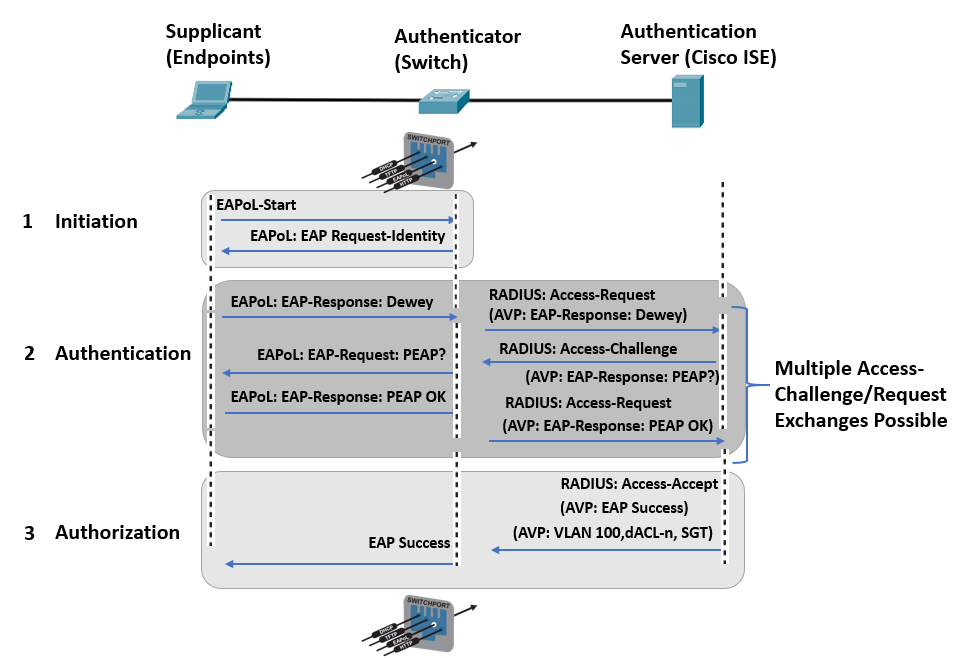
As the video explained, the authenticator (switch) doesn't understand the user's password. It simply packages the EAP messages from the supplicant into RADIUS packets and forwards them to the authentication server. This process is called EAP over LAN (EAPoL) between the supplicant and authenticator, and EAP over RADIUS between the authenticator and the server.
The image below shows this message flow clearly.
A switch port configured for 802.1X exists in one of two states:
- Unauthorized: This is the default state. The port blocks all user traffic except for specific control plane packets needed for authentication, like EAPoL, CDP, and STP.
- Authorized: After the authentication server validates the supplicant and sends a RADIUS
Access-Acceptmessage, the port transitions to this state and allows normal data traffic to pass.
Core Configuration of 802.1X and RADIUS
Now, let's translate these concepts into a Cisco IOS XE configuration. The process involves global settings for AAA and 802.1X, and specific settings on the interfaces where you want to enforce access control.
The following guide provides the definitive commands and steps.
Configuring IEEE 802.1x Port-Based Authentication [Cisco IOS XE 17]
This official Cisco documentation, 'Configuring IEEE 802.1x Port-Based Authentication', is the primary source for understanding the configuration process. We'll walk through the key parts.
Please review the section 'Configuring 802.1x Port-Based Authentication'. Focus on steps 3 through 14, which cover enabling AAA, defining the RADIUS server, and applying the necessary commands to the interface. We will implement these steps next.
Based on that guide, here is a summary of the essential configuration steps:
-
Enable AAA Globally and Define the RADIUS Server:
Just like with TACACS+, you must enableaaa new-model. You then define your RADIUS server's IP address and the shared secret key.! Enable the AAA framework aaa new-model ! Define the RADIUS server (e.g., Cisco ISE) ! Note: 'key' must match the configuration on the RADIUS server radius server MY_ISE_SERVER address ipv4 10.10.10.101 auth-port 1812 acct-port 1813 key MySharedSecretKey123 exit ! (Best Practice) Group servers for redundancy and scalability aaa group server radius ISE_GROUP server name MY_ISE_SERVER exit -
Configure AAA Method Lists for 802.1X:
This tells the switch to use your RADIUS server group for 802.1X authentication requests.! Use the 'ISE_GROUP' for all dot1x authentication requests aaa authentication dot1x default group ISE_GROUP -
Enable 802.1X Globally:
This command activates the 802.1X feature on the switch.! Globally enable the 802.1X protocol dot1x system-auth-control -
Configure the Access Interfaces:
Finally, apply the policy to the physical ports where end-users will connect.interface GigabitEthernet1/0/1 switchport mode access ! Set the port to control access based on authentication authentication port-control auto ! Define this port's role as an authenticator dot1x pae authenticator exit
Adding MAC Authentication Bypass (MAB)
What about devices that don't have an 802.1X supplicant, like printers, cameras, or simple IoT sensors? They can't participate in an EAP exchange. For these devices, we use MAC Authentication Bypass (MAB).
With MAB, the switch waits for the 802.1X process to time out. It then takes the client's source MAC address and uses it as both a username and password in a RADIUS request to the authentication server. The server checks if this MAC address is in a known-device database and responds accordingly.
To add MAB as a fallback to an 802.1X port, you simply add one command to the interface:
interface GigabitEthernet1/0/1
 ! ... (previous dot1x commands) ...
 ! Enable MAB on this interface
 mab
Modern Configuration with IBNS 2.0 Policy Maps
While the basic commands work, modern IOS XE versions use a more flexible and powerful framework called Identity-Based Networking Services (IBNS) 2.0. This uses policy maps—similar to QoS—to define a sophisticated sequence of authentication events.
This approach is highly reflective of real-world enterprise configurations. Let's explore a practical template.
Cisco IBNS 2.0 802.1x and MAB Authentication for IOS-XE Switches
The article 'Cisco IBNS 2.0 802.1x and MAB Authentication for IOS-XE Switches' provides an excellent, production-ready configuration template. It shows how to build a policy that intelligently handles the order of 802.1X and MAB, server failures, and other events.
First, read the section 'Global IBNS 2.0 Class Maps and Service Templates' to see the building blocks. Then, carefully review the policy map itself under 'Global IBNS 2.0 Policy Maps'. Pay attention to the logic: the 'session-started' event triggers dot1x, and the 'authentication-failure' event triggers MAB.
Let's break down the logic from that article's policy map. It's a sequence of event -> class -> action.
policy-map type control subscriber DOT1X_MAB_POLICY
  ! Event: A new device connects and a session starts
  event session-started match-all
   10 class always do-until-failure
    10 authenticate using dot1x priority 10  // Action: First, try 802.1X

  ! Event: An authentication method fails
  event authentication-failure match-first
   5 class DOT1X_FAILED do-until-failure    // Class: If 802.1X fails authoritatively
    10 terminate dot1x                      // Action: Stop trying dot1x
    20 authenticate using mab priority 20   // Action: Now, try MAB

   30 class DOT1X_NO_RESP do-until-failure  // Class: If client doesn't respond to dot1x
    10 terminate dot1x
    20 authenticate using mab priority 20   // Action: Fallback to MAB

   50 class MAB_FAILED do-until-failure     // Class: If MAB also fails
    10 terminate mab
    20 authentication-restart 60            // Action: Wait 60s and try again
This policy is then applied to the interface with a single command:service-policy type control subscriber DOT1X_MAB_POLICY
This policy-based approach provides much more granular control over the authentication sequence compared to the legacy commands.
Verification and Troubleshooting
Once 802.1X is configured, verification is key. You need to confirm that clients are being authenticated correctly and troubleshoot those that are not.
Let's watch a detailed video lab that covers the full process, from server setup to switch configuration and verification.
Cisco ISE (Radius Server) MAB with Wired Dot1X Authentication configuration || EVE-NG Full Lab
This lab video walks through a complete wired 802.1X and MAB setup with Cisco ISE. It will solidify your understanding of how the switch and server configurations work together.
Please watch the following key segments: Adding the Authenticator (13:50 - 15:20): See how the switch is added as a 'Network Device' in ISE, defining its IP and the shared RADIUS key. Switch CLI Configuration (19:07 - 20:45): This is the most crucial part. Observe the configuration of aaa, radius server host, dot1x system-auth-control, and the interface commands. Troubleshooting (27:30 - 29:57): The presenter demonstrates how to use the RADIUS Live Logs in ISE and the show authentication session command on the switch. This is the primary workflow for troubleshooting.
The single most useful command for verification on the switch CLI is:
show authentication sessions interface <interface-id> detail
This command shows you:
- Interface: Which port the session is on.
- MAC Address: The client's MAC address.
- Method: The authentication method used (e.g.,
dot1x,mab). - Status: The current status (
Authz Success,Authz Failed). - VLAN Policy: The VLAN the user was assigned to by the RADIUS server.
As shown in the video, when troubleshooting, your first step is to check show authentication sessions on the switch. Your second, more powerful step, is to check the Live Logs on the RADIUS server (ISE). The server will give you a detailed reason for any failure, such as "User not found" or "Wrong password".
Test your understanding!
You have configured a switch port for both 802.1X and MAB. A user connects a new corporate laptop and it authenticates successfully. They then unplug their laptop and connect a new office printer to the same port, but the printer fails to get network access. Looking at the output of show authentication sessions, you see the printer's status is "Authz Failed".
What is the likely difference in how the switch tried to authenticate the two devices, and what is the most probable cause of the printer's failure?
Show answer
The switch likely authenticated the laptop using 802.1X. The laptop's operating system has a built-in 802.1X supplicant that responded to the switch's EAP requests, provided credentials, and was successfully validated by the RADIUS server.
For the printer, which likely does not have an 802.1X supplicant, the switch would have attempted 802.1X, timed out, and then fallen back to MAB. The "Authz Failed" status indicates that the MAB attempt was rejected by the RADIUS server. The most probable cause is that the printer's MAC address has not yet been added to the endpoint database on the RADIUS server (e.g., Cisco ISE), so the server does not recognize it as a legitimate device.
Conclusion
In this lesson, we secured network access at the port level using the 802.1X and RADIUS framework. This is a fundamental security control for any modern enterprise network, preventing unauthorized devices from gaining a foothold.
Key Takeaways:
- 802.1X is a port-based access control framework involving a Supplicant, Authenticator, and Authentication Server.
- EAP is the protocol used to carry credentials, while RADIUS is the protocol used to communicate with the authentication server.
- Basic configuration involves enabling AAA and 802.1X globally, defining the RADIUS server, and setting the port control to
autoon access interfaces. - MAC Authentication Bypass (MAB) serves as a crucial fallback mechanism for devices that do not support 802.1X.
- Modern IBNS 2.0 configurations use flexible policy maps to orchestrate the authentication sequence for 802.1X, MAB, and failure scenarios.
- Verification relies on the
show authentication sessionscommand on the switch and, most importantly, the Live Logs on the RADIUS server.
Preview of the Next Lesson:
We have now covered two major pillars of network access security: device administration (TACACS+) and network admission control (RADIUS/802.1X). In our next lesson, we will pivot to Layer 2 resiliency by exploring a critical protocol for building loop-free, scalable switched networks: Analyze the operation and configuration of Multiple Spanning Tree Protocol (MST).