Hello! Welcome back to your CCNP ENCOR course.
In our last lesson, we focused on securing network access by configuring 802.1X and RADIUS to authenticate users and devices before they join the network. This is a critical first line of defense. Today, we'll build on that by securing the network from malicious actions after a device has connected.
This lesson addresses the learning outcome: Implement Layer 2 security features including DHCP snooping, Dynamic ARP Inspection (DAI), and IP Source Guard. These three features work together to create a powerful, layered defense against common attacks that originate from within the access layer, such as IP and MAC address spoofing.
You will learn to:
- Understand the threats posed by rogue DHCP servers, DHCP starvation, ARP poisoning, and IP spoofing.
- Configure and verify DHCP Snooping to build a database of legitimate IP-to-MAC bindings.
- Configure and verify Dynamic ARP Inspection (DAI) to validate ARP packets against that database.
- Configure and verify IP Source Guard (IPSG) to prevent hosts from spoofing IP addresses.
1. DHCP Snooping: The Foundation of Trust
Imagine the chaos if anyone could set up their own DHCP server on your network. They could assign malicious DNS servers, set their own machine as the default gateway to intercept traffic (a man-in-the-middle attack), or simply exhaust the real DHCP server's IP address pool, causing a denial-of-service. DHCP Snooping is the feature designed to prevent exactly this.
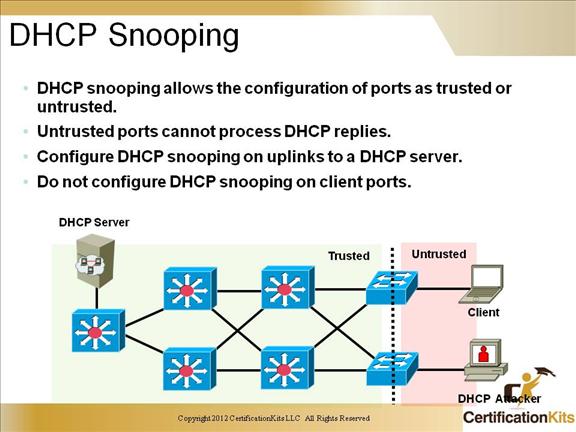
It works by classifying switch ports into two categories:
- Trusted: Ports connected to legitimate DHCP servers or other trusted network infrastructure (like uplinks to other switches). These ports are allowed to send all types of DHCP messages.
- Untrusted: Ports connected to end-user devices. These ports are only allowed to send DHCP requests from clients; any DHCP server messages (like
OfferorAck) are dropped.
By default, all ports are untrusted.
Let's start with a quick review of the attacks DHCP snooping mitigates and how the trusted/untrusted port logic works.
Free CCNA | DHCP Snooping | Day 50 | CCNA 200-301 Complete Course
The video 'Free CCNA | DHCP Snooping' from Jeremy's IT Lab provides a great visual summary of DHCP starvation and poisoning attacks, and it clearly explains the concept of trusted versus untrusted ports.
Please watch these two segments: Trusted vs. Untrusted Ports (01:30 - 03:08): Focus on the logic of trusting uplinks and leaving downlinks untrusted. DHCP-Based Attacks (04:25 - 09:13): Pay attention to how both DHCP starvation and poisoning attacks are executed. This provides the 'why' for implementing DHCP snooping.
The DHCP Snooping Binding Table
The most crucial outcome of DHCP snooping is the creation of the DHCP Snooping Binding Table. When a client on an untrusted port successfully leases an IP address from a server via a trusted port, the switch records the following information:
- Client's MAC Address
- Assigned IP Address
- VLAN ID
- Interface
- Lease Time
This table becomes a trusted database of legitimate IP-to-MAC bindings. As we will see, this database is the cornerstone upon which DAI and IP Source Guard are built.
Configuration and Verification
Configuring DHCP snooping is a straightforward, three-step process. The following article provides a concise overview and command reference.
CCNP Enterprise - Mastering DHCP Snooping and Binding Table
The article 'CCNP Enterprise - Mastering DHCP Snooping and Binding Table' from Network Journey gets straight to the point. It outlines the core purpose and provides the essential commands at a CCNP level.
Please read the introduction section 'What is DHCP Snooping?' to reinforce the concept. Then, review the 'CLI Commands' table to familiarize yourself with the configuration syntax.
Here is the essential configuration flow:
-
Enable DHCP Snooping Globally:
Switch(config)# ip dhcp snooping -
Enable DHCP Snooping on Specific VLANs:
Switch(config)# ip dhcp snooping vlan 10,20 -
Configure Trusted Interfaces:
Identify the ports that connect to your DHCP server or are uplinks to the core and trust them.Switch(config)# interface GigabitEthernet1/0/24 Switch(config-if)# ip dhcp snooping trust
To verify, the most important command is show ip dhcp snooping binding. This lets you see the database that the switch has built.
Switch# show ip dhcp snooping binding
MacAddress          IpAddress        Lease(sec)  Type           VLAN  Interface
------------------  ---------------  ----------  -------------  ----  --------------------
00:1A:2B:3C:4D:5E   192.168.10.101   685603      dhcp-snooping  10    GigabitEthernet1/0/1
A best practice is also to configure rate limiting on untrusted ports to prevent DHCP starvation attacks, where an attacker floods the switch with DHCP discover messages.
Switch(config)# interface GigabitEthernet1/0/1
Switch(config-if)# ip dhcp snooping limit rate 100
2. Dynamic ARP Inspection (DAI): Validating Layer 2 Identity
The Address Resolution Protocol (ARP) is inherently insecure. It trusts any ARP reply it receives. An attacker can exploit this by sending a gratuitous ARP reply, falsely claiming that their MAC address corresponds to the default gateway's IP address. This is ARP poisoning, and it allows the attacker to position themselves as a man-in-the-middle, intercepting all traffic destined for outside the local network.
Dynamic ARP Inspection (DAI) prevents this by intercepting all ARP packets on untrusted ports and validating them against the DHCP Snooping Binding Table.
- If an incoming ARP packet has a source IP and MAC address pair that matches an entry in the binding table, DAI permits it.
- If the pair does not match, DAI drops the packet.
This directly ties a device's Layer 2 (MAC) and Layer 3 (IP) identities together, ensuring a host can only claim the IP address it was legitimately assigned.

Configuration and Verification
DAI configuration is very similar to DHCP snooping. You enable it per-VLAN and define your trusted interfaces. On trusted interfaces, DAI checks are not performed.
Configuring DHCP Features and IP Source Guard
To understand the details of DAI, let's refer to the official Cisco documentation. It provides the most authoritative explanation.
This document is quite long, so we won't read it all. For now, simply know that it is our primary reference for the official configuration and behavior of these features. We will draw from it in the following sections.
The configuration is as follows:
-
Enable DAI on Specific VLANs:
Switch(config)# ip arp inspection vlan 10,20 -
Configure Trusted Interfaces:
These should be the same interfaces you trusted for DHCP snooping.Switch(config)# interface GigabitEthernet1/0/24 Switch(config-if)# ip arp inspection trust
To verify, use show ip arp inspection vlan <vlan-id> and show ip arp inspection statistics.
A critical real-world consideration is devices with statically assigned IP addresses, like servers. Since they don't use DHCP, they won't be in the snooping table, and DAI will drop their ARP packets. To solve this, you can create an ARP ACL and apply it to the switch. This manually creates a list of trusted IP-to-MAC bindings.
! Create an ARP ACL to permit the server
arp access-list STATIC_DEVICES
 permit ip host 192.168.10.200 mac host aabb.cc00.0100

! Apply the filter to the VLAN
ip arp inspection filter STATIC_DEVICES vlan 10
3. IP Source Guard (IPSG): Enforcing the Binding
The final piece of our Layer 2 security puzzle is IP Source Guard (IPSG). While DAI validates ARP, IPSG goes a step further and prevents IP spoofing in general. When enabled on an untrusted port, it creates a dynamic port-ACL that permits traffic only if its source IP address matches the address found in the DHCP Snooping Binding Table for that port.
Any traffic from a source IP address not in the binding table for that specific interface is dropped. This effectively stops a host from trying to use an IP address that wasn't assigned to it.
Let's turn to the Cisco documentation to understand this feature in detail.
Configuring DHCP Features and IP Source Guard
The section 'Understanding IP Source Guard' in the Cisco documentation we referenced earlier provides a clear explanation of how IPSG works by dynamically applying port ACLs.
Please read the section titled 'Understanding IP Source Guard', including the subsections on 'Source IP Address Filtering' and 'Source IP and MAC Address Filtering'. Focus on how IPSG uses the binding table to create and apply a port ACL.
Configuration and Verification
IPSG is configured directly on the untrusted access interfaces. There are two main modes:
-
Source IP Filtering: This is the default. It filters based only on the source IP address.
Switch(config)# interface GigabitEthernet1/0/1 Switch(config-if)# ip verify source -
Source IP and MAC Filtering: This mode is more secure. It filters on the source IP address AND checks that the source MAC address also matches the binding table entry. This is often combined with port security.
Switch(config)# interface GigabitEthernet1/0/1
Switch(config-if)# ip verify source port-security
For hosts with static IPs, you can create a manual binding:
Switch(config)# ip source binding aabb.cc00.0100 vlan 10 192.168.10.200 interface GigabitEthernet1/0/10
Verification is done with show ip verify source and show ip source binding.
Test your understanding!
You have successfully deployed DHCP Snooping and DAI across your access layer switches. All company laptops using DHCP are working perfectly. However, the network printer in the finance department, which has a static IP address of 10.1.20.50, is suddenly unable to communicate with any other device. Technicians confirm its IP, subnet mask, and gateway are correct.
What is the most likely cause of this issue, and what are two distinct ways to resolve it?
Show answer
The most likely cause is that Dynamic ARP Inspection (DAI) is dropping the printer's ARP packets. Since the printer has a static IP, it does not have an entry in the DHCP snooping binding table. When the printer sends an ARP request or reply, the switch inspects it, finds no matching binding, and discards it as invalid.
Here are two ways to resolve this:
-
Trust the printer's interface: Configure the switch port connected to the printer with
ip arp inspection trust. This tells the switch to bypass DAI checks for all ARP packets arriving on this specific port. This is simple but less secure, as it would also allow a malicious device plugged into that port to poison ARP. -
Create an ARP ACL: This is the more secure and scalable solution. Create an ARP access list that explicitly permits the printer's IP-to-MAC address binding and apply it to the VLAN. This allows DAI to validate the static device while continuing to inspect all other traffic on untrusted ports.
arp access-list PRINTERS
 permit ip host 10.1.20.50 mac host [printer's MAC address]
!
ip arp inspection filter PRINTERS vlan 20
Conclusion
In this lesson, we have constructed a robust, three-layered defense for the access layer. These features work in concert to build a chain of trust, preventing some of the most common and disruptive internal network attacks.
Key Takeaways:
- Layered Defense: DHCP Snooping, DAI, and IPSG are designed to be deployed together.
- DHCP Snooping is the Foundation: It protects against rogue DHCP servers and builds the binding table, which is the source of truth for the other features.
- DAI Prevents Man-in-the-Middle: It validates ARP packets against the binding table, preventing ARP poisoning attacks.
- IPSG Prevents Spoofing: It filters all IP traffic based on the binding table, ensuring hosts can only use the IP addresses they have been assigned.
- Static Hosts Require Special Handling: For devices not using DHCP, you must use features like ARP ACLs or static IP source bindings to prevent them from being blocked.
Preview of the Next Lesson:
We've now covered port-level security in depth, from 802.1X admission control to mitigating DHCP, ARP, and IP spoofing attacks. Our next topic will shift from security to redundancy and loop prevention. We will dive into a critical Layer 2 protocol by learning to Compare Rapid Spanning Tree Protocol (RSTP) to legacy STP, focusing on convergence.