Hello! Welcome to the final lesson in our EIGRP module.
In our previous lesson, we focused on EIGRP route summarization, a key technique for building scalable and stable networks. We saw how manual summarization contains the scope of DUAL queries, which directly enhances network stability.
Today, we'll put that knowledge into a broader context by learning how to diagnose and fix EIGRP when it isn't behaving as expected. Your learning outcome is to troubleshoot EIGRP neighbor adjacency failures and route propagation issues. This is one of the most practical and essential skills for a network professional, moving from configuration to diagnostics. We'll adopt a systematic approach, which will be familiar territory given your experience as a solutions engineer.
A Framework for Troubleshooting
A structured methodology is the key to efficient troubleshooting. Before diving into specific commands, it's helpful to have a mental map of the process. The first question is always: "Is the problem with the neighbor adjacency or with the routes themselves?"
This flowchart provides a high-level overview of the diagnostic steps we'll be following today.
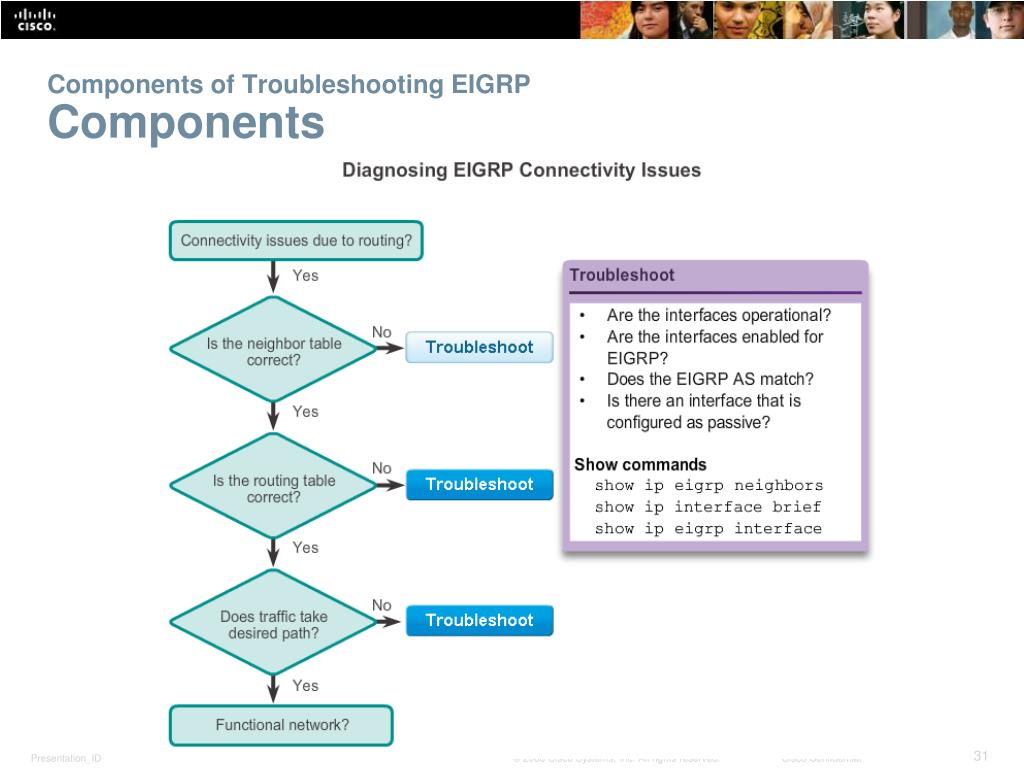
Our lesson will be structured around the two main branches of this flowchart: neighbor failures and route propagation problems.
1. Troubleshooting Neighbor Adjacency Failures
When two routers fail to become EIGRP neighbors, the show ip eigrp neighbors command will show an empty table or a "flapping" neighbor that appears and disappears. This is always the first place to look.
The cause is typically a mismatch in a fundamental parameter required for adjacency or a connectivity issue. Here is a checklist of the most common causes:
- Layer 1/2/3 Connectivity: The interface is down, there's no physical link, or the IP addresses are in different subnets.
- Mismatched AS Numbers: Routers must be in the same EIGRP autonomous system.
- Mismatched K-Values: The metric calculation weights must be identical.
- Passive Interface: The interface connecting to the neighbor is mistakenly configured as passive, which suppresses Hello packets.
- Authentication Mismatch: The key-chain, key ID, or key string do not match.
- Access Control List (ACL): An ACL on an interface is blocking EIGRP multicast (
224.0.0.10) or unicast packets.
Let's watch a video that demonstrates how to methodically diagnose several of these common adjacency problems.
ENARSI (300-410) Topic 1.9 - Troubleshooting EIGRP
The video 'Troubleshooting EIGRP' from Kevin Wallace Training, LLC walks through a series of practical troubleshooting scenarios. It's a great example of using show commands to isolate and resolve different types of adjacency failures.
Watch the video from 01:17 to 18:46. As you watch, pay close attention to the commands used to identify each problem: (01:17 - 04:56) The video begins with a checklist of common adjacency issues, which we've just covered. (04:56 - 12:04) The first scenario involves mismatched K-values. Notice the use of show ip protocols to compare the K-values on different routers. (12:04 - 15:44) The second scenario is an incorrect IP address, placing interfaces in different subnets. See how show ip interface brief confirms the problem. (15:44 - 18:46) The final scenario is a mismatched Autonomous System number, again verified with show ip protocols.
Deeper Dive: When Hellos Work but Adjacency Fails
A more subtle issue occurs when Hellos (which are multicast) are exchanged, but the adjacency still fails to complete. This often manifests as a retry limit exceeded log message. This error points to a failure in EIGRP's reliable transport protocol, which uses unicast packets for updates, queries, and replies. If these unicast packets or their acknowledgements are lost, the adjacency will eventually be torn down.
A common culprit is an ACL that permits multicast traffic but inadvertently blocks the unicast EIGRP traffic between the neighbors.
CCNA #024 EIGRP Retransmission retry limit exceeded? EIGRP Neighbor Troubleshooting CCNA
Let's watch a video from David Bombal that specifically addresses the 'retry limit exceeded' error. This is an excellent case study on how to diagnose an issue caused by an ACL.
Watch the entire video (from the beginning to 06:28). Observe the troubleshooting process: The initial symptom is the retry limit exceeded message in the log (show log). debug eigrp commands show packets being sent from one router but nothing being received by the other. This one-way communication leads the troubleshooter to check for an inbound filter (show run interface ..., show access-lists). Removing the ACL resolves the issue, and the neighbor relationship forms immediately.
Test your understanding!
You log into a router and run show ip eigrp neighbors, but the output is empty. The physical link to the neighbor is up. Based on our checklist, what are the first three show commands you would run to investigate, and what specific information are you looking for in each?
Show answer
A good systematic approach would be:
show ip interface brief: First, confirm the Layer 3 status. Is the interface you expect to form a neighborship on listed as "up" and "up", and does its IP address belong to the correct subnet?show ip protocols: This command is a goldmine. You would check for several things:- Is the EIGRP Autonomous System number correct?
- Are the K-values set to their defaults (or do they match the neighbor)?
- Is the interface listed under "Passive Interface"?
show ip eigrp interfaces: This command confirms which interfaces are actively participating in EIGRP (passive interfaces won't appear here). If your interface is missing, it's either passive or not covered by anetworkcommand.
2. Troubleshooting Route Propagation
Once the neighborship is established, the next step is to exchange routes. A route propagation problem occurs when show ip eigrp neighbors looks correct, but a specific network is missing from the routing table.
The key is to determine where the route is being lost. Is it never being advertised? Is it being filtered? Or is it being learned but not installed in the routing table?
To explore these scenarios, we will consult a definitive Cisco guide.
Troubleshoot EIGRP Common Issues
The Cisco document 'Troubleshoot EIGRP Common Issues' provides detailed explanations for why routes might go missing. We'll focus on the section dedicated to this problem.
Please read the section titled 'Missing Prefixes'. It's divided into two parts; focus on understanding the key causes for each: Missing Prefixes in RIB (Routing Table): Lower Administrative Distance (AD): The router knows about the prefix from a more trusted source (like a static route or another routing protocol). Check this with show ip route <prefix>. Distribute-List: An inbound filter is blocking the route. Check this with show ip protocols. Missing Prefixes in Topology Table: Mask Specification: A simple but common mistake—always specify the subnet mask when using show ip eigrp topology <prefix>. Split-Horizon: A loop-prevention rule is preventing a route from being advertised back out the same interface it was learned on. The show ip eigrp topology all-links command is crucial for spotting this, as it shows paths that were received but not considered feasible.
Let's summarize the common causes for missing routes:
- Filtering: A
distribute-listis blocking the route from being advertised or learned. - Summarization: The specific route is being aggregated into a summary. The summarizing router will have the specific routes, but its neighbors will only see the summary. (This links back to our previous lesson).
- Split Horizon: The router learns a route via an interface and will not advertise it back out the same interface. This is expected behavior but can cause issues in certain hub-and-spoke topologies.
- Stub Routing: A router is configured as a
stub, which limits the routes it advertises to its neighbors (e.g., it may only advertise connected and summary routes). You can see this status in the output ofshow ip eigrp neighbors detail. - Administrative Distance (AD): The router is learning the same prefix from a different source with a lower (better) AD, so the EIGRP route is not installed in the routing table. EIGRP internal routes have an AD of 90.
3. A Special Case: Stuck-in-Active (SIA)
A dreaded EIGRP condition is "Stuck-in-Active." This occurs when a router loses its successor for a route and sends a Query to its neighbors, but one or more neighbors fail to send a Reply within the active timer (about 3 minutes).
- Symptom: You will see a
DUAL-3-SIAerror message in the logs, and the router will tear down the adjacency with the non-responsive neighbor. - Cause: SIA is a symptom of an underlying problem, not the problem itself. It's usually caused by:
- Extremely congested or poor-quality links where replies are dropped.
- Unidirectional links where queries are received but replies cannot be sent back.
- An overly large query domain, where queries must traverse too many routers.
The best solution for SIA is prevention through good design. This is where our previous lesson on summarization is critical. By creating summarization boundaries, you limit the query domain and drastically reduce the chances of an SIA event occurring. Configuring branch routers as EIGRP stubs has the same preventative effect.
Conclusion
In this lesson, we developed a structured approach to diagnosing EIGRP problems. By systematically checking for adjacency requirements and then for route propagation issues, you can efficiently isolate and resolve most common EIGRP faults.
Key Takeaways:
- Troubleshooting is a two-step process: First, verify neighbor adjacencies (
show ip eigrp neighbors). Second, verify route propagation (show ip routeandshow ip eigrp topology). - Adjacency Failures are typically caused by misconfigurations like mismatched AS numbers, K-values, authentication, or subnet masks. ACLs blocking EIGRP packets are a more subtle cause.
- Route Propagation Issues occur when adjacencies are up but routes are missing. Common causes include filtering with
distribute-list, split horizon, stub router configuration, and a route being learned via another protocol with a better Administrative Distance. - The
show ip protocolscommand is your best friend for checking many EIGRP parameters in one place, including AS, K-values, passive interfaces, and filtering.
Preview of the Next Lesson:
This concludes our deep dive into EIGRP. You now understand how it forms adjacencies, calculates metrics, selects paths, summarizes routes, and how to troubleshoot it. We will now move on to the other major interior gateway protocol in the CCNP curriculum: OSPF. In our next lesson, we will begin by analyzing the fundamental components of OSPF, including its packet types, neighbor state machine, and how it floods link-state information—drawing comparisons to the concepts we've just mastered in EIGRP.