Hello! Welcome back to our course on Enterprise Networking.
In our last lesson, we established the foundation of Cisco's centralized wireless architecture. We looked at how Lightweight Access Points (APs) connect to a Wireless LAN Controller (WLC) using the CAPWAP protocol and how the modern Catalyst 9800 platform uses a modular system of profiles and tags for configuration.
Today, we build directly on that foundation to address our next learning outcome: Describe the different modes of operation for a Cisco Access Point (e.g., local, FlexConnect).
While all lightweight APs rely on a controller, they can perform very different roles depending on their configured mode of operation. Understanding these modes is critical for designing a wireless network that is efficient, resilient, and serves the specific needs of different physical locations—from a dense corporate headquarters to a small branch office or even a teleworker's home.
We will explore the most common AP modes, grouping them into two main categories: those that directly serve wireless clients and those that function as dedicated network management and security tools.
A Quick Refresher: Autonomous vs. Lightweight APs
Before we explore the modes for controller-based (lightweight) APs, it's useful to briefly recall the alternative: autonomous APs. As a CCNA, you'll be familiar with this concept. An autonomous AP is a self-contained device that handles all functions internally—authentication, security, radio management, and switching.
While simple for very small deployments, this model does not scale. To see why, let's watch a short video segment.
2.6 Compare Cisco Wireless Architectures and AP modes - CCNA Exam
This video from the NetworkBruh channel explains the nature of autonomous APs and highlights the management challenges they present in larger networks, setting the stage for why the controller-based model and its various AP modes are necessary.
Watch from 01:18 to 04:59. Focus on understanding why managing autonomous APs individually becomes a major challenge in large deployments. This is the primary driver for the centralized, controller-based architecture we are studying.
The difficulty of individual configuration and lack of centralized control in large environments led to the development of the lightweight AP and WLC architecture. Now, let's see the different roles these lightweight APs can play.
Categorizing AP Modes
We can broadly classify AP modes into two groups. The Cisco Wireless Controller Configuration Guide provides a clear set of definitions for these.
Cisco Wireless Controller Configuration Guide, Release 8.5
This official Cisco documentation provides concise, authoritative definitions for the various AP modes. It's a great reference for the official terminology.
Briefly read the section 'Access Point Modes' to get familiar with the two main categories: 'Client-Serving AP Modes' and 'Network Management AP Modes'. We will explore these in detail next.
1. Client-Serving AP Modes
These are the modes where the AP's primary function is to provide wireless connectivity to client devices like laptops and smartphones.
Local Mode
This is the default and most common mode for APs in a centralized deployment, where the APs and WLC are in the same physical location (e.g., a corporate campus).
- Function: In local mode, an AP establishes a CAPWAP tunnel to the WLC. All client data traffic is encapsulated within this tunnel and sent to the WLC for processing and forwarding onto the wired network.
- Use Case: Ideal for campus environments where centralized policy enforcement and traffic management are desired. Latency between the AP and WLC should be low (< 20ms).
This slide from a Cisco Live presentation illustrates three key deployment models. The 'Local Mode AP' diagram on the left clearly shows the centralized design where all CAPWAP data is tunneled to the WLC before entering the core network.
FlexConnect Mode
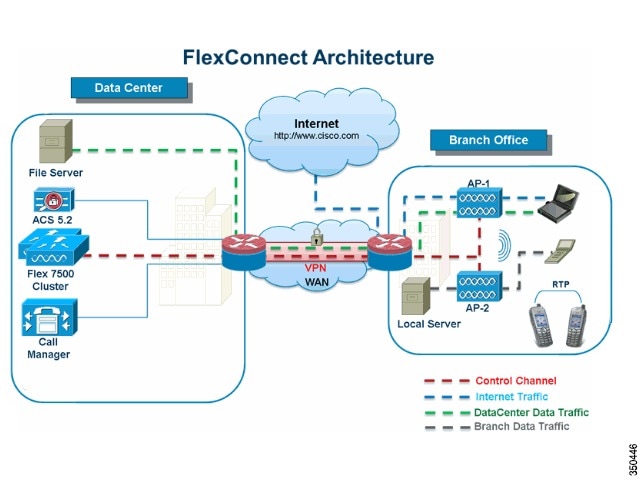
FlexConnect is designed for distributed enterprise environments, such as branch or retail locations, where APs are deployed across a WAN from the central WLC. It addresses the inefficiency of tunneling all traffic back to a central controller.
- Function: FlexConnect allows for a hybrid approach to traffic handling on a per-WLAN basis.
- Central Switching: Traffic is tunneled back to the WLC via CAPWAP, just like in local mode. This is typically used for corporate SSIDs that require access to central resources.
- Local Switching: Traffic is switched directly from the AP onto the local wired network at the branch. This is ideal for guest traffic that just needs internet access.
- Key Advantage: It offers WAN resilience. If the connection to the WLC is lost, a FlexConnect AP can continue to service locally switched WLANs, a state known as standalone mode.
To see a detailed comparison of the traffic flow in Local vs. FlexConnect mode, the following video is very helpful.
CCNA Wireless :: Access Point Modes of Operation
This video from IPexpertInc provides an excellent breakdown of the most common AP modes. We'll watch the segments on Local and FlexConnect to understand their traffic patterns and use cases.
Watch the following two segments: Local Mode (00:51 - 03:00): Pay attention to the traffic flow diagram showing all client traffic going through the CAPWAP tunnel. FlexConnect (HREAP) (03:00 - 09:09): Focus on the explanation of how FlexConnect solves the WAN inefficiency problem by allowing local switching. Note the discussion of survivability when the WAN link fails.
This diagram illustrates a typical FlexConnect deployment, showing the different traffic paths.
Bridge Mode (Mesh)
Bridge mode is used when an AP cannot get a wired connection back to the network. Instead, it forms a wireless backhaul connection to another AP.
- Function: APs form a "mesh" network.
- Root Access Point (RAP): An AP with a wired connection to the network.
- Mesh Access Point (MAP): An AP without a wired connection that connects wirelessly to a RAP or another MAP to reach the network.
- Use Case: Outdoor deployments, historical buildings, or any location where running Ethernet cable is impractical or too expensive.
Fabric Mode (for SD-Access)
This is a specialized mode used in Cisco's Software-Defined Access (SDA) architecture.
- Function: In Fabric mode, the AP is integrated into the SDA fabric. Client data is not tunneled via CAPWAP but is encapsulated in VXLAN and forwarded directly into the fabric underlay from the AP. The control plane connection to the WLC is still maintained via CAPWAP.
- Use Case: Required for APs that are part of an SD-Access deployment, providing seamless policy and segmentation from the wired to the wireless domain.
Test your understanding!
A retail company has 100 stores, each with a local internet connection. The company's WLCs and corporate servers are located in a central data center. Each store needs to provide a "Corporate" SSID for employee devices to access internal inventory systems and a "Guest" SSID for customers. To optimize WAN bandwidth, how should the SSIDs be configured, and which AP mode supports this?
Show answer
The solutions engineer should propose using FlexConnect mode for the APs in each store.
- The "Corporate" SSID should be configured for central switching. This tunnels the traffic back to the data center WLC, allowing employees to securely access internal corporate resources.
- The "Guest" SSID should be configured for local switching. This will forward customer traffic directly out the store's local internet connection, preventing unnecessary guest traffic from traversing the corporate WAN.
2. Network Management & Monitoring Modes
These modes repurpose the AP to act as a dedicated sensor, providing valuable data for network management, troubleshooting, and security. In these modes, the AP does not serve clients.
Let's watch a video that covers these specialized modes.
CCNA Wireless :: Access Point Modes of Operation
Continuing with the IPexpertInc video, we'll now look at the modes that turn an AP into a powerful network tool.
Watch the segments covering the following modes: Monitor Mode (16:45 - 20:11): Understand how a monitor-mode AP acts as a dedicated sensor to improve rogue detection and location accuracy without serving clients. Rogue Detector Mode (21:05 - 22:47): Note the unique function of this mode: radios are off, and it sniffs the wired network for rogue devices. Sniffer Mode (22:47 - 24:12): See how this turns an AP into a remote packet capture device for deep troubleshooting. SE-Connect Mode (24:12 - 26:05): Learn how this mode provides remote Layer 1 spectrum analysis capabilities.
Here's a summary of these modes:
| Mode | Function | Primary Use Case |
|---|---|---|
| Monitor | Radios are dedicated to scanning all channels to listen for rogue devices, interferers, and aid in RRM. | Enhancing security, RF visibility, and location services (like with Cisco CMX). |
| Rogue Detector | Radios are off. The AP monitors the wired network for ARP requests from known rogue clients or APs. | Confirming if a rogue AP detected over the air is connected to your wired network. (Note: Deprecated on newer APs). |
| Sniffer | Captures all 802.11 frames on a specific channel and forwards them to a PC running Wireshark or similar tools. | Remote wireless packet capture for in-depth troubleshooting. |
| SE-Connect | Uses the AP's CleanAir chip to act as a remote spectrum analyzer for tools like Spectrum Expert or Chanalyzer. | Remote Layer 1 RF analysis to identify non-Wi-Fi interference sources. |
3. Hybrid and Sub-Modes
Finally, there are a few other modes or sub-modes worth knowing:
- OfficeExtend AP (OEAP): A special variant of FlexConnect designed for teleworkers. It creates a secure, corporate SSID that is centrally switched while also allowing a personal, locally-switched SSID for home use, all from a single AP.
- Flex+Bridge: Combines the capabilities of FlexConnect and Bridge mode, allowing a mesh AP to support locally switched clients.
- Enhanced Local Mode (ELM): A sub-mode for Local and FlexConnect APs. The AP continues to serve clients on its primary channel but periodically goes off-channel to perform security scanning, providing some of the benefits of a monitor-mode AP without needing a dedicated device.
Conclusion
In this lesson, we have described the key modes of operation for a Cisco Access Point. You now understand that an AP is a versatile device that can be deployed in various roles to meet specific network design requirements.
Key Takeaways:
- AP modes are broadly categorized as client-serving or network management.
- Local Mode is the default for centralized campus deployments, tunneling all traffic to the WLC.
- FlexConnect Mode is essential for branch/remote sites, enabling local traffic switching and WAN survivability.
- Bridge (Mesh) Mode provides wireless backhaul where wired connections are not feasible.
- Fabric Mode integrates the AP into an SD-Access architecture using a VXLAN data plane.
- Monitor, Sniffer, and SE-Connect modes turn the AP into a powerful remote sensor for security, troubleshooting, and RF analysis.
Preview of the Next Lesson:
Now that we understand how APs in different locations connect to the controller and handle traffic (using Local or FlexConnect mode), our next step is to analyze how a client device can move seamlessly between these APs. This process is called roaming. In the next lesson, we will explain the Layer 2 and Layer 3 roaming processes in a wireless network.