Hello! Welcome to our next lesson in the CCNP ENCOR course.
In the previous module, we concluded our deep dive into Layer 2 redundancy by mastering how to troubleshoot Spanning Tree Protocol. We learned how to ensure a loop-free and efficient path for traffic within a switched LAN environment. Now, we shift our focus from redundancy within the LAN to redundancy at its edge.
This lesson introduces First-Hop Redundancy Protocols (FHRPs), which solve a critical single point of failure: the default gateway. Specifically, we will focus on Cisco's proprietary solution, the Hot Standby Router Protocol (HSRP). Our goal is to analyze HSRP operation, including its use of a virtual IP, the priority-based election process, and the role of preemption.
1. The Problem: A Single Point of Failure
Imagine a typical enterprise network. All end-user devices—laptops, desktops, servers—are configured with the IP address of a single default gateway router to communicate with the rest of the network and the internet.
What happens if that single router fails?
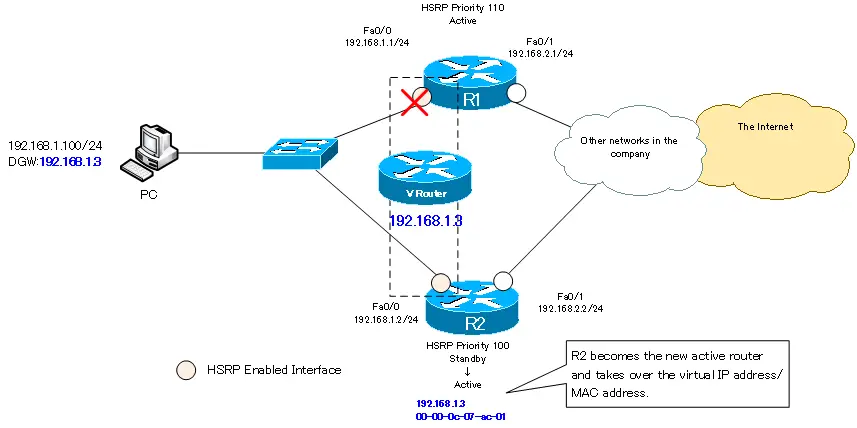
Since end devices can only point to one gateway at a time, a router failure effectively isolates the entire subnet. Manually reconfiguring every device with a new gateway IP is not a scalable or practical solution. We need an automatic, transparent failover mechanism. This is where HSRP comes in.
2. The HSRP Solution: A Virtual Router
HSRP provides high availability by creating the illusion of a single, continuously available virtual router. A group of physical routers work together, sharing a common virtual IP (VIP) and virtual MAC address. From the perspective of the end devices, this virtual router is their default gateway, and it never goes down.
To understand this core concept, please watch the beginning of the following video.
Understanding (and Configuring) HSRP
This video from Kevin Wallace Training provides an excellent introduction to the HSRP concept. It clearly explains the idea of a virtual router that masks the failure of a physical device from end hosts.
Please watch the first 1 minute and 45 seconds of the video, which covers the fundamental purpose of HSRP and introduces the roles of active and standby routers.
Within an HSRP group, routers take on specific roles:
- Active Router: This router is responsible for forwarding traffic sent to the virtual IP address. It actively responds to ARP requests for the VIP with the shared virtual MAC address.
- Standby Router: This router listens for status updates from the active router and is prepared to take over immediately if the active router fails.
- Other Routers: Any other routers in the group remain in a listen state, ready to become the standby router if the current standby takes over the active role.
3. HSRP Operation and Election
How do the routers in a group communicate and decide on their roles? And how does the standby router know when the active router has failed?
Hello Messages and Timers
HSRP routers exchange Hello messages at regular intervals. These are multicast messages (sent to 224.0.0.2 for HSRPv1 or 224.0.0.102 for HSRPv2) that contain information about the router's HSRP state and priority.
- Hello Timer: By default, Hello messages are sent every 3 seconds.
- Hold Timer: The standby router listens for these Hellos. If it doesn't hear from the active router within the Hold Time (default is 10 seconds), it assumes the active router has failed and transitions to the active state itself.
Let's continue with the video to see how this works.
Understanding (and Configuring) HSRP
The next segment of the video explains the role of Hello messages and the default timers in HSRP's failure detection mechanism.
Please watch from 01:45 to 02:54.
The Election Process: Priority and IP Address
The election of the active router is determined by the HSRP priority value, which is configured on a per-interface basis.
- The router with the highest priority wins the election and becomes the active router.
- The default priority is 100. The range is 0 to 255.
- In case of a tie in priority, the router with the highest IP address on its HSRP-enabled interface becomes the active router.
This process is fundamental to controlling which router becomes the primary path for your traffic.
HSRP (Hot Standby Routing Protocol)
This article from NetworkLessons.com provides a clear, practical explanation of the HSRP election process, including how to verify the results.
Please read the sections 'Each HSRP router will go through several states...' and 'Active Gateway Election'. Pay close attention to the state transitions (Init, Listen, Speak, Standby, Active) and the rules for election (highest priority, then highest IP).
You can verify the HSRP status using the show standby and show standby brief commands. These commands are essential for troubleshooting and will show you:
- The HSRP group and virtual IP.
- The router's current state (e.g., Active, Standby).
- The configured priority.
- The IP address of the active and standby routers.
4. Forcing a Failback: Preemption
There's a crucial detail in the default HSRP behavior. Let's say you have two routers:
- R1 (Primary): Priority 110
- R2 (Backup): Priority 100
Initially, R1 becomes active. If R1 fails, R2 correctly takes over the active role. But what happens when R1 comes back online?
By default, nothing. R2 will remain the active router, even though R1 has a higher priority. The network continues to use a suboptimal path through R2. This is because preemption is disabled by default.
Preemption is the mechanism that allows a router with a higher priority to forcefully take over the active role from a router with a lower priority. When preemption is enabled on R1, it will reclaim its active role shortly after it comes back online, ensuring the most preferred path is always used.
Understanding (and Configuring) HSRP
Let's revisit the Kevin Wallace video for a concise explanation of what preemption is and why it's important.
Please watch from 04:23 to 05:00 to understand the concept of preemption.
Enabling preemption is a best practice in most designs where you have a clear primary and backup router.
HSRP (Hot Standby Routing Protocol)
Now, let's see how to configure preemption and observe its effect. This section of the NetworkLessons article demonstrates the configuration and the resulting change in the active router.
Please read the section 'Preemption' to see the standby preempt command in action.
5. Configuration and Verification
Now that we understand the core components—virtual IP, priority, and preemption—let's see how they are configured in Cisco IOS. A typical HSRP setup involves:
- Defining the HSRP group number and virtual IP address on the participating routers' interfaces (
standby <group> ip <virtual_ip>). - Setting a higher priority on the primary router (
standby <group> priority <value>). - Enabling preemption on the primary router (and often on the standby as well) to ensure predictable failover and failback (
standby <group> preempt).
This final video segment puts all these pieces together in a live demonstration.
Understanding (and Configuring) HSRP
Watch this segment to see a complete basic HSRP configuration, including setting the virtual IP, adjusting priority, and enabling preemption.
Please watch from 06:12 to 11:34. This covers both the configuration commands and the verification commands (show standby brief and show standby) used to confirm the operational state.
Test your understanding!
You have two routers, R1 and R2, configured for HSRP group 10 on their GigabitEthernet0/1 interfaces.
- R1: IP address
192.168.1.2, HSRP priority105 - R2: IP address
192.168.1.3, HSRP priority105
- Which router becomes the active router when both are first powered on? Why?
- Now, R1 is rebooted. When it comes back online, which router will be active if preemption is disabled on both?
- How would you change the configuration to ensure R2 is always the preferred active router, and that it reclaims the active role if it ever fails and comes back online?
Show answer
- R2 becomes active. Since the HSRP priorities are identical (105), the tie-breaker is the highest IP address. R2's IP (
192.168.1.3) is higher than R1's (192.168.1.2), so R2 wins the election. - R2 will remain active. When R1 reboots, R2 is already the active router. Since preemption is disabled, R1 cannot force a new election to become active, even if it had a higher priority. In this case, with equal priorities and R2 having the higher IP, R1 would become the standby router.
- To make R2 the preferred active router and ensure it reclaims the active role, you would:
- Increase R2's priority to a value higher than R1's (e.g.,
standby 10 priority 110on R2's Gi0/1 interface). - Enable preemption on R2 (
standby 10 preempton R2's Gi0/1 interface). This allows it to take over the active role from R1 if R1 were ever active with a lower priority.
- Increase R2's priority to a value higher than R1's (e.g.,
Conclusion
In this lesson, we analyzed the fundamental operation of HSRP. We moved from understanding the problem of a single-point-of-failure default gateway to implementing a robust, redundant solution.
Key Takeaways:
- HSRP provides first-hop redundancy by creating a virtual router with a shared virtual IP and virtual MAC address.
- The active router is elected based on the highest HSRP priority. If priorities are equal, the highest IP address wins.
- The standby router detects an active router failure when it stops receiving Hello messages for the duration of the hold timer (10 seconds by default).
- Preemption, which is disabled by default, allows a higher-priority router to forcefully reclaim the active role, ensuring the network uses the intended optimal path.
Preview of the Next Lesson:
HSRP is a powerful tool, but it is a Cisco-proprietary protocol. What if you're in a multi-vendor environment? In our next lesson, we will explore an open-standard alternative that accomplishes the same goal: the Virtual Router Redundancy Protocol (VRRP). We will configure and verify VRRP, and compare its operation to HSRP.