Hello! Welcome to the final lesson in our module on First-Hop Redundancy.
In our previous lessons, we explored HSRP and VRRP, both excellent protocols for providing default gateway redundancy. We saw how they use an active/standby or master/backup model to ensure a single point of failure is avoided. However, in those models, the backup router's bandwidth remains largely unused, waiting for a failover.
As a solutions engineer, you're always thinking about efficiency and maximizing resource utilization. This brings us to our topic today: the Gateway Load Balancing Protocol (GLBP). GLBP is Cisco's answer to the question, "How can we achieve first-hop redundancy while also actively using all available gateway routers?"
This lesson covers how to configure and verify GLBP for load balancing and first-hop redundancy. We will dissect how GLBP achieves this unique feat and how you can manipulate its behavior for sophisticated traffic engineering.
1. The GLBP Innovation: One Virtual IP, Many Virtual MACs
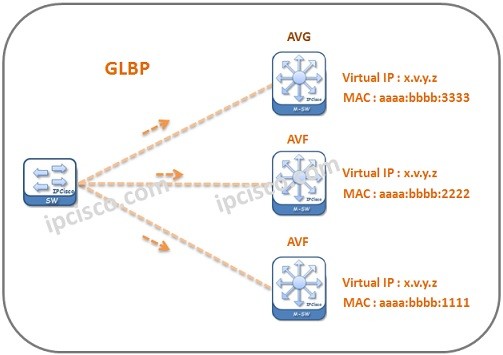
GLBP's core innovation is decoupling the virtual IP address from the virtual MAC address. While clients still point to a single virtual IP address as their default gateway, GLBP intelligently provides different clients with different virtual MAC addresses, effectively steering their traffic towards different physical routers.
To manage this process, GLBP introduces two distinct roles:
- Active Virtual Gateway (AVG): Think of the AVG as the "manager" or "controller" of the GLBP group. Only one router is the AVG at any time. It is elected based on the highest priority, just like in HSRP. The AVG's primary job is to respond to ARP requests for the virtual IP address.
- Active Virtual Forwarder (AVF): These are the "workers." An AVF is a router that actively forwards packets sent to the virtual MAC address it has been assigned. A single GLBP group can have up to four AVFs simultaneously. The AVG is responsible for assigning a unique virtual MAC address to each AVF.
When a client ARPs for the virtual IP, the AVG replies with one of the AVF's virtual MAC addresses. When another client ARPs, the AVG can reply with a different AVF's virtual MAC. The result? Different clients on the same subnet use different physical routers as their gateway, achieving true load balancing.
To see this process explained, let's watch a short video.
ENCOR (350-401) Topic: Understanding and Configuring GLBP (Gateway Load Balancing Protocol)
This video from Kevin Wallace Training provides a clear introduction to GLBP theory, explaining the roles of the AVG and AVF and how they work together to load-balance traffic.
Please watch from 00:20 to 03:54. Focus on how the AVG responds to ARP requests from different PCs with different virtual MAC addresses.
2. Basic GLBP Configuration and Verification
The command syntax for GLBP is very similar to HSRP and VRRP, making it straightforward to configure.
Let's see a hands-on demonstration of a basic GLBP setup. The following video covers the initial configuration and the essential verification commands.
ENCOR (350-401) Topic: Understanding and Configuring GLBP (Gateway Load Balancing Protocol)
We'll continue with the same video, which now moves into a practical lab demonstration. It covers setting the virtual IP, influencing the AVG election with priority, and enabling preemption.
Please watch from 03:54 to 09:06. Pay close attention to the show glbp and show glbp brief commands and how to interpret their output to identify the AVG and AVFs.
As you saw, the key commands on the interface are:
glbp <group-number> ip <virtual-ip-address>: Enables GLBP and sets the virtual IP for the group.glbp <group-number> priority <level>: Sets the priority (1-255, default 100) to influence the AVG election. The router with the highest priority becomes the AVG.glbp <group-number> preempt: Allows a router with a higher priority to take over the AVG role from the current AVG. Like HSRP, this is disabled by default.glbp <group-number> authentication ...: Configures authentication (text or MD5) for the group.
Verification Commands
show glbp brief: This is your go-to command for a quick overview. The first line for a given group shows the AVG status (Active, Standby, Listen), its priority, and the active and standby AVG routers. Subsequent lines show the status of each AVF (referred to as "Fwd"), its state, and its virtual MAC address.show glbp: This command provides a detailed view, including timers, authentication details, weighting information, and the state of each forwarder.
3. Controlling the Load: GLBP Load-Balancing Methods
By default, the AVG uses a round-robin algorithm to distribute AVF virtual MAC addresses. This treats all AVFs equally. However, you might have routers with different forwarding capacities. GLBP provides methods to control this distribution.
For a deeper dive into the configuration options, the official Cisco documentation is the best resource.
Network Services Configuration Guide, Cisco IOS XE 17.x
The official Cisco IOS XE Configuration Guide provides the definitive explanation of GLBP's features. We will use it to understand the different load-balancing methods and other customizable parameters.
In the 'How to Configure GLBP' section, find and read the table row for the glbp group load-balancing command under the 'Customizing GLBP' subsection. This will explain the three available methods.
The three load-balancing methods are:
- Round-robin (default): The AVG cycles through the list of AVF virtual MAC addresses for consecutive ARP requests.
- Weighted: You assign a
weightvalue to each router in the GLBP group. The AVG then distributes traffic proportionally to these weights. A router with a weight of 100 will be assigned twice as much traffic as a router with a weight of 50. This is perfect for heterogeneous environments. - Host-dependent: This method ensures that a specific host (identified by its MAC address) will always receive the same virtual MAC address in response to its ARP requests. This can be useful for applications that require a consistent gateway path.
4. Advanced Control: Weighting and Object Tracking
Here is where GLBP truly shines. The weighting mechanism is not just for load balancing; it's also the primary mechanism for an AVF to determine if it is healthy enough to forward traffic. This is where object tracking comes into play.
Unlike HSRP/VRRP where tracking typically decrements priority to trigger a role change, in GLBP, tracking is used to decrement a forwarder's weight.
The process is as follows:
- Define a weight and thresholds: You configure an initial weight on a GLBP router and set upper and lower thresholds.
glbp <group> weighting <initial-weight> lower <lower-threshold> upper <upper-threshold> - Define a tracked object: You create a
trackobject, just as you did for VRRP (e.g., tracking an interface line protocol or IP SLA reachability).
track <object-id> interface <type/num> line-protocol - Link the object to GLBP weighting: You instruct GLBP to decrement its weight if the tracked object goes down.
glbp <group> weighting track <object-id> decrement <value>
If the tracked object fails, the router's weight is reduced. If its weight drops below the lower threshold, it relinquishes its role as an AVF and stops forwarding traffic for its virtual MAC. For it to become an AVF again, its weight must recover and rise above the upper threshold. This hysteresis mechanism prevents the AVF from flapping if the tracked object is unstable.
The following part of the video provides an excellent demonstration of this advanced feature.
ENCOR (350-401) Topic: Understanding and Configuring GLBP (Gateway Load Balancing Protocol)
This final section of the video demonstrates how to configure weighted load balancing and combine it with object tracking to dynamically adjust a router's forwarding status based on network conditions.
Watch from 13:52 to 21:59. This is a critical section that ties together weighting, thresholds, and object tracking to create a highly resilient and intelligent forwarding plane.
Test your understanding!
You have two routers, R1 and R2, in a GLBP group.
- R1:
glbp 10 priority 150,glbp 10 preempt,glbp 10 weighting 100 - R2:
glbp 10 priority 100,glbp 10 weighting 120 lower 80 upper 90 - R2 is also configured with:
track 1 interface Serial0/0/0 line-protocolandglbp 10 weighting track 1 decrement 30.
- Which router becomes the AVG and why?
- Initially, both routers are healthy. Which router is likely to handle more traffic and why? (Assuming round-robin is not in use and weighted balancing is configured).
- The
Serial0/0/0interface on R2 goes down. What happens to R2's role in the GLBP group? What is its new weight? - After the failure, R1 also fails completely. What happens now?
Show answer
- R1 becomes the AVG. The AVG is elected based on the highest priority (150 vs 100).
- R2 will handle more traffic. The proportion of traffic is determined by the
weighting, not the priority. R2 has a higher weight (120) than R1 (100), so the AVG will assign R2's virtual MAC address more frequently. - R2 stops being an Active Virtual Forwarder (AVF). When the tracked interface goes down, R2's weight is reduced by 30. Its new weight becomes 90 (120 - 30). Because this new weight (90) is not below the configured lower threshold of 80, the question is slightly tricky. Re-reading the video transcript, Kevin Wallace states "if I drop below 50, not if I equal 50". So, the weight must be strictly less than the lower threshold. Let's assume this behavior. Ah, let's re-read the cisco docs
glbp group weighting maximum [lower lower] [upper upper]. Let's assume the standard behavior isweight < lower. If the decrement was 45 instead, the new weight would be 75. Since 75 is below the lower threshold of 80, R2 would cease to be an active forwarder. The remaining active forwarder, R1, would take over forwarding for R2's virtual MAC address.
Correction based on standard behavior: R2's weight becomes 90 (120-30). This is not below the lower threshold of 80. Therefore, R2 remains an active AVF. If the decrement had been 41, the new weight would be 79, which is below 80, and R2 would stop being an AVF. - R2 becomes the AVG and the sole AVF. When R1 fails, R2 (the standby AVG) is promoted to become the new AVG. It is also the only remaining router, so it will become the AVF for all virtual MAC addresses and handle 100% of the traffic, despite its reduced weight from the downed serial link. This demonstrates that GLBP provides redundancy even when load-balancing capabilities are degraded.
Conclusion
Congratulations on completing our module on First-Hop Redundancy Protocols! You have progressed from simple active/standby redundancy with HSRP and VRRP to dynamic, intelligent load balancing with GLBP. This knowledge is invaluable for designing enterprise networks that are not only resilient but also efficient.
Key Takeaways:
- GLBP is a Cisco-proprietary FHRP that provides both redundancy and load balancing.
- It uses an Active Virtual Gateway (AVG) to manage the group and respond to ARPs, and multiple Active Virtual Forwarders (AVFs) to forward traffic.
- Load balancing is achieved by assigning unique virtual MAC addresses to each AVF for a single virtual IP.
- Load distribution can be controlled via round-robin, weighted, or host-dependent methods.
- Object tracking integrates with the weighting mechanism, not priority, to allow an AVF to dynamically remove itself from the forwarding path if an upstream link fails.
Preview of the Next Module:
We now pivot from ensuring local subnet resiliency to the core of enterprise networking: dynamic routing. Our next module, EIGRP Routing, will introduce you to Cisco's advanced distance-vector protocol. We will start by analyzing EIGRP's packet types and its powerful DUAL algorithm, which ensures loop-free paths through the network.