Hello! Welcome to the next lesson in our journey toward the CCNP ENCOR certification.
In our previous lessons, we've focused on how the Spanning Tree Protocol, in its various forms like RSTP and MST, builds an efficient and loop-free Layer 2 topology. However, a well-designed network must also be resilient. It needs protection against accidental misconfigurations, unauthorized device connections, and hardware failures that could destabilize the STP topology.
This lesson focuses on exactly that: securing your Spanning Tree domain. We will configure and verify STP protection features including BPDU Guard, Root Guard, and Loop Guard. Mastering these tools is essential for building robust and predictable enterprise networks, moving beyond just functionality to ensure stability and security.
1. Protecting the Root Bridge: Root Guard
The stability of your entire Spanning Tree topology depends on the predictable placement of the root bridge. If a new or misconfigured switch with a superior (lower) bridge ID is added to the network, it can illegitimately become the new root. This can cause a complete reconvergence and shift traffic patterns to a suboptimal path, potentially overwhelming lower-bandwidth links and leading to performance issues or outages.
Root Guard is the feature designed to prevent this from happening.
How Root Guard Works
When you enable Root Guard on a port, you are essentially stating, "A root bridge should never be on the other side of this link." The port remains a designated port (DP) and continues to function normally. However, if it receives a superior BPDU—a BPDU that would normally cause it to become a root port (RP)—it does not accept the new root.
Instead, the port is put into a root-inconsistent state. In this state, the port is blocked for all traffic, effectively preventing the rogue switch from influencing the topology. A key characteristic of Root Guard is its automatic recovery. Once the port stops receiving superior BPDUs, it automatically unblocks and transitions back through the normal STP listening, learning, and forwarding states.
The following video provides an excellent demonstration of this entire process.
Learn STP Protection From Zero | Root Guard, Loop Guard, BPDU Guard and BPDU Filter #cisco #ccnp
This segment from PM Networking clearly explains the threat of a rogue root bridge and provides a step-by-step demonstration of how Root Guard prevents it. Pay close attention to the port state before and after the feature is triggered.
Please watch from 05:18 to 25:07. The video will show: How a new switch with a low priority can take over the root bridge role. The configuration of Root Guard on a designated port. How the port enters a 'root-inconsistent' state when a superior BPDU is received. How the port automatically recovers once the threat is removed.
Configuration and Placement
As you saw, Root Guard is configured on a per-interface basis.
Switch(config)# interface <interface-id>
Switch(config-if)# spanning-tree guard root
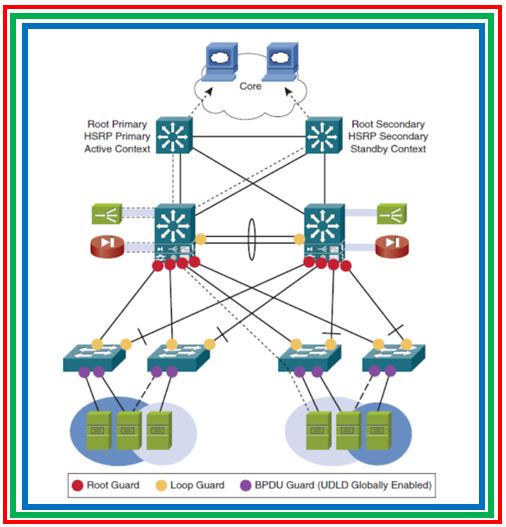
The crucial design question is where to enable it. You should enable Root Guard on all designated ports where you do not expect to see a root bridge. In a typical hierarchical design, this means enabling it on distribution-layer switch ports that connect down to access-layer switches.
2. Securing Access Ports: BPDU Guard
While Root Guard protects the core of your STP domain, your network edge also needs protection. Access ports are intended for end devices like PCs, printers, and IP phones—devices that should not be participating in STP. If a user connects an unauthorized switch to an access port, it could start sending BPDUs, potentially creating a loop or other instability.
BPDU Guard is the feature that protects against this.
How BPDU Guard Works
BPDU Guard is typically enabled on ports configured with PortFast. When a port with BPDU Guard enabled receives any BPDU, it is assumed that an unauthorized device has been connected. The switch immediately puts the port into an err-disabled state, effectively shutting it down and logging a security violation.
This is a critical difference from Root Guard:
- State: BPDU Guard puts the port in
err-disabled(a shutdown state), while Root Guard usesroot-inconsistent(a blocking state). - Recovery: The
err-disabledstate requires manual intervention by an administrator (ashutdownfollowed by ano shutdownon the interface) or automatic recovery can be configured with theerrdisable recovery cause bpduguardcommand. This is a much stricter response than Root Guard's automatic recovery.
Let's watch a demonstration of BPDU Guard in action.
Learn STP Protection From Zero | Root Guard, Loop Guard, BPDU Guard and BPDU Filter #cisco #ccnp
Continuing with the PM Networking video, this next segment focuses on BPDU Guard. It clearly explains its purpose on access ports and demonstrates the 'err-disable' mechanism.
Watch from 42:01 to 52:03. This part will show you: The risk of receiving BPDUs on an access port. How to enable BPDU Guard. The port being placed into the 'err-disabled' state and the corresponding log messages.
Configuration and Placement
BPDU Guard can be enabled globally on all PortFast-enabled interfaces, which is the most common and scalable method.
Switch(config)# spanning-tree portfast bpduguard default
Alternatively, it can be applied to a specific interface:
Switch(config)# interface <interface-id>
Switch(config-if)# spanning-tree bpduguard enable
You should enable BPDU Guard on all access-layer ports that connect to end-user devices.
Test your understanding!
An engineer is reviewing the STP design. They want to prevent switches in a new building from ever becoming the root bridge. They also want to immediately shut down any port where a user plugs in a personal switch at their desk.
Which feature should they use on the distribution switch ports connecting to the new building, and which should they use on the access switch ports connected to user desks?
Show answer
- Distribution ports to the new building: They should use Root Guard. This prevents the downstream switches from becoming root but still allows them to participate in STP. If a superior BPDU is received, the port will block but recover automatically once the issue is fixed.
- Access ports for users: They should use BPDU Guard. This provides a hard shutdown (
err-disable) of the port if any BPDU is detected, which is appropriate for a security violation on a port intended only for an end device.
3. Preventing Unidirectional Link Failures: Loop Guard
Some of the most insidious Layer 2 loops are caused by unidirectional link failures, which are common with fiber optic cabling. A link can fail in one direction (e.g., the transmit fiber breaks) while remaining operational in the other. A switch port may therefore stop receiving BPDUs but can still send traffic.
When a root or alternate port stops receiving BPDUs, it will eventually time out the old STP information (after MaxAge). It might then incorrectly transition to a designated, forwarding state, creating a forwarding loop.
Loop Guard is designed to prevent this specific scenario.
How Loop Guard Works
Loop Guard keeps track of BPDUs on non-designated ports (root and alternate ports). If these ports stop receiving BPDUs, Loop Guard does not allow them to transition to a designated state. Instead, it places the port into a loop-inconsistent state. This is a blocking state that prevents the port from forwarding traffic, thus averting the loop.
Like Root Guard, recovery is automatic. As soon as BPDUs are received again on the port, it exits the inconsistent state and resumes normal STP operation.
Additional STP Protection Mechanisms - Cisco Press
The official CCNP cert guide provides a concise explanation of Loop Guard and the problem of unidirectional links. This text will solidify the concept before we see it in a lab.
Please read the sections titled 'Problems with Unidirectional Links' and 'STP Loop Guard'. Focus on how a unidirectional failure can lead to a loop and how Loop Guard's 'loop-inconsistent' state prevents it.
Now, let's see a lab that cleverly simulates this failure and shows Loop Guard's effectiveness.
CCNP ENCOR // STP Root Guard & Loop Guard (LAB) / BPDU Filter // ENCOR 350-401 Complete Course
This lab from Jeremy's IT Lab uses a creative technique to demonstrate Loop Guard. It uses BPDU Filter (which we'll touch on next) to stop BPDUs from being sent, perfectly simulating a unidirectional failure.
Watch from 06:05 to 12:04. This segment covers: How a Layer 2 loop is created when BPDUs are lost on a root port. Enabling Loop Guard globally. Verifying that Loop Guard places the port in a 'loop-inconsistent' state to prevent the loop. Watching the port automatically recover when BPDUs are restored.
Configuration and Placement
Loop Guard can be enabled globally on all point-to-point links, which is a common best practice.
Switch(config)# spanning-tree loopguard default
Or on a per-interface basis:
Switch(config)# interface <interface-id>
Switch(config-if)# spanning-tree guard loop
It should be enabled on all switch-to-switch links, particularly on fiber connections in your distribution and core layers where unidirectional failures are more likely. Note: You should not enable Loop Guard on ports where PortFast is enabled.
4. A Note on BPDU Filter
You saw BPDU Filter used in the last lab. While not a primary protection mechanism like the others, it's important to know what it does. BPDU Filter stops a port from sending or receiving BPDUs, effectively disabling STP on that interface.
- When configured on an interface: It unconditionally stops all BPDU traffic.
- When configured globally: It is only active on PortFast operational ports. If such a port receives a BPDU, it loses its PortFast status, and BPDU Filter is disabled, allowing normal STP operation.
BPDU Filter should be used with extreme caution as it can easily cause loops. Its main use case is on ports connected to devices that do not speak STP (like a router or a server) to prevent unnecessary BPDUs from being sent to them.
Conclusion
In this lesson, we added a critical layer of security and stability to our Spanning Tree Protocol knowledge. By understanding and deploying STP's protection features, you can build a far more resilient network that is defended against common configuration errors and physical link failures.
Key Takeaways:
| Feature | Threat | Mechanism | Port State | Recovery | Typical Placement |
|---|---|---|---|---|---|
| Root Guard | Rogue or misconfigured switch becoming the root bridge. | Blocks ports that receive superior BPDUs. | root-inconsistent |
Automatic | Designated ports facing other switches (e.g., distribution to access). |
| BPDU Guard | Unauthorized switches/hubs connected to access ports. | Shuts down a PortFast port that receives any BPDU. | err-disabled |
Manual (or timed recovery) | All user-facing access ports (with PortFast). |
| Loop Guard | Unidirectional link failures causing a root/alt port to become designated. | Blocks a non-designated port that stops receiving BPDUs. | loop-inconsistent |
Automatic | All point-to-point switch-to-switch links (non-PortFast). |
Preview of the Next Lesson:
Now that we know how to design, configure, and secure an STP topology, the final step is to learn how to fix it when things go wrong for other reasons. In our next lesson, we will focus on how to troubleshoot spanning tree topology issues including blocked ports and suboptimal paths, using a systematic approach and key verification commands.