Hello! Welcome back to our journey toward your CCNP ENCOR certification.
In our last lesson, we constructed a resilient, multihomed BGP architecture, using policies like local preference and AS-path prepending to manage traffic flow. Building such a network is one thing; fixing it when it breaks is another. As a solutions engineer, a logical and efficient troubleshooting methodology is one of your most valuable skills.
This lesson directly addresses that need and covers the learning outcome: Troubleshoot BGP peering issues and route advertisement problems. We will develop a systematic approach to diagnose the two major categories of BGP failures: problems establishing a neighbor relationship and problems with the exchange of routing information.
1. The Foundation: Troubleshooting BGP Peering
Before any routes can be exchanged, two BGP routers must successfully establish a TCP connection and agree on session parameters. When this fails, the neighbor relationship will not become Established. The key to troubleshooting this is understanding the BGP Finite State Machine (FSM).
The BGP Finite State Machine (FSM)
The FSM is a sequence of states that a BGP session must progress through to become fully operational. Understanding these states tells you where in the process the failure is occurring.

To explore these states in detail, let's watch a video that breaks down the FSM into two distinct phases, which is a very effective way to structure your troubleshooting.
CCIE R&S Instructor JP Discussing BGP States
This video from IPexpertInc provides a clear, step-by-step walkthrough of the BGP FSM. It excellently categorizes the states into a TCP-dependent phase and a BGP-dependent phase, which helps narrow down potential problems.
Watch the following two segments: The TCP-Dependent States (00:58 - 05:12): Pay attention to the Idle, Connect, and Active states. Note that problems in this phase are not BGP configuration issues but are related to underlying TCP connectivity (IP reachability, ACLs, firewalls). The BGP-Dependent States (05:12 - 09:24): Focus on the OpenSent, OpenConfirm, and Established states. Understand that the routers exchange Open messages here and that failures are caused by mismatched BGP parameters (e.g., wrong AS number, timers, authentication).
A Two-Phase Troubleshooting Approach
As the video explained, you can diagnose peering issues by identifying which phase the BGP session is stuck in. You can see the current state using the show ip bgp summary command.
Phase 1: TCP Connectivity Issues (States: Idle, Connect, Active)
If your BGP neighbor is stuck in Idle, Connect, or Active, the problem is almost always a failure to establish a TCP session on port 179.
- Common Causes:
- No IP route to the neighbor's IP address.
- Incorrect IP address in the
neighborcommand. - An Access Control List (ACL) or firewall is blocking TCP port 179.
- For iBGP, the source IP address of the TCP session might not be what the neighbor expects (solved with
neighbor <ip> update-source <interface>).
- Troubleshooting Steps:
show ip bgp summary: Confirm the state is Idle, Connect, or Active.ping <neighbor_ip>: Verify basic Layer 3 reachability. If using loopbacks for peering, ensure you can ping the neighbor's loopback from your own loopback (ping <neighbor_loopback> source <my_loopback>).telnet <neighbor_ip> 179: A direct test of TCP port 179 connectivity. If it fails, an ACL or firewall is the likely culprit.
Phase 2: BGP Parameter Mismatches (State: OpenSent)
If the state is flapping or stuck in OpenSent, TCP connectivity is working, but the routers cannot agree on BGP parameters. The router that finds a mismatch will send a BGP Notification message and tear down the TCP session.
- Common Causes:
- Mismatched AS Number: The
remote-asconfigured on one router does not match the actual AS of the neighbor. This is the most common cause. - BGP Authentication Mismatch: If MD5 authentication is used, the passwords do not match.
- Mismatched Timers: BGP hold timers do not match, and the configuration requires them to.
- Mismatched AS Number: The
- Troubleshooting Steps:
show ip bgp summary: Confirm the state (it will likely flap back to Idle quickly).show loggingorshow log: Check for BGP error messages. A "peer in wrong AS" or "MD5 authentication" error is very explicit.- Review the configuration on both peers (
show run | section router bgp) to find the mismatched parameter. The packet capture in the video you watched (from 09:24 onwards) provides a great visualization of how a "wrong AS" notification appears.
2. Troubleshooting Route Advertisement
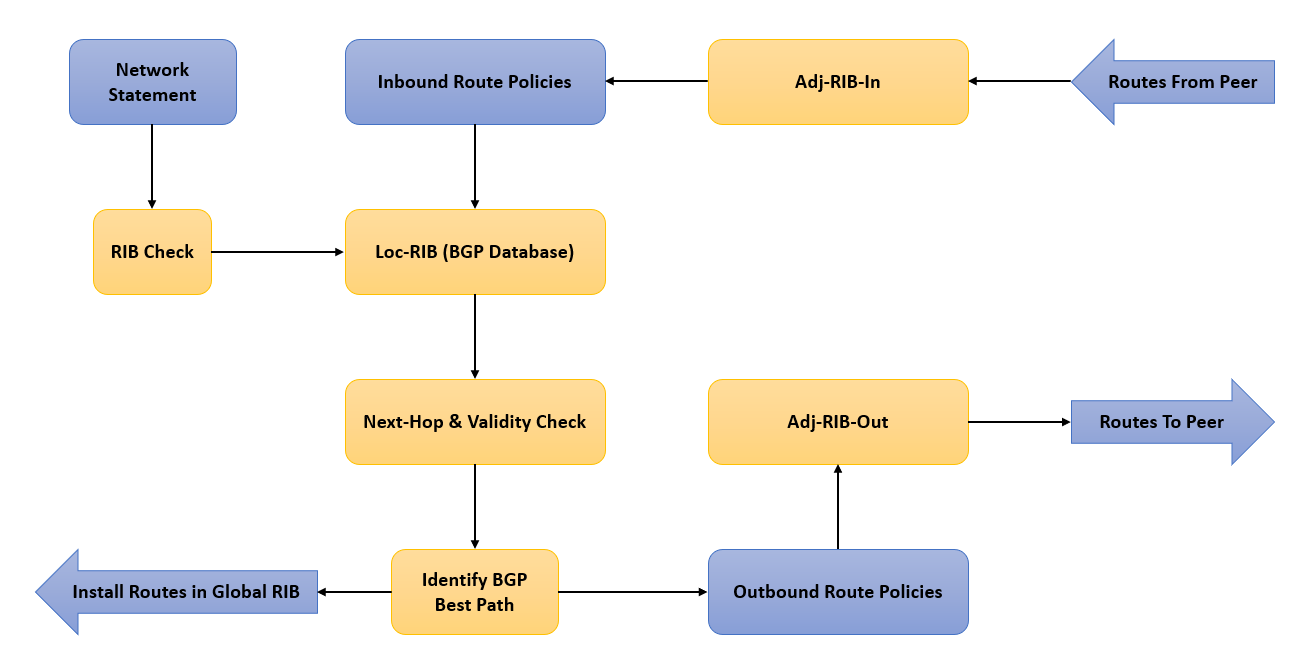
Once the peering is Established, the next challenge is ensuring routes are advertised and accepted correctly. A route may be missing, or it may be received but not used.
Problem 1: Route is Missing
If a neighbor is not receiving a prefix you expect to be advertising, the issue lies on the advertising router.
-
Is the route in the advertiser's BGP table?
- BGP can only advertise routes that are in its own BGP table. Check with
show ip bgp <prefix>. - If the route is not there, you need to inject it. As we reviewed in the last lesson, the
networkcommand requires an exact match (prefix and mask) in the router's main IP routing table (show ip route). Redistribution from an IGP is another method.
- BGP can only advertise routes that are in its own BGP table. Check with
-
Is the route being advertised to the neighbor?
- Even if a route is in the BGP table, an outbound policy might be filtering it.
- The single most useful command here is
show ip bgp neighbor <ip> advertised-routes. This shows you exactly what you are sending to that specific peer after any outbound filters have been applied. If the route isn't in this output, check your route-maps, prefix-lists, and AS-path filters applied to the neighbor.
Problem 2: Route is Received but Not Used (Not "Best")
This is one of the most common and subtle BGP issues, particularly within an iBGP environment. The receiving router sees the prefix in its BGP table (show ip bgp), but it is not marked with a > symbol, meaning it's not the "best" path and will not be installed in the IP routing table.
The most frequent cause of this is an unreachable next-hop.
The "Internal BGP Explained" resource provides a clear, step-by-step guide through this exact scenario.
Internal BGP (Border Gateway Protocol) Explained
This article, 'Internal BGP Explained' from NetworkLessons.com, perfectly illustrates the unreachable next-hop problem. It walks through a topology where a router receives an iBGP update but cannot use it because the next-hop address is not locally reachable.
Read the sections titled 'Next Hop' and 'Traffic Black Hole'. In 'Next Hop', focus on why router R4 fails to install the prefix from R2. The key insight is that iBGP does not change the next-hop attribute by default. See how the next-hop-self command on R2 resolves this issue for R4. In 'Traffic Black Hole', understand why R3, a router in the transit path not running BGP, drops the traffic. This reinforces why all transit routers in an AS must run iBGP.
To diagnose an invalid next-hop:
- Run
show ip bgp <prefix>on the receiving router. - Look at the output. If the route is not best, the router will often explicitly state why. A common reason is
Nexthop invalidorNexthop inaccessible. - Check the router's main routing table for a route to the next-hop address listed in the BGP entry:
show ip route <next_hop_ip>. - If there's no route, you've found the problem. The solution, as the article describes, is to use the
neighbor <ip> next-hop-selfcommand on the iBGP peer that is advertising the route.
3. A Practical Troubleshooting Scenario
Now let's watch a real-world troubleshooting scenario that consolidates these concepts. This video walks through a ticket where PCs cannot reach servers, and the engineer methodically works through the BGP configuration to find the root cause.
BGP Real-Time Scenario Troubleshooting | Learn Network Troubleshooting | CCNP and CCIE T-shoot
This video from PM Networking is an excellent demonstration of a structured BGP troubleshooting process. It simulates a real support ticket and uses a series of verification commands to isolate a next-hop reachability problem in an iBGP network.
As you watch, focus on the process the engineer uses: Initial Checks (05:34 - 11:53): The engineer verifies that the edge router (R2) is receiving the prefix but its iBGP peers (R4, R5) are not installing it. Notice the use of show ip bgp and show ip bgp neighbor advertised-routes. Diagnosing the 'Not Best' Route (18:11 - 22:19): This is the key part. The engineer uses show ip bgp <prefix> on R4 and sees the message inaccessible next to the next-hop IP (1.1.1.1). He confirms this by checking the routing table (show ip route 1.1.1.1), which has no entry. Applying the Fix (31:10 - 35:14): The engineer applies the next-hop-self command on the edge routers (R2 and R3) for their iBGP peerings to R4 and R5. He then verifies that the routes become 'best' in R4's and R5's BGP tables.
This video is a powerful example of how to move from a symptom ("no connectivity") to a root cause by logically checking each link in the chain: routing table, BGP table, neighbor advertisements, and path validity.
Test your understanding!
You are troubleshooting a new iBGP peering between router R1 and R2. show ip bgp summary on R1 shows the state for R2 as Active.
- What is the most likely category of problem? (e.g., Layer 1, Layer 3, BGP parameters)
- What are the first two commands you would use to start troubleshooting?
- Later, you find that a prefix advertised from an eBGP peer to R1 is not showing up as
beston R2. The output ofshow ip bgp 10.100.0.0/24on R2 shows the route but lists the next-hop as the IP of the external eBGP peer. What command would you configure on R1 to fix this?
Show answer
- The problem is in the TCP Connectivity category (Phase 1). The
Activestate means the router is actively trying to initiate a TCP connection to its peer, which implies previous attempts have failed. The issue is likely Layer 3 reachability or something blocking TCP port 179. - First, verify L3 reachability:
ping <R2_ip_address>. Second, verify TCP port 179 is open:telnet <R2_ip_address> 179. - You would configure
neighbor <R2_ip_address> next-hop-selfon R1 under the BGP process. This tells R1 to substitute its own IP address as the next-hop when advertising routes learned from an eBGP peer to an iBGP peer.
Conclusion
In this lesson, we transitioned from configuring BGP to troubleshooting it. We developed a methodical approach, starting with the BGP Finite State Machine to solve peering issues and then moving to route advertisement problems, with a special focus on the common "unreachable next-hop" scenario in iBGP.
Key Takeaways:
- Systematic Approach: BGP troubleshooting is a logical process, not guesswork.
- Peering Issues (FSM): Use the BGP FSM to isolate peering problems. If stuck in Idle/Connect/Active, it's a TCP/connectivity issue. If stuck in OpenSent, it's a BGP parameter mismatch.
- Route Advertisement Issues:
- To check if you are sending a route, use
show ip bgp neighbor <ip> advertised-routes. - To check why a received route isn't used, use
show ip bgp <prefix>.
- To check if you are sending a route, use
- Unreachable Next-Hop: This is a classic iBGP problem where a router receives a prefix but can't reach the eBGP next-hop. The standard solution is the
next-hop-selfcommand.
Preview of the Next Lesson:
We have now concluded our deep dive into the major enterprise routing protocols: EIGRP, OSPF, and BGP. In the next module, we will broaden our scope to cover essential IP Services. Our first topic will be Network Address Translation (NAT), where we will learn to configure and verify static NAT, dynamic NAT, and Port Address Translation (PAT).