Hello! Welcome back to your CCNP ENCOR course.
In our last lesson, we delved into BGP confederations, a powerful method for scaling iBGP within very large autonomous systems by dividing them into manageable sub-ASes. We saw how this provides strong administrative boundaries while maintaining a single AS identity to the outside world.
Today, we shift our focus from internal scalability to external connectivity. This lesson addresses the learning outcome: Apply BGP for enterprise multihoming scenarios to one or more ISPs. We will explore how an enterprise network uses BGP to connect to multiple Internet Service Providers (ISPs). This common design pattern is crucial for building resilient and high-performance internet edge connectivity. As a solutions engineer, understanding the trade-offs and configuration techniques for multihoming is a fundamental skill.
We'll cover the 'why' and 'how' of multihoming, from advertising your own network prefixes to steering both outbound and inbound traffic according to your policies.
1. The "What" and "Why" of BGP Multihoming
Multihoming is the practice of connecting your network to more than one ISP. This design provides two primary benefits:
- Redundancy: If one ISP connection fails, traffic can automatically fail over to the other, ensuring continuous internet connectivity.
- Traffic Engineering: You can intelligently route traffic over the best-performing path or load-balance across links to optimize cost and performance.
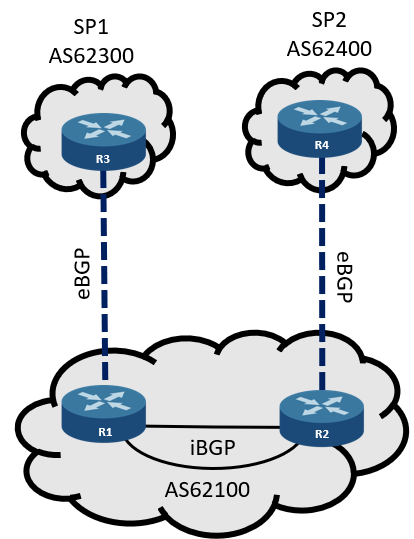
The typical architecture involves establishing eBGP peerings with each ISP, while running iBGP between your own edge routers to share routing information and enforce consistent policies.
The Critical Risk: Becoming a Transit AS
When you connect to two ISPs, you create a potential path between them through your network. If you're not careful, your routers could start advertising routes learned from ISP1 to ISP2. This could cause internet traffic from ISP2 destined for networks at ISP1 to flow through your enterprise network. This is known as becoming a transit autonomous system. This is almost always undesirable, as it can saturate your internet links and overload your routers with traffic that has nothing to do with your business.
To understand this risk and the fundamental solution, please read the introductory section of the following Cisco guide.
Configure BGP with Two Different Service Providers - Cisco
This Cisco document, 'Configure BGP with Two Different Service Providers', introduces multihoming and immediately highlights the risk of becoming a transit AS. It also presents the standard method for preventing this.
First, read the 'Background Information' section. Then, under 'Configuration to Receive Full Internet Routing Table', focus on the AS-Path access list and route-map example used to filter advertisements. The key elements are ip as-path access-list 10 permit ^$ and the associated route-map localonly.
As the document explains, the key is to filter your outbound BGP advertisements so that you only announce your own, locally originated prefixes. The regular expression ^$ is a powerful tool for this. It matches an empty AS-Path, which is characteristic of routes originating within your own AS. By applying a route-map with this filter to your eBGP neighbors, you ensure you never re-advertise routes learned from one ISP to another.
Multihoming Strategies
An enterprise doesn't have to accept the entire internet routing table (over 900,000 routes!) from its ISPs. There are several common strategies:
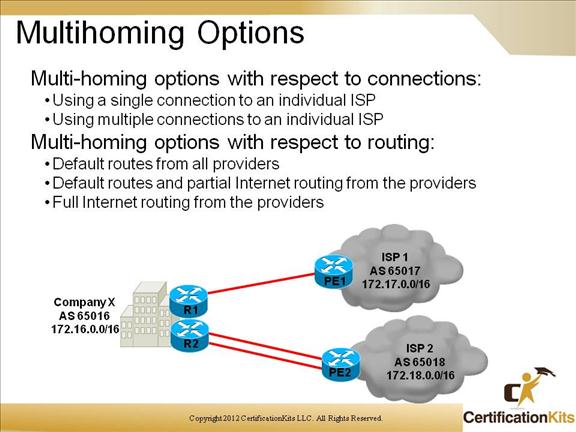
- Full Routes: Accept all BGP routes from all ISPs. This provides optimal routing decisions but requires powerful routers with significant memory.
- Partial Routes: Accept only routes from your ISPs and their direct customers. This reduces the routing table size while still providing good path information for nearby networks. A default route is still needed for the rest of the internet.
- Default Routes Only: The simplest approach. You only accept a default route from each ISP. This is easy to manage but gives you no ability to make granular path selections.
Your choice of strategy depends on your technical requirements, hardware capabilities, and business needs.
2. Advertising Your Network Prefixes
For multihoming to work, you must advertise your own public IP address block to your ISPs. This is done using the BGP network command. However, this command works differently in BGP than in IGPs like OSPF or EIGRP.
Let's watch a video that explains this crucial concept and demonstrates the configuration.
CCNP ENCOR, Advertising BGP Networks - Live Stream Recording
This video from Jeremy Cioara's CCNP series provides a very clear, practical explanation of how to originate routes in BGP, highlighting a critical and often misunderstood requirement of the network command.
Watch the following segments: The 'network' Command (23:10 - 25:42): Focus on the explanation that the BGP network command requires an exact match (prefix and mask) in the IP routing table to work. Configuration Demo (25:42 - 32:14): Observe the configuration process and how a mismatched mask causes the advertisement to fail. Verification (35:50 - 42:03): Pay close attention to the show ip bgp neighbor <ip> advertised-routes command. This is an essential tool for verifying what you are sending to your peers.
As the video demonstrated, for network 198.51.100.0 mask 255.255.255.0 to work, the route 198.51.100.0/24 must exist in the router's IP routing table. A common and clever technique to ensure this, especially for an aggregate prefix, is to create a static route pointing to the Null0 interface (e.g., ip route 198.51.100.0 255.255.255.0 Null0). This makes the route available in the routing table for BGP to advertise, without affecting traffic forwarding for more specific subnets.
3. Controlling Traffic Flow
Once your peerings are up and you're advertising your prefixes, the next step is to control how traffic flows. This is done differently for outbound and inbound traffic.
Outbound Traffic: Your Choice with Local Preference
You have complete control over how traffic leaves your AS. The primary tool for this is the Local Preference attribute.
- It is a BGP attribute with a default value of 100.
- It is only exchanged between iBGP peers within your AS. It is not sent to eBGP peers (ISPs).
- A path with a higher local preference is preferred.
By setting a higher local preference for routes learned from one ISP, you can instruct all routers within your AS to prefer that ISP as the exit point for those destinations. This is typically done with a route map applied to incoming advertisements from an eBGP peer.
Inbound Traffic: Their Choice, Your Influence with AS-Path Prepending
You cannot directly control how traffic enters your AS. That is decided by other networks on the internet. However, you can influence their decision. One of the most common ways to do this is by manipulating the AS_PATH attribute.
A shorter AS_PATH is one of the most important factors in BGP path selection. By making the path through one of your ISP connections appear longer, you can make it less attractive to other networks. This technique is called AS-Path Prepending. You artificially lengthen the AS-PATH by adding your own AS number to it multiple times.
The following video explains this concept and shows a real-world configuration.
Tuning Inbound Load Balancing! Ep.9: Real World BGP
This video, also from Jeremy Cioara, is an excellent deep-dive into influencing inbound traffic. It covers the concept, configuration, and verification of AS-path prepending.
Watch the following segments: Introduction (00:00 - 01:56): Understand the difference between controlling outbound vs. influencing inbound traffic. AS Path Explained (01:56 - 07:07): This covers how the AS path works and why it's a strong tie-breaker in path selection. Prepending Mechanism (07:07 - 08:28): See how adding your own AS number multiple times makes a path less desirable. Configuration (14:47 - 17:59): Follow the step-by-step configuration using a prefix-list and a route-map with the set as-path prepend command.
A key takeaway is that you use a route-map applied to your outbound advertisements to an ISP. For the path you want to make less preferred, you prepend your AS number. For example: set as-path prepend 65001 65001 65001.
Test your understanding!
You are the administrator for AS 100, which is multihomed to ISP-A (AS 200) and ISP-B (AS 300).
- To make ISP-A the preferred exit point for all outbound traffic, which attribute would you modify and on which BGP session type?
- To make ISP-B the backup link for inbound traffic (i.e., less preferred), what technique would you use and where would you apply the policy?
Show answer
- You would use the Local Preference attribute. You would apply an inbound route-map on your eBGP peering with ISP-A that sets a higher local preference (e.g., 200) for all received routes. This preference would be shared with your other internal routers via iBGP, making ISP-A the preferred exit point.
- You would use AS-Path Prepending. You would apply an outbound route-map on your eBGP peering to ISP-B that prepends your own AS number (100) several times. This makes the path through ISP-B appear longer and less desirable to other networks on the internet.
4. Case Study: A Complete Multihoming Configuration
We've covered several individual concepts. Now, let's tie them together by examining a complete, practical design example from Cisco's documentation. This case study demonstrates how an enterprise (AS100) connects to two ISPs (AS200 and AS300), uses OSPF as its internal routing protocol, and applies BGP policies to manage traffic.
Examine Border Gateway Protocol Case Studies - Cisco
This case study provides a comprehensive, step-by-step example of a multihoming design. It is an excellent resource for seeing how all the pieces fit together in a realistic scenario.
Read the entire section titled 'Practical Design Example'. As you read: Note the initial configurations and the troubleshooting steps for next-hop reachability and synchronization issues. Pay close attention to the final configurations for router RTA and RTB. Specifically, analyze how RTA uses route-map setlocalpref to set a local preference of 200 for routes from AS200, and how RTB sets a local preference of 300 for routes from AS300. This configuration achieves policy-based outbound routing.
This example effectively demonstrates a common multihoming strategy:
- Use ISP-A (via RTA) as the primary path for most internet traffic (local preference 200).
- Use ISP-B (via RTB) as the preferred path for specific routes local to that ISP (local preference 300, which is higher).
- Inject default routes into the internal network from both edge routers, with different metrics, to provide a clear primary and backup path.
This is a sophisticated design that combines redundancy with policy-based performance optimization, showcasing the power and flexibility of BGP.
Conclusion
In this lesson, we moved from the internal workings of BGP to its most common real-world application: enterprise multihoming. You now have the foundational knowledge to design and implement a resilient and intelligent internet edge for an enterprise network.
Key Takeaways:
- Multihoming provides internet redundancy and allows for traffic engineering.
- It is critical to filter outbound advertisements (e.g., using
ip as-path access-list permit ^$) to prevent your network from becoming a transit AS. - Local Preference is the primary tool to control outbound traffic flow, steering traffic to the preferred ISP exit point.
- AS-Path Prepending is a key technique to influence inbound traffic flow by making a path appear less desirable to external networks.
- A combination of these policies allows you to create sophisticated traffic engineering solutions tailored to your business needs.
Preview of the Next Lesson:
Now that you have configured a complex, multihomed BGP environment, the next logical step is to learn how to fix it when it doesn't work as expected. In our next lesson, we will cover the learning outcome: Troubleshoot BGP peering issues and route advertisement problems. We will dive into show and debug commands to diagnose and resolve common BGP failures.