Hello! Welcome to the next module in your CCNP ENCOR preparation. In our previous lessons, we concluded our deep dive into advanced BGP routing by focusing on a crucial real-world skill: troubleshooting. You learned to systematically diagnose peering failures and route advertisement problems, valuable expertise for any network professional.
Now, we shift our focus from routing between autonomous systems to the essential IP Services that make enterprise networks function. This lesson begins that journey by addressing a fundamental technology you've likely encountered but will now master at a CCNP level. We will cover the learning outcome: Configure and verify Network Address Translation (NAT) including static, dynamic, and PAT.
By the end of this lesson, you will understand the theory, configuration, and verification for all three major types of NAT, preparing you not only for the ENCOR exam but also for deploying one of the most common services in any IPv4 network.
1. NAT Fundamentals: The Why and the How
At its core, Network Address Translation (NAT) was developed to solve the problem of IPv4 address exhaustion. With a limited number of public IPv4 addresses, it became impractical for every device on a private network to have its own unique public IP. NAT allows an entire private network, using addresses from RFC 1918 ranges (like 10.0.0.0/8, 172.16.0.0/12, and 192.168.0.0/16), to access the internet using a single or small pool of public IP addresses.
Key NAT Terminology
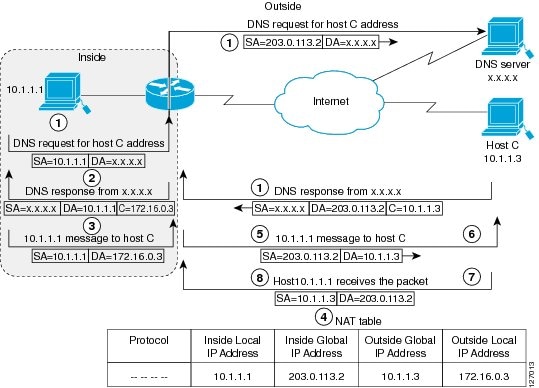
Before we configure anything, it's critical to understand the terminology Cisco uses to describe addresses in a NAT environment. Getting these terms straight is essential for both configuration and troubleshooting.
The following article from the AlphaPrep blog provides a clear breakdown.
Mastering NAT and PAT Configuration & Verification for CCNP ...
Please read the introductory section of the article 'Mastering NAT and PAT Configuration & Verification'. It provides an excellent cheat sheet for the four key address terms that are frequently tested on the CCNP exam.
Read the section 'Let’s Break Down NAT and PAT', focusing specifically on the table under 'Inside/Outside, Local/Global—Address Terms Demystified'. Commit these definitions to memory.
Here's a summary of those crucial terms:
| Term | Description | Example |
|---|---|---|
| Inside Local | The private IP address of the host on your LAN. | 192.168.10.10 |
| Inside Global | The public IP address that represents the host. | 203.0.113.10 |
| Outside Local | The IP address of the external host as seen from your LAN. | 8.8.8.8 |
| Outside Global | The actual public IP address of the external host. | 8.8.8.8 |
For most common NAT scenarios, the Outside Local and Outside Global addresses are the same. The distinction becomes important in more complex scenarios, but for now, focus on the difference between Inside Local (private) and Inside Global (public).
The First Step: Defining NAT Boundaries
No NAT configuration will work until you tell the router which interface is connected to the internal (private) network and which is connected to the external (public) network. This is done with the ip nat inside and ip nat outside interface configuration commands. A common mistake is forgetting or swapping these roles.
! On the interface connected to your LAN
interface GigabitEthernet0/0
 ip address 192.168.1.1 255.255.255.0
 ip nat inside

! On the interface connected to the Internet/ISP
interface GigabitEthernet0/1
 ip address 203.0.113.1 255.255.255.252
 ip nat outside
2. Static NAT
Static NAT creates a permanent, one-to-one mapping between an inside local address and an inside global address. Its primary use case is to make an internal resource, such as a web server or email server, accessible from the internet.
Since the mapping is static, it allows for connections to be initiated from either direction. An internal user can initiate an outbound connection, and an external user can initiate an inbound connection to the public IP, which is then translated to the private IP of the server.
Let's see how this is configured and verified.
Static NAT -- Configuration and Verification -- NAT on Cisco IOS Routers (FREE Course Preview)
This video from Practical Networking provides a clear, hands-on demonstration of configuring and verifying static NAT.
Watch the following sections: Configuration and Verification (02:09 - 05:53): Pay attention to the ip nat inside source static command syntax. Observe how the show ip nat translations command is used to verify the translation, and how packet captures confirm the source IP address change. Traffic-Generated Entries (08:56 - 10:06): Focus on the distinction between the static translation entry that is always present in the table and the temporary entries that are created when traffic actively flows through the router.
As the video demonstrated, the configuration is straightforward:ip nat inside source static <inside_local_ip> <inside_global_ip>
Verification is done with show ip nat translations. For a static entry, you will see a translation in the table even before any traffic flows. Once traffic passes, you will see additional, more detailed entries for each specific session (e.g., ICMP or TCP/UDP sessions).
3. Dynamic NAT
Dynamic NAT automates the mapping of a group of private IP addresses to a pool of available public IP addresses. Unlike static NAT, the mapping is temporary and is created on-demand when an inside host initiates an outbound connection.
This method still maintains a one-to-one mapping for the duration of the connection, but the specific public IP a host uses can change.
The configuration involves three steps:
- Define an Access Control List (ACL) to identify the source (inside local) addresses that are permitted to be translated.
- Define a NAT pool of public (inside global) addresses to be used for translation.
- Bind the ACL to the pool with a NAT statement.
Free CCNA | NAT (part 2) | Day 45 | CCNA 200-301 Complete Course
The following segment from Jeremy's IT Lab explains the concept of Dynamic NAT, including its configuration and its primary limitation.
Watch the section on Dynamic NAT (03:16 - 12:35). Focus on: How an ACL is used to identify traffic for translation. How a NAT pool defines the available public IPs. The concept of 'NAT pool exhaustion' when more inside hosts need translation than there are available public IPs.
The Limitation of Dynamic NAT
As the video explained, dynamic NAT has a significant drawback: you need one public IP in your pool for every internal host that needs to communicate simultaneously. If all addresses in the pool are in use, subsequent hosts will be denied access.
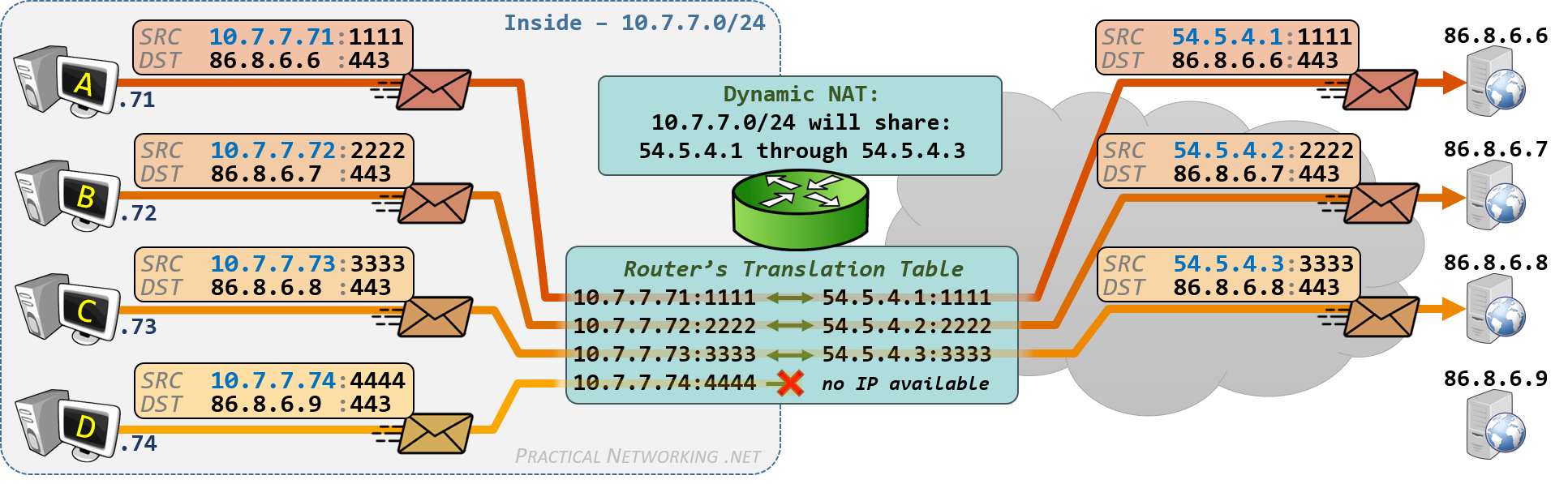
This limitation makes dynamic NAT less common today, but it serves as a perfect bridge to understanding the most widely used form of NAT: PAT.
4. Port Address Translation (PAT) or NAT Overload
Port Address Translation (PAT), also known as NAT Overload, is the mechanism that allows many inside hosts to share a single public IP address. It achieves this by not only translating the IP address but also the source port number.
The NAT router maintains a detailed translation table that tracks the unique combination of Inside Local IP/Port and maps it to the Inside Global IP and a unique Inside Global Port. When return traffic arrives, the router uses this table to translate the destination IP and port back to the correct internal host.
Because a single IP address has 65,535 TCP and UDP ports, PAT allows for thousands of simultaneous sessions through one public IP. This is the form of NAT used in virtually all home and small office networks.
There are two primary ways to configure PAT:
- Using the outside interface's IP: The most common method.
- Using a pool of addresses: Useful if you have a small block of public IPs and want to spread the load.
This final video segment explains both methods.
Free CCNA | NAT (part 2) | Day 45 | CCNA 200-301 Complete Course
Let's return to Jeremy's IT Lab to see how PAT solves the scaling problem of dynamic NAT and how to configure it.
Watch the section on PAT (12:35 - 20:17). Note the two main configuration methods: Using a NAT pool with the overload keyword. Using the outside interface address with the overload keyword. This is the most common real-world configuration.
Verifying PAT
You use the same commands, show ip nat translations and show ip nat statistics, to verify PAT. The key difference in the output of show ip nat translations is that you will see multiple, unique Inside Local addresses all mapped to the same Inside Global address, differentiated by their port numbers.
Router# show ip nat translations
Pro  Inside global         Inside local          Outside local         Outside global
tcp  203.0.113.1:1025      192.168.1.10:1025     8.8.8.8:53            8.8.8.8:53
tcp  203.0.113.1:1026      192.168.1.11:1025     8.8.4.4:53            8.8.4.4:53
---  203.0.113.10          192.168.1.100         ---                   ---
In this example, two different inside hosts (.10 and .11) are using PAT to share the same public IP (203.0.113.1). A separate static NAT entry also exists for an internal server.
Test your understanding!
You are a solutions engineer for a small business with the following requirements:
- An on-premises web server with the private IP
10.10.10.50must be accessible to customers on the internet via the public IP209.165.200.226. - All 50 employees in the office (
10.10.10.0/24subnet) must be able to browse the internet. The ISP has only provided one usable public IP address for this purpose, which is configured on the router's outside interface.
Which type(s) of NAT would you configure to meet these requirements? Briefly outline the key commands.
Show answer
You would need to configure both Static NAT and PAT (NAT Overload).
-
Static NAT for the web server:
ip nat inside source static 10.10.10.50 209.165.200.226
-
PAT for the employees:
- First, define an ACL to identify the employee subnet:
ip access-list standard EMPLOYEE_ACLfollowed bypermit 10.10.10.0 0.0.0.255. - Then, create the PAT rule using the outside interface:
ip nat inside source list EMPLOYEE_ACL interface <name_of_outside_interface> overload.
- First, define an ACL to identify the employee subnet:
You would also need to ensure the inside and outside interfaces are correctly defined with ip nat inside and ip nat outside.
Conclusion
In this lesson, we explored the configuration and verification of the three fundamental types of Network Address Translation on Cisco IOS. You now have the practical skills to deploy NAT in various enterprise scenarios.
Key Takeaways:
- NAT's Purpose: To conserve public IPv4 addresses and allow private networks to access the internet.
- Core Concepts: Always define
ip nat insideandip nat outsideinterfaces first. Master the four address terms: Inside Local, Inside Global, Outside Local, and Outside Global. - Static NAT: Provides a one-to-one, permanent mapping, ideal for exposing internal servers to the public internet.
- Dynamic NAT: Maps a group of private IPs to a pool of public IPs on demand. It is limited by the size of the pool.
- PAT (NAT Overload): The most common form, allowing many private hosts to share a single public IP by translating port numbers. It's configured using the
overloadkeyword. - Verification: The primary commands are
show ip nat translationsto see active and static mappings andshow ip nat statisticsfor an overall summary.
Preview of the Next Lesson:
Having covered address translation, we will continue our exploration of IP Services by looking at address assignment. In the next lesson, you will learn how to configure a Cisco IOS device as a DHCP server and DHCP relay agent to automate IP address allocation within your network.