Hello! Welcome back to our study of OSPF.
In our last lesson, we focused on the practical skills of configuring and verifying single-area OSPF for both IPv4 and IPv6. While a single-area design is simple and effective for small networks, it runs into significant scalability problems as a network grows. A core principle of enterprise network design is building systems that are hierarchical, modular, and scalable, and OSPF is no exception.
This lesson directly addresses that challenge. We will explore how to build scalable OSPF networks by breaking them down into multiple areas. Our learning outcome is to design multi-area OSPF hierarchies using area types (standard, stub, totally stubby, and NSSA). We will examine the purpose of each area type, understand how they control the flow of routing information, and learn when to use each one in a real-world network design.
1. The Case for Multi-Area OSPF
Imagine an enterprise network with hundreds of routers, all in a single OSPF area. Every time a link flaps or a router is added, an update (a Link-State Advertisement or LSA) is flooded to every single router. This leads to several problems.
To understand these challenges, let's start with a short video that explains why a single OSPF area doesn't scale.
The video 'OSPF Multi Area Explained' from CertBros provides a clear, high-level overview of the problems that arise in large single-area OSPF networks and introduces the multi-area solution.
Please watch from 01:06 to 03:15. As you watch, focus on the three main problems described: Huge Link-State Databases (LSDBs) Large routing tables Widespread update flooding and SPF recalculations
By dividing a large OSPF domain into smaller areas, we can contain the impact of topology changes and optimize routing information. This hierarchical design is fundamental to OSPF's power and scalability.
2. Multi-Area OSPF Fundamentals
A multi-area OSPF design is built on a few key components and rules:
- Backbone Area (Area 0): This is the core of the OSPF network. All other areas must connect to the backbone area. Traffic moving between two non-backbone areas must pass through Area 0.
- Area Border Router (ABR): A router with interfaces in two or more areas, one of which is typically Area 0. ABRs are responsible for summarizing routes and advertising them between areas.
- Hierarchical Topology: The design resembles a hub-and-spoke model, with Area 0 as the hub and other areas as the spokes. This prevents routing loops and provides a logical structure.
- Router Roles: In a multi-area network, routers have specific roles. The video you just watched introduces these, but let's quickly review them:
- Internal Router: All interfaces are in a single area.
- Backbone Router: Has at least one interface in Area 0.
- Area Border Router (ABR): Connects two or more areas.
- Autonomous System Boundary Router (ASBR): Injects routes from other routing domains (e.g., BGP, EIGRP, or static routes) into OSPF.
The following segment of the same video explains these design principles and the role of the ABR in summarizing routes.
Let's continue with the 'OSPF Multi Area Explained' video to see how these fundamental components work together.
Watch from 03:15 to 07:46. Pay attention to how ABRs summarize routes and how this contains LSAs within an area, reducing the size of routing tables and LSDBs in other areas.
3. Understanding LSA Types: The Key to Area Design
To truly master OSPF area design, you must understand how OSPF shares information using Link-State Advertisements (LSAs). The primary function of different area types is to filter which LSAs are allowed to enter them. Before we dive into the area types themselves, let's review the most common LSAs.
The article 'OSPF Basic Concepts: Part 3' from Kevin Wallace Training provides an excellent, concise summary of the essential LSA types. Understanding these is a prerequisite for the rest of this lesson.
Please read the first section, 'OSPF LSA Types,' which covers Type 1, 2, 3, 4, 5, and 7 LSAs. Focus on the role of each LSA and where it originates and floods.
Here is a summary of the LSAs you need to know for area design:
| LSA Type | Name | Scope | Description |
|---|---|---|---|
| Type 1 | Router LSA | Intra-Area | Generated by every router to describe its own links and their status. Flooded only within an area. |
| Type 2 | Network LSA | Intra-Area | Generated by the Designated Router (DR) on a multi-access network to describe all routers on that segment. Flooded only within an area. |
| Type 3 | Summary LSA | Inter-Area | Generated by ABRs to advertise prefixes from one area to another. This is how routers learn about networks in other areas. |
| Type 4 | ASBR Summary LSA | Inter-Area | Generated by an ABR to tell other areas how to reach an ASBR. It's essentially an advertisement for the ASBR's location. |
| Type 5 | External LSA | Entire Domain | Generated by an ASBR to advertise external routes (e.g., from BGP). These are flooded to all areas by default. |
| Type 7 | NSSA External LSA | NSSA Only | A special LSA for advertising external routes within a Not-So-Stubby Area (NSSA). It is converted to a Type 5 LSA by the ABR. |
The core idea of special area types is to block the most "expensive" LSAs—Type 4 and 5—which advertise external routes that a simple leaf area may not need.
4. A Deep Dive into OSPF Area Types
With a solid understanding of LSAs, we can now explore the different area types. Each type represents a trade-off between route visibility and network efficiency.
The following video from Practical Networking provides an excellent, detailed walkthrough of each area type using a consistent topology. We will watch it in segments as we discuss each type.
OSPF Area Types - Stub, NSSA, Totally Stub, Totally NSSA - Practical OSPF
First, let's get acquainted with the topology and the baseline 'Normal Area' in the video 'OSPF Area Types' by Practical Networking. This sets the stage for all the optimizations we'll discuss.
Watch the video from the beginning to 03:34. This section explains the network diagram used for the demonstrations and defines the default 'Normal Area' where all LSA types are permitted.
a) Stub Area
A Stub Area is the first level of optimization. It's designed for areas that do not contain any ASBRs and do not need to know the specifics of external routes.
- Purpose: To reduce the LSDB size and routing table on routers within the area.
- Rules:
- Blocks Type 4 and Type 5 LSAs from entering the area.
- Routers in a stub area cannot see individual external routes.
- ABR Action: The ABR connected to the stub area automatically injects a Type 3 LSA for a default route (
0.0.0.0/0) into the area. This allows routers in the stub area to reach external destinations without needing specific routes.
OSPF Area Types - Stub, NSSA, Totally Stub, Totally NSSA - Practical OSPF
Let's see how a stub area works in practice.
Now, watch the segment from 03:34 to 06:10. Notice how the Type 4 and 5 LSAs are removed and replaced by a single default route injected by the ABR.
b) Totally Stubby Area (TSA)
A Totally Stubby Area is a Cisco-proprietary enhancement that provides even more optimization. It's ideal for very simple "leaf" or "spoke" areas where the only path out is via the ABR.
- Purpose: To maximally reduce the LSDB and routing table.
- Rules:
- Blocks Type 3, Type 4, and Type 5 LSAs.
- ABR Action: The ABR injects a single Type 3 LSA for a default route. This is the only inter-area route that routers in a TSA will see. They will have intra-area routes plus one default route.
OSPF Area Types - Stub, NSSA, Totally Stub, Totally NSSA - Practical OSPF
The 'OSPF Area Types' video explains this logical next step in optimization.
Watch from 06:10 to 08:08. This segment shows how a totally stubby area goes a step further by also blocking summary (Type 3) LSAs from other areas.
c) Not-So-Stubby Area (NSSA)
What if an area needs the resource savings of a stub area (blocking external routes from the core) but also needs to originate its own external routes? This is a common scenario in a branch that has its own local internet exit. This is where the Not-So-Stubby Area comes in.
- Purpose: To allow an area to behave like a stub area while still permitting local route redistribution.
- Rules:
- Blocks Type 4 and Type 5 LSAs from entering from other areas.
- Allows an ASBR within the NSSA.
- This ASBR advertises its external routes using special Type 7 LSAs.
- ABR Action: The ABR translates the Type 7 LSAs from the NSSA into standard Type 5 LSAs and floods them into the backbone (Area 0) and other standard areas.
OSPF Area Types - Stub, NSSA, Totally Stub, Totally NSSA - Practical OSPF
NSSA is a crucial concept for flexible enterprise designs. Let's see how it works.
Watch the segment from 08:08 to 13:42. Focus on the introduction of the Type 7 LSA and its role. Also, note the important point that a default route is not automatically injected into an NSSA.
d) Totally NSSA
Finally, we can combine the concepts. The Totally Not-So-Stubby Area is a Cisco-proprietary version of NSSA that also blocks summary routes from other areas, just like a totally stubby area.
- Purpose: To provide maximum route optimization for a leaf area that also needs to originate external routes.
- Rules:
- Blocks Type 3, Type 4, and Type 5 LSAs.
- Allows an ASBR within the area, which uses Type 7 LSAs.
- ABR Action: The ABR injects a Type 3 default route and also translates Type 7 LSAs into Type 5 LSAs.
OSPF Area Types - Stub, NSSA, Totally Stub, Totally NSSA - Practical OSPF
The final area type combines the benefits of NSSA and totally stubby areas.
Watch from 13:42 to 15:43. This part explains how a totally NSSA blocks summary (Type 3) LSAs while still allowing redistribution via Type 7 LSAs.
5. Summary and Real-World Use Cases
Now that we've covered the mechanics, let's consolidate this knowledge. The table below, from Network Journey, provides a perfect summary.
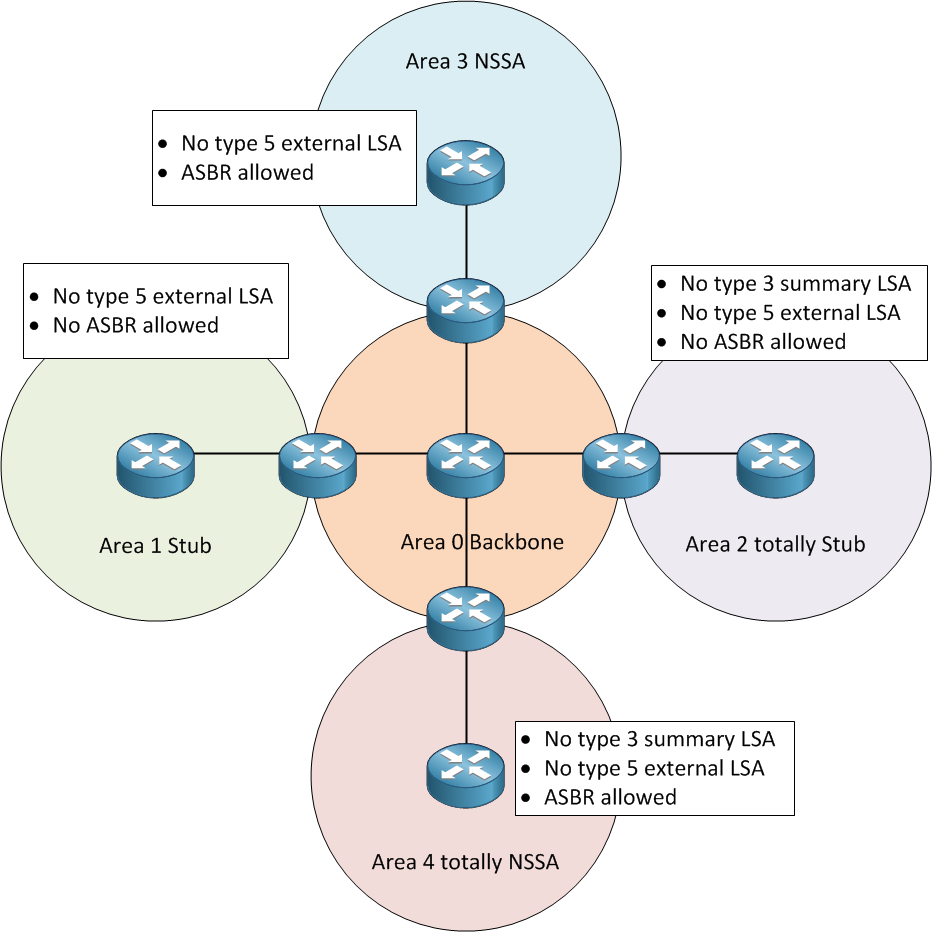
The article "OSPF Area Types Explained" provides a concise comparison and, most importantly, practical use cases for each area type. As a solutions engineer, matching the right technology to a business requirement is key.
OSPF Area Types Explained: Stub, Totally Stubby & NSSA with CLI ...
Let's reinforce what we've learned with the article 'OSPF Area Types Explained' from Network Journey. It offers excellent summary tables.
Please review the tables under the headings 'Comparison of Area Types' and 'Real-World Use Cases'. These tables distill the information into a format perfect for design decisions.
Here's a summary of when to use each area type:
- Standard Area: Use for the backbone (Area 0) and any transit areas that need to pass full routing information between other areas.
- Stub Area: Use for a simple branch or remote site that connects only to the corporate network and doesn't need to know about external routes from BGP, etc.
- Totally Stubby Area: The best choice for a simple spoke in a hub-and-spoke topology. The branch router's routing table is minimized to local routes and a single default route.
- NSSA: Use for a branch or remote site that has its own connection to another network (e.g., a partner network or a secondary ISP) and needs to advertise routes from that network into the main OSPF domain.
- Totally NSSA: Combines the above two. Use for a remote site that needs to redistribute routes and wants the smallest possible routing table for routes from the corporate network.
Test your understanding!
You are designing an OSPF network for a company with a central headquarters (HQ) in Area 0. There are two branch offices, A and B.
- Branch A is a small office with a single WAN link back to HQ. Its routers have limited memory and CPU.
- Branch B is a large regional office. It also has a WAN link to HQ, but it has a separate direct internet connection for guest traffic. A static default route on the branch's edge router points to the internet firewall. This static route needs to be advertised to the rest of the OSPF network so that other sites can use Branch B's internet connection as a backup.
Which OSPF area type would be most appropriate for Branch A and Branch B? Justify your choices based on LSA filtering and routing requirements.
Show answer
-
Branch A: Totally Stubby Area.
- Justification: Since the branch has only one way out (towards HQ) and its routers have limited resources, a totally stubby area is the most efficient choice. It will block all inter-area (Type 3) and external (Type 4/5) LSAs, leaving the branch routers with a tiny routing table consisting of only intra-area routes and a single default route pointing to the ABR at HQ.
-
Branch B: Not-So-Stubby Area (NSSA).
- Justification: Branch B needs to block the large number of external routes coming from the main corporate network (e.g., from the HQ's primary internet edge). This makes a stub-variant appropriate. However, it also needs to originate its own external route (the redistributed static default route). A standard stub area does not allow redistribution. An NSSA is designed for this exact scenario. It will block Type 5 LSAs from entering but allow the local ASBR to create a Type 7 LSA for the static route, which the ABR will then convert to a Type 5 LSA for the rest of the network.
Conclusion
In this lesson, we moved beyond single-area OSPF to understand the principles of scalable, hierarchical network design. We explored how dividing a network into multiple areas and using special area types can drastically reduce routing overhead and improve stability.
Key Takeaways:
- Multi-area OSPF solves scalability issues by creating smaller failure domains and enabling route summarization.
- All non-backbone areas must connect to the backbone, Area 0.
- The choice of area type is a design decision based on controlling LSA flooding.
- Stub areas block external routes (Type 4/5 LSAs).
- Totally Stubby areas block external and inter-area summary routes (Type 3/4/5 LSAs).
- NSSA areas block external routes but allow local redistribution using Type 7 LSAs.
- Totally NSSA areas block external and summary routes but still allow local redistribution.
Preview of the Next Lesson:
We've designed our areas to control LSA flooding. The next logical step in optimizing a multi-area OSPF network is to control the size of the routing table itself. In the next lesson, we will focus on how to configure and verify OSPF route summarization at ABRs and ASBRs, a powerful technique for creating smaller, more manageable routing tables.