Hello! Welcome to your next lesson on OSPF.
In our previous lessons, we've focused on building a scalable and efficient OSPF network. We designed a multi-area hierarchy to control LSA flooding and then used route summarization to reduce routing table sizes and improve stability. Now, we'll add a critical layer on top of that architecture: security. Unsecured routing protocols are a significant vulnerability, as a malicious actor could inject false routes and disrupt your entire network.
This lesson directly addresses the learning outcome: Implement OSPF authentication (MD5 and SHA) for routing security. We will explore how to configure OSPF to authenticate its neighbors, ensuring that your routers only accept routing updates from trusted sources. We'll cover both the legacy MD5 and modern SHA-based methods for OSPFv2, and the equivalent mechanisms for OSPFv3.
1. Why OSPF Authentication is Necessary
By default, OSPF has no authentication. If a router receives an OSPF Hello packet on an interface, it will attempt to form a neighbor relationship. Imagine a scenario where an unauthorized device is connected to one of your network segments. This rogue device could:
- Inject False Routes: Advertise routes to non-existent networks (a "black hole" attack) or advertise itself as a better path to a legitimate destination, effectively hijacking traffic (a "man-in-the-middle" attack).
- Cause a Denial of Service (DoS): Form an adjacency and flood spurious LSAs, consuming CPU and memory on all routers in the area and forcing constant SPF recalculations.
OSPF authentication prevents this by requiring neighbors to prove they know a shared secret (a password or key). If the authentication check fails, the OSPF packet is dropped, and no adjacency is formed. This ensures both the authenticity (the message is from who it says it's from) and integrity (the message has not been altered) of the routing updates.
2. OSPFv2 Authentication Types
OSPFv2 supports three types of authentication, defined in the OSPF packet header:
- Type 0 (Null): No authentication. This is the default.
- Type 1 (Plain Text): The password is sent in clear text within the OSPF packet. This is highly insecure as it can be easily captured and is not recommended for any production network.
- Type 2 (Cryptographic): A hash is generated from the OSPF packet and a secret key. The hash is sent instead of the key itself. This is the secure method and the focus of our lesson. It primarily uses MD5 or SHA algorithms.
We will focus exclusively on Type 2 cryptographic authentication.
3. Configuring MD5 Authentication (The Classic Method)
MD5 was the long-standing standard for OSPF authentication. While newer SHA-based algorithms are now preferred for their superior security, you will still frequently encounter MD5 in existing networks, and it remains part of the CCNP ENCOR exam.
MD5 authentication can be enabled in two ways: on a specific interface or for an entire area.
Method 1: Per-Interface Configuration
This is the most granular method. You enable authentication and set the key directly on the router interface.
- Enable MD5 authentication on the interface:
R1(config-if)# ip ospf authentication message-digest - Configure the key and key ID:
R1(config-if)# ip ospf message-digest-key <key-id> md5 <password>key-id: A number from 1 to 255. This ID, along with the password, must match between the neighboring routers.password: The shared secret key.
For two routers to become neighbors, their connected interfaces must be configured with the same key-id and password.
Method 2: Per-Area Configuration
To simplify configuration, you can enable MD5 authentication for all interfaces within a given OSPF area with a single command under the OSPF process.
- Enable MD5 authentication for the area:
R1(config-router)# area <area-id> authentication message-digest - Configure the key on each interface in that area: Even when using the area command, you must still configure the
message-digest-keyon each individual interface. The area command simply acts as a shortcut to enable the feature (ip ospf authentication message-digest) on all of that router's interfaces belonging to that area.
Verification:
You can verify MD5 authentication is active using the show ip ospf interface command. The output will show that "Message digest authentication" is enabled and list the key ID in use.
4. Configuring SHA Authentication (The Modern Method)
To overcome the security weaknesses of MD5, Cisco IOS introduced support for stronger Secure Hash Algorithms (SHA) using an HMAC (Hash-based Message Authentication Code). This method is more secure and offers a more flexible configuration using key chains.
A key chain is a container for one or more keys. This is a significant advantage over the static MD5 key, as it allows for key rollover. You can pre-configure a new key to become active at a future time, allowing you to change passwords across your network without causing downtime.
The following guide provides a complete walkthrough of configuring HMAC-SHA authentication.
OSPF HMAC-SHA Extended Authentication
To see how modern SHA-based authentication is configured, this guide from NetworkLessons.com walks through the process of creating a key chain and applying it to an OSPF interface.
Please read the entire article. Pay close attention to the three main steps: 1) creating the key chain, 2) defining the key, algorithm, and password, and 3) applying the key chain to the interface. Note the verification commands shown at the end.
As you saw in the article, the configuration involves these core steps:
-
Create a key chain:
R1(config)# key chain MY_OSPF_KEYS -
Define a key within the chain:
R1(config-keychain)# key 1 -
Specify the key string (password) and algorithm:
R1(config-keychain-key)# key-string MyS3cureP@ssw0rd
R1(config-keychain-key)# cryptographic-algorithm hmac-sha-256
Cisco IOS supports several variants (
hmac-sha-1,hmac-sha-256,hmac-sha-384,hmac-sha-512).hmac-sha-256is a strong, commonly used choice. -
Apply the key chain to the OSPF interface:
R1(config)# interface GigabitEthernet0/1
R1(config-if)# ip ospf authentication key-chain MY_OSPF_KEYS
Important Note: Unlike the older MD5 method, SHA authentication using key chains can only be configured on a per-interface basis. There is no area-level command for this method.
Quick Comparison: MD5 vs. SHA Configuration
| Feature | MD5 Authentication | SHA Authentication |
|---|---|---|
| Security | Weaker algorithm (vulnerable to collisions) | Stronger (HMAC with various SHA lengths) |
| Configuration Scope | Per-interface or per-area | Per-interface only |
| Key Management | Static key per interface | Flexible key chains supporting key rollover |
| IOS Support | Supported in virtually all IOS versions | Requires newer IOS (e.g., 15.4(1)T+) |
Given your role as a solutions engineer, understanding key chains is valuable as they provide a more robust and manageable solution for credential lifecycle management in a network.
5. Securing OSPFv3 for IPv6
OSPFv3, which runs over IPv6, handles authentication differently. OSPFv3 was designed to rely on the IPsec framework for security, which is powerful but can be complex to configure.
To simplify this, a newer mechanism was introduced in RFC 7166, which appends an "Authentication Trailer" to OSPFv3 packets. This approach operates similarly to the HMAC-SHA method in OSPFv2, using key chains for configuration.
This official Cisco document details the process.
Configuring OSPFv3 Authentication Trailer
For IPv6, OSPFv3 uses a different mechanism. This Cisco documentation provides a detailed look at how to configure the modern 'Authentication Trailer' method.
Please read the sections 'Information About the OSPFv3 Authentication Trailer', 'How to Configure...', and 'Configuration Examples...'. Focus on understanding that this method also uses key chains, but the commands are specific to OSPFv3. Notice that it can be applied at different scopes (per-interface or per-area).
To help you visualize what this "trailer" looks like on the wire, here is a packet capture.
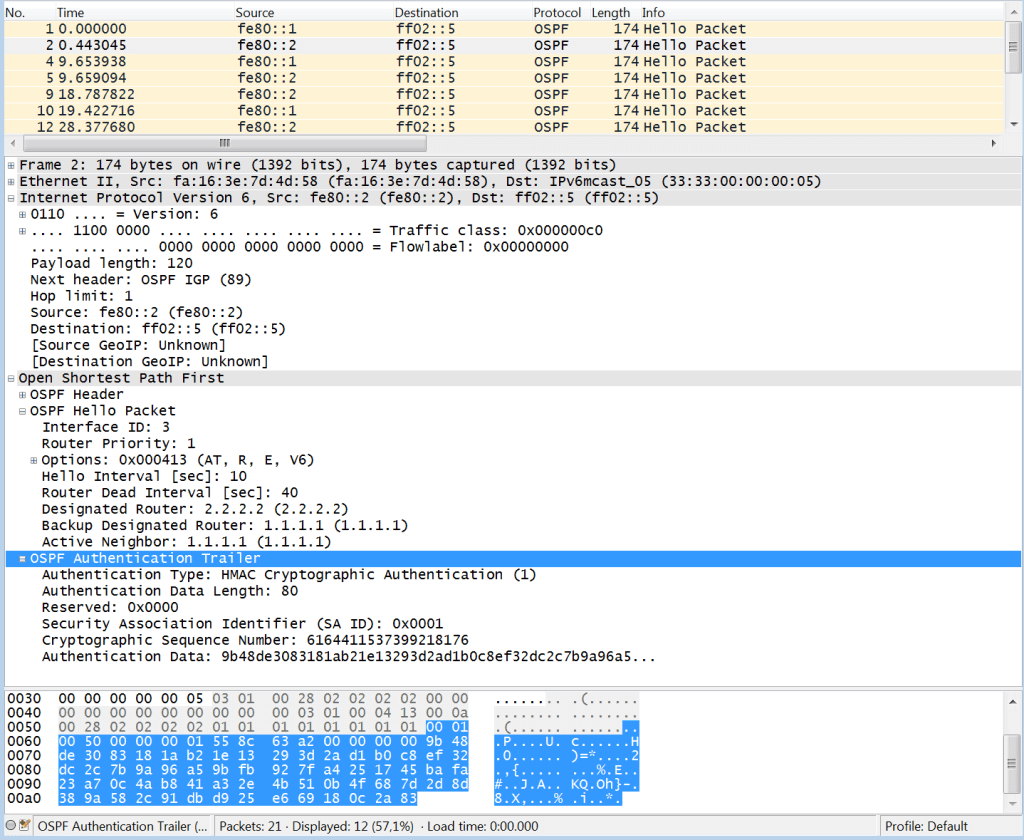
The key configuration commands for OSPFv3 authentication are:
- Per-Interface: Applied under the interface configuration.
R1(config-if)# ospfv3 1 authentication key-chain MY_OSPFv3_KEYS - Per-Area: Applied under the OSPFv3 address-family configuration.
R1(config-router-af)# area 0 authentication key-chain MY_OSPFv3_KEYS
This gives you the flexibility to apply a consistent security policy across an entire area or use different keys for specific links if needed.
Test your understanding!
You are tasked with securing two different OSPF environments:
- Environment A: An OSPFv2 network running on modern Cisco routers. The security policy requires the strongest possible authentication and the ability to update passwords every 90 days with zero downtime.
- Environment B: An OSPFv2 network running on older routers that do not support SHA authentication. Authentication must be enabled for all routers in Area 51.
Which configuration approach would you choose for each environment?
A) Env. A: area 0 authentication message-digest. Env. B: ip ospf authentication key-chain.
B) Env. A: ip ospf authentication key-chain. Env. B: area 51 authentication message-digest.
C) Env. A: ip ospf message-digest-key 1 md5 .... Env. B: ip ospf authentication key-chain.
D) Env. A: ip ospf authentication key-chain. Env. B: ip ospf message-digest-key 1 md5 ... applied to every interface.
Show answer
The correct answer is B.
- For Environment A: The requirements for "strongest possible authentication" and "zero downtime password updates" point directly to SHA authentication with key chains. Key chains are designed for seamless key rollovers. The command to apply this is
ip ospf authentication key-chainon each interface. - For Environment B: Since the routers are older and do not support SHA, you must use MD5. The requirement to enable it for all routers in "Area 51" is best met with the
area 51 authentication message-digestcommand under the OSPF process, followed by configuring keys on each interface in that area.
Conclusion
In this lesson, we secured our OSPF domain by implementing cryptographic authentication. This is a non-negotiable step in any production network to protect against routing attacks.
Key Takeaways:
- OSPF authentication is critical for preventing unauthorized routers from injecting malicious routes or disrupting the network.
- For OSPFv2, you have two main options:
- MD5 (legacy): Configured either per-interface or per-area. It is less secure but widely supported.
- SHA (modern): Configured per-interface using key chains. It offers superior security and flexible key management. This is the recommended method.
- For OSPFv3, the modern approach is the Authentication Trailer, which also uses key chains and is far simpler to configure than the original IPsec requirement.
Preview of the Next Lesson:
Now that you know how to configure areas, summarization, and authentication, you have a solid foundation for building a robust OSPF network. However, things can still go wrong. In our next lesson, we will dive into troubleshooting OSPF adjacency formation issues. You will find that an authentication mismatch is one of the most common reasons an OSPF adjacency fails to come up, making today's lesson a perfect prerequisite for our next topic.