Welcome to the first lesson of our second module, where we move from the mechanics of running code to the core concepts of programming. In the previous module, you learned how to write and execute Python code, both in script files and through the interactive interpreter (REPL). The REPL, in particular, will be your best friend today as we explore one of the most fundamental ideas in all of programming: variables.
Think of any useful application—a social media app, a game, a calculator. They all need to remember information: your username, your high score, the numbers you're adding. Variables are how programs store and manage this information. In this lesson, you will learn how to declare variables and assign values to them, which is the first step toward writing programs that can work with data and produce meaningful results.
What are Variables?
At its heart, a variable is a named storage location in your computer's memory. You can think of it as a labeled box where you can put a piece of data. You give the box a name (the variable name), and you can put things inside it (the value). Later, you can look inside the box by using its name, or even replace what's inside with something new.
The following short video provides an excellent visual analogy for this concept.
Python Variables - Visually Explained
The video "Python Variables - Visually Explained" by the Visually Explained channel clearly introduces variables as reusable storage containers.
Watch the beginning of the video, from the start, to see the analogy of a variable as a container and understand the role of the assignment operator.
Declaring a Variable and Assigning a Value
Creating a variable in Python is called declaring it. This is done using a simple syntax: you write the name you've chosen for your variable, followed by a single equals sign (=), and then the value you want to store.
The equals sign in this context is called the assignment operator. It's crucial to understand that it doesn't mean "is equal to" in the mathematical sense. Instead, it's an instruction: "Take the value on the right and assign it to the variable on the left."
Let's look at how to declare variables to store different kinds of data.
Python Variables: A Beginner's Guide to Declaring, Assigning, and ...
This article from TutorialsTeacher provides straightforward examples of declaring variables.
Start by reading the introductory text to solidify the concept of a variable. Next, look at the first code example under the heading "Example: Declare a Variable in Python". It shows the simplest case: num = 10. Finally, review the second code block, under the "Example: Variables" heading, which demonstrates how to create variables for a whole number (integer), a decimal number (float), text (string), and a true/false value (boolean).
Now, it's your turn to practice. Open your Python REPL (by typing python or python3 in your terminal) and try creating these variables yourself. After you create one, type its name and press Enter. The REPL will show you the value stored inside.
>>> player_score = 100
>>> player_score
100
>>> user_name = "Alice"
>>> user_name
'Alice'
Using and Reassigning Variables
Once you've stored a value in a variable, you can use that variable's name anywhere you would have used the value itself. When your code runs, Python automatically substitutes the variable's value. You can also change, or reassign, the value of a variable at any time.
This video segment shows these two concepts in action.
Python Variables - Visually Explained
Let's return to the "Visually Explained" video.
Watch the segment on using variables to see how Python substitutes the variable's value when it's used. Next, watch the section on reassignment, which demonstrates how you can update a variable to hold a new value.
Try this out in your REPL. Create a variable, print it, reassign it, and print it again.
>>> current_level = 1
>>> print("Welcome to level", current_level)
Welcome to level 1
>>> current_level = 2
>>> print("Congratulations! You've reached level", current_level)
Congratulations! You've reached level 2
Variable Naming: Rules and Conventions
Python has strict rules for what you can and cannot name your variables. Following them is mandatory. There are also community-wide conventions, or best practices, that aren't mandatory but make your code much easier to read and understand.
Naming Rules (The "Must Do's")
If you break these rules, your program will produce a SyntaxError and won't run.
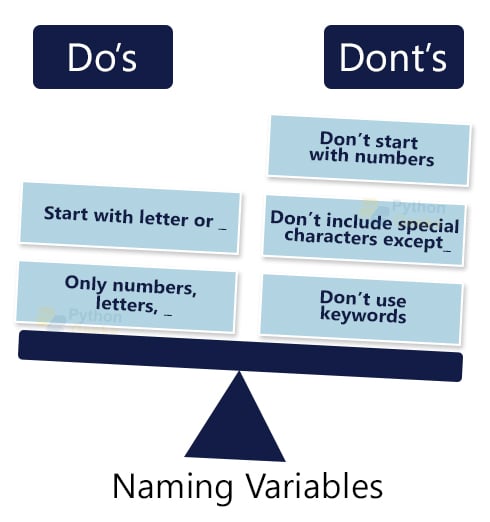
The following video and text resource clearly outline these essential rules.
Python Variables - Visually Explained
This part of the "Visually Explained" video breaks down the naming rules with clear examples of what is and isn't allowed.
Watch the segment from the discussion of rules until the summary. It covers the four main rules: not starting with numbers, allowed characters, no spaces, and case sensitivity.
For a quick reference, the "Naming Conventions" section in the TutorialsTeacher article provides a concise list of these same rules.
Python Variables: A Beginner's Guide to Declaring, Assigning, and ...
This section provides a convenient checklist for the rules of naming variables.
Read the list of five rules under the heading "Naming Conventions". This list is a great summary to keep in mind.
Naming Conventions (The "Should Do's")
Beyond the strict rules, experienced programmers follow style guidelines to keep their code clean and readable. In Python, the standard convention is called snake_case, where all letters are lowercase and words are separated by underscores.
Python Variables - Python Tutorial for Beginners with Examples | Mosh
In this video, "Python Variables," Programming with Mosh explains the best practices for naming your variables.
Watch the section from the start of the discussion on best practices. Pay close attention to these four points: Use descriptive and meaningful names (student_count instead of sc). Use all lowercase letters. Use an underscore to separate multiple words (course_name). Put a space around the assignment operator (=) for readability.
Writing code that follows these conventions is a hallmark of a good programmer. It makes it easier for you and others to understand what your code does.
Multiple Assignments
Python offers a convenient shortcut for creating several variables at once. This can make your code more compact.
This tutorial from learnpython.org shows a few more assignment examples.
Read the part of the article that explains how assignments can be done "simultaneously" on the same line. Note the example: a, b = 3, 4.
You can use this to assign different types of values as well:name, age, is_student = "Bob", 20, True
Practice Exercise
Now, let's put everything you've learned into practice. Your goal is to create three variables with specific names and values.
The exercise section of the learnpython.org tutorial provides an interactive challenge. While you can't use the interactive element on their site directly from here, you can complete the task in your own editor.
Read the instructions under the "Exercise" heading. Your task is to: Create a variable named mystring and assign it the text value "hello". Create a variable named myfloat and assign it the number 10.0. Create a variable named myint and assign it the number 20. You can do this in your REPL or in a new Python script file (e.g., variables.py). After creating the variables, use print() statements to display their values and confirm they are correct. For example: print(mystring).
Conclusion
In this lesson, you've mastered a foundational concept of programming. You now have the ability to store, label, and update information within your programs. This is the first major step toward creating software that does more than just print a fixed message.
Here are the key takeaways:
- A variable is a named container used to store data in memory.
- You declare a variable and assign it a value using the assignment operator:
variable_name = value. - Variable names must follow specific rules (e.g., can't start with a number) but should also follow conventions (e.g., use
snake_casefor readability). - The value of a variable can be changed at any time through reassignment.
Now that you know how to store data, our next lesson will focus on the data itself. We will explore Python's basic data types—integers, floats, strings, and booleans—in much more detail, learning about their unique properties and how to work with them.