Following our last session where you learned to create variables, we'll now explore what kinds of information you can store in them. In programming, not all data is the same. A number is fundamentally different from a piece of text, and Python needs to know how to handle each one. This concept is known as data types.
This lesson will introduce you to the four most fundamental data types in Python: integers, floats, strings, and booleans. Understanding these is essential because the type of data determines what you can do with it. By the end of this lesson, you will be able to identify these types and use them to store different kinds of information in your variables.
What are Data Types?
A data type is a classification that tells the program how the programmer intends to use the data. For instance, you can perform mathematical calculations on numbers, but you can't do the same with text. Python, being a dynamically typed language, is smart enough to figure out the data type on its own when you assign a value to a variable. You don't have to explicitly tell it, "this variable will hold a number."
Let's begin with a high-level overview of some of Python's built-in data types.
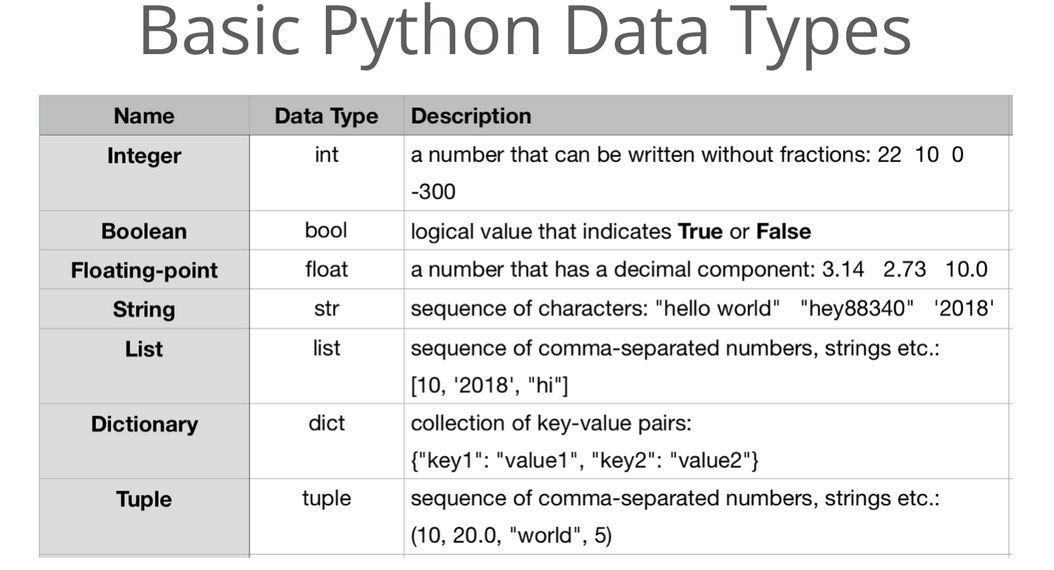
The Four Core Data Types
The video below from the GeoDelta Labs channel provides a great conceptual introduction to our four core data types. As you watch, pay attention to the definition of each type and the real-world examples given.
Lesson 4- Basic Data Types in Python (int, float, str, bool)
This video, "Basic Data Types in Python," clearly explains the four fundamental types we will be covering.
Watch the following segments to get a clear definition of each type: First, watch the introduction, which outlines the lesson's focus. Next, learn about integers (int), which are whole numbers. Then, see the explanation for floats (float), which are numbers with decimals. Notice the important distinction between 1 (an integer) and 1.0 (a float). After that, understand strings (str), which are used to represent text. Finally, grasp the concept of booleans (bool), which represent True or False values. The analogies of a light switch or a coin flip are particularly helpful.
Let's quickly review and formalize these concepts.
-
Integers (
int): These are whole numbers, without any decimal part. They can be positive, negative, or zero.# Examples of integers player_count = 4 current_year = 2023 account_balance = -50 -
Floating-Point Numbers (
float): These are numbers that have a decimal point. They are used for values that require precision, like measurements or prices.# Examples of floats pi = 3.14159 item_price = 19.99 temperature = -2.5Even a number like
10.0is a float because of the decimal point, distinguishing it from the integer10. -
Strings (
str): A string is a sequence of characters used to store text. In Python, you create a string by enclosing the text in either single quotes ('...') or double quotes ("...").# Examples of strings user_name = "Alice" greeting_message = 'Hello, world!' error_code = "Error 404"You can use either single or double quotes, but you must be consistent.
user_name = "Alice'would cause a syntax error. -
Booleans (
bool): A boolean can only have one of two values:TrueorFalse. They are used to represent logical states, like whether a condition is met or an option is enabled.# Examples of booleans is_logged_in = True has_permission = FalseCrucially, these values are case-sensitive.
trueandfalseare not valid boolean values in Python and will cause an error. They must be capitalized asTrueandFalse.
How to Check a Variable's Type
Since Python determines the data type automatically, it's useful to have a way to check what type a variable holds. This is especially helpful when you're debugging code or trying to understand how a program works. Python provides a built-in function called type() for exactly this purpose.
The W3Schools page on Python Data Types provides a concise explanation.
This section explains the purpose and usage of the type() function.
Read the section under the heading "Getting the Data Type". It shows the basic syntax: type(variable_name).
To see this in practice, let's look at an image showing type() being used in a Python interactive shell.
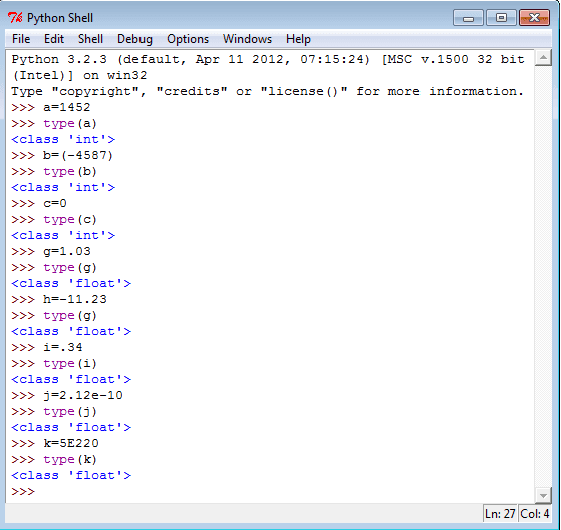
Now, let's see a demonstration of type() being used for all four of our basic data types. The second half of the GeoDelta Labs video you watched earlier does exactly this.
Lesson 4- Basic Data Types in Python (int, float, str, bool)
The video "Basic Data Types in Python" demonstrates how to use type() for each of the four data types within the Python shell.
Watch these practical demonstrations: Using type() with integers: see the demo. Using type() with floats: see the demo. Using type() with strings: see the demo. Using type() with booleans: see the demo.
Practice Exercise
It's time to put this into practice. Open your Python REPL (interactive shell) or create a new script file (datatypes.py).
- Create a variable named
book_titleand assign it the string value of your favorite book. - Create a variable named
page_countand assign it the number of pages in that book as an integer. - Create a variable named
book_priceand assign it the price of the book as a float. - Create a variable named
is_readand assign it a boolean value (TrueorFalse) indicating whether you have read it.
After creating these four variables, use the print() and type() functions together to display the type of each variable. For example:
print(type(book_title))
print(type(page_count))


# ... and so on for the other two variables
Running your code should output the class for each type: <class 'str'>, <class 'int'>, <class 'float'>, and <class 'bool'>.
Conclusion
In this lesson, you've been introduced to the fundamental building blocks of data in Python. You now know how to create and identify the four most common data types, which will be the foundation for almost every program you write.
Here are the key takeaways:
- A data type defines what kind of data a variable holds and what operations are allowed on it.
- The four basic data types are:
int: For whole numbers (e.g.,10,-5).float: For numbers with a decimal point (e.g.,3.14,99.0).str: For text, enclosed in quotes (e.g.,"hello",'Python').bool: For logical values, which must beTrueorFalse.
- You can use the built-in
type()function to find out the data type of any variable.
Now that you have a solid understanding of numeric data types (int and float), our next lesson will focus on what you can do with them. We will explore arithmetic operations, learning how to perform calculations like addition, subtraction, multiplication, and division in Python.