Welcome back! In our last lesson, we learned how to make our programs interactive by reading data from the user with the input() function. We also discovered a crucial rule: input() always provides the data as a string. This led to a puzzle: trying to add two numbers entered by the user, like 2 and 5, resulted in string concatenation ("25") instead of mathematical addition (7).
Today, we will solve that puzzle. This lesson focuses on converting the string data you receive from the user into numeric types—specifically, integers and floats. Mastering this step is the key to unlocking your program's ability to perform calculations, turning it from a simple message-passer into a powerful, interactive tool.
The Problem: When a Number Isn't a Number
As we saw last time, Python makes a critical distinction between the text character "5" and the numerical value 5. When input() reads a number from the keyboard, it captures it as text. Attempting to perform math on this text leads to unexpected behavior.
The following video provides a perfect visual demonstration of this exact problem.
Python User Input - Visually Explained
Watch this segment from the "Python User Input - Visually Explained" video by the Visually Explained channel. It clearly shows why adding two numbers from input() doesn't work as expected.
Pay close attention to the example from the common mistake. The animation vividly illustrates how Python treats the inputs "1" and "2" as strings, joining them to form "12" instead of calculating their sum.
This behavior isn't a bug; it's a fundamental aspect of how data types work. To perform calculations, we must first explicitly tell Python to interpret these strings as numbers.
The Solution: Type Casting with int() and float()
The process of converting a value from one data type to another is called type casting or type conversion. Python provides simple, built-in functions to do this. For our purposes, the two most important are:
int(): Converts a value into an integer (a whole number).float(): Converts a value into a floating-point number (a number with a decimal).
The fundamental idea is to take the string that input() gives you and pass it through one of these functions to get a number back.
How to Convert a String Into an Integer in Python
This article from DataCamp clearly explains the reason for type conversion.
Please read the section titled Why Convert a String?. The example comparing '5' + '10' to int('5') + int('10') perfectly captures the "before and after" of type casting.
Converting to Integers for Whole Numbers
When you know the user will enter a whole number (like an age or a quantity), you can use the int() function. The most common pattern is to "wrap" the input() function directly inside the int() function.
The structure looks like this:variable_name = int(input("Enter a whole number: "))
Python first executes the inner function, input(), which pauses and waits for the user. Once the user enters a value (e.g., "42"), that string is immediately passed to the outer function, int(), which converts it to the number 42. The final numeric value is then stored in your variable.
Let's see this in a complete program.
2.1. Simple Calculations - Programming Basics with Python
This chapter from the book "Programming Basics with Python" provides a practical example of reading and calculating with an integer.
Read through the section Reading User Input in Integer Type. Focus on the "Square Area" problem. Notice how int(input(...)) is used to get the side length a as a number, allowing the calculation a * a.
This pattern of combining int() and input() is fundamental for numerical programs.

Handling Decimals with float()
What happens if you try to convert a string containing a decimal, like "98.6", into an integer?
int("98.6") # This will cause a crash!
The int() function only works for strings that represent whole numbers. Attempting to give it a decimal will result in a ValueError.
This is where the float() function comes in. It's designed specifically to handle numbers with decimal parts.
Let's return to the "Python user input" video from Bro Code. It demonstrates this exact issue and presents the solution.
First, watch the segment explaining the int() error. This shows the ValueError that occurs when a decimal string is passed to int(). Then, watch the following segment that introduces the float() solution, using the example of a person's height. This shows how float() correctly handles decimal inputs.
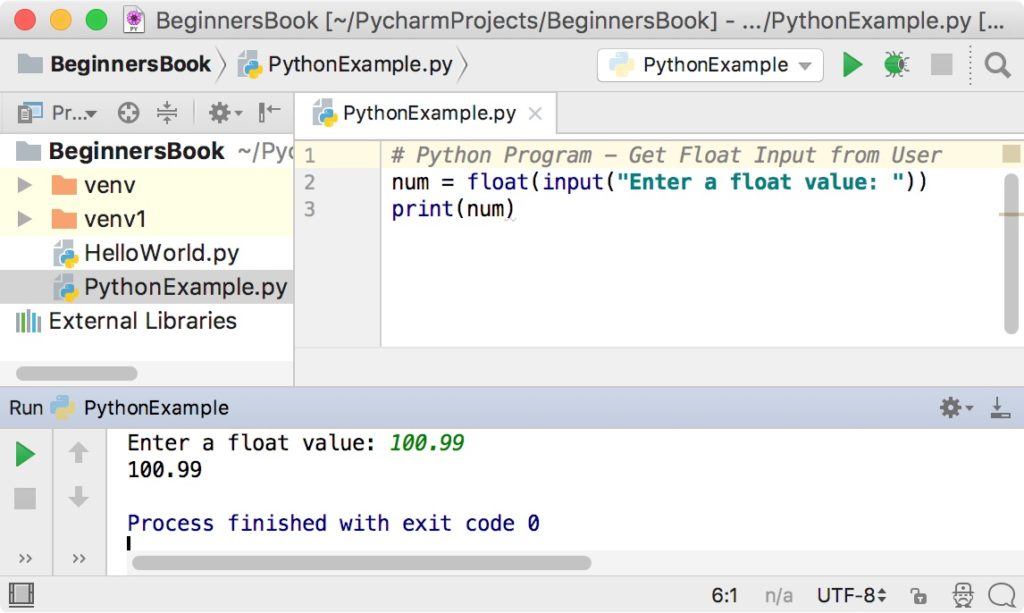
The syntax for float() is identical to int():
variable_name = float(input("Enter a number (can have decimals): "))
A Word of Caution: Invalid Input
You might be wondering: what happens if the user types "hello" instead of a number?
Both int("hello") and float("hello") will cause a ValueError and crash your program. For now, this is expected behavior. As you progress in your coding journey, you'll learn techniques to handle such errors gracefully using try...except blocks, which we'll cover in Module 9. For today's exercises, you can assume the user will enter valid numerical data.
Practice: Build a Simple Adder
Now it's your turn to apply what you've learned. Your task is to write a program that takes two numbers from the user and calculates their sum.
Instructions:
- Open your code editor and create a new Python file.
- Write a line of code that prompts the user to "Enter the first number:" and stores their input in a variable. Use
float()to handle potential decimals. - Write a second line that prompts the user to "Enter the second number:" and stores it in another variable, also as a
float. - Create a third variable to store the sum of the first two numbers.
- Use a
print()statement to display the result in a readable format, like "The sum is: [result]".
Run your program and test it with both whole numbers (like 10 and 20) and decimal numbers (like 3.14 and 1.5). This simple exercise directly implements the core skill of this lesson and is a building block for almost any numerical program you'll write.
Conclusion
In this lesson, we bridged the critical gap between user input and mathematical computation. You now have the tools to build interactive programs that can work with numbers, not just text.
Here are the key takeaways:
- Type Casting is Essential: The
input()function always returns a string, which must be converted before it can be used in calculations. - Use
int()for Whole Numbers: Theint()function converts a string representation of a whole number (e.g.,"10") into an integer (10). - Use
float()for Decimal Numbers: Thefloat()function converts a string representation of a number (e.g.,"19.99") into a floating-point number (19.99). - Choose the Right Tool: Using
int()on a decimal string will cause aValueError. If an input might contain a decimal,float()is the safer choice.
You can now get numbers from a user and perform calculations. But how can we make the output look clean and professional? In our next lesson, we will explore f-strings, a modern and powerful way to format your output, allowing you to seamlessly blend text and variables to create clear, readable messages for your users.