Welcome to the first lesson in our module on making your programs interactive. In the last module, we successfully built programs that perform calculations using variables we defined directly in our code. This was a crucial step, but those programs always produce the same result because their data is "hard-coded."
Today, we'll change that. We will learn how to make our programs dynamic by reading data directly from the user's keyboard. This is the foundation of creating personalized and interactive applications. Our focus will be on a single, powerful tool: Python's built-in input() function. By the end of this lesson, you'll be able to write a program that can have a simple conversation with its user.
From Static to Dynamic Programs
So far, when we've needed data for a calculation, we've done something like this:
# Hard-coded value
bill_amount = 150.0
The value 150.0 is static; it's fixed within the code. To change it, you have to edit the program itself. This is fine for learning, but real-world applications need to respond to user actions. Imagine a login screen where the username is hard-coded—it wouldn't be very useful!
The input() function allows us to get dynamic values—data provided while the program is running. The following video offers a great introduction to this idea.
Python Input Function: Visually Explained | #Python Course 6
The video "Python Input Function: Visually Explained" from the channel Data with Baraa clearly distinguishes between hard-coded and dynamic input, explaining why user input is essential for building real applications.
First, watch the introduction from the beginning to understand where and why the input() function is used in everyday applications like social media or chatbots. Then, jump to the section that explains hardcoded vs. dynamic values. This part clearly illustrates how input() makes your program's behavior dependent on the user, not just on the code you wrote.
The input() Function: Your Gateway to User Data
The input() function is your primary tool for reading information from the keyboard. It does two things:
- It displays a message (a "prompt") to the user, telling them what information to enter.
- It pauses the program and waits for the user to type something and press the Enter key.
Once the user presses Enter, the function takes everything they typed and returns it to your program so you can store it in a variable.
The basic flow looks like this:
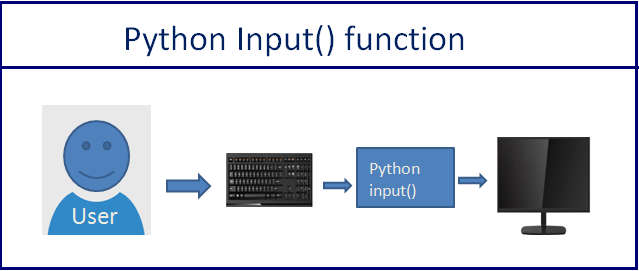
The syntax is simple and intuitive:variable_name = input("Your prompt message here: ")
Let's put this into practice.
How to Receive User Input in Python: A Beginner's Guide
This article from DigitalOcean provides a concise and clear explanation of the input() function with a straightforward example.
Read the section titled Using the input() Function. This will show you the basic structure of asking for a user's name and printing a greeting. Also, look at the first question in the FAQ section for a quick recap.
As you saw in the reading, a simple program to get a user's name would look like this:
# The input() function displays the prompt and waits.
# The user's entry is stored in the 'name' variable.
name = input("Please enter your name: ")


# We then use that variable to print a personalized message.
print("Hello, " + name + "!")
If you run this code, your terminal will display "Please enter your name: " and wait. If you type "Alex" and press Enter, the program will then print "Hello, Alex!".
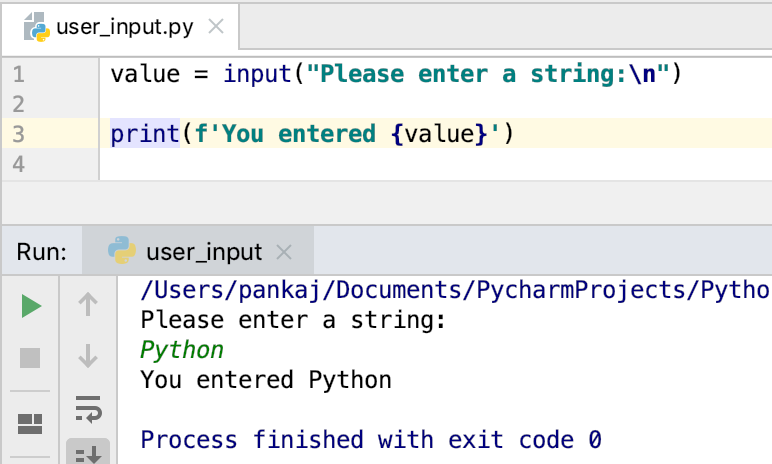
The Execution Flow: A Moment of Pause
It is crucial to understand that input() brings your program to a halt. Python executes code line by line, but when it encounters input(), it stops and waits for the user to act.
This video provides an excellent visual walkthrough of how Python processes a script containing the input() function.
Python Input Function: Visually Explained | #Python Course 6
Let's return to the "Python Input Function: Visually Explained" video to see exactly how the program pauses and handles the data it receives.
Watch the animated explanation of how input() works. Notice how the program pauses after displaying the prompt. Next, watch the practical demonstration from practicing input, where the input is stored in a variable and then used. Pay attention to what happens when the returned value isn't stored in a variable—it's lost forever! Finally, the segment on line-by-line execution visualizes how Python creates variables in memory, pausing at the input() line until the user provides a value.
The Golden Rule of input()
There is one rule you must never forget about the input() function: it always returns a string.
It doesn't matter if the user types their name, the number 42, or the date 2023-10-27. Python sees it all as text—a string. This has a very important implication that we'll explore fully in the next lesson. For now, let's see a demonstration of what this means in practice.
Getting Started with User Input in Python: The “input()” Function Explained.
This article clearly explains the "always returns a string" rule with a perfect example.
Find the section that begins with A crucial aspect. Read through this part and study the code examples. It demonstrates why trying to "add" two numbers from input() directly doesn't work as you might expect.
As the article showed, if you get two numbers from the user and try to add them...
num1 = input("Enter the first number: ")  # User enters 2
num2 = input("Enter the second number: ") # User enters 5

result = num1 + `num2`

print(result)
...the output will be "25", not 7. This is because Python is performing string concatenation ("2" + "5"), not mathematical addition (2 + 5).
This isn't an error; it's a fundamental concept. We've successfully read the user's input, but it's not yet in the right format for calculations.
Practice: A Simple Greeting
Let's put this all together. Your task is to write a short program that asks the user for two pieces of information and then uses them in a sentence.
Instructions:
- Open your code editor and create a new Python file.
- Write code that prompts the user to enter their first name and stores it in a variable.
- Write another line of code that prompts the user to enter the name of their favorite city and stores it in a different variable.
- Finally, use a
print()statement to display a personalized message, such as: "Hello, [name]! I've heard that [city] is a wonderful place to visit."
If you need a refresher on how to combine variables and text in a print() statement, the following video is a helpful guide.
Python For Beginners - Inputs & Outputs Explained
The video "Python For Beginners - Inputs & Outputs Explained" by TeachingCS demonstrates how to capture user input and then integrate it into a personalized message.
Watch from asking for information to see how to create a variable from an input() call. Then, see how to combine the input with text for a personalized message, starting at the print statement. The video introduces f-strings (f"Hello, {variable}"), which are a very clean and modern way to format strings.
Give this exercise a try on your own. It's a simple but important step in mastering interactive programming.
Conclusion
In this lesson, we took a significant leap from static scripts to interactive programs. You learned how to bridge the gap between your program and its user with the input() function.
Here are the key takeaways:
- The
input()function makes programs dynamic by allowing them to accept data from the user while they are running. - When called,
input()displays a prompt, pauses program execution, and waits for the user to type something and press Enter. - The most important rule:
input()always returns the user's entry as a string, regardless of what they typed.
We ended with a small puzzle: input() gives us strings, but we often need numbers for calculations. How do we solve this? That is precisely the topic of our next lesson. We will learn how to convert the string data we receive from the user into integers and floats, unlocking the ability to build interactive calculators and other numerical tools.