Introduction
Welcome back! In our previous lesson, we focused on the Gold layer of the Medallion Architecture, learning how to build aggregated tables that deliver business-ready insights. These tables provide a high-value, performant snapshot of your data.
However, business data is rarely static. Customers move, product names are corrected, and sales territories are reassigned. How do we manage these changes in our dimension tables without losing data integrity? This lesson addresses that exact challenge by introducing Slowly Changing Dimensions (SCDs).
Specifically, we will focus on the learning outcome: Implement Type 1 slowly changing dimensions in Delta Lake to overwrite existing data. You will learn how to use the powerful MERGE statement in Delta Lake to create data pipelines that handle updates by simply overwriting old values, ensuring your dimension tables always reflect the most current state.
Understanding Slowly Changing Dimensions
Slowly Changing Dimensions are a core concept in data warehousing for managing the history of dimension attributes. When an attribute for a record changes, an SCD strategy defines how that change is stored. There are several types, each with a different approach to handling history.
For this lesson, our focus is SCD Type 1.
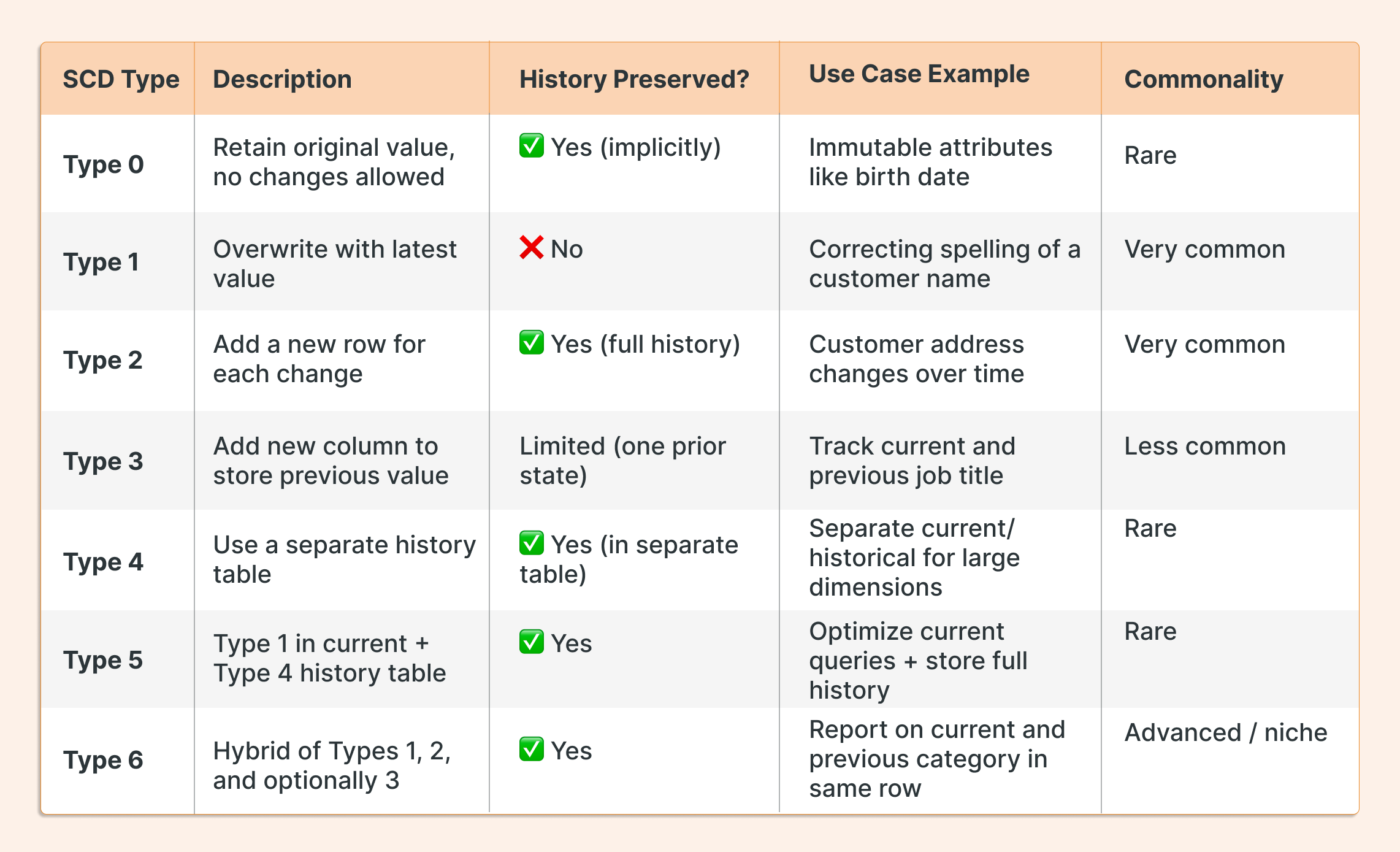
In an SCD Type 1 implementation, when a dimension attribute changes, you overwrite the existing record with the new information. This is the simplest SCD type and is ideal when you don't need to track the historical values of an attribute.
The MERGE Statement: The Engine for SCD Type 1
In Databricks, the cornerstone for implementing SCDs is the MERGE statement. You may know this operation by another name: upsert. It's a single, atomic operation that combines UPDATE, INSERT, and DELETE logic.
For SCD Type 1, we are interested in two main clauses:
WHEN MATCHED THEN UPDATE: If a record from our source data (the updates) finds a matching record in our target dimension table (based on a business key likecustomer_id), we update the target record's fields.WHEN NOT MATCHED THEN INSERT: If a record from our source is new and doesn't exist in the target table, we insert it as a new row.
Let's watch a video that explains this concept clearly.
Mastering SCD Type 1: Step-by-Step Implementation with Merge and UpSert in Databricks | Delta Table
The video 'Mastering SCD Type 1' by The Data Master provides an excellent conceptual overview of SCD Type 1 and the MERGE statement. The first few minutes use a simple Excel example to make the logic very clear.
Please watch the first three segments of the video (00:00 - 04:51). Focus on: The definition of SCD Type 1 as an overwrite operation. The MERGE syntax and how it maps to 'update' and 'insert' logic (upsert). The Excel demonstration, which visualizes how existing records are updated and new records are inserted.
As the video explained, the MERGE statement elegantly handles the logic required for an SCD Type 1 load. It checks for the existence of a record and then performs the correct action—update or insert—all within a single, transactional command. This is crucial for maintaining data consistency.
Hands-On: Implementing SCD Type 1 in Databricks
Now that you understand the concept, let's walk through a practical implementation. Your preference for hands-on, code-centric learning will be well-served here. We will see how to construct and execute the MERGE query in a Databricks notebook.
Mastering SCD Type 1: Step-by-Step Implementation with Merge and UpSert in Databricks | Delta Table
Let's continue with the same video, which now moves into a Databricks notebook to implement the concepts we just learned.
Watch the rest of the video (04:51 - 17:15). This is a complete, step-by-step walkthrough. Pay close attention to: Setup (04:51 - 08:58): Creating the initial source DataFrame and the empty target Delta table. Initial Load (08:58 - 14:01): Running the MERGE statement for the first time. Notice how all records fall into the WHEN NOT MATCHED THEN INSERT clause because the target is empty. Update and Insert (14:01 - 16:34): Modifying the source data (one record updated, one new record added) and re-running the exact same MERGE statement. Observe how the command now triggers both WHEN MATCHED THEN UPDATE and WHEN NOT MATCHED THEN INSERT. Verification (16:34 - 17:15): Using DESCRIBE HISTORY to see the MERGE operations recorded in the Delta transaction log.
Code Examples
To solidify your understanding, here are the essential MERGE patterns for SCD Type 1 in both SQL and Python. Given your proficiency in both, you can appreciate the flexibility Databricks offers.
These examples assume you have a target Delta table (dim_employees) and a source of updates (new_employee_data), both containing an employee_id column as the unique key.
Spark SQL
This is the most direct and readable way to perform a merge. The * syntax is a convenient shorthand to update or insert all columns, assuming the schemas match.
MERGE INTO dim_employees AS target
USING new_employee_data AS source
  ON target.employee_id = source.employee_id
WHEN MATCHED THEN
  UPDATE SET *
WHEN NOT MATCHED THEN
  INSERT *
Python (PySpark)
You can also perform the same operation programmatically using the DeltaTable class in PySpark. This is particularly useful when building complex data pipelines or integrating this logic into a larger Python application.
from delta.tables import DeltaTable


# Assume 'spark' is your SparkSession and the table 'dim_employees' exists
delta_target = DeltaTable.forName(spark, "dim_employees")


# Assume 'new_employee_data_df' is your source DataFrame of updates
delta_target.alias("target").merge(
    source=new_employee_data_df.alias("source"),
    condition="target.employee_id = source.employee_id"
  ) \
  .whenMatchedUpdateAll() \
  .whenNotMatchedInsertAll() \
  .execute()
Both of these code blocks achieve the exact same SCD Type 1 outcome. They find matching records based on employee_id and update them, or insert new records if no match is found.
SCD Type 1 in Declarative Pipelines (Delta Live Tables)
For streaming or incremental use cases, Delta Live Tables (DLT) provides a declarative way to manage SCDs, which can greatly simplify your pipeline code. While MERGE gives you fine-grained control for batch jobs, DLT can automate the process.
You can instruct a DLT pipeline to handle SCD Type 1 logic automatically.
Managing Slowly Changing Dimensions in Databricks - SunnyData
The article 'Managing Slowly Changing Dimensions in Databricks' from SunnyData shows a concise example of this advanced technique.
Please review the Python code block under the subsection 'SCD Type 1: Overwriting for the Latest View' within the 'Lakeflow Declarative Pipelines' section. Notice the stored_as_scd_type = 1 parameter, which tells DLT to handle the upsert logic for you.
The key part of the DLT code is:
dlt.create_auto_cdc_flow(
  target = "products_scd1",
  source = "products",
  keys = ["product_id"],


  # ... other parameters
  stored_as_scd_type = 1
)
By setting stored_as_scd_type = 1, you are telling the DLT engine to apply the MERGE (upsert) logic automatically, abstracting away the manual WHEN MATCHED/WHEN NOT MATCHED clauses. This is a powerful feature for building robust, modern data pipelines.
Conclusion
In this lesson, you have learned how to manage changes in dimensional data using the SCD Type 1 pattern in Databricks. This is a fundamental skill for maintaining clean, current, and reliable data in your Lakehouse.
Key Takeaways:
- SCD Type 1 is a strategy for handling dimension changes by overwriting the old data with the new data. It does not preserve history and is used when only the current state is important.
- The
MERGEstatement is the primary tool for implementing SCD Type 1 in Delta Lake. ItsWHEN MATCHED THEN UPDATEandWHEN NOT MATCHED THEN INSERTclauses provide the necessary "upsert" logic in a single atomic operation. - You can implement
MERGElogic using both Spark SQL for clarity and PySpark'sDeltaTableclass for programmatic control. - For advanced streaming pipelines, Delta Live Tables can automate SCD Type 1 processing declaratively, simplifying your code.
Preview of the Next Lesson:
SCD Type 1 is perfect for corrections, but what if you need to track the history of changes? For example, what if you need to analyze sales performance based on a customer's address at the time of purchase, even if they have since moved? In our next lesson, we will tackle this by learning how to implement Type 2 slowly changing dimensions, where we preserve history by creating new versions of records.