Introduction
In our last lesson, we explored how to manage data changes using the SCD Type 1 pattern, where new data simply overwrites the old. This is effective for correcting errors but falls short when you need to analyze data historically.
This lesson directly addresses that limitation by focusing on this learning outcome: Implement Type 2 slowly changing dimensions in Delta Lake using MERGE to preserve historical data.
SCD Type 2 is a cornerstone of data warehousing. Instead of overwriting data, it preserves history by inactivating the old record and inserting a new, current version. This allows you to perform "point-in-time" analysis, such as understanding which sales territory a customer belonged to last year, even if they've since been reassigned. We will see how Delta Lake's MERGE statement, which you're already familiar with from SCD Type 1, can be used to implement this more sophisticated logic atomically.
What is SCD Type 2?
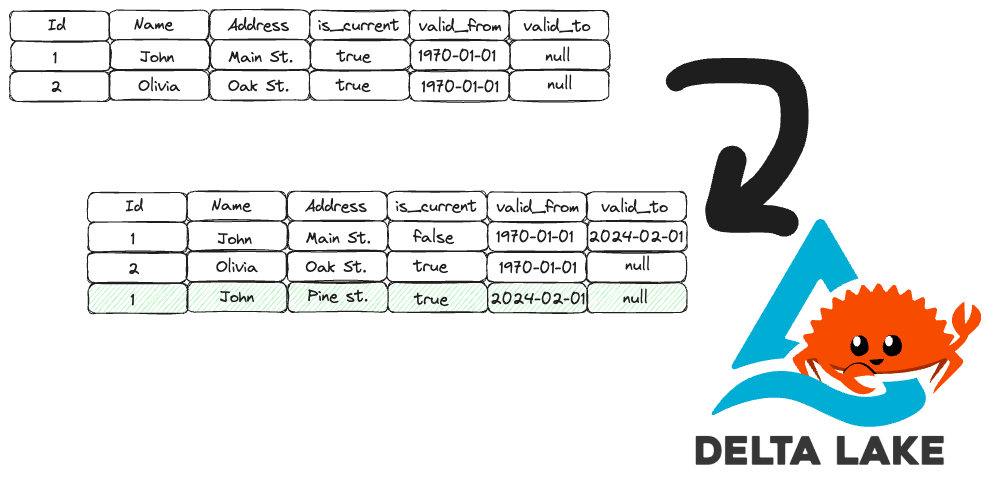
In an SCD Type 2 implementation, a change to a dimension attribute triggers two actions:
- The existing, current record is marked as "inactive" or "expired."
- A new record is inserted with the updated information and marked as "current."
This creates a complete historical trail of all versions of a given record. To manage this, we typically add several metadata columns to our dimension table:
- A boolean flag like
is_currentoractive_statusto quickly identify the current version. - Date/timestamp columns like
start_dateandend_dateto define the period during which a version was valid. - A surrogate key (e.g., a unique integer
id) because the natural business key (e.g.,employee_id) will now have duplicates.
The image below illustrates this process. When John's address changes, the original record is expired (its valid_to date is set), and a new, current record is inserted.
To understand the business value and context of SCD Type 2, let's watch a short segment from a Databricks tech chat.
Tech Chat | Slowly Changing Dimensions (SCD) Type 2
In this video, 'Tech Chat | Slowly Changing Dimensions (SCD) Type 2', experts from Databricks discuss the importance of SCD Type 2 for historical analysis and how Delta Lake's features make it possible.
Please watch the video from 09:37 to 18:51. Focus on these key points: The 'Why' (09:37 - 11:40): How SCD Type 2 preserves history, contrasting it with SCD Type 1's overwrite approach. The Analytical Value (11:40 - 16:23): How this pattern enables 'as of' analytics (e.g., quarter-over-quarter analysis) within a star schema, which is impossible with Type 1. The 'How' with Delta (16:23 - 18:51): Why Delta Lake's transactional MERGE operation is crucial for implementing SCD Type 2 reliably, avoiding the data consistency issues found in older append-only data lake technologies.
Implementing SCD Type 2 with MERGE
As the video explained, the MERGE statement is the key to performing an SCD Type 2 update in a single, atomic transaction. The challenge is that for each incoming change, we need to perform both an UPDATE (on the old record) and an INSERT (for the new version).
We will explore two common patterns to achieve this. Since you are proficient in both Python and SQL, we'll look at a PySpark-centric approach and a SQL-centric one.
Pattern 1: A Programmatic PySpark Approach
This pattern involves a series of transformations to prepare a source DataFrame that can then drive the MERGE command. The core idea is to create a DataFrame containing records that will match for an update, and other records that will not match, forcing an insert.
A great way to understand this is to walk through a detailed, step-by-step example.
61. Databricks | Pyspark | Delta Lake : Slowly Changing Dimension (SCD Type2)
The video 'Databricks | Pyspark | Delta Lake : Slowly Changing Dimension (SCD Type2)' from Raja's Data Engineering provides an excellent, clear walkthrough of this programmatic pattern.
Please watch from 02:48 to 19:49. The video is broken into logical steps that are great to follow: Conceptual Walkthrough (02:48 - 06:16): The presenter uses an Excel sheet to clearly explain the source, target, and desired output, defining the logic before any code is written. Logic Steps (06:16 - 11:59): He explains the programmatic steps: left join, filter for changes, and the key step of creating 'dummy' records with a null merge key to force inserts. PySpark Implementation (13:53 - 18:37): This is the core implementation. Observe how he translates the logical steps into PySpark code, culminating in the merge operation. Pay close attention to the whenMatchedUpdate and whenNotMatchedInsert clauses. Verification (18:37 - 19:49): Finally, he queries the target table to prove that the SCD Type 2 logic worked as expected.
This method is powerful because it gives you fine-grained control over the logic within your Python code, which can be beneficial when building complex ETL pipelines or libraries.
Pattern 2: The SQL UNION ALL Approach
Another common and elegant pattern, especially in SQL, involves constructing a source for the MERGE statement using a UNION ALL. This source table contains two sets of records:
- Records for updates: The incoming changes with their natural keys. These will match existing records in the target table.
- Records for inserts: A
UNIONof the same incoming changes, but with their merge keys set toNULL. These will never match, forcing them into theWHEN NOT MATCHED THEN INSERTclause.
Let's explore this pattern using a practical article that implements SCD Type 2 on Databricks SQL.
SCD 2 Warehousing Design Pattern on Databricks SQL Serverless
The article 'SCD 2 Warehousing Design Pattern on Databricks SQL Serverless' provides a robust SQL implementation. We will focus on the table structure and the MERGE statement itself.
Please read two sections from the article: Start at 'Step 2 — Create your target Silver table'. Review the DDL and the explanation of the essential processing columns (_is_current, _start_timestamp, _end_timestamp). Continue to 'Step 3 — Load your staging data with a MERGE'. Focus on the MERGE INTO statement. Analyze the USING clause with its UNION ALL, and see how it drives the WHEN MATCHED (to expire old records) and WHEN NOT MATCHED (to insert new records) logic.
Here is a simplified version of the SQL MERGE logic from the article, which you can use as a template:
MERGE INTO silver_dimension AS target
USING (
  -- Records to find matches for expiring
  SELECT
    updates.natural_key AS merge_key,
    updates.*
  FROM updates

  UNION ALL

  -- Records to insert new versions
  SELECT
    NULL AS merge_key,
    updates.*
  FROM updates
) AS source
ON target.natural_key = source.merge_key AND target.is_current = true

-- Clause 1: Expire old records
-- A record from the first part of the UNION matches an existing, current record.
WHEN MATCHED AND target.dimensional_attribute <> source.dimensional_attribute THEN
  UPDATE SET
    target.is_current = false,
    target.end_date = source.event_timestamp

-- Clause 2: Insert new records
-- A record from the second part of the UNION (with NULL key) does not match.
WHEN NOT MATCHED THEN
  INSERT (
    natural_key,
    dimensional_attribute,
    is_current,
    start_date,
    end_date
  )
  VALUES (
    source.natural_key,
    source.dimensional_attribute,
    true,
    source.event_timestamp,
    NULL
  );
This pattern is very explicit and readable within a single SQL statement, making it a popular choice for SQL-based transformations and Databricks SQL workflows.
Practical Considerations
Implementing SCD Type 2 effectively involves a few more details that are crucial in a production environment.
1. Surrogate Key Generation
As noted, when you start keeping history, your natural business key is no longer unique. You need a surrogate key. Traditional databases often have an AUTO_INCREMENT feature. Delta Lake's MERGE statement doesn't support this directly. A common approach is to use a window function like ROW_NUMBER() to generate IDs.
Slowly Changing Dimensions (SCD Type 2) with Delta and Databricks
The article 'Slowly Changing Dimensions (SCD Type 2) with Delta and Databricks' by Advancing Analytics touches on this specific challenge.
Please read the short section starting with 'What about the [id] column I hear you ask?'. It acknowledges this limitation and suggests a practical workaround using ROW_NUMBER() in a separate step.
In modern Databricks, you can also define columns with GENERATED ALWAYS AS IDENTITY when you create the table, which handles this automatically for INSERT operations (though you must list columns explicitly and not use INSERT *).
2. Creating Views for Users
Your dimension table now contains all historical versions, which can be confusing for business users who typically only want to see the current state. The best practice is to provide a clean, simple view on top of the SCD table.
This view filters for only the active records, hiding the complexity of the historical data and improving query performance through partition pruning if you partition by the is_current flag.
CREATE OR REPLACE VIEW silver_dimension_current AS
SELECT *
FROM silver_dimension
WHERE is_current = true;
Conclusion
In this lesson, you've moved beyond simple data updates to master a fundamental data warehousing technique for preserving history. You now have the tools to build dimension tables that provide a complete and auditable record of changes over time.
Key Takeaways:
- SCD Type 2 preserves history by expiring old records and inserting new ones, enabling point-in-time analysis.
- The implementation requires adding metadata columns to your dimension table, such as
is_current,start_date, andend_date. - Delta Lake's
MERGEstatement is the atomic and reliable tool for implementing SCD Type 2 logic. - You learned two powerful patterns for structuring the
MERGEoperation: a programmatic PySpark approach and a SQLUNION ALLapproach. - In production, you should create a view that exposes only the current records to simplify access for downstream users.
Preview of the Next Lesson:
We have now covered how to build dimensions that are always current (SCD Type 1) and dimensions that track full history (SCD Type 2). The next logical step is to combine these dimensions with our transactional data. In the next lesson, we will construct a star schema with fact and dimension tables in the gold layer, bringing together all the modeling concepts we've learned to build a powerful analytical model.