Introduction
Welcome to the final module of our course! You've built a strong foundation, moving from the essentials of the Databricks platform and Delta Lake all the way through to implementing production-grade CI/CD pipelines. Our focus now shifts from how to build to what to build and why. This module is designed to sharpen your analytical skills, preparing you for the kind of scenario-based questions you'll face in the Databricks Certified Data Engineer Professional exam.
This lesson addresses the learning outcome: Analyze a scenario to select the appropriate data ingestion method (e.g., Auto Loader, COPY INTO, streaming).
We've encountered these tools in previous modules, but today our goal is to establish a clear decision-making framework. You will learn to evaluate the trade-offs between different ingestion methods based on factors like data volume, velocity, schema stability, and cost. This skill is fundamental for a data engineer, as choosing the right ingestion tool is the first critical step in designing an efficient and scalable data pipeline.
1. The Data Ingestion Landscape
Before we dive into specific tools, let's look at the bigger picture. Data arrives in many forms. Some data sources, like application events or IoT sensors, produce a continuous stream of events that are often managed by message queues. Other sources, like daily reports or batch exports from operational systems, deliver data as files in cloud object storage.
Databricks provides specialized tools for each of these patterns.
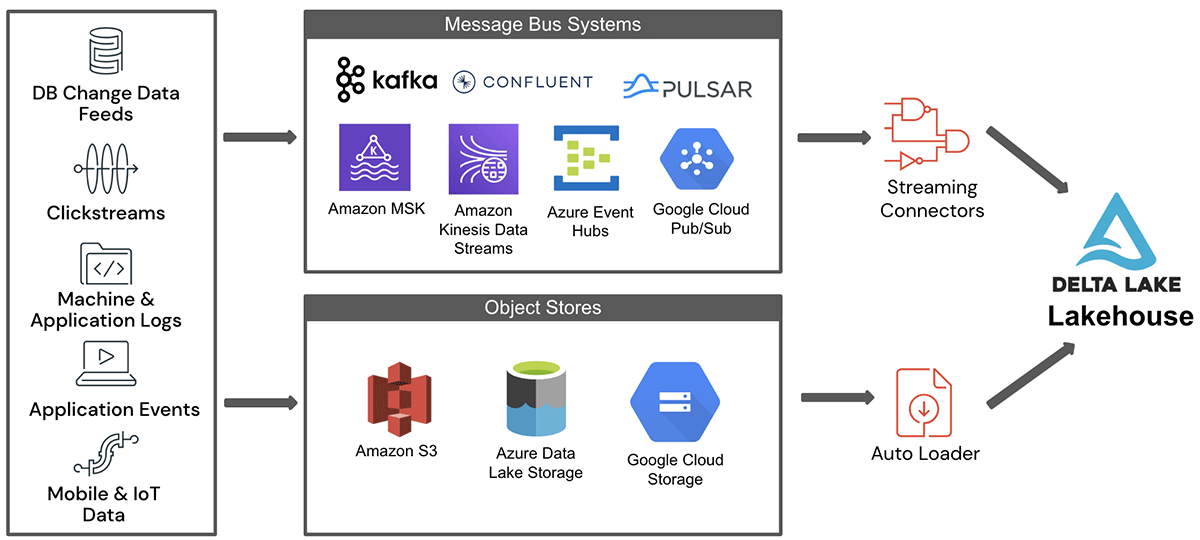
Our focus today is primarily on ingesting files from cloud storage, which is a very common task for data engineers. The two main tools for this are COPY INTO and Auto Loader. We'll also clarify how Spark Structured Streaming relates to both.
Let's start with a brief video overview of the main ingestion methods.
How to Ingest Data into Databricks | COPY INTO, Structured Streaming, AutoLoader, Federated query
This video from SleekData provides a practical introduction to COPY INTO, Structured Streaming, and Auto Loader. It will help you visualize how each tool is used.
Please watch the following two segments: COPY INTO (00:43 - 02:52): Notice the simplicity of the SQL command and how it's used for batch loading. Auto Loader (03:56 - 05:42): Pay attention to how it uses the cloudFiles format within a streaming context and the mention of its two file detection modes.
2. A Framework for Choosing Your Ingestion Tool
The core of this lesson is learning to ask the right questions about a given scenario. The answers will point you to the optimal ingestion tool. Let's break down the decision-making process using four key criteria.
Criterion 1: Scale and Data Arrival Pattern
This is often the most important factor. How much data are you expecting, and how often does it arrive?
-
COPY INTO: This command is designed for batch loading. It's ideal for scenarios where you need to load data on a predictable schedule (e.g., once an hour, once a day) or for ad-hoc loads. It's simple, idempotent (it won't load the same file twice), and performs well for ingesting up to thousands of files. Given your experience with Airflow, you can think of usingCOPY INTOwithin a scheduled Databricks Job as being analogous to running a Python script in a scheduled DAG to perform a batch data load. -
Auto Loader: This is built for incremental and streaming ingestion at scale. It excels when you have data arriving continuously or in large volumes (think millions of files over time). It's an optimized version of Spark Structured Streaming specifically for files. It efficiently discovers new files as they land in cloud storage and processes them in a cost-effective manner.
The official Databricks documentation provides a succinct comparison.
Ingest data from cloud object storage
Let's read the official Databricks guidance on when to choose Auto Loader versus COPY INTO.
Read the section titled 'When to use COPY INTO and when to use Auto Loader'. Focus on the first point, which directly addresses data volume and scale.
Criterion 2: Schema Management
Data schemas are not always static. Your source systems might add new columns or change data types. How your ingestion tool handles these changes is critical.
-
COPY INTO: Provides some options for schema evolution but is generally best suited for data with a stable and well-defined schema. Handling schema changes often requires more manual intervention. -
Auto Loader: This is a key strength of Auto Loader. It has powerful mechanisms for schema inference and evolution. It can automatically detect new columns in the source data and add them to the target Delta table. It can also "rescue" data that doesn't match the expected schema by storing it in a separate column for later analysis, preventing data loss.
This video from Databricks provides an excellent demonstration of Auto Loader's schema handling capabilities.
Data Ingestion using Auto Loader
This short video dives into the specifics of Auto Loader, highlighting its powerful schema inference and evolution features.
Watch the segment from 01:20 to 03:01. Observe how Auto Loader infers the schema, handles schema hints, appends new columns automatically, and rescues mismatched data.
Criterion 3: File Discovery Method and Cost
Discovering new files in a cloud bucket can be an expensive operation, especially if the bucket contains millions or billions of files.
-
COPY INTO: On each run, it must scan the source directory to identify files that have not yet been loaded. This is efficient for a few thousand files but does not scale well to directories with a very large number of files. -
Auto Loader: Offers two highly optimized modes for file discovery:
- Directory Listing Mode: A more advanced listing mechanism than
COPY INTO. It incrementally lists files and tracks state, making it more efficient for larger directories. - File Notification Mode: The most scalable and cost-effective approach. It leverages cloud provider services (e.g., AWS SQS, Azure Queue Storage) to get notifications when new files arrive, eliminating the need for expensive directory listings altogether.
- Directory Listing Mode: A more advanced listing mechanism than
Criterion 4: Data Source Type
Finally, what is the origin of your data?
-
Files in Cloud Storage (S3, ADLS, GCS): This is the domain of
COPY INTO(for batch) and Auto Loader (for streaming/incremental). -
Streaming Message Queues (Kafka, Event Hubs, Pub/Sub): For these sources, you would use Spark Structured Streaming directly with its built-in connectors (e.g.,
spark.readStream.format("kafka")). Auto Loader'scloudFilessource is not applicable here, as it's specifically designed for file sources.
3. Synthesizing the Comparison
We've covered the main decision points. The following resources provide a concise summary to help you consolidate this information.
First, this table gives a quick, at-a-glance comparison.

For a more detailed textual comparison, please review the following resource.
HOW TO: Simplify data ingestion in Databricks using Autoloader
This article provides a direct comparison table that clearly lays out the differences in use cases and functionality between the two tools.
Read the section 'What Is the Main Difference Between Databricks Autoloader and COPY INTO?'. The table provides an excellent summary. Also, quickly review the FAQs at the end, particularly the questions comparing Autoloader and COPY INTO.
4. Putting It into Practice: Scenarios
Now, let's apply this framework. For each scenario below, decide which ingestion method is most appropriate and briefly justify your choice.
Scenario 1:
You are building a pipeline for your company's sales data. A new report, in the form of a single 2 GB CSV file with a consistent schema, is uploaded to a dedicated S3 bucket every morning at 5 AM. The data must be loaded into a bronze Delta table before the business day starts at 8 AM. The pipeline should be simple to maintain.
Click for analysis
**Answer:** **`COPY INTO`** is the ideal choice here.Justification:
- Batch Pattern: The data arrives on a predictable daily schedule, which is a classic batch use case.
- Stable Schema: The schema is described as "consistent," so powerful schema evolution features are not required.
- Simplicity:
COPY INTOis a single SQL command that can be easily placed inside a Databricks Job and scheduled to run once a day. This meets the "simple to maintain" requirement. - Scale: A single, albeit large, file per day is well within the capabilities of
COPY INTO.
Scenario 2:
Your team manages a popular mobile application that generates thousands of small JSON log files every minute. These files are streamed into a GCS bucket. The development team frequently adds new fields to the JSON logs to capture more user interactions, and you need to ingest this data in near real-time without losing any information.
Click for analysis
**Answer:** **Auto Loader** is the clear winner.Justification:
- Scale and Velocity: "Thousands of files every minute" is a high-volume, high-velocity scenario that perfectly matches Auto Loader's strengths. Using
COPY INTOwould be inefficient and costly. - Schema Evolution: The requirement that "new fields are frequently added" makes Auto Loader's automatic schema evolution and data rescuing capabilities essential.
- Near Real-time: Auto Loader runs as a continuous streaming job, enabling near real-time ingestion. For maximum performance and cost-efficiency, you would configure it to use File Notification mode.
Scenario 3:
You need to build a dashboard that monitors fraudulent transactions in near real-time. The transaction events are published to an Azure Event Hubs topic. Your pipeline needs to consume these events, filter for suspicious patterns, and write the results to a "gold" level Delta table that powers the dashboard.
Click for analysis
**Answer:** **Spark Structured Streaming** with the Event Hubs connector.Justification:
- Data Source: The source is a message queue (Event Hubs), not files in object storage. Therefore, neither
COPY INTOnor Auto Loader is the correct tool. - Real-time Processing: The use case requires consuming a continuous stream of events, which is the core purpose of Spark Structured Streaming.
- Implementation: You would use
spark.readStream.format("eventhubs")...to create a streaming DataFrame directly from the message queue.
Conclusion
In this lesson, you've developed a framework for analyzing data ingestion scenarios and selecting the most appropriate tool for the job. You are now equipped to make informed engineering decisions that balance simplicity, scalability, cost, and robustness.
Key Takeaways:
COPY INTOis your tool for simple, scheduled, batch ingestion of files, especially when the schema is stable and the file count is manageable (up to thousands).- Auto Loader is the go-to for robust, scalable, and continuous ingestion of files from cloud storage, especially with high volumes or evolving schemas. It is the powerhouse for building the bronze layer of your Lakehouse from files.
- Spark Structured Streaming (with its various connectors) is used for ingesting data from non-file streaming sources like Kafka, Event Hubs, or Kinesis.
Preview of the Next Lesson:
Once data is ingested, the next step is to orchestrate the transformations that will move it through the bronze, silver, and gold layers of the Medallion Architecture. In our next lesson, we will analyze scenarios to help you select the appropriate orchestration tool, comparing and contrasting Delta Live Tables and Databricks Workflows.