Introduction
Welcome back! In our previous lesson, we established a framework for selecting the right data ingestion tool, focusing on how to get raw data into the Databricks Lakehouse. You learned to differentiate between COPY INTO, Auto Loader, and native Structured Streaming based on the scenario's requirements for scale, data velocity, and schema management.
Now that our data has landed, typically in a bronze table, the next logical step is to process it. This involves orchestrating the transformations that will cleanse, enrich, and aggregate the data as it moves through the silver and gold layers of the Medallion Architecture.
This lesson directly addresses the learning outcome: Analyze a scenario to select the appropriate orchestration tool (e.g., Delta Live Tables, Databricks Workflows).
This is a critical architectural decision. Your choice of tool will fundamentally shape how you build, manage, and maintain your data pipelines. We'll move beyond simply writing code to designing robust, scalable, and manageable data systems.
1. The Two Paradigms: Declarative vs. Imperative
At the heart of the DLT vs. Workflows choice is a fundamental difference in programming paradigms: declarative versus imperative. Your experience with tools like Airflow has already familiarized you with the imperative model, where you explicitly define each step and the dependencies between them.
- Imperative (Databricks Workflows): You are the architect of the control flow. You define a Directed Acyclic Graph (DAG) by telling the system, "First, run Notebook A. If it succeeds, run Notebook B and SQL Query C in parallel. When both are done, run Notebook D." This gives you maximum control and flexibility.
- Declarative (Delta Live Tables - DLT): You are the architect of the data flow. You define the end state of your tables by telling the system, "The
silver_userstable is derived from thebronze_raw_logstable by applying these transformations." DLT then analyzes these definitions, infers the dependencies, and builds and executes the optimal execution graph for you.
Understanding this distinction is key to making the right choice. Let's start with a short reading that explains this theoretical foundation.
The Orchestration Dilemma: Declarative vs. Imperative Patterns
This article provides an excellent theoretical framing of the DLT vs. Workflows decision, connecting it to graph theory and state management.
Please read the section titled 'The Theoretical Foundation: The DAG and The State'. Focus on how it contrasts the 'Imperative Model' (you are the graph builder) with the 'Declarative Model' (you define the nodes; the system builds the graph).
2. A Closer Look at Delta Live Tables (The Declarative Engine)
Delta Live Tables is an opinionated framework designed specifically for building reliable and maintainable data transformation pipelines. It's not a general-purpose orchestrator; its purpose is to manage the flow of data between tables.
Let's watch a short video from Databricks that explains the motivation behind DLT.
Delta Live Tables A to Z: Best Practices for Modern Data Pipelines
This video explains the typical complexities involved in building production data pipelines and how DLT's declarative nature aims to solve them.
Watch the segment from 00:38 to 03:35. Pay close attention to the long list of concerns a data engineer traditionally has to manage (dependency management, failures, checkpointing, quality checks, etc.) and how DLT abstracts these away.
As you saw, DLT handles much of the "undifferentiated heavy lifting" of data engineering.
Key Strengths of DLT:
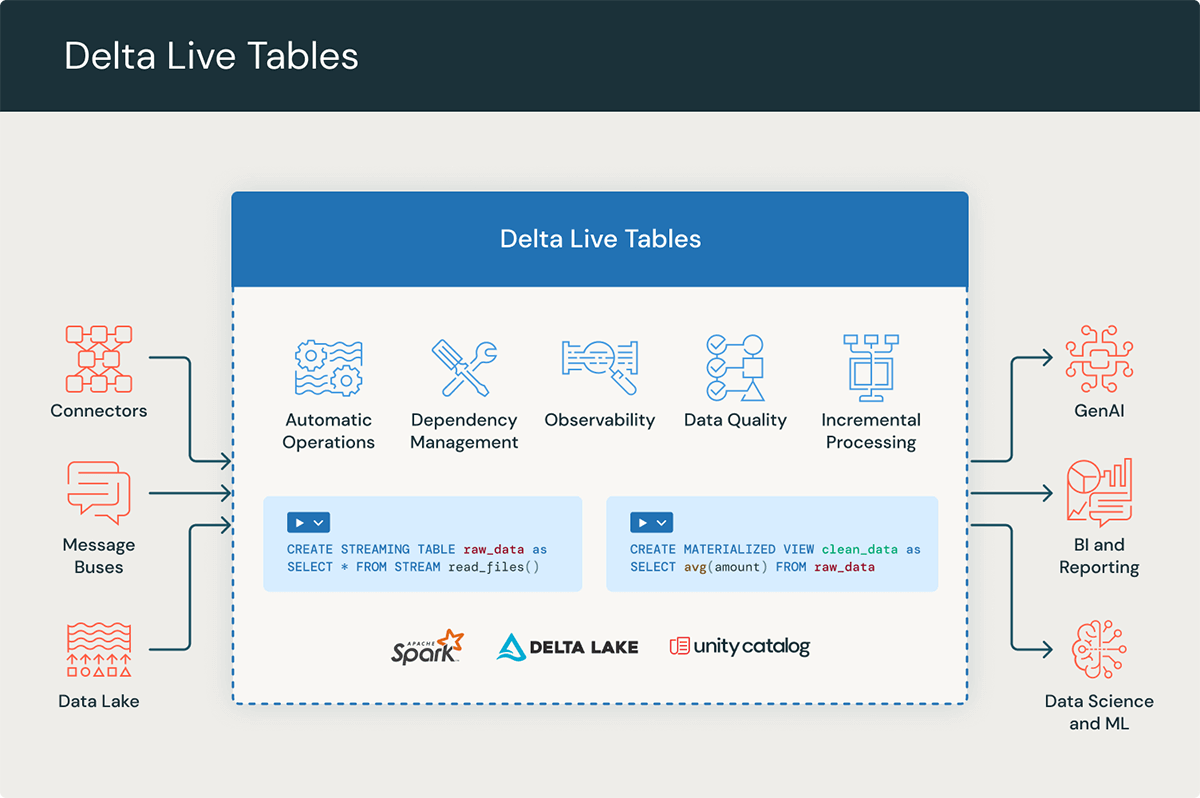
- Automatic Dependency Management: DLT automatically builds the pipeline DAG by analyzing references between tables (e.g.,
dlt.read("another_table")). - Integrated Data Quality: You can define data quality rules directly in your pipeline using
EXPECTclauses, which can stop the pipeline, drop bad records, or just record metrics. - Automated Operations: It manages complex operations like cluster lifecycle, retries, fault tolerance, and performance optimization automatically.
- Simplified Streaming: DLT greatly simplifies stateful stream processing by managing checkpoints and schema evolution seamlessly.
When to Choose DLT:
DLT is the ideal choice for the core ETL/ELT logic of your Medallion Architecture. If your primary goal is to transform data from bronze to silver and then to gold, especially with streaming or incremental data, DLT provides a robust, scalable, and maintainable solution.
The image below gives a high-level view of DLT's place in the ecosystem.
3. A Closer Look at Databricks Workflows (The Imperative Orchestrator)
Databricks Workflows is a general-purpose orchestrator. Unlike DLT, it is not focused exclusively on data transformations. You can use it to chain together any sequence of tasks, such as notebooks, SQL queries, Python scripts, and even tasks that don't run on Databricks.
Key Strengths of Workflows:
- Maximum Flexibility and Control: You can run any arbitrary code and have full control over the execution environment for each task.
- Advanced Control Flow: Workflows support complex dependencies, conditional execution of tasks (if/else logic), loops, and robust error handling.
- Interoperability: It excels at tasks that require interacting with external systems. This is where your experience with tools like Postman for API interaction becomes relevant. You can easily create a Workflow task that calls an external API.
- Granular FinOps: You can assign a specific cluster configuration (including spot instance strategies) to each individual task, allowing for precise cost optimization.
When to Choose Workflows:
Choose Workflows when your process involves more than just a linear flow of data transformations. It is the right tool if you need to:
- Integrate with external systems (e.g., call a REST API, trigger an external service).
- Implement complex conditional logic that determines which parts of a pipeline should run.
- Orchestrate tasks that are not data transformations, such as training a machine learning model or running a data validation script.
Let's refer back to the "Orchestration Dilemma" article to see its summary of Workflows.
The Orchestration Dilemma: Declarative vs. Imperative Patterns
This section of the article details the strengths of the imperative approach offered by Databricks Workflows.
Read the section 'Workflows in Depth: The Imperative Approach & Control Flow'. Note the focus on interoperability, control flow, and the ability to perform node-level optimization for FinOps.
4. The Real Answer: Use Them Together
The question "Should I use DLT or Workflows?" is often a false dichotomy. In most enterprise-grade scenarios, the answer is to use them together.
- Use DLT to manage the complex, data-intensive transformation graph (your Medallion pipeline).
- Use a Workflow to orchestrate the DLT pipeline as a single task within a larger business process.
This is sometimes called the "Workflow Container Pattern." The Workflow acts as the high-level controller, handling scheduling and interaction with the outside world, while DLT acts as the powerful, specialized engine for the core data processing.
This very short clip from the Databricks video makes this point clearly.
Delta Live Tables A to Z: Best Practices for Modern Data Pipelines
Let's hear the official take from Databricks on the relationship between DLT and Workflows.
Watch this brief segment from 05:02 to 05:35. It directly answers the question of whether you should use one or the other, confirming they are complementary.
5. A Framework for Decision-Making
To solidify your understanding, let's use a comparison table and then apply the concepts to a few scenarios.
Databricks Pipeline Showdown: Delta Live Tables vs Jobs & Workflows
This blog post provides a very clear comparison table and concise guidance on when to choose each tool. This will serve as a great summary and reference.
Review the 'Comparison' table and the 'Which One Should You Choose?' section. This provides a practical, at-a-glance decision framework.
| Feature | Delta Live Tables (DLT) | Databricks Workflows |
|---|---|---|
| Paradigm | Declarative (Define the "what") | Imperative (Define the "how") |
| Primary Use Case | Data transformation pipelines (ETL/ELT) | General-purpose task orchestration |
| Dependency Mgmt | Automatic, based on data flow | Manual, based on task dependencies |
| Data Quality | Built-in (EXPECT rules) |
Custom code required (e.g., assertions in a notebook) |
| Flexibility | Opinionated and focused on data flow | Maximum flexibility to run any code/task |
| Best For | Standardized, scalable Bronze-Silver-Gold pipelines | Complex logic, external integrations, ML Ops |
6. Putting It into Practice: Scenarios
Let's analyze a few scenarios to practice applying this framework.
Scenario 1:
You are tasked with building the core data platform for a new e-commerce site. Raw order and clickstream data arrive continuously as JSON files in cloud storage. You need to build a pipeline with dozens of interdependent tables that moves data through bronze, silver, and gold layers. The pipeline must include strict data quality checks for things like null order_ids and valid prices. Reliability and ease of maintenance are top priorities.
Click for analysis
**Answer:** **Delta Live Tables** is the superior choice for the core pipeline.Justification:
- This is the classic use case for DLT. The focus is purely on data transformation within the Medallion Architecture.
- DLT's automatic dependency management will simplify the development of the "dozens of interdependent tables."
- The requirement for "strict data quality checks" is directly met by DLT's
EXPECTfunctionality. - DLT's automated handling of streaming, retries, and infrastructure simplifies operations, addressing the "reliability and ease of maintenance" requirement.
Scenario 2:
Your team has a nightly process that involves several distinct steps:
- Check an external SFTP server to see if a specific file has been delivered.
- If the file exists, run a notebook to ingest it into a bronze table.
- After ingestion, call a third-party data validation API to get quality scores for the new data.
- Based on the API response, either run a notebook to promote the data to silver or send a Slack notification to the on-call engineer about a quality issue.
Click for analysis
**Answer:** **Databricks Workflows** is the necessary tool here.Justification:
- This pipeline is defined by its control flow and external interactions, not just data flow.
- Step 1 (SFTP check): Requires custom scripting, which is a perfect fit for a Workflow task.
- Step 3 (API call): DLT cannot make external API calls. This must be done in a Workflow task (e.g., using a Python script with the
requestslibrary). - Step 4 (Conditional logic): The "either/or" logic based on the API response is a key feature of Workflows (conditional tasks) and is not possible within a DLT pipeline.
Scenario 3:
An enterprise data team needs to build a highly reliable streaming pipeline that processes financial transaction data through the Medallion Architecture. The core transformations are managed by one team. After the gold table is successfully updated, a separate Machine Learning team needs to be notified so they can trigger their own feature engineering job, which is a complex multi-step process. The entire end-to-end process must be scheduled to run every 15 minutes and have robust alerting.
Click for analysis
**Answer:** A hybrid approach: **A DLT pipeline orchestrated by a Databricks Workflow**.Justification:
- This scenario combines the needs of both tools, making it a perfect example of the "Workflow Container Pattern."
- DLT for the Core Pipeline: The financial data processing through Bronze-Silver-Gold is a perfect fit for DLT, leveraging its reliability, quality, and streaming features. This part of the pipeline can be encapsulated as a single DLT pipeline.
- Workflows for Orchestration:
- A Workflow can be scheduled to run every 15 minutes.
- The first task in the Workflow would be to run the DLT pipeline.
- A second task can be defined with a dependency on the first task's success. This second task would trigger the ML team's feature engineering job.
- The Workflow's native alerting capabilities can be configured to send notifications on success or failure of the entire end-to-end process.
Conclusion
Today, you've learned to analyze orchestration requirements and choose between two powerful but different tools in the Databricks ecosystem. This ability to think architecturally is a hallmark of a professional-level data engineer.
Key Takeaways:
- DLT is a declarative data transformation framework. Use it for the core data flow logic (ETL/ELT) to gain reliability, automatic management, and built-in data quality.
- Databricks Workflows is an imperative, general-purpose orchestrator. Use it when you need to manage complex control flow, conditional logic, or integrate with systems outside of Databricks.
- The most robust and common enterprise pattern is to use them together: embed a DLT pipeline as a task within a larger Databricks Workflow to get the best of both worlds.
Preview of the Next Lesson:
Now that we understand the tools for ingestion and orchestration, we will zoom in on the design of the data flow itself. In our next lesson, we will analyze scenarios to design a Medallion Architecture, deciding what specific transformations and business logic belong in the bronze, silver, and gold layers.