Hello! Welcome back to our module on building streaming data pipelines.
In the last two lessons, we explored how to read from streaming sources and control when data is processed using triggers. Now, we'll complete the picture by focusing on the destination: writing the results of our streaming query into a permanent table.
Today's learning outcome is to write streaming query results to Delta tables as a sink. For any data engineer working in the Databricks ecosystem, Delta Lake is the default and most powerful destination for streaming data. It provides reliability, performance, and advanced features that are simply not available with other file formats.
We'll start with the basic syntax for appending stream data to a Delta table and then move to a more advanced and practical pattern: performing MERGE operations (upserts) within a stream to handle updates and changes from a source system.
1. The Basics: Delta Lake as a Streaming Sink
In Structured Streaming, a "sink" is the destination where your processed data is written. Using a Delta table as a sink is the most common and recommended approach on Databricks because its transaction log guarantees exactly-once processing, ensuring data integrity even if your stream is stopped and restarted.
The overall architecture is straightforward: data flows from a source, is processed by the Structured Streaming engine, and is written to a Delta table.
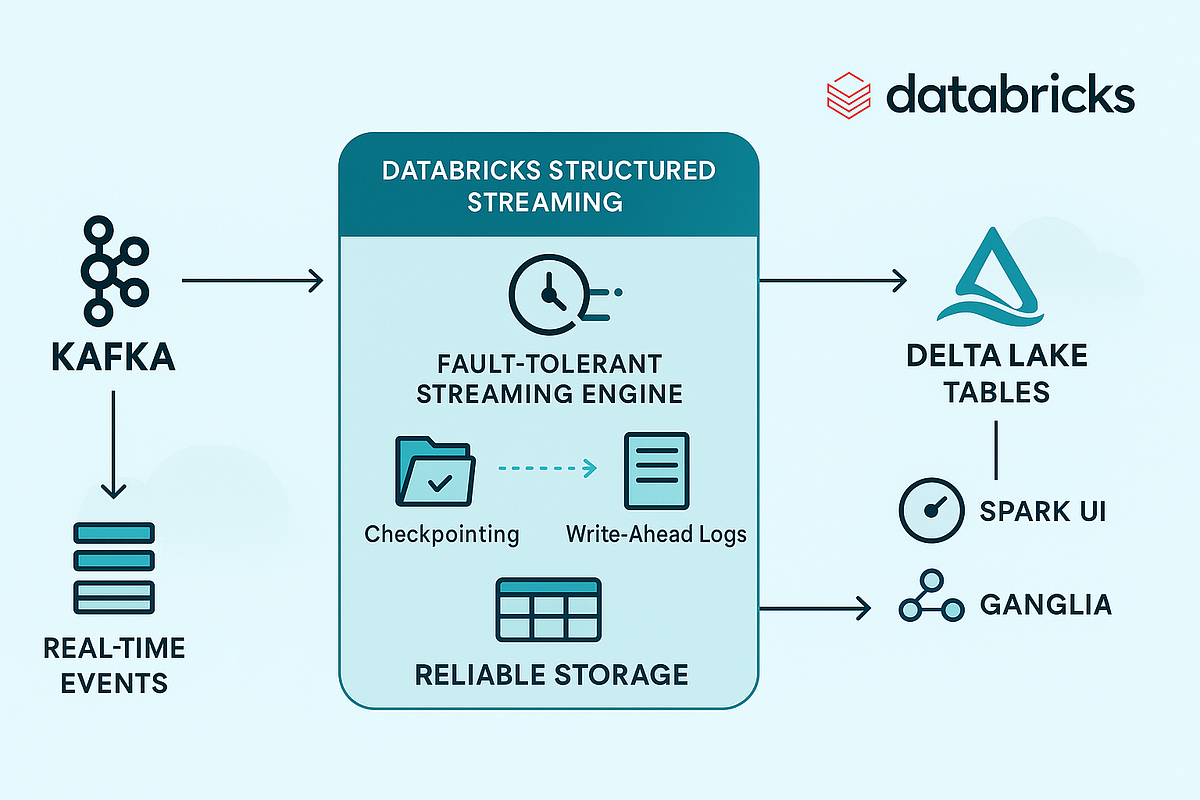
To write a stream to a Delta table, you simply specify "delta" as the format in your writeStream command.
Let's watch a short video that demonstrates the fundamental syntax.
Advancing Spark - Databricks Delta Streaming
This clip from Advancing Analytics shows how to configure a basic streaming write to a Delta table. Pay close attention to the two key components: specifying the format and defining a checkpoint location.
Watch from 03:05 to 04:42. The presenter walks through the code for writing a streaming DataFrame to a Delta sink, explaining the importance of the checkpoint directory for maintaining state.
As you saw in the video, the core of a simple streaming write looks like this:
(
  streaming_df
    .writeStream
    .format("delta")  # Specify Delta Lake as the sink format
    .outputMode("append") # Add new records to the table
    .option("checkpointLocation", "/path/to/my_checkpoint") # Crucial for fault tolerance
    .start("/path/to/my_delta_table") # Start the stream, writing to this path
)
Alternatively, and more commonly when using Unity Catalog, you can write directly to a registered table name using .toTable():
(
  streaming_df
    .writeStream
    .outputMode("append")
    .option("checkpointLocation", "/path/to/my_checkpoint")
    .toTable("my_catalog.my_schema.my_target_table") # Write to a managed table
)
This append mode is perfect for append-only data sources, like logs or sensor events. But what about sources that produce updates or deletes?
2. The Challenge: Handling Updates and Deletes
A simple append stream will fail or produce incorrect data if your source stream contains updates or deletions. For example, if you're streaming change data from a database, a single record might appear multiple times: first as an INSERT, and later as an UPDATE. Simply appending these events would result in duplicate records with outdated information.
Delta Lake is built to handle UPDATE, DELETE, and MERGE operations, but a standard streaming writeStream in append mode can't use them directly. Attempting to process updates can lead to errors, as the streaming engine expects to only append new data.
This is a common challenge in data engineering, especially when implementing Change Data Capture (CDC) pipelines. How can we apply these row-level changes to our target Delta table in a streaming context?
3. The Solution: foreachBatch with MERGE
The answer lies in a powerful Structured Streaming feature called foreachBatch. This allows you to specify a function that will be executed on the output data of every micro-batch. Inside this function, you are working with a standard batch DataFrame, not a streaming one. This means you can use all the powerful batch operations—like MERGE—that aren't available in a standard writeStream.
Let's explore the official documentation for this pattern.
Delta table streaming reads and writes
The Databricks documentation explains the concept of using foreachBatch to perform complex operations like upserts. It highlights the primary use cases for this pattern.
Read the section 'Upsert from streaming queries using foreachBatch'. Note the list of applications, such as writing streaming aggregates and applying CDC changes.
Now that you understand the concept, let's see it in action. The following video provides a complete, step-by-step guide to implementing a streaming MERGE using foreachBatch.
Advancing Spark - Delta Merging with Structured Streaming Data
This video is a detailed walkthrough of the exact problem we're solving. It starts by showing why a simple append fails and then builds the foreachBatch solution from scratch.
Please watch from 06:09 to 13:30. The video covers: The concept of foreachBatch (06:09 - 08:04): How it hijacks the micro-batch to apply custom logic. Implementing the MERGE function (08:04 - 11:48): A detailed look at the Python code that defines the MERGE logic. Executing and verifying the stream (11:48 - 13:30): Running the query and confirming that records were correctly updated instead of duplicated.
4. Code Deep Dive: Implementing the Upsert Logic
As demonstrated in the video, the pattern involves two main parts:
- A Python function that takes a micro-batch DataFrame and a batch ID as input.
- The
writeStreamcall that uses.foreachBatch()to invoke that function.
Here is a summary of the code structure, using the Delta Lake programmatic APIs:
from delta.tables import *


# 1. Define the function to be called on each micro-batch
def upsert_to_delta(micro_batch_df, batch_id):


  # Target Delta table
  delta_table = DeltaTable.forName(spark, "my_target_table")


  # Define the MERGE logic
  # Alias the target table as 't' and the source (micro-batch) as 's'
  (
    delta_table.alias("t")
      .merge(
        micro_batch_df.alias("s"),
        "t.primary_key = s.primary_key"  # The merge condition
      )
      .whenMatchedUpdateAll() # If a key matches, update all columns
      .whenNotMatchedInsertAll() # If a key is new, insert the new row
      .execute()
  )


# 2. Configure the streaming query to use this function
(
  streaming_source_df
    .writeStream
    .foreachBatch(upsert_to_delta)
    .outputMode("update")
    .option("checkpointLocation", "/path/to/my_checkpoint")
    .start()
)
Alternative: Using SQL within foreachBatch
Given your proficiency in SQL, you might prefer to express the MERGE logic using SQL. This is also a perfectly valid and common approach. To do this, you create a temporary view from the micro-batch DataFrame and then execute a MERGE SQL statement.
def upsert_with_sql(micro_batch_df, batch_id):


  # Create a temporary view from the micro-batch
  micro_batch_df.createOrReplaceTempView("updates_view")


  # Use SQL to perform the merge
  spark.sql("""
    MERGE INTO my_target_table t
    USING updates_view s
    ON t.primary_key = s.primary_key
    WHEN MATCHED THEN
      UPDATE SET *
    WHEN NOT MATCHED THEN
      INSERT *
  """)


# In your writeStream, you would call this function:
# .foreachBatch(upsert_with_sql)
5. Professional-Level Concern: Idempotency
When you use foreachBatch, Spark's checkpointing guarantees that the function will be called for each micro-batch at least once. In case of a failure and restart, the same micro-batch could be processed again. Therefore, your MERGE logic must be idempotent: running it multiple times on the same input data should produce the same result as running it once.
The standard MERGE operation is naturally idempotent. However, if your foreachBatch function writes to multiple tables, you need an extra mechanism to ensure the entire multi-table transaction is idempotent. Delta Lake provides options for this.
Delta table streaming reads and writes
The documentation covers how to make writes idempotent when writing to multiple tables inside foreachBatch. This is an advanced topic that is important for building robust, production-grade pipelines.
Read the section 'Idempotent table writes in foreachBatch'. Focus on the purpose of the txnAppId and txnVersion options.
By providing a unique application ID (txnAppId) and the batch ID (txnVersion), you allow Delta Lake to identify and ignore duplicate writes, ensuring end-to-end exactly-once semantics even across multiple tables.
Conclusion
Today, you've learned the essential patterns for writing streaming data to its most powerful sink in Databricks: Delta Lake. This capability is the foundation of the Lakehouse architecture, enabling you to build reliable and scalable pipelines that combine real-time ingestion with the full analytical power of Delta.
Key Takeaways:
- Delta as a Sink: Use
.format("delta")to write streaming data to a Delta table, which guarantees exactly-once semantics via its transaction log. - Append Mode: The default mode, suitable for append-only data like logs.
foreachBatch: The key to unlocking advanced operations in streaming. It allows you to apply batch logic (likeMERGE) to each micro-batch of a stream.- Streaming Upserts: Combining
foreachBatchwith aMERGEstatement is the standard pattern for handling CDC data or any stream that includes updates and deletes. - Idempotency: Your logic inside
foreachBatchmust be idempotent to handle stream restarts correctly. TheMERGEoperation is inherently idempotent.
Preview of the Next Lesson:
We've covered reading sources, setting triggers, and writing to sinks. But what happens if some data arrives "out of order" or significantly delayed? This can wreak havoc on time-based aggregations. In our next lesson, we will learn how to use watermarking to handle late-arriving data, a critical technique for ensuring data correctness in real-world streaming pipelines.