Hello! Welcome to the next lesson in our course on building streaming data pipelines.
In our previous session, we learned how to write streaming data to Delta Lake, focusing on both simple appends and complex MERGE operations using foreachBatch. This gave us a powerful way to land our data. However, real-world data is often messy and doesn't always arrive in perfect order. This can cause major problems for stateful operations like time-based aggregations.
Today, we'll address this challenge head-on. Our learning outcome is to use watermarking to handle late-arriving data in streaming queries. This is a fundamental technique for building robust, production-grade streaming pipelines that are resilient to the realities of distributed data systems. We'll explore why late data is a problem, how watermarking solves it, and how to implement it in your code.
1. The Problem: Late Data and Unbounded State
When you perform a stateful operation in a stream—like counting events within a 10-minute window—Spark needs to maintain the state (the current count) for each active window in memory. If a data point from an earlier window arrives late, Spark can still update the correct window's state.
But this raises a critical question: how long should Spark keep the state for old windows? Without a clear boundary, Spark would have to hold the state for every window forever, just in case a very late record arrives. This would inevitably lead to the state growing infinitely, consuming all available memory and causing your application to fail with an Out-of-Memory error.
To understand this problem in more detail, let's watch a video that explains how Spark manages state for windowed aggregations and why this creates a memory challenge.
The following video from Learning Journal provides an excellent conceptual breakdown of why Spark needs to keep window states in memory to handle late records and the memory problem this creates without a cleanup mechanism.
Watch the first 4 minutes of the video (00:00 - 04:03). Focus on how Spark processes records across micro-batches and why it saves window information in its state store.
2. The Solution: Introducing Watermarking
Watermarking is Spark's mechanism to solve the unbounded state problem. A watermark is a moving threshold that tells the streaming engine how late is "too late." It allows Spark to place a limit on how long it will wait for late data before finalizing a window's result and discarding its state from memory.
A watermark works based on the event times of the data being processed. Here's the core logic:
- Spark keeps track of the maximum event time it has seen in the stream so far. Let's call this
max_event_time. - You define a "lateness" threshold, for example, "10 minutes".
- The watermark is continuously calculated as
max_event_time - <lateness_threshold>. - Spark will drop any incoming record whose event time is older than the current watermark.
- Spark will also use this watermark to clear out old state for windows that have already passed the threshold.
This mechanism serves two crucial purposes:
- Data Correctness: It provides a predictable window of time to wait for late data before an aggregate is considered final.
- Resource Management: It allows Spark to safely evict old state from memory, guaranteeing that the state will not grow indefinitely.
The following diagram from Databricks illustrates this process perfectly.
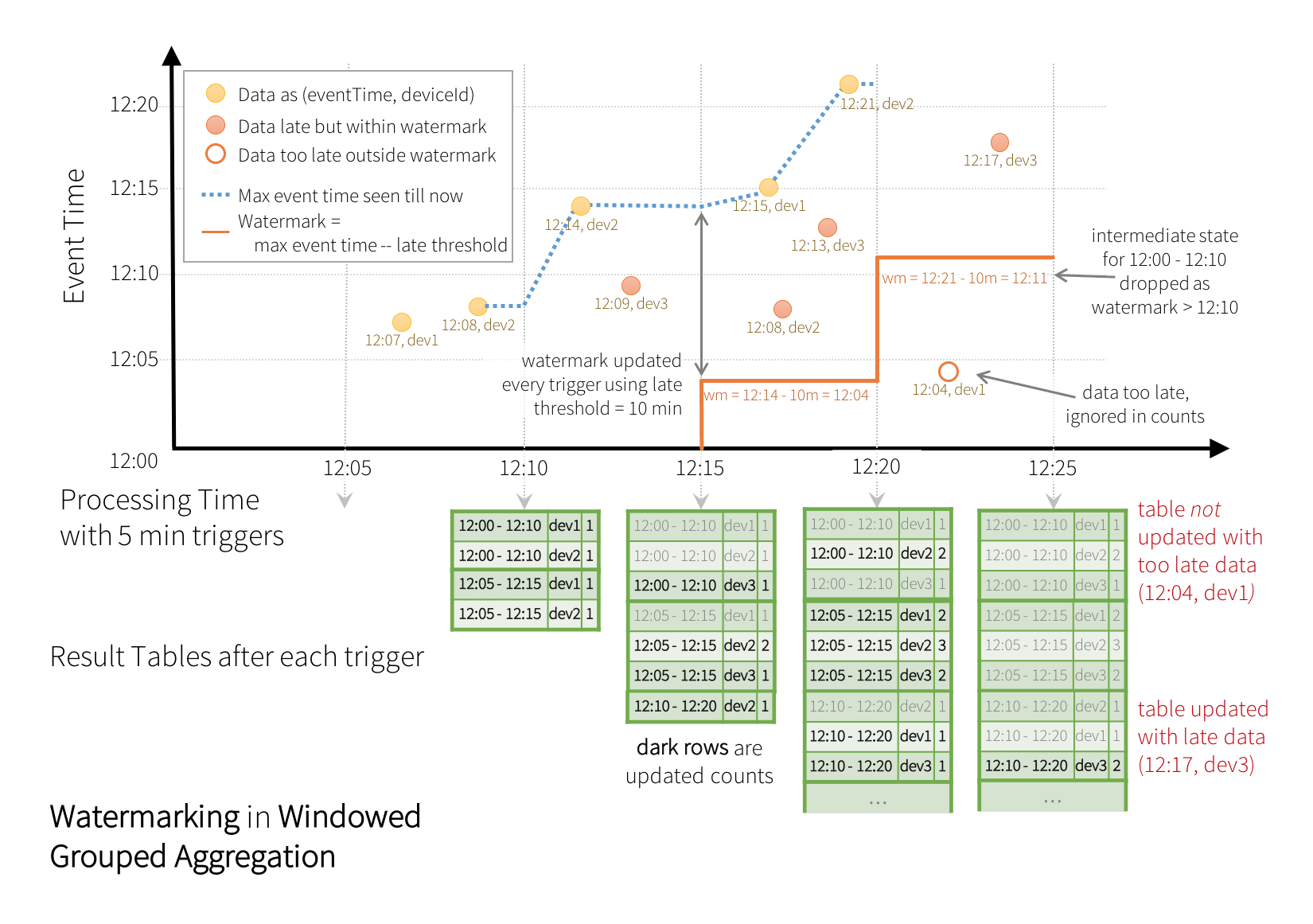
3. Implementing Watermarking in Your Code
Implementing a watermark is done by calling the .withWatermark() method on your streaming DataFrame. This method must be called before you define your stateful operation (like a groupBy on a window).
# General syntax
(
  streaming_df
    .withWatermark("timestamp_column", "10 minutes")  # Watermark on event time with a 10-minute delay
    .groupBy(
      window("timestamp_column", "5 minutes")  # 5-minute tumbling window
    )
    .count()
)
The first argument is the column that contains the event timestamp, and the second is a string specifying the lateness threshold.
Now, let's read a short section from a Databricks blog post that provides a concise PySpark example and introduces how to think about setting this threshold.
Feature Deep Dive: Watermarking in Apache Spark Structured Streaming
This blog post from Databricks, 'Feature Deep Dive: Watermarking in Apache Spark Structured Streaming', gives a practical code example and explains the key parameters you need to define.
Read the section 'Incorporating Watermarking into Your Pipelines'. Focus on the PySpark code block and the two items you need to identify to implement a watermark.
4. Watermarking and Output Modes: A Critical Distinction
A key aspect of using watermarks, especially at the professional level, is understanding how they interact with different streaming output modes. Watermarking is not compatible with complete mode, because that mode requires all results to be preserved, which contradicts the goal of dropping old state.
Watermarking behaves differently in append and update modes.
- Update Mode: The stream continuously emits updated results for windows as new data arrives. Once the watermark passes a window's end time, Spark drops the state for that window, and no more updates for it will be emitted. Any late data arriving for that dropped window is ignored.
- Append Mode: The stream does not emit any output for a window until after the watermark has passed the window's end. It waits until it is certain that all late data (within the threshold) has been processed, then emits the final, aggregated result for that window just once.
To see this difference in action, let's watch a quick, practical demonstration.
16 Late Data Processing | Watermarks | Tumbling and Sliding Window Operations in Spark Streaming
This video clip from Ease With Data clearly shows the difference in output when using a watermark with update versus complete mode, highlighting why the latter is incompatible.
Watch from 07:35 to 09:30. Pay close attention to how the output behaves when a late event is introduced. The presenter first shows that the update mode correctly ignores the late event, while complete mode does not. Then, he explains why this is critical for managing memory in stateful applications.
For a deeper, hands-on walkthrough that you can replicate, the following article provides a full code example and traces the output for both append and update modes step-by-step as new data arrives.
Watermark In Structured Streaming
This article by Omkar Patil provides a fantastic, detailed code walkthrough of how update and append modes behave differently with watermarking.
Read the section 'Understanding Append and Update Mode with a Code Example'. Follow the logic for both the 'Update Mode' and 'Append Mode' examples. Observe when data is written to the sink in each case and how the watermark's progression triggers this.
5. Professional Considerations
Choosing a Watermark Delay
How do you choose the right delay (e.g., "10 minutes" vs. "2 hours")? This is a business decision that involves a trade-off:
| Watermark Delay | Data Precision / Completeness | Output Latency | Memory / State Usage |
|---|---|---|---|
| Longer (e.g., hours) | Higher. You drop fewer late records. | Higher. You must wait longer for final results. | Higher. More state is kept in memory for longer. |
| Shorter (e.g., minutes) | Lower. More late records might be dropped. | Lower. You get final results faster. | Lower. State is cleared from memory more quickly. |
You need to analyze your source systems and business requirements. If 99.9% of your data arrives within 30 minutes, a 30-minute watermark might be a good starting point.
Monitoring Dropped Data
How do you know if your watermark is too aggressive? Spark provides metrics to monitor your stream. Specifically, the numRowsDroppedByWatermark metric tells you if you are dropping data that is considered too late. A high number might indicate that your watermark delay needs to be increased.
Conclusion
You have now learned one of the most important concepts for building reliable, stateful streaming applications. Watermarking is the mechanism that allows Spark to handle the inherent messiness of real-world event streams without running out of memory.
Key Takeaways:
- The Problem: Stateful streaming aggregations without a cleanup mechanism lead to unbounded state and memory errors.
- The Solution: Watermarking defines a lateness threshold based on event time, allowing Spark to safely drop old state and ignore overly late records.
- Implementation: Use the
.withWatermark("event_time_col", "delay")method before your stateful operation. - Output Modes: Watermarking works with
updateandappendmodes but is incompatible withcompletemode.updatemode emits results as they change and stops updating a window once its state is dropped.appendmode waits to emit a window's final result until after the watermark has passed its boundary.
- Trade-offs: Choosing a watermark duration is a balance between data completeness, output latency, and memory consumption.
Preview of the Next Lesson:
We've built a robust pipeline that can read data, handle updates via foreachBatch, and now manage late-arriving data with watermarking. The final piece of the puzzle is knowing what's happening inside. In our next lesson, we will learn how to monitor and troubleshoot streaming queries using the Spark UI and query progress, giving you the visibility needed to run these pipelines in production.