Hello! Welcome to the next lesson in our "Building Streaming Data Pipelines" module.
In our last session, we focused on controlling what data gets written to a sink using output modes (append, update, and complete). We learned that this choice is fundamental to the logic and efficiency of your pipeline.
Today, we'll tackle the next crucial question: when does the data get written? This is controlled by configuring a trigger interval. Mastering triggers allows you to precisely manage the trade-offs between latency, cost, and resource utilization in your streaming applications. This is a core competency for any data engineer working with real-time data on Databricks.
Our learning outcome for this lesson is to configure trigger intervals for streaming queries (fixed interval, availableNow, and continuous). We will explore the different trigger modes, see how to implement them in code, and understand the best scenarios for each.
1. What is a Trigger?
In Structured Streaming, a trigger defines how often a streaming query processes new data. Think of it as the pacemaker for your pipeline. When you start a stream, Spark periodically checks the source for new data. The trigger determines the timing of these checks and the subsequent processing micro-batches.
This classic diagram of the Structured Streaming model illustrates the concept.
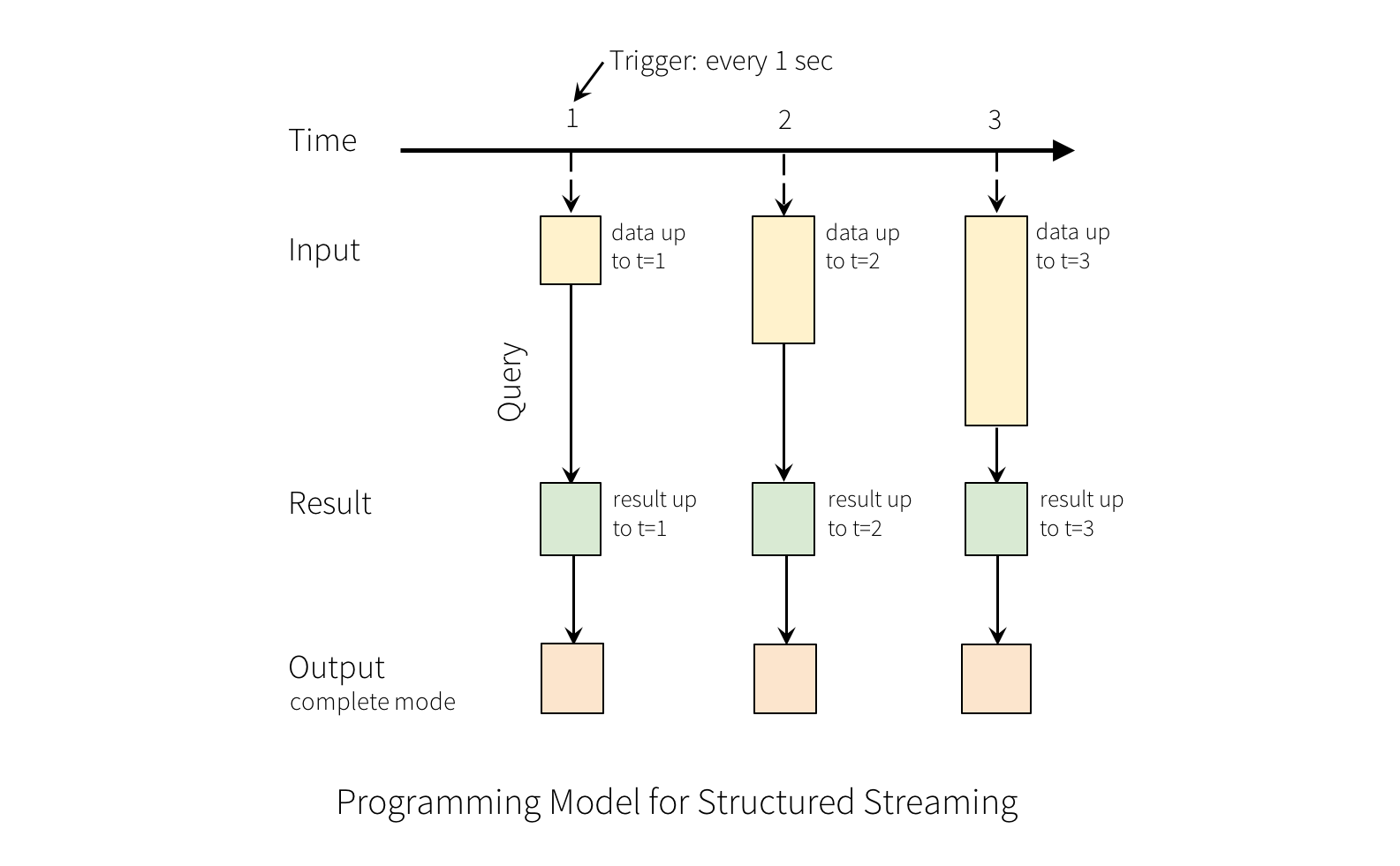
If you don't specify a trigger, Spark uses a default mode. Let's start there.
2. The Default Trigger
By default, Structured Streaming tries to process data as quickly as possible. As soon as one micro-batch finishes, Spark immediately starts the next one. On Databricks, this defaults to fixed-interval micro-batches of 500ms.
Understanding Triggers with Databricks Spark Structured Streaming
This article provides a concise introduction to the default trigger. It helps set the baseline before we explore more specific configurations.
Read the section titled '1. Trigger default'. It explains the behavior and provides a code example where no trigger is explicitly set.
The default trigger is excellent for low-latency use cases where you want to process data almost as soon as it arrives, and your system can handle the constant processing load.
Here is the basic syntax for a write stream, which would use the default trigger since no .trigger() call is present:
# This query will use the default trigger (process data as fast as possible)
query = (
  streaming_df
    .writeStream
    .format("delta")
    .outputMode("append")
    .option("checkpointLocation", "/path/to/checkpoint")
    .toTable("my_target_table")
)
However, running a stream continuously isn't always desirable or cost-effective. Let's look at other options.
3. Trigger availableNow: Incremental Batch Processing
One of the most powerful trigger modes allows you to blend the worlds of streaming and batch processing. The availableNow trigger processes all the data that is currently available in the source in a single batch, and then the stream stops automatically.
This is ideal for scenarios where you want to run an incremental update on a schedule (e.g., every hour, every night) rather than continuously. You can use a scheduler, like the one in Databricks Workflows, to run the notebook containing this query at your desired cadence.
11 Spark Streaming Triggers - Once, Processing Time & Continuous | Tune Kafka Streaming Performance
This video provides a great demonstration of this 'process-all-and-stop' behavior. Note that the presenter uses .trigger(once=True), which was the syntax in older Spark versions. Databricks now recommends .trigger(availableNow=True), but the behavior is identical.
Watch from 02:38 to 04:34. Observe how the streaming query starts, processes the available data, and then stops on its own, behaving like a traditional batch job.
The key advantages of availableNow=True are:
- Cost-Effectiveness: You only use compute resources when the job is actually running, rather than having a cluster running 24/7.
- Simplicity: You can reuse the same streaming code for both near real-time and batch-like use cases.
- Idempotency: Since it uses the same checkpointing mechanism as other streams, re-running the job will pick up where it left off, preventing duplicate processing.
Here is the correct syntax using availableNow:
query = (
  streaming_df
    .writeStream
    .trigger(availableNow=True)  # Process all available data and stop
    .format("delta")
    .option("checkpointLocation", "/path/to/checkpoint")
    .toTable("my_target_table")
)
4. Trigger processingTime: Fixed Interval Micro-batches
The processingTime trigger gives you more control than the default. It instructs Spark to launch a new micro-batch at a fixed interval that you define, for example, "every 1 minute" or "every 10 seconds".
This is useful for balancing latency against cost. If you don't need sub-second latency, you can reduce the frequency of micro-batches to lower the overhead and cost associated with constantly checking for new data.
11 Spark Streaming Triggers - Once, Processing Time & Continuous | Tune Kafka Streaming Performance
The same video also demonstrates the processingTime trigger. Pay attention to the Spark UI, where you can see jobs being triggered at a regular, predictable cadence.
Watch from 04:34 to 05:51. The presenter sets a 10-second processing time and you can see the batches being processed accordingly.
The syntax for this trigger is straightforward:
query = (
  streaming_df
    .writeStream
    .trigger(processingTime='30 seconds')  # New micro-batch every 30 seconds
    .format("delta")
    .option("checkpointLocation", "/path/to/checkpoint")
    .toTable("my_target_table")
)
5. Low-Latency Triggers: continuous vs. realTime
For use cases requiring the lowest possible latency (sub-second), Spark offers another mode beyond micro-batching. This is where a crucial distinction arises between open-source Spark and its implementation on Databricks—a key detail for your certification exam.
The Open-Source continuous Trigger
Open-source Apache Spark includes an experimental continuous trigger. Unlike micro-batch triggers, this mode processes data continuously with very low latency.
The video you watched previously introduces this concept. While it's good for understanding the idea, it's important to remember this is not the recommended approach on Databricks.
The Databricks realTime Trigger
On the Databricks platform, the continuous trigger is not supported. Instead, you should use realTime mode, which is a Databricks-optimized feature for ultra-low-latency workloads.
Let's read the official documentation to get this right.
Configure Structured Streaming trigger intervals
This is the most important part of this lesson for your certification. The official Databricks documentation clarifies the platform's stance on continuous processing and introduces the realTime mode.
Please read the section titled 'realTime: Ultra-low-latency operational workloads'. Pay close attention to the note that explicitly states that Databricks does not support or recommend the Continuous Processing mode and that you should use realTime mode instead.
This is a perfect example of a platform-specific detail that is highly likely to appear on a professional certification exam.
Key takeaway: When a scenario requires sub-second latency on Databricks, the correct answer is realTime mode, not the experimental continuous mode from open-source Spark.
Conclusion
You have now learned how to control the timing and frequency of your streaming jobs using different trigger configurations. This skill is essential for building pipelines that are not only correct but also efficient and cost-effective.
Key Takeaways:
| Trigger Mode | Syntax | Behavior | Best For |
|---|---|---|---|
| Default | (none) | Processes data as fast as possible in continuous micro-batches. | Low-latency use cases where cost is not a primary concern. |
| Fixed Interval | .trigger(processingTime='X units') |
Runs a micro-batch at a fixed time interval (e.g., every minute). | Balancing latency and cost when near real-time is not strictly required. |
| Available Now | .trigger(availableNow=True) |
Processes all available data in one batch and then stops. | Scheduled, incremental batch jobs; migrating ETL to a streaming paradigm. |
| Real-time | .trigger(realTime='X minutes') |
Databricks-specific. Achieves sub-second latency. | Ultra-low-latency operational workloads like fraud detection. |
Your ability to choose the right trigger for a given scenario is a hallmark of a professional-level data engineer.
Preview of the Next Lesson:
We've covered the what (outputMode) and the when (trigger) of writing to a sink. But what happens if data arrives out of order or much later than expected? A simple processingTime aggregation could produce incorrect results. In our next lesson, we will tackle this challenge by learning how to use watermarking to handle late-arriving data, a critical technique for ensuring data correctness in real-world streaming pipelines.