Hello! Welcome back to our module on "Building Streaming Data Pipelines."
In the previous lesson, we focused on the source of a streaming pipeline, learning how to use spark.readStream to ingest data from files, Delta tables, and message queues. You also learned about the critical role of checkpointing in creating fault-tolerant streams.
Today, we shift our focus to the other end of the pipeline: the sink. Specifically, we'll explore how to control what data is written to the sink at each trigger. This is governed by the streaming query's output mode. Your choice of output mode is a fundamental decision in pipeline design, as it impacts everything from performance and cost to the behavior of downstream applications.
Our learning outcome for this lesson is to differentiate between complete, append, and update output modes.
1. What is an Output Mode?
When you run a streaming query, Spark processes data in small micro-batches. If your query includes stateful operations like an aggregation (e.g., a running count), the result table changes with each new micro-batch. An output mode tells Spark which rows from this evolving result table should be written to the sink.
There are three output modes:
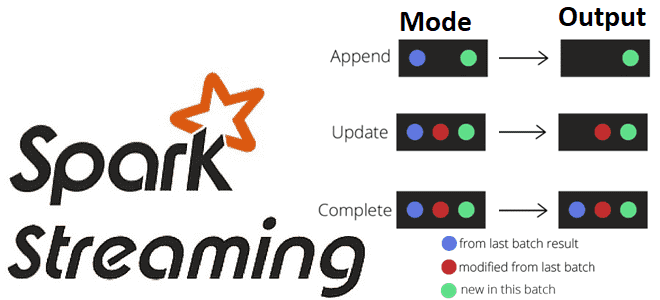
- Append Mode: Writes only the new rows to the sink.
- Update Mode: Writes only the rows that were updated since the last trigger.
- Complete Mode: Writes the entire set of rows in the result table every time.
This diagram provides a great visual summary of the concept.
Now, let's get the formal definitions from the official documentation.
Select an output mode for Structured Streaming
The Databricks documentation provides concise definitions for each output mode. This will give you the precise technical understanding of what each mode does.
Please read the section titled 'Available output modes'. Focus on the description for each of the three modes: Append, Update, and Complete.
2. Output Modes in Action: A Word Count Example
Theory is good, but seeing the modes in action makes the differences clear. The classic example for demonstrating stateful streaming is a running word count. As new words arrive in the stream, we update their counts. This is an aggregation (groupBy().count()), which means the result table is constantly changing.
Let's watch a video that walks through this exact scenario.
05 Spark Streaming Output Modes, Optimization and Background
This video from Ease With Data provides an excellent, practical demonstration of the complete and update modes using a streaming word count. You'll see the code and the resulting console output side-by-side.
First, watch from 06:06 to 09:07. The presenter explains the conceptual difference between the three modes using the word count example. Pay close attention to how the output changes for complete vs. update mode as new batches of words arrive.
As you saw, complete mode always outputs the full list of words and their current counts, while update mode only outputs the counts for words that appeared in the most recent micro-batch.
Now, let's see this implemented in code.
05 Spark Streaming Output Modes, Optimization and Background
The next part of the video shows the live execution of the code for both modes. This will solidify your understanding of the practical difference.
Watch from 09:36 to 11:56. The presenter runs the word count stream first in complete mode and then in update mode. Observe the console output in each case and how it matches the conceptual explanation you just saw.
Here is the Python code, similar to what you saw in the video, so you can see how the output mode is configured.
# Assuming 'lines_df' is a streaming DataFrame with a 'value' column containing text


# 1. Define the streaming aggregation
word_counts_df = lines_df.select(
   explode(
       split(col("value"), " ")
   ).alias("word")
).groupBy("word").count()


# 2. Write the stream to the console using an output mode
#    You would change the string in .outputMode() to test the different behaviors.


# Complete Mode
query_complete = word_counts_df.writeStream \
    .outputMode("complete") \
    .format("console") \
    .start()


# Update Mode
query_update = word_counts_df.writeStream \
    .outputMode("update") \
    .format("console") \
    .start()


# Append Mode (Note: This will fail for this specific query)
query_append = word_counts_df.writeStream \
    .outputMode("append") \
    .format("console") \
    .start()
A Note on Append Mode and Aggregations
You might have noticed we haven't shown a working example of append mode with our word count aggregation. If you try to run the code above with .outputMode("append"), Spark will throw an AnalysisException.
Why? Append mode is designed to only write rows that will never be updated again. In our simple word count example, any word's count could theoretically be updated at any time in the future if that word appears again. The result is never "final."
Append mode is the default and is used in two main scenarios:
- Stateless Queries: When you are not performing any aggregation, just selecting, filtering, or transforming rows (e.g.,
select,where,withColumn). Each output row is independent and won't be changed later. - Stateful Queries with Watermarking: This is the advanced case. By defining a "watermark," you tell Spark that you don't expect data to arrive after a certain time delay. This allows Spark to finalize the state for time-based windows (e.g., "the total count for the 10:00-10:05 AM window is final") and safely append the result. We will cover watermarking in a future lesson.
3. Production Considerations: How to Choose the Right Mode
As a data engineer building production pipelines, choosing the correct output mode is a critical design decision. It's not just about what works, but about what is most efficient and serves the business need. The choice involves trade-offs between data freshness, cost, and sink compatibility.
Select an output mode for Structured Streaming
The Databricks documentation has an excellent section on these trade-offs. Reading this will elevate your understanding from simply knowing what the modes do to knowing when and why to use them in a professional context.
Please read the section titled 'Production considerations'. As you read, think about these three key factors: Application Semantics: What does the downstream system need? A real-time dashboard might need update mode, while a service that sends a one-time alert would need append mode. Sink Compatibility: Can your destination (the sink) handle the chosen mode? For example, a simple file sink can't handle in-place updates, making update mode incompatible. Sinks like Delta Lake and Kafka are more flexible. Latency and Cost: Complete mode is expensive as it rewrites everything. Update mode can be costly if the sink charges per transaction. Append mode can introduce latency while waiting for results to be finalized.
Conclusion
You have now learned to control what your streaming queries write to a sink by differentiating between the three output modes. This is a fundamental skill for building robust and efficient streaming pipelines.
Key Takeaways:
| Output Mode | What It Writes | Typical Use Case | Key Constraint/Consideration |
|---|---|---|---|
| Append | Only new rows that will not change in the future. | Stateless queries (select/filter), or stateful queries with watermarks. | Default mode. For aggregations, requires a watermark to finalize results. |
| Update | Only the rows that were updated in the last batch. | Writing to a sink that can handle updates, like a real-time dashboard DB. | Only outputs rows with changes. Not all sinks support this. |
| Complete | The entire result table after every trigger. | Debugging, or sinks that need the full picture and can handle overwrites. | Requires an aggregation. Can be very expensive in terms of I/O and compute. |
Preview of the Next Lesson:
We've covered how to read a stream and how to control what gets written. The final piece of the core streaming puzzle is controlling when and how often the writing happens. In the next lesson, we will dive into configuring trigger intervals for your streaming queries, looking at options like fixed intervals, availableNow, and continuous processing.