Hello! Welcome to the first lesson in our module on "Building Streaming Data Pipelines."
In the previous module, we finished by implementing a sophisticated Change Data Capture (CDC) pattern using foreachBatch to MERGE streaming data into a Delta table. That gave you a powerful tool for the sink, or output, side of a streaming pipeline.
Now, we're going to step back and build our streaming knowledge from the ground up. Today's lesson focuses on the very beginning of the pipeline: the source. Our learning outcome is to read streaming data sources using Spark Structured Streaming. You'll learn the fundamental API and see how to connect it to the most common types of streaming data you'll encounter as a data engineer, including files, Delta tables, and message queues.
1. The Structured Streaming Model
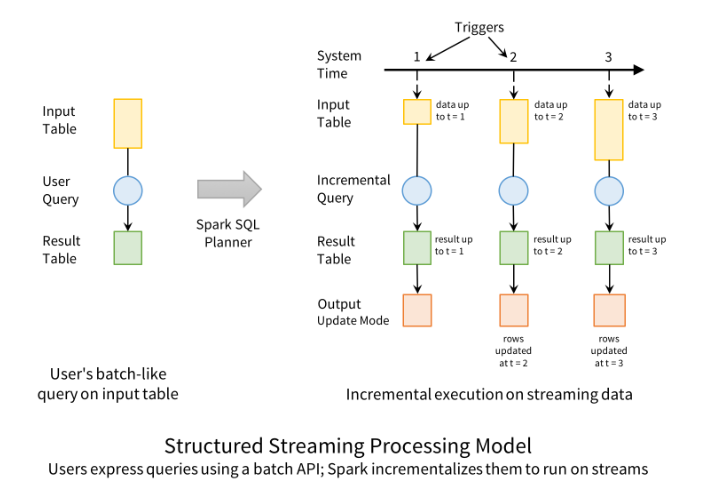
At its core, Spark Structured Streaming provides a simple but powerful abstraction: it treats a live data stream as a table that is continuously being appended. This allows you to use the familiar Spark DataFrame API—which you already know from batch processing—to perform transformations on streaming data.
This concept is key. Instead of learning a new, complex API for streaming, you can leverage your existing skills in writing queries and transformations. The Spark engine handles the complexity of running these queries incrementally and continuously on new data as it arrives.
Spark Structured Streaming with PySpark | DP-700 Exam Prep
To start, let's watch a short clip that explains this core idea of treating a stream like a table and contrasts it with traditional batch processing.
Watch the section from 01:53 to 03:00. Pay attention to the distinction between a large, scheduled batch job and the continuous processing of small 'micro-batches' in streaming.
This model can be visualized as running a batch-like query repeatedly on new data.
2. The Core API: spark.readStream
The entry point for all streaming queries is spark.readStream. This should feel very familiar, as it's the direct counterpart to spark.read which you use for batch jobs. The methods for defining the source format, options, and schema are nearly identical.
# Batch read
batch_df = spark.read.format("json").load("/path/to/data")


# Streaming read
streaming_df = spark.readStream.format("json").load("/path/to/data")
The key difference is that spark.readStream returns a streaming DataFrame. You can apply most of the same transformations to it (select, filter, withColumn, join, etc.), but the execution is triggered differently via writeStream, which we will cover in the next lesson.
3. Reading from Common Streaming Sources
As a data engineer, you will encounter data streams from various systems. Let's explore how to read from the three most common sources on Databricks.
A. File-Based Streams (and Auto Loader)
A very common pattern is to process files as they land in cloud storage (like S3 or ADLS Gen2). While you can use the basic spark.readStream.format("json").load(path) to monitor a directory, Databricks provides a much more powerful and optimized tool for this purpose: Auto Loader.
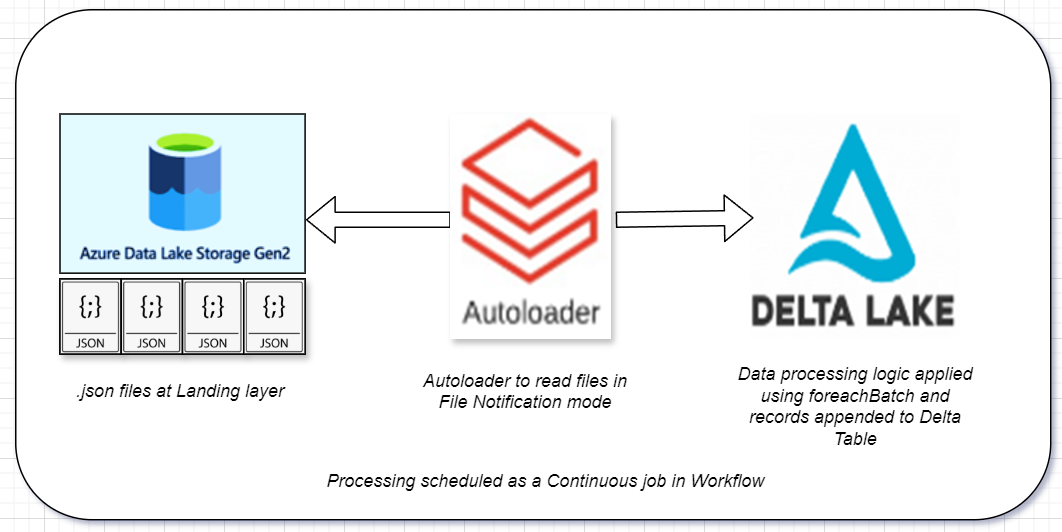
Auto Loader is specifically designed to incrementally and efficiently process new data files as they arrive in cloud storage. It's the recommended method for file ingestion on Databricks because it's more scalable and feature-rich than the basic file stream.
Run your first Structured Streaming workload
Let's look at the official Databricks documentation for the syntax of reading files with Auto Loader. Notice how it uses a special format, cloudFiles.
Read the first section, 'Use Auto Loader to read streaming data from object storage'. The code example shows how to configure cloudFiles to read JSON data. The cloudFiles.schemaLocation option is particularly important, as this is where Auto Loader tracks which files have been processed and can evolve the data schema over time.
A typical pipeline using Auto Loader looks like this:
To see this in a more practical, end-to-end context, the following video demonstrates setting up a stream reader for JSON files arriving in a folder.
Spark Structured Streaming with PySpark | DP-700 Exam Prep
This video provides a hands-on demonstration of generating and then reading a stream of JSON files. It will help solidify your understanding of how file streaming works in practice.
Watch from 04:21 to 05:49 to understand the setup, and then from 08:48 to 13:45 for the coding demonstration. Key things to notice: The use of spark.readStream to define the streaming source. The maxFilesPerTrigger option, which controls how many new files are processed in each micro-batch. The definition of a schema, which is a best practice for production pipelines. The explanation of the checkpointPath, which we will discuss in more detail shortly.
B. Delta Lake Streams
Another powerful pattern in the Lakehouse is to use a Delta table as a streaming source. This allows you to build reactive pipelines that trigger downstream actions whenever a table is updated. For example, you could have a pipeline that automatically refreshes an aggregated dashboard table whenever new data arrives in a silver-layer table.
Advancing Spark - Databricks Delta Streaming
Let's watch a demonstration of how to configure a stream to read from a Delta table.
Watch from 02:06 to 03:05. The presenter shows the basic syntax using spark.readStream.format("delta").load(path). This is the foundational way to create a stream from a Delta table.
A cleaner, more modern syntax for this is to use .table():
# Reads from the Delta table named 'my_delta_table'
stream_df = spark.readStream.table("my_delta_table")
Delta streaming also offers powerful options to control the starting point of the stream. For example, you can process all changes since a specific table version.
Advancing Spark - Databricks Delta Streaming
This next clip from the same video demonstrates the startingVersion option, which gives you precise control over where your stream begins processing.
Watch from 14:59 to 18:16. This is a very useful feature for scenarios like backfilling data or recovering from a pipeline failure without reprocessing the entire table history.
C. Message Bus Streams (e.g., Kafka)
For very low-latency, high-throughput scenarios, data is often streamed through a message bus like Apache Kafka or Azure Event Hubs. Structured Streaming has built-in connectors for these systems. While we won't do a deep dive, it's important to see that the pattern remains consistent.
Run your first Structured Streaming workload
The Databricks documentation shows a clear example of connecting to Kafka. Notice that you're still using spark.readStream, just with a different format and source-specific options.
Review the code snippet under the section 'Read data from Kafka...'. The key lines are .format("kafka") and the options to specify the Kafka servers (kafka.bootstrap.servers) and the topic to subscribe to (subscribe).
4. The Critical Role of Checkpointing
You've seen checkpointLocation or checkpointPath mentioned in every example. This is arguably the most important concept for building reliable, fault-tolerant streaming pipelines.
A checkpoint is a location on durable storage (like S3) where a streaming query saves its progress. This "progress" includes:
- Source Tracking: Which files (for a file source) or offsets (for a Kafka source) have already been processed.
- Stateful Operations: Intermediate state for operations like streaming aggregations (which we'll cover later).
Without a checkpoint, if your stream stops for any reason (e.g., cluster shutdown, failure), it has no memory of where it left off. When restarted, it would either reprocess all data from the beginning or miss data. The checkpoint ensures exactly-once processing guarantees.
Advancing Spark - Databricks Delta Streaming
Let's revisit the 'Advancing Spark' video for a concise explanation of why checkpointing is so essential.
Watch the section from 03:24 to 04:42. The presenter clearly explains that the checkpoint stores the state, allowing the stream to know which transaction log versions of a source Delta table it has already processed.
Every production streaming query must have a unique checkpoint location.
Conclusion
In this lesson, you have learned the foundational concepts of reading data with Spark Structured Streaming. You are now equipped to start building the ingestion part of any streaming data pipeline on Databricks.
Key Takeaways:
- Structured Streaming lets you use the familiar DataFrame API on streaming data by treating a stream as an unbounded table.
spark.readStreamis the entry point for creating a streaming DataFrame from a source.- For file-based ingestion, Auto Loader (
.format("cloudFiles")) is the recommended, high-performance method. - You can stream directly from Delta tables, enabling reactive data pipelines within the lakehouse.
- A checkpoint location is mandatory for all production streams to ensure fault tolerance and prevent data loss or duplication.
Preview of the Next Lesson:
Now that you can read a stream, the next logical step is to write it to a destination, or a "sink". In our next lesson, we will focus on writeStream and explore the different output modes (append, complete, update) that determine how the results of your streaming query are written to the sink.