Introduction
Welcome to the first lesson in our module on CI/CD for Databricks Projects. In the last module, we focused on production operations, culminating in a lesson on securing your Databricks workspace at the network level. We've established a secure foundation; now, we'll build upon it by exploring the best practices for developing, testing, and deploying your data engineering code.
This lesson addresses the learning outcome: Compare common Git branching models (e.g., GitFlow, trunk-based) for managing Databricks projects.
As a data engineer leading a team, you already know that a consistent development process is vital for productivity and stability. Git is the cornerstone of that process. While you are proficient with Git, this lesson will focus specifically on evaluating and selecting the right branching strategy for different types of data projects you might build on Databricks, from traditional batch ETL to real-time streaming pipelines. Understanding these trade-offs is a key competency for a professional-level data engineer.
1. Why Git Branching Models Matter in Databricks
Before we compare models, let's briefly touch on why a deliberate branching strategy is so important. It's about more than just versioning your notebooks. A good branching model:
- Enables Collaboration: Allows multiple engineers to work on different features or fixes without interfering with each other.
- Ensures Stability: Isolates unstable, in-progress code from your production-ready pipelines.
- Facilitates CI/CD: Provides clear triggers for automated testing and deployment pipelines. For example, merging a change to a
releasebranch could trigger a deployment to a staging environment. - Provides Governance: Creates an auditable history of changes, which is critical in regulated industries.
Databricks Repos provides a direct integration with Git providers, allowing you to manage your code directly within the workspace. Let's see a quick practical demonstration of this integration.
Developer Best Practices on Databricks: Git, Tests, and Automated Deployment
This short clip from the video 'Developer Best Practices on Databricks' demonstrates how Databricks Repos integrates with Git. It shows how to switch between branches and commit changes directly from the Databricks UI.
Watch from 04:21 to 06:40. Pay attention to how the Databricks UI provides a native Git experience for switching branches, viewing changes, and committing code. This grounds the abstract branching models we're about to discuss in the tool you'll be using.
2. The Evolution of Git Workflows
Git workflows have evolved significantly over the last decade, moving from complex, structured models to simpler, faster ones that better support modern continuous delivery practices. Understanding this evolution helps in choosing the right model for your project.
The following video provides an excellent overview of the three most common branching strategies: GitFlow, GitHub Flow, and Trunk-Based Development. We'll watch it in segments to discuss each model's relevance to Databricks.
3 Git Workflows Every Developer Should Know (And When to Use Each)
First, let's get some context on why different workflows exist. This segment from '3 Git Workflows Every Developer Should Know' by TechWorld with Nana sets the stage.
Watch the introduction from 00:00 to 03:11.
The Structured Approach: GitFlow
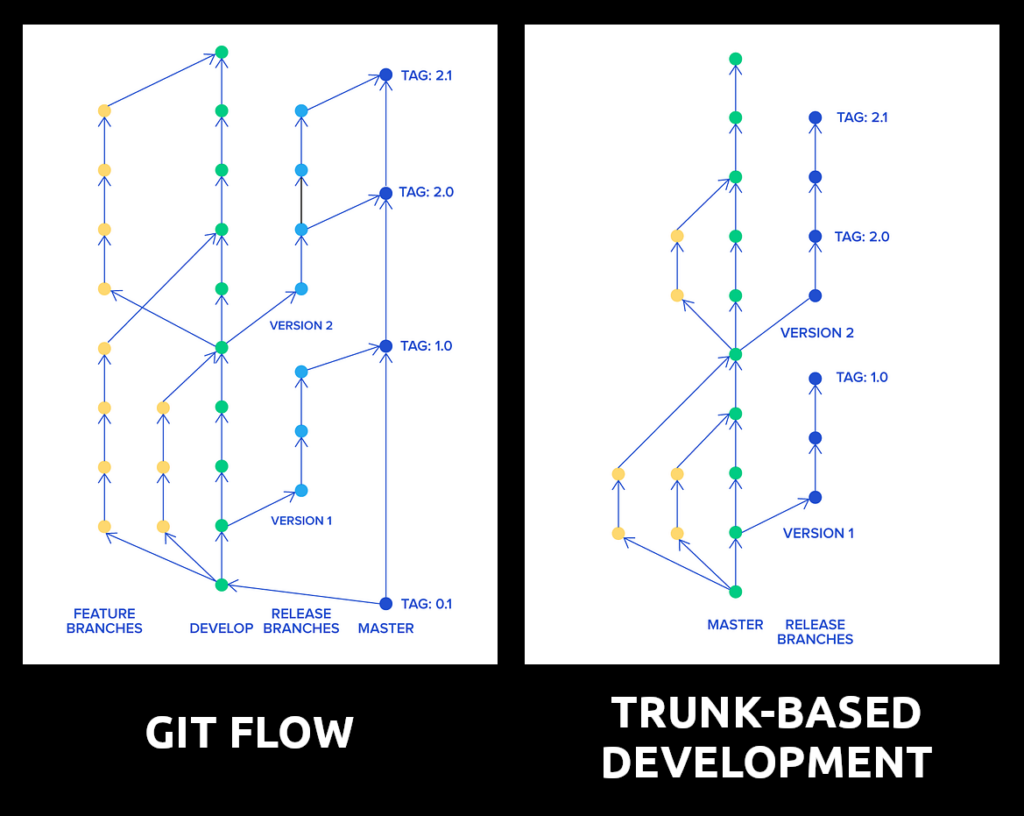
GitFlow was the de facto standard for many years. It's a highly structured model with long-lived branches for development (develop) and production (main), and temporary branches for features, releases, and hotfixes.
3 Git Workflows Every Developer Should Know (And When to Use Each)
Now, let's dive into GitFlow. This segment explains its structure, use cases, and significant drawbacks for modern development.
Watch the section on GitFlow from 03:11 to 08:56. Focus on understanding the purpose of each branch type (main, develop, feature, release, hotfix).
GitFlow in a Databricks Context:
While the video notes that GitFlow is often considered a legacy practice, it has a specific and important place in the Databricks world, particularly for enterprise customers.
How to use GitFlow and DABs for seamless Databricks Deployments
This Databricks community article discusses using GitFlow for Databricks projects. A comment from a Databricks employee provides crucial context on why this model is still relevant.
First, quickly read the sections 'What is GitFlow' and 'Why Choose GitFlow' to solidify your understanding of the model. Then, pay close attention to the comment from the Databricks employee in response to TomDudziak (the first comment shown in the provided text). This comment explains the 'why' behind using GitFlow in regulated environments.
As you read, GitFlow is a strong candidate for Databricks projects when:
- You are in a regulated industry (finance, healthcare) requiring strict audit trails and change control.
- You manage scheduled releases of batch jobs (e.g., quarterly or monthly updates) rather than continuous deployment.
- You need to maintain and patch multiple versions of a project simultaneously.
Its structure provides stability and predictability at the cost of speed.
The Simplified Approach: GitHub Flow
As development cycles accelerated, simpler models emerged. GitHub Flow is a much leaner alternative to GitFlow.
3 Git Workflows Every Developer Should Know (And When to Use Each)
Next, let's look at GitHub Flow, a simpler model designed for speed and continuous deployment.
Watch the section on GitHub Flow from 08:56 to 12:59. The core principle is simple: your main branch is always deployable.
GitHub Flow in a Databricks Context:
GitHub flow is essentially a simplified Feature Branch Workflow. This is a very common pattern for data engineering teams. It works well for Databricks projects where:
- You practice continuous delivery, deploying changes to production soon after they are merged.
- The team is small to medium-sized and moves quickly.
- You have a solid automated testing and CI/CD pipeline to ensure
mainremains stable.
The High-Velocity Approach: Trunk-Based Development (TBD)
Trunk-Based Development takes the principle of continuous integration to its logical conclusion. All developers work on a single branch—the trunk (usually main).
3 Git Workflows Every Developer Should Know (And When to Use Each)
Finally, let's examine Trunk-Based Development (TBD), the model favored by high-performing DevOps teams.
Watch the section on Trunk-Based Development from 14:34 to 22:02. Pay close attention to the concepts of very short-lived branches and the critical role of feature flags and automated testing.
Trunk-Based Development in a Databricks Context:
TBD is the most modern approach and aligns perfectly with a mature DevOps culture. It is ideal for Databricks projects when:
- You are building streaming pipelines or using Delta Live Tables (DLT) where the goal is continuous flow and processing.
- Your team is experienced and has a strong culture of automated testing and code quality.
- You want the fastest possible feedback loop from code change to production deployment.
However, it requires a significant investment in automation. Committing directly to main without robust, automated tests is a recipe for production failures.
3. Choosing the Right Strategy for Your Project
There is no single "best" branching strategy. The right choice depends on your team's maturity, the project's release cadence, and your organization's governance requirements.
The following guide provides an excellent summary and a decision matrix to help you choose.
Git Branching Strategy: A Complete Guide
This guide from DataCamp provides a detailed textual comparison of the major branching strategies and offers a practical matrix for choosing the right one.
First, skim the 'Principal Branching Strategies' section to quickly review the definitions of each model we've discussed. Then, focus on the 'Team maturity assessment' section at the end, specifically the 'Strategy selection matrix' table. This table is an invaluable tool for making a decision based on your team's characteristics.
Let's apply this to two common Databricks scenarios:
Scenario A: Batch ETL for a Financial Firm
- Project: A set of batch jobs that calculate daily risk reports.
- Requirements: Releases are scheduled quarterly. Every change must be audited. Production stability is paramount.
- Recommendation: GitFlow. Its structured
releasebranches, explicit promotion process, and stablemainbranch are perfect for a scheduled, high-governance release cycle. The overhead is acceptable because the release frequency is low.
Scenario B: Real-time Personalization Engine
- Project: A streaming pipeline using DLT that enriches user clickstream data for a recommendation engine.
- Requirements: New features and bug fixes need to be deployed multiple times a day. The team needs to iterate quickly.
- Recommendation: Trunk-Based Development. The emphasis on continuous integration and rapid deployment aligns with the nature of a streaming application. The team would rely heavily on automated tests within their CI/CD pipeline and possibly use feature flags to roll out new enrichment logic safely.
Conclusion
In this lesson, we compared the most common Git branching models and evaluated their suitability for Databricks projects. You've seen how the ideal strategy is a trade-off between structure, stability, and speed.
Key Takeaways:
- GitFlow provides maximum structure and stability, making it ideal for projects with scheduled releases or strict regulatory requirements.
- GitHub Flow (Feature Branching) offers a balance of collaboration and speed, suitable for many agile teams practicing continuous delivery.
- Trunk-Based Development (TBD) offers the highest velocity and aligns with modern DevOps principles, but requires a mature team and extensive automation (testing, feature flags).
- The choice of branching model is not a technical decision alone; it's a reflection of your team's culture, process, and project goals.
Preview of the Next Lesson:
A recurring theme in our discussion, especially with TBD and GitHub Flow, was the critical importance of automated testing. A branching strategy is only as good as the quality checks that support it. In our next lesson, "Write unit tests for data transformation logic in Databricks notebooks," we will dive into the practical side of this, learning how to write and run tests for your Spark code to build confidence in every commit you make.