Introduction
Welcome to the final lesson in our module on Production Operations and Automation. In the previous lesson, you learned how to programmatically update and promote Databricks job configurations using the REST API, a crucial skill for building robust CI/CD pipelines.
We've covered how to automate and orchestrate your workflows; now, we shift our focus to securing the underlying infrastructure. This lesson directly addresses the learning outcome: Evaluate network security options (e.g., VPC peering, private endpoints) for a given workspace deployment scenario.
As an experienced data engineer who has designed and deployed data platforms on AWS and GCP, you understand that network security is not an afterthought but a foundational requirement for any production system. We'll explore how to architect a secure Databricks environment, covering key concepts and patterns on both AWS and Azure. This knowledge is critical for the Databricks Certified Data Engineer Professional exam, which expects you to make architectural decisions based on security and operational requirements.
1. The Core Architecture: Control Plane and Data Plane
To understand Databricks network security, it's essential to first recall its hybrid architecture:
- Control Plane: This is managed by Databricks in its own cloud account. It includes the web UI, notebook command processing, and job scheduling services.
- Data Plane: This is where your data is processed. The compute resources (Spark clusters) are deployed within your cloud account (AWS or Azure).
The primary challenge is securing the communication between these two planes, as well as the communication from your data plane to your data sources (e.g., S3, ADLS, databases).
By default, Databricks can create a managed network for you. However, for enterprise-grade security and control, the best practice is to deploy the data plane into your own virtual network.
- On AWS, this is called deploying in a Customer-Managed VPC.
- On Azure, this is called VNet Injection.
This approach gives you full control over IP addressing, routing, firewall rules, and connectivity to other services.
2. Foundational Security Features
Before diving into specific cloud architectures, let's cover two fundamental features that form the bedrock of a secure Databricks deployment, regardless of the cloud provider.
Secure Cluster Connectivity (No Public IP)
The most critical first step is to ensure your Spark cluster nodes are not exposed to the public internet. This is achieved with a feature called Secure Cluster Connectivity (SCC) on AWS, or simply "No Public IP" (NPIP) on Azure.
When enabled:
- Your cluster nodes are launched in private subnets with no public IP addresses.
- No inbound ports are opened on your cluster's security group.
- Instead, the cluster initiates a secure, outbound connection to a relay service in the Databricks control plane over port 443. All communication between the planes is routed through this secure tunnel.
This dramatically reduces the attack surface of your deployment. It is a non-negotiable feature for any production environment.
Private Link: Securing Connections without the Internet
While SCC secures the clusters themselves, the communication to the control plane and other cloud services might still traverse the public internet by default. Private Link (available on both AWS and Azure) solves this by creating private endpoints that allow services to communicate over the cloud provider's backbone network.
For Databricks, Private Link is typically used in two ways:
- Back-end Private Link: Secures the connection from the data plane (your clusters) to the control plane (the SCC relay). This ensures that even the management traffic never leaves the cloud provider's network.
- Front-end Private Link: Secures the connection from your users' machines to the Databricks web application and REST API. This is crucial for organizations where users must access cloud services from within a private corporate network.
To understand the core concept of a private endpoint, this short video provides an excellent explanation in the context of Azure. The principles are analogous in AWS.
What is Private Endpoint in Azure? | Intro to Private Endpoints
This video from PetterTech explains what a private endpoint is, how it works, and why it's more secure than other options like service endpoints.
Watch from 00:33 to 04:24. Focus on: The definition of a private endpoint as a network interface for a PaaS service inside your VNet. How it enables private connectivity and keeps traffic on the Microsoft backbone. The comparison with Service Endpoints, and why Private Endpoints are generally more secure and performant.
3. Evaluating Deployment Scenarios
Now let's apply these concepts to evaluate deployment scenarios on both AWS and Azure.
Scenario 1: A Secure Enterprise Deployment on AWS
An organization wants to deploy a new Databricks workspace on AWS for a critical production workload. The security requirements are strict: no public IPs on clusters, all traffic must stay within the AWS network, and access to the workspace UI must be restricted to the corporate network.
The Databricks blog post below details the best practices for exactly this scenario.
Deploying Databricks on AWS: Part 2
This article from the Databricks blog provides a comprehensive guide for cloud engineers deploying Databricks on AWS. It's written as a conversation, making complex networking topics easy to follow.
Read the following sections from the article: Start with the intro and the section 'J: Let's get started' to understand the four core requirements. Read the discussion on 'customer-managed VPC' and subnet sizing. Pay attention to the IP address calculations, as IP exhaustion is a common operational issue. Carefully read the section on 'data plane to control plane connectivity,' which explains Secure Cluster Connectivity (SCC) and the recommendation to use AWS PrivateLink for both back-end and front-end connections. Finally, read the summary section that starts with 'It looks like we're approaching time here' to review the key recommendations for network configuration.
Key architectural choices for this AWS scenario:
- Customer-Managed VPC: To gain full control.
- Private Subnets: Two or more private subnets across different Availability Zones, sized appropriately for the expected number of cluster nodes.
- Secure Cluster Connectivity (SCC): Enabled by default with a customer-managed VPC.
- AWS PrivateLink: For both back-end (data plane to control plane) and front-end (user to web app) connectivity.
- Gateway Endpoints: For S3, STS, and Kinesis to ensure traffic to these critical AWS services also stays on the AWS backbone.
Scenario 2: A Secure Enterprise Deployment on Azure
Let's consider the same requirements for an organization on Azure. The principles are identical, but the terminology and implementation details differ slightly.
This video from Databricks provides a concise walkthrough of setting up a secure workspace on Azure using the portal.
Setup Azure Databricks Workspace with VNET Injection
This official Databricks video demonstrates the practical steps of deploying an Azure Databricks workspace with VNet Injection and Secure Cluster Connectivity.
Watch the entire video (around 6 minutes). It visually demonstrates the concepts we're discussing: Creating a Virtual Network (VNet) with public and private subnets (though with SCC, both effectively become private). Creating the Databricks workspace and enabling 'Secure cluster connectivity'. Injecting the workspace into the VNet you created ('Deploy Azure Databricks workspace in your own Virtual Network').
For a deeper dive into the architectural considerations, including Private Link and other security controls, the following guide is an excellent resource.
Guide for Architecting Azure-Databricks: Design to Deployment
This Microsoft Tech Community guide provides a detailed architecture and deployment plan for secure Azure Databricks environments.
Read 'Step 2: Plan the “Right” CIDR Range' and 'Step 3: Plan Network Architecture'. Focus on these key sections: 2.2 VNet Injection: The core concept of deploying into your own VNet. 3.1 Secure Cluster Connectivity: The Azure equivalent of SCC, also called NPIP. 3.3 Front-End Connectivity with Azure Private Link: The pattern for securing user access.
Key architectural choices for this Azure scenario:
- VNet Injection: To deploy into your own Virtual Network.
- Two Subnets: A host and container subnet are required. A third is needed for Private Link endpoints.
- Secure Cluster Connectivity (NPIP): Enabled during workspace creation.
- Azure Private Link: For back-end and front-end connectivity.
- User-Defined Routes (UDRs) and Azure Firewall: To control outbound (egress) traffic from the clusters.
Scenario 3: Connecting Your Workspace to Other Resources
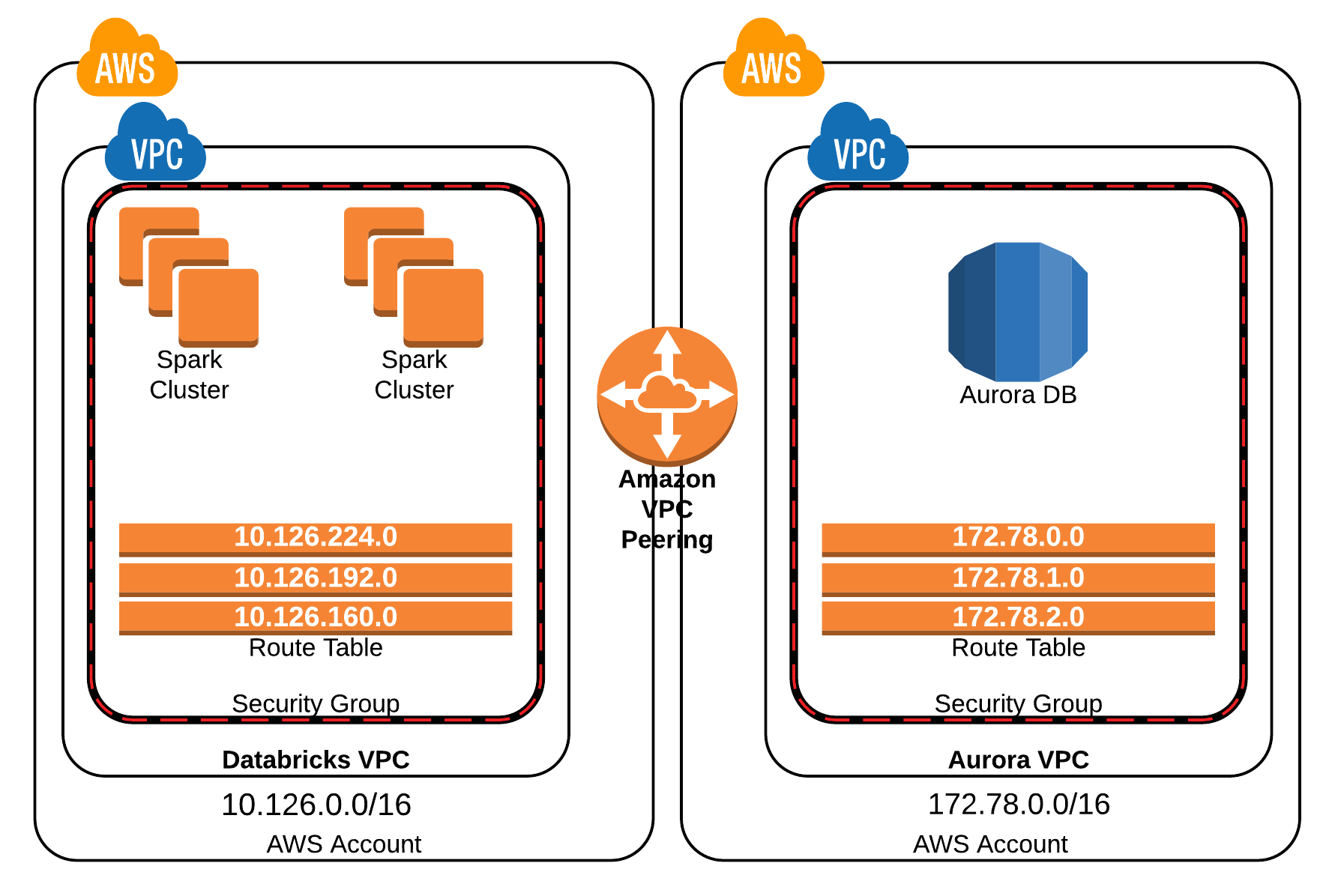
Your Databricks clusters will almost always need to communicate with other resources in your cloud environment, such as databases, message queues, or other applications. A common pattern is connecting to a database (like RDS, Aurora, or Azure SQL) that resides in a separate VPC/VNet for security and organizational reasons.
On AWS:
- VPC Peering: The simplest way to connect two VPCs. It creates a direct, private connection between them. It is non-transitive, meaning if VPC A is peered with B, and B is peered with C, A cannot talk to C. This is suitable for simple, one-to-one connections.
- Transit Gateway: For more complex scenarios involving multiple VPCs (a "hub-and-spoke" model), a Transit Gateway is the modern, scalable solution. It acts as a central hub, simplifying network management as you don't need to create a mesh of peering connections.
The choice between these depends on scale, complexity, and cost.

On Azure:
- VNet Peering: Similar to AWS, this connects two VNets.
- Hub-and-Spoke with UDRs: A common Azure pattern is to use a central "hub" VNet (often with an Azure Firewall) and connect multiple "spoke" VNets (like your Databricks VNet) to it. User-Defined Routes (UDRs) are then used to direct traffic from the spokes through the central hub for inspection and routing.
Given your experience, you can see how these patterns for interconnecting services are directly applicable to building out a full data platform around Databricks.
Conclusion
In this lesson, we explored the critical network security options for deploying a production-ready Databricks workspace. You learned to evaluate these options based on security requirements and architectural patterns for both AWS and Azure.
Key Takeaways:
- Deploy into your own network: Using Customer-Managed VPC (AWS) or VNet Injection (Azure) is the foundation for a secure deployment.
- Eliminate public access: Secure Cluster Connectivity (SCC/NPIP) is essential to remove public IPs from cluster nodes.
- Keep traffic private: Private Link is the recommended approach to ensure traffic between the control plane, data plane, and users never traverses the public internet.
- Connect securely to other resources: Use VPC/VNet Peering for simple connections and Transit Gateway (AWS) or a Hub-and-Spoke model with UDRs (Azure) for scalable, centralized network architectures.
- Evaluation is key: The right choice depends on the specific scenario's requirements for security, scale, performance, and cost.
Preview of the Next Lesson:
We have now completed the module on production operations and automation. We're moving into the final phase of this course, focusing on development and deployment best practices. The next lesson, "Compare common Git branching models (e.g., GitFlow, trunk-based) for managing Databricks projects," will kick off our module on CI/CD for Databricks. We will shift from the "what" (infrastructure) to the "how" (code management and deployment workflows).