Introduction
Welcome to the second lesson in our CI/CD module. In our previous lesson, we explored how different Git branching models enable collaboration and ensure stability in Databricks projects. A key takeaway was that modern, high-velocity workflows like Trunk-Based Development are critically dependent on robust, automated testing. This lesson directly addresses that need.
Today, we will tackle the learning outcome: Write unit tests for data transformation logic in Databricks notebooks.
As an experienced data engineer, you understand that reliable code is built, not just written. Testing is fundamental to that process. This lesson will focus on applying software engineering testing principles specifically to the PySpark data transformations you build in Databricks. We'll move beyond ad-hoc checks in notebooks and establish a structured, repeatable, and automated way to validate your logic. This skill is essential for building production-grade pipelines and is a cornerstone of the professional-level certification.
1. The Role of Unit Tests in Data Pipelines
Before writing tests, it's important to be precise about what we're testing. In a data pipeline, we can test at different levels.
Developer Best Practices on Databricks: Git, Tests, and Automated Deployment
Let's start by defining our terms. This segment from the video 'Developer Best Practices on Databricks' by Dustin Vannoy clearly distinguishes between unit, integration, and end-to-end tests.
Watch from 07:50 to 10:24. Focus on understanding that a unit test is designed to validate a single, small piece of logic, like one specific data transformation function.
As the video explains, our focus today is on unit tests. For a data engineer, a "unit" is often a function that transforms a DataFrame. Why is this so important?
- Catch Bugs Early: Unit tests help you find and fix issues in your transformation logic (e.g., handling nulls, incorrect calculations, edge cases) before they ever reach a full pipeline.
- Enable Safe Refactoring: With a solid test suite, you can refactor and optimize your code with confidence, knowing your tests will immediately flag any unintended changes in behavior.
- Promote Better Design: Writing testable code forces you to create small, modular, and pure functions. This leads to cleaner, more maintainable, and reusable code.
The main challenge with testing in a notebook-native environment is that monolithic, linear scripts are difficult to test. The first and most crucial step is to refactor our code for testability.
2. The Prerequisite: Refactoring for Testability
The key to unit testing in Databricks is to separate your pure transformation logic from the rest of your notebook code (like data loading, dbutils calls, or visualization). You'll move this logic into standard Python (.py) files that can be imported into your notebooks and, more importantly, into your test scripts.
This process involves two main steps:
- Creating a Python file (e.g.,
transforms.py) with your transformation functions. - Writing a separate test file (e.g.,
test_transforms.py) that imports your functions and validates them.
The official Databricks documentation provides an excellent walkthrough of this process. We'll use it to guide our practical setup.
Software engineering best practices for notebooks
This guide, 'Software engineering best practices for notebooks,' demonstrates how to modularize your code. We'll focus on the refactoring step.
Read 'Step 3: Move code into a shared module', focusing on 'Step 3.3: Add the notebook's supporting shared code functions'. The key action here is creating the covid_analysis/transforms.py file and populating it with Python functions. You can ignore the Git operations as we covered that in the last lesson.
By moving functions like filter_country and pivot_and_clean into a .py file, you've made them independent and testable units.
3. Writing Unit Tests for PySpark Transformations
With our logic refactored into functions, we can now write tests for them. The pattern for a PySpark unit test is consistent and follows the "Arrange, Act, Assert" model:
- Arrange: Create a small, sample input DataFrame and a corresponding expected output DataFrame. This data should be created directly in your test code to ensure the test is self-contained.
- Act: Call your transformation function with the sample input DataFrame to get the actual result.
- Assert: Compare the actual result DataFrame with your expected output DataFrame. The test passes if they are identical.
Tools for Assertion
PySpark provides built-in utilities for this, and popular third-party libraries offer even more functionality.
pyspark.testing.utils: Available in recent Databricks runtimes, this module includesassertDataFrameEqualandassertSchemaEqual. It's a great, dependency-free starting point.chisa: A popular open-source library created specifically for PySpark testing. It provides powerful and flexible functions for comparing DataFrames and columns.
Let's see these in action.
Best Practices for Unit Testing PySpark
This video from Databricks, 'Best Practices for Unit Testing PySpark,' provides excellent examples of the 'Arrange, Act, Assert' pattern using the chisa library. It also differentiates between testing a full DataFrame transformation and a single column function.
Watch the following sections: From 03:43 to 06:16 to see how to test a DataFrame transformation (clean_animals). From 06:16 to 08:31 to see how to test a column function (life_stage). From 15:37 to 17:07 to see how to create input dataframes directly in code, removing file I/O dependencies from your tests.
Now, let's see an example using the built-in PySpark testing utilities.
Developer Best Practices on Databricks: Git, Tests, and Automated Deployment
This clip from Dustin Vannoy's video shows how to use the native assertDataFrameEqual function from pyspark.testing.utils. This is a fantastic alternative that is built directly into PySpark.
Watch from 17:40 to 20:00. Pay close attention to how a sample input DataFrame is created, the transform is applied, and assertDataFrameEqual is used to validate the result.
Creating the Test File
Now, let's apply this knowledge by creating our test file. We'll continue with the Databricks tutorial, which uses the popular pytest framework.
Software engineering best practices for notebooks
We will now create the test file that validates the functions in transforms.py. This section of the guide walks you through creating the test data and the test script itself.
Read 'Step 4: Test the shared code', focusing on 'Step 4.2: Add the tests'. Study the code in transforms_test.py. Notice how it uses pytest fixtures (@pytest.fixture) to create a sample DataFrame, then defines test functions (e.g., test_filter, test_pivot) that follow the Arrange-Act-Assert pattern.
4. Running Your Unit Tests in Databricks
Once you have your transforms.py module and your transforms_test.py script in your Databricks Repo, how do you run the tests? You have two primary methods:
- Inside the Databricks Workspace: You can use a "runner" notebook to install
pytestand execute your test suite. This is a great way to integrate testing directly into your Databricks workflow. - From a Local IDE: Using tools like Databricks Connect, you can run your
pytestsuite from your local machine (e.g., in VS Code or PyCharm), with the code executing against a Databricks cluster. This is a common practice for developers who prefer a local IDE experience.
For this lesson, we'll focus on the in-workspace approach.
Software engineering best practices for notebooks
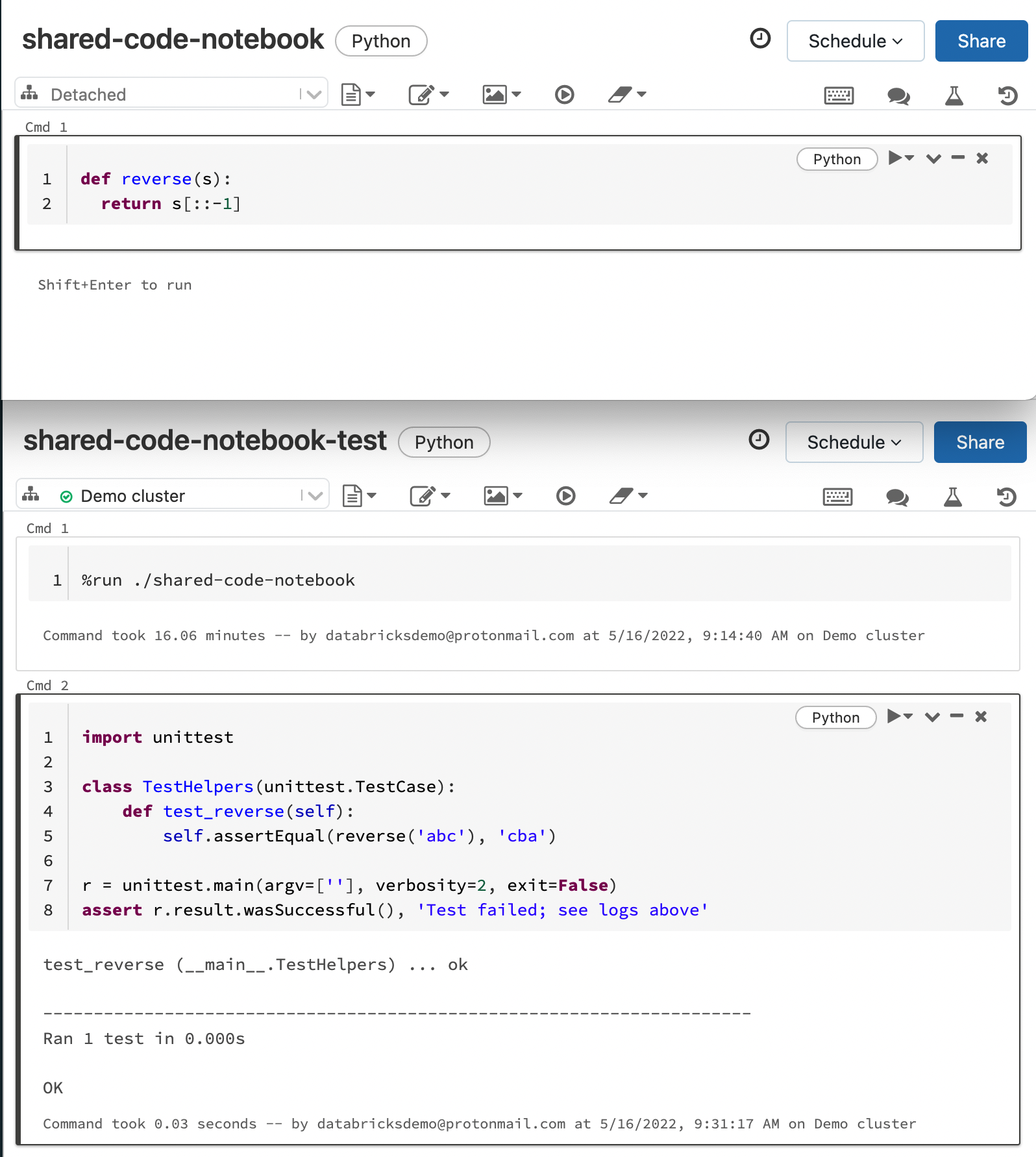
Let's run the tests we just created. This final part of the Databricks guide demonstrates how to use a simple notebook to execute your pytest suite.
Read 'Step 4.3: Run the tests'. The key is the run_unit_tests.py notebook, which uses %pip install pytest and then runs the pytest.main() command. The output in the notebook shows the results of the test run.
This method of using a runner notebook is a powerful way to confirm your logic is sound before you commit your code or merge it into the main branch.
Conclusion
In this lesson, you've learned the fundamental workflow for implementing professional-grade unit tests for your data transformations in Databricks. This practice elevates your code from a simple script to reliable, production-ready software.
Key Takeaways:
- Refactor for Testability: The most critical step is to move your transformation logic from monolithic notebooks into modular Python files.
- Arrange, Act, Assert: All unit tests should follow this pattern. Create sample data, execute your function, and assert that the output matches your expectation.
- Use the Right Tools:
pytestis the industry standard for testing Python code. For asserting DataFrame equality, you can use the built-inpyspark.testing.utils.assertDataFrameEqualor powerful libraries likechisa. - Integrate Testing: Run your tests directly within the Databricks workspace using a runner notebook or locally with Databricks Connect to make testing a seamless part of your development loop.
Preview of the Next Lesson:
Unit tests are perfect for validating individual functions, but they don't tell you if those functions work together correctly as part of a larger pipeline. In our next lesson, "Implement an integration test for a data pipeline using the REST API to trigger a job and validate output," we will move up a level to test a segment of our data pipeline, ensuring that the different components integrate as expected.