Introduction
In our last lesson, we explored how Unity Catalog automatically traces data lineage, giving you a clear map of your data's journey. This is crucial for understanding impact and debugging pipelines. Now that we can see how data flows, the next logical step in data governance is to control who can see what information within that data.
Today's lesson addresses this by focusing on a powerful Unity Catalog feature for fine-grained access control. Our learning outcome is to implement dynamic views for row-level and column-level security. You will learn how to create a single, secure view that dynamically changes the data it displays based on the identity of the user querying it. This allows you to enforce security rules directly within the lakehouse, rather than in downstream applications.
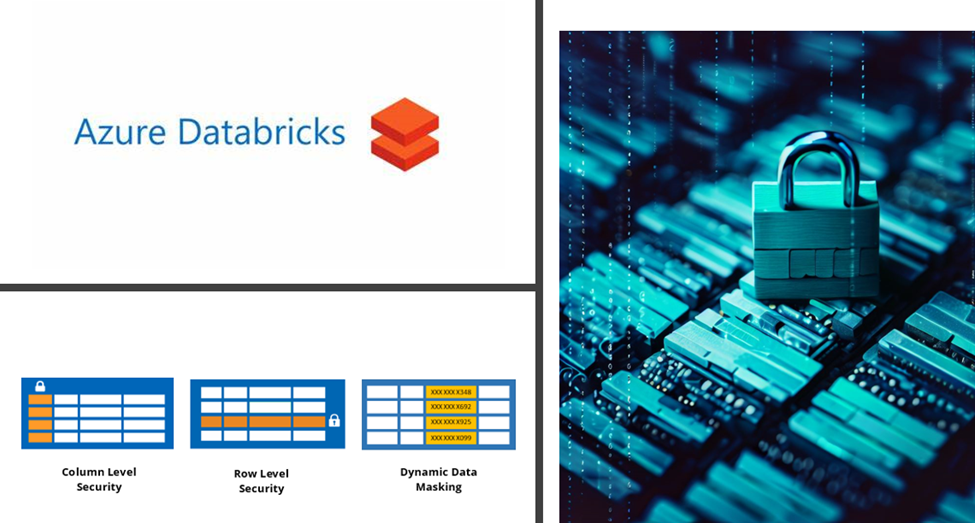
We will cover three key patterns:
- Column-Level Security: Hiding or redacting specific columns.
- Row-Level Security: Filtering which rows a user is allowed to see.
- Data Masking: Obscuring parts of the data in a column, rather than hiding it completely.
1. Understanding Dynamic Views
A dynamic view is not a new type of object; it's a standard SQL view (VIEW) that contains logic to customize its output for the user running the query. The "dynamic" part comes from using specific functions inside the view's definition that evaluate user identity and group membership at query time.
The two most important functions for creating dynamic views in Unity Catalog are:
current_user(): Returns the email address of the user executing the query.is_account_group_member(): ReturnsTRUEif the current user is a member of a specified account-level group.
By embedding these functions within CASE statements or WHERE clauses, you can build powerful security logic.
The official Databricks documentation, 'Create a dynamic view,' provides a concise overview of these functions and the general principles. It's a great reference to have open as we work through the hands-on examples.
Read the introductory section of the document, which defines dynamic views and lists the key functions. Pay special attention to the recommendation to use is_account_group_member() for Unity Catalog data, as this is a best practice you'll be expected to know.
The fundamental security model is that you grant users SELECT permission on the dynamic view, but not on the underlying base table. This forces all queries to pass through the security logic embedded in the view.
2. Hands-On: Column-Level Security and Data Masking
Let's start with a practical, hands-on scenario. Imagine you have a customer table containing personally identifiable information (PII) like email addresses and phone numbers. Your goal is to create a view that most users can query for general analytics, but only users in a privileged group (e.g., auditors) can see the sensitive data.
This video provides an excellent walkthrough of setting up the sample data and then implementing these rules.
Unlocking the Secrets of Data Access Control with Databricks
The video 'Unlocking the Secrets of Data Access Control with Databricks' by The Data Master demonstrates exactly how to implement column-level security and masking. We will follow its hands-on approach.
Please watch the following segments: Introduction and Setup (00:00 - 03:18): Understand the scenario and see how the sample pii_data table is created. Column Redaction (06:38 - 13:25): Focus on how a CASE statement and is_account_group_member() are used to create a view that redacts the email and phone_number columns for most users. Notice the use of an ELSE clause to show the real data for privileged users. (Note: The video narrator occasionally says 'is account member', but the correct function name used in the code is is_account_group_member.) Data Masking (18:08 - 20:20): Observe how the logic is changed to mask the email address using regexp_extract instead of just redacting it. This shows only the domain name, which can be useful for analysis without revealing the full email.
To summarize the patterns you saw in the video, here are the core SQL structures.
Column Redaction
This pattern uses a CASE statement in the SELECT clause to decide whether to show the actual data or a redacted placeholder.
-- Grant SELECT on this view, but not the base table `sales_raw`.
CREATE OR REPLACE VIEW sales_redacted AS
SELECT
  user_id,
  CASE
    WHEN is_account_group_member('auditors') THEN email
    ELSE 'REDACTED'
  END AS email,
  country,
  product,
  total
FROM sales_raw;
Data Masking
Data masking is a more nuanced form of column-level security where you transform the data rather than hiding it completely. This is also achieved with a CASE statement, but the ELSE branch contains a function to transform the data, like regexp_extract.
-- This masks the email to show only the domain for non-auditors.
CREATE OR REPLACE VIEW sales_masked AS
SELECT
  user_id,
  CASE
    WHEN is_account_group_member('auditors') THEN email
    ELSE regexp_extract(email, '^.*@(.*)$', 1)
  END AS email
FROM sales_raw;
3. Hands-On: Row-Level Security
Next, let's control which rows a user can see. For example, you might want managers to see all sales records, but individual sales reps to see only records from their own region.
Simple Approach: Filtering with WHERE
The most direct way to implement row-level security is by adding a WHERE clause to your dynamic view that filters rows based on user identity or group membership.
Unlocking the Secrets of Data Access Control with Databricks
Let's return to the same video to see a demonstration of this simple approach.
Watch the section on Row-Level Restriction (13:25 - 18:08). Pay attention to how the WHERE clause is constructed with a CASE statement to filter the data based on the user's group. In this example, only users meeting the criteria can see records with age > 35.
The general SQL pattern for this is as follows:
-- This view shows all records to managers, but only transactions
-- under $1,000,000 to other users.
CREATE OR REPLACE VIEW sales_filtered AS
SELECT
  user_id,
  country,
  product,
  total
FROM sales_raw
WHERE
  CASE
    WHEN is_account_group_member('managers') THEN TRUE
    ELSE total <= 1000000
  END;
Scalable Approach: Using a Metadata Table and a Function
Hardcoding business logic (like regions or age thresholds) directly into views can become difficult to manage as rules change. A more robust and scalable pattern, suitable for professional environments, is to store your access rules in a metadata table (often called an Access Control List or ACL) and use a SQL function to enforce them.
This next video demonstrates this advanced pattern beautifully.
36 Row Level Filters in UC | Filter Sensitive Data in Unity Catalog table using Row Level Security
The video 'Row Level Filters in UC' by Ease With Data showcases a professional-grade pattern for row-level security. This is a key technique for your certification preparation.
Watch the following segments to see how a scalable RLS system is built: Create the ACL Table (05:38 - 07:36): See how an allowed_market_segment table is created to map user emails to the market segments they are allowed to access. Create the Logic Function (07:36 - 12:56): Understand how a SQL function is created that returns TRUE or FALSE by checking if the current_user() is allowed to see a given market segment, based on the ACL table. Create the Dynamic View (12:56 - 16:00): Finally, see how a dynamic view is created that uses this new function in its WHERE clause to dynamically filter the data. This separates the access rules (in the table) from the access enforcement (in the view).
This metadata-driven approach is highly powerful because you can update access permissions by simply inserting, updating, or deleting rows in your ACL table, without ever needing to change the view or function definition.
A Note on Row Filters
While this lesson focuses on dynamic views, it's important to know that Unity Catalog also offers a more direct method for row-level security and column masking called Row Filters and Column Masks.
Instead of creating a separate view object, you can use the ALTER TABLE ... SET ROW FILTER command to attach a SQL function directly to a base table. Once applied, this filter is automatically enforced for every query against that table, providing a more transparent and encompassing layer of security.
We focused on dynamic views because they are explicitly part of this learning outcome and a foundational concept. However, for the professional exam, you should be aware that row filters exist as a more modern and integrated alternative for applying this kind of security directly to tables.
Conclusion
In this lesson, you learned how to implement granular data security within Databricks using dynamic views. By embedding user-identity functions into standard CREATE VIEW statements, you can control exactly what data a user sees, down to the specific column and row.
Key Takeaways:
- Dynamic views are standard views that use functions like
current_user()andis_account_group_member()to change their results based on who is querying. - Column-level security is implemented using
CASEstatements in theSELECTlist to either redact, mask, or show a column's value. - Row-level security is implemented by adding a
WHEREclause that filters rows based on user identity or group membership. - For scalable and maintainable security, use a metadata-driven approach where access rules are stored in an ACL table and enforced by a SQL function used within the view.
- Users should be granted access to the view, not the underlying base table, to ensure security policies are not bypassed.
Preview of the Next Lesson:
So far, our security discussions have revolved around human users and groups. However, in production data engineering, most pipelines are run by automated processes, not people. In the next lesson, we will cover how to configure and use service principals for automated programmatic access, ensuring your automated jobs and applications can securely interact with data governed by Unity Catalog.